

MemberPress Android Release Apps ermöglichen eine produktionsreife Build-Vorbereitung für die Einreichung bei Google Play, reale Tests und eine genaue Validierung von In-App-Käufen. Release Apps kompilieren Website-Konfiguration, Branding, Menüs und Anpassungen in Android App Bundle-Dateien mit Cloud-basierten Build-Servern.
In diesem Dokument wird erklärt, wie man Android Release App-Builds erstellt, sie auf Google Play-Teststrecken hochlädt, Tester einlädt und Build-Updates verwaltet.
Release-Apps und Test-Apps verstehen
Release-Apps und Test-Apps dienen unterschiedlichen Zwecken im Entwicklungs- und Vertriebszyklus.
Release-Apps sind für die Einreichung im Google Play Store und die Überprüfung der tatsächlichen Abonnementpreise, Laufzeiten und Kaufabläufe erforderlich. Test-Apps dienen der täglichen Qualitätssicherung und schnellen Entwicklungsvorschau, während Release-Apps echte In-App-Kauftransaktionen und offizielle Distributionstests ermöglichen. Die richtige Konfiguration der Release-App gewährleistet genaue Tests vor der Veröffentlichung und reibungslose Einreichungsprozesse bei Google Play.
Test-App-Eigenschaften
Test-Apps ermöglichen eine schnelle Bereitstellung für Entwicklungs- und Qualitätssicherungsaktivitäten.
Tägliche Qualitätssicherung ermöglicht schnelle Testzyklen ohne Verzögerungen durch die Einreichung im App Store. Test-Apps werden über einen QR-Code installiert, ohne dass eine Verteilung über Google Play erforderlich ist.
Demonstrationen von Interessengruppen Präsentieren Sie App-Funktionen und -Funktionalitäten für Genehmigungsprozesse. Die direkte Installation vereinfacht die Weitergabe an nicht-technische Prüfer.
Vorschau benutzerdefinierter Codes Validieren Sie GitHub-verbundene Anpassungen vor der Bereitstellung in der Produktion. Entwicklungsteams testen Codeänderungen ohne formelle Release-Verfahren.
Simulierte Käufe Verwenden Sie Platzhalterpreise, ohne echte Transaktionen zu verarbeiten. Die Testumgebung ermöglicht die Überprüfung des Kaufablaufs ohne finanzielle Auswirkungen.
Release-App-Eigenschaften
Release-Apps bieten produktionsreife Builds für den offiziellen Vertrieb und Tests.
Einreichung bei Google Play Erfordert Release-App-AAB-Dateien für die Veröffentlichung im Store. Nur Release-Apps erfüllen die Vertriebsanforderungen von Google für die öffentliche Verfügbarkeit.
Praxistests Überprüft die Funktionalität der App in produktionsähnlichen Umgebungen. Testpfade ermöglichen eine kontrollierte Verteilung von Release-Apps vor der öffentlichen Einführung.
Tatsächliche Preisangabe zeigt Testern die tatsächlichen Abonnementkosten und -bedingungen. Die Preisüberprüfung stellt sicher, dass die Erwartungen der Mitglieder vor der öffentlichen Veröffentlichung korrekt sind.
Echte Kauftransaktionen Verarbeiten Sie echte In-App-Käufe über Google Play Billing. Transaktionstests bestätigen die ordnungsgemäße Zahlungsabwicklung und Rechnungsvalidierung.
AAB-Dateiformat Erfüllt seit August 2021 die Anforderungen von Google Play. Das Android App Bundle-Format ermöglicht eine optimierte App-Bereitstellung und reduzierte Downloadgrößen.
Erstellen einer Android-Release-App-Build
Die App-Build-Generierung erstellt produktionsfertige AAB-Dateien für den Vertrieb über Google Play.
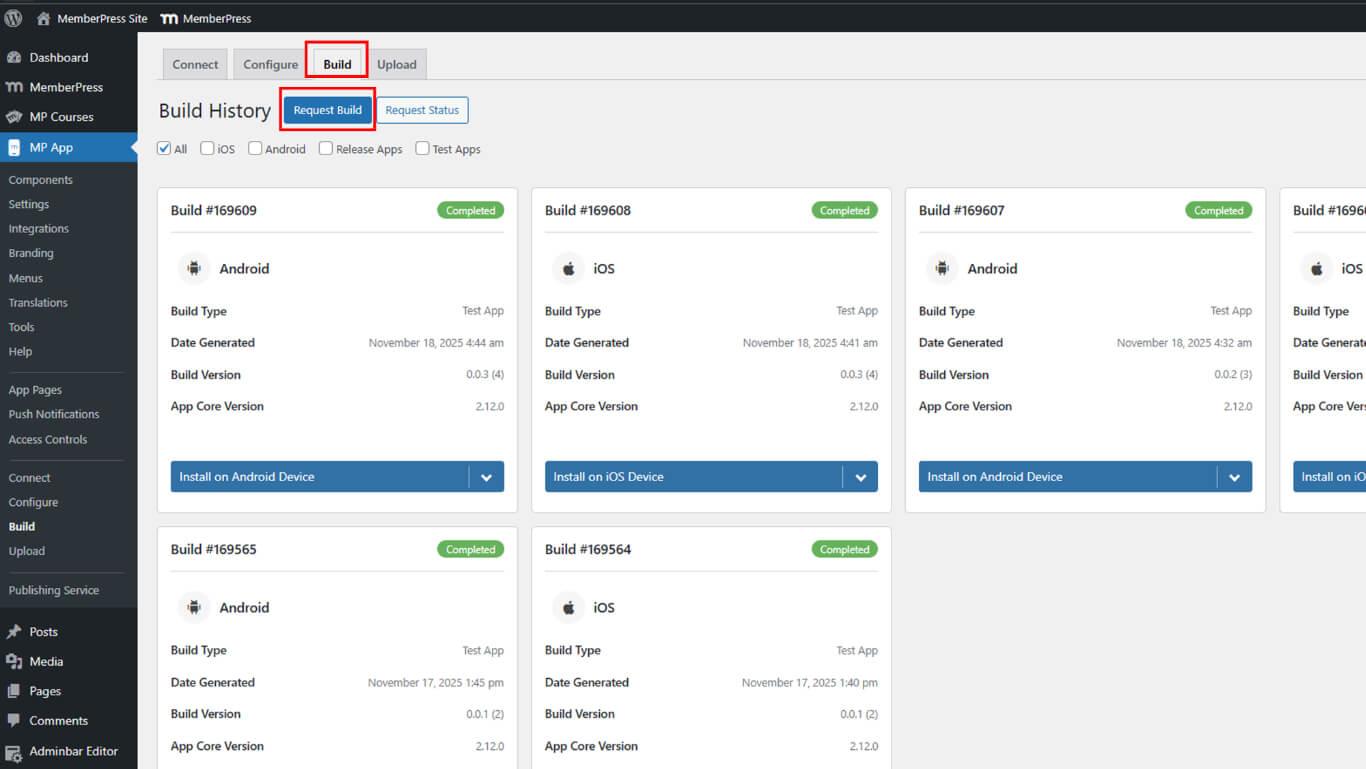
- Navigieren Sie zu Dashboard > MP AppKit > Erstellen.
- Klicken Sie auf die Erstellen anfordern Taste.
- Wählen Sie Android als Plattform aus den verfügbaren Optionen.
- Wählen Sie App veröffentlichen als Build-Typ.
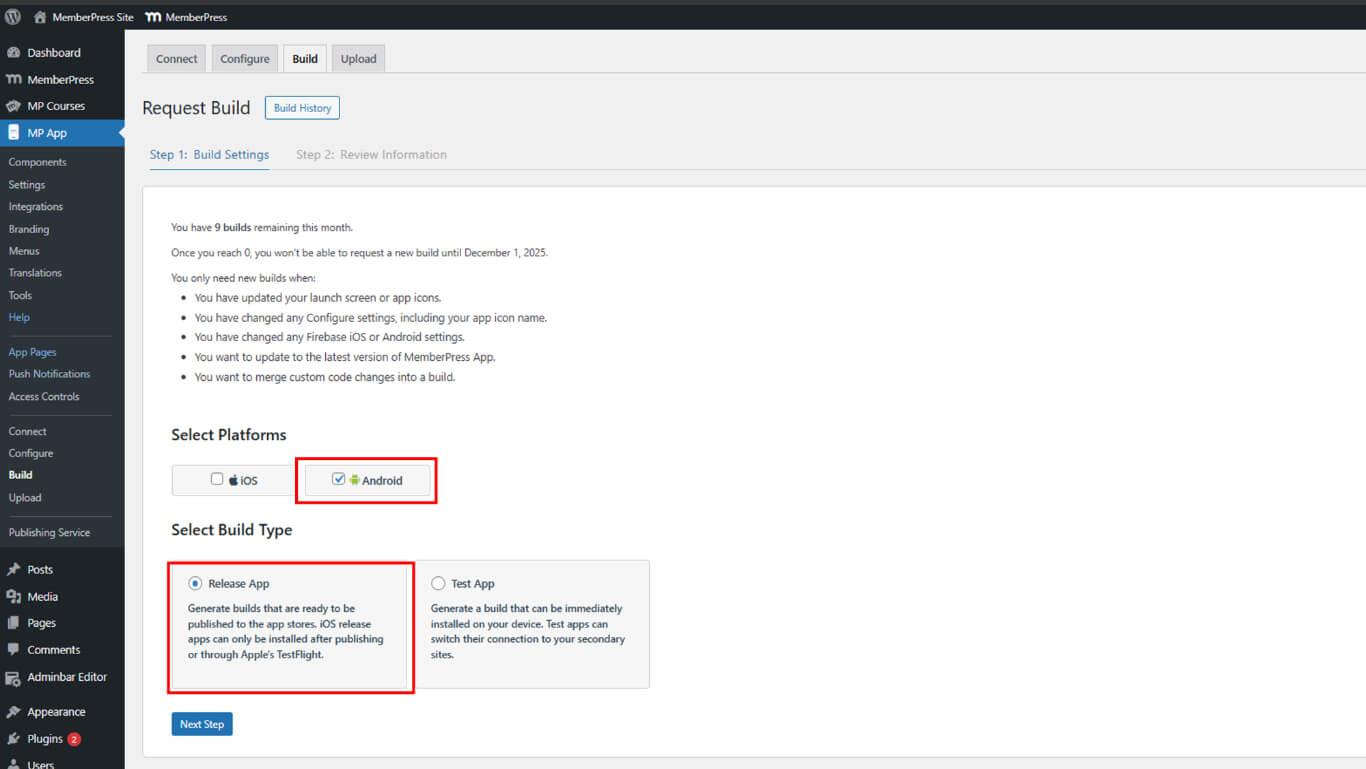
- Klicken Sie auf Nächster Schritt mit der Konfiguration fortfahren.
- Klicken Sie auf Build-Anfrage senden die Build-Anforderung zu übermitteln.
- Warten Sie, bis der Build in der Build-Warteschlange abgeschlossen ist.
- Navigieren Sie zum Entstehungsgeschichte Abschnitt.
- Suchen Sie den abgeschlossenen Release-Build in der Verlaufsliste.
- Klicken Sie auf Auf dem Android-Gerät installieren.
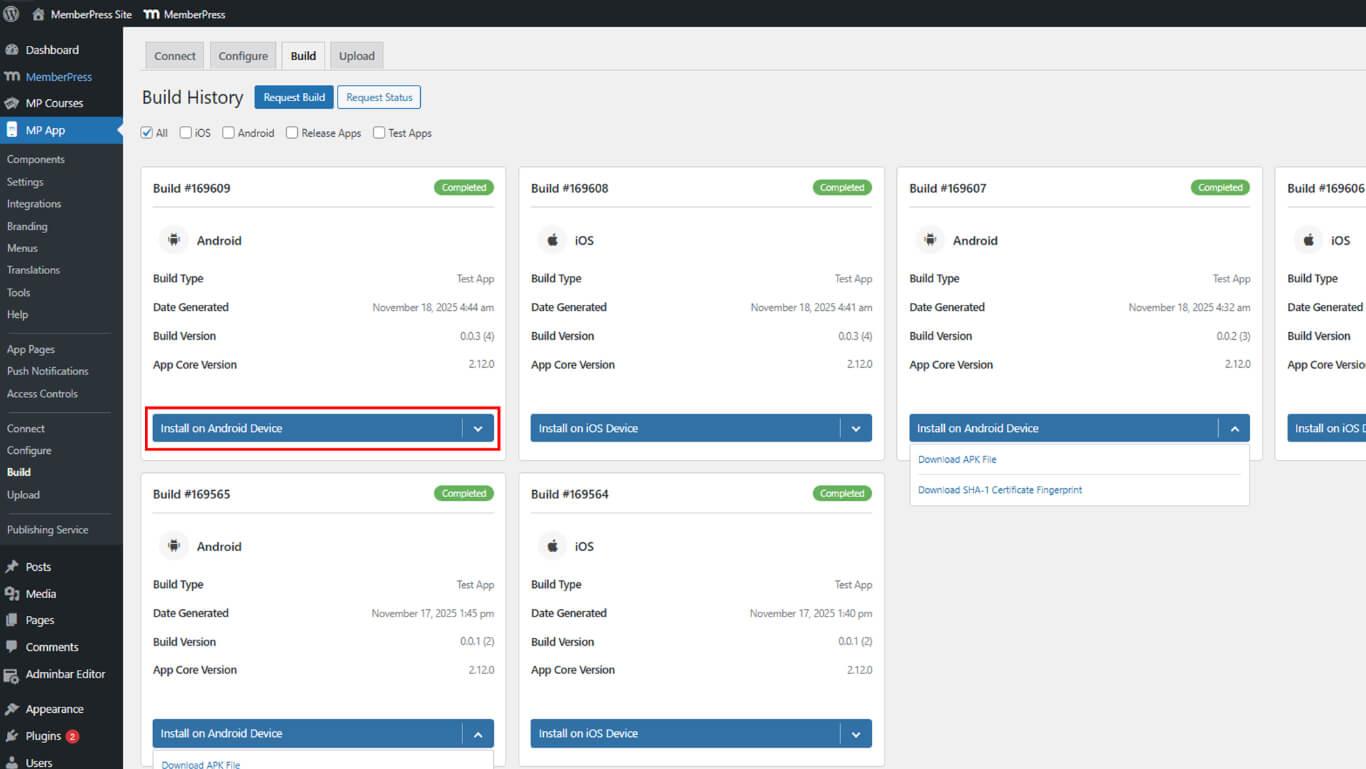
- AAB-Datei herunterladen neben der fertigen Release-Version.
- Speichern Sie die AAB-Datei an einem sicheren Ort auf dem Gerät.
AAB auf Google Play Testing Track hochladen
Das Hochladen auf die Teststrecke ermöglicht kontrollierte Freigabetests vor der öffentlichen Veröffentlichung.
- Melden Sie sich bei Google Play Console an unter play.google.com/console.
- Navigieren Sie zu Alle Apps und wählen Sie die App aus der Liste aus.
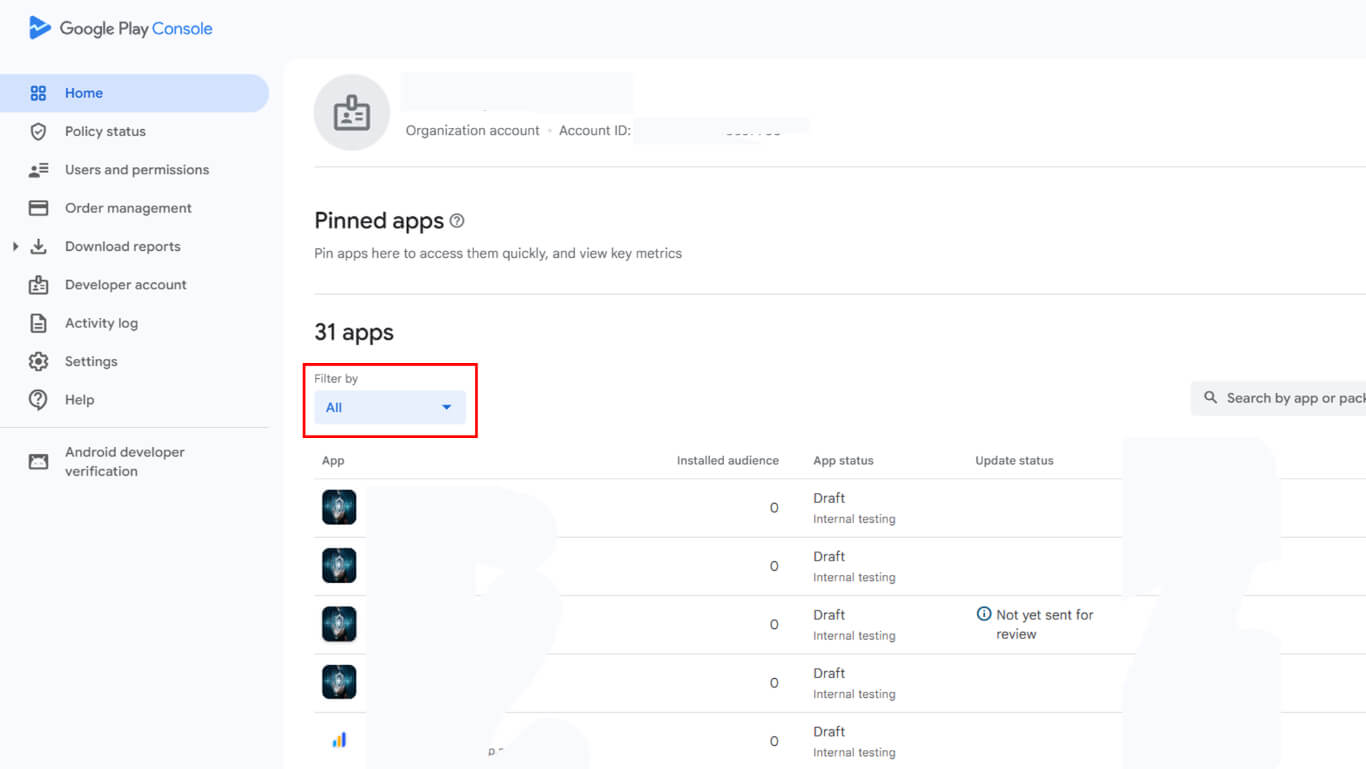
- Navigieren Sie zu Test und Freigabe > Produktion die Länder- und Regionseinstellungen zu überprüfen.
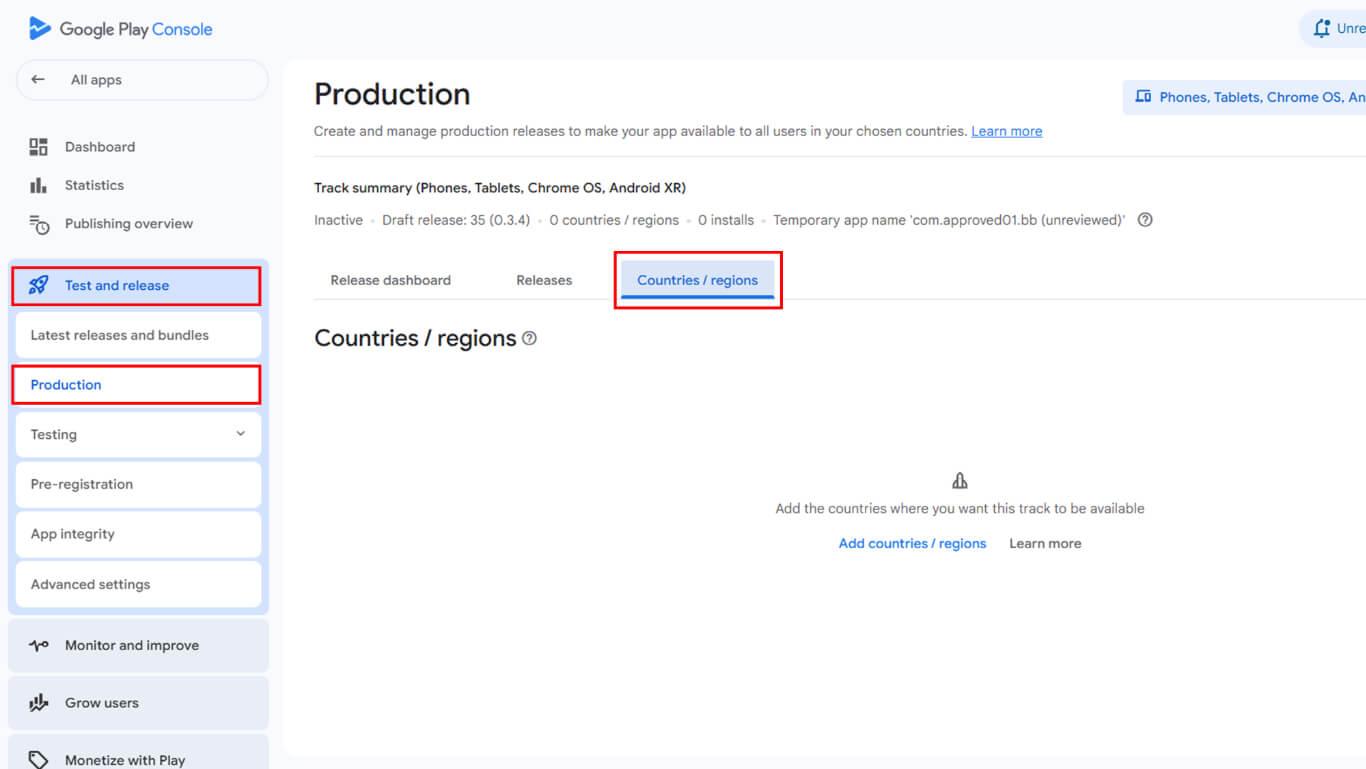
- Überprüfen Sie, ob die Zielländer und -regionen korrekt konfiguriert sind.
- Navigieren Sie zu Veröffentlichung > Testen in der Seitenleiste.
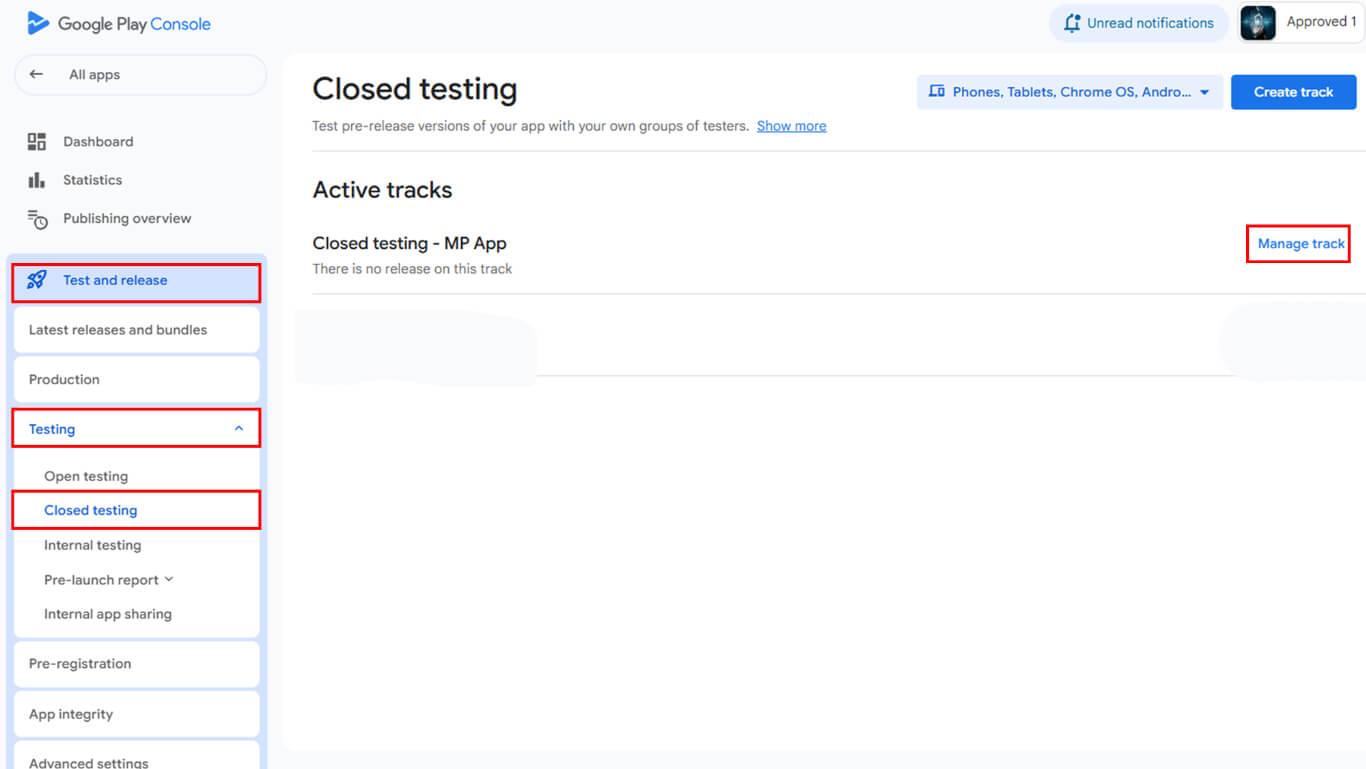
- Wählen Sie die Geschlossene Tests Verfolgen Sie die Qualitätssicherung für In-App-Käufe.
- Klicken Sie auf Track verwalten neben dem Namen der gewünschten Teststrecke.
- Klicken Sie auf Neue Version erstellen mit der Erstellung der Veröffentlichung beginnen.
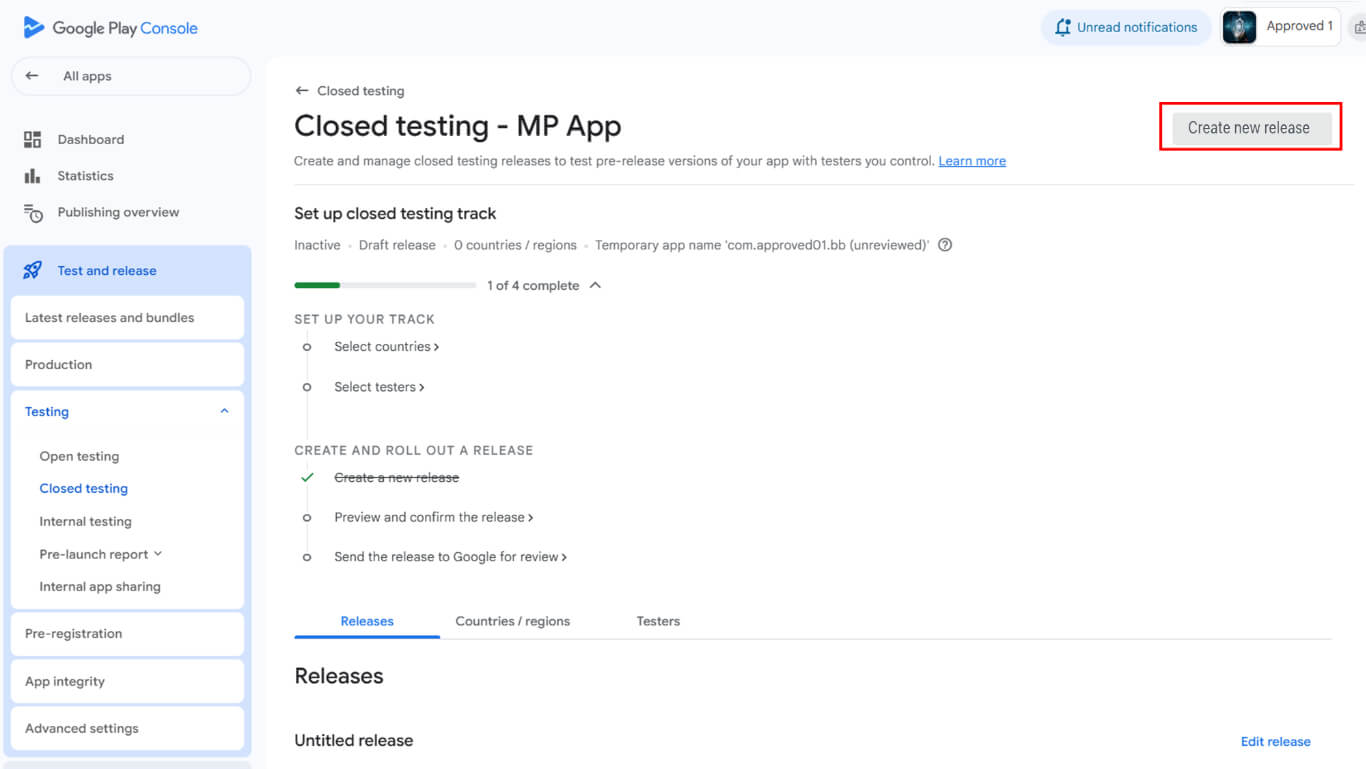
- Suchen Sie die App-Bundles und APKs Abschnitt.
- Klicken Sie auf Hochladen um die heruntergeladene AAB-Datei auszuwählen.
- Navigieren Sie zum Veröffentlichungsdetails Abschnitt nach Abschluss des Uploads.
- Lassen Sie den automatisch ausgefüllten Freigabenamen unverändert.
- Fügen Sie die Versionshinweise in die Versionshinweise Feld.
- Klicken Sie auf Speichern Sie die Freigabekonfiguration zu speichern.
- Klicken Sie auf die Veröffentlichung der Rezension zum Überprüfungsbildschirm weitergehen.
- Klicken Sie auf Start der Einführung für [Name der Strecke] auf der Teststrecke veröffentlichen.
- Warten Sie auf die Genehmigung der Teststrecke durch Google.
Tester zum Testen einladen
Die Tester-Einladung ermöglicht bestimmten Benutzern den Zugriff auf und die Installation von Testversionen.
- Navigieren Sie zu Veröffentlichung > Testphase > Geschlossene Testphase in der Google Play Console.
- Klicken Sie auf die Tester tab.
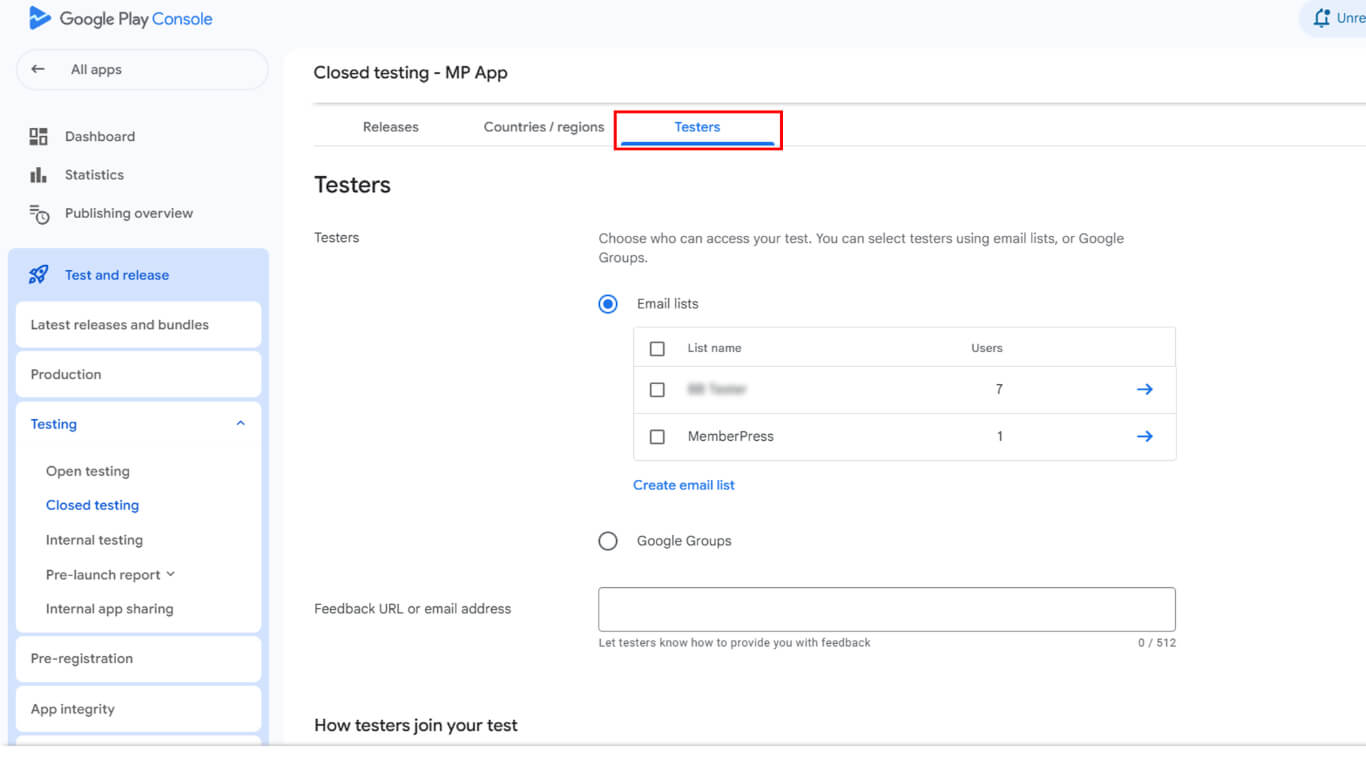
- Suchen Sie die E-Mail-Listen Abschnitt.
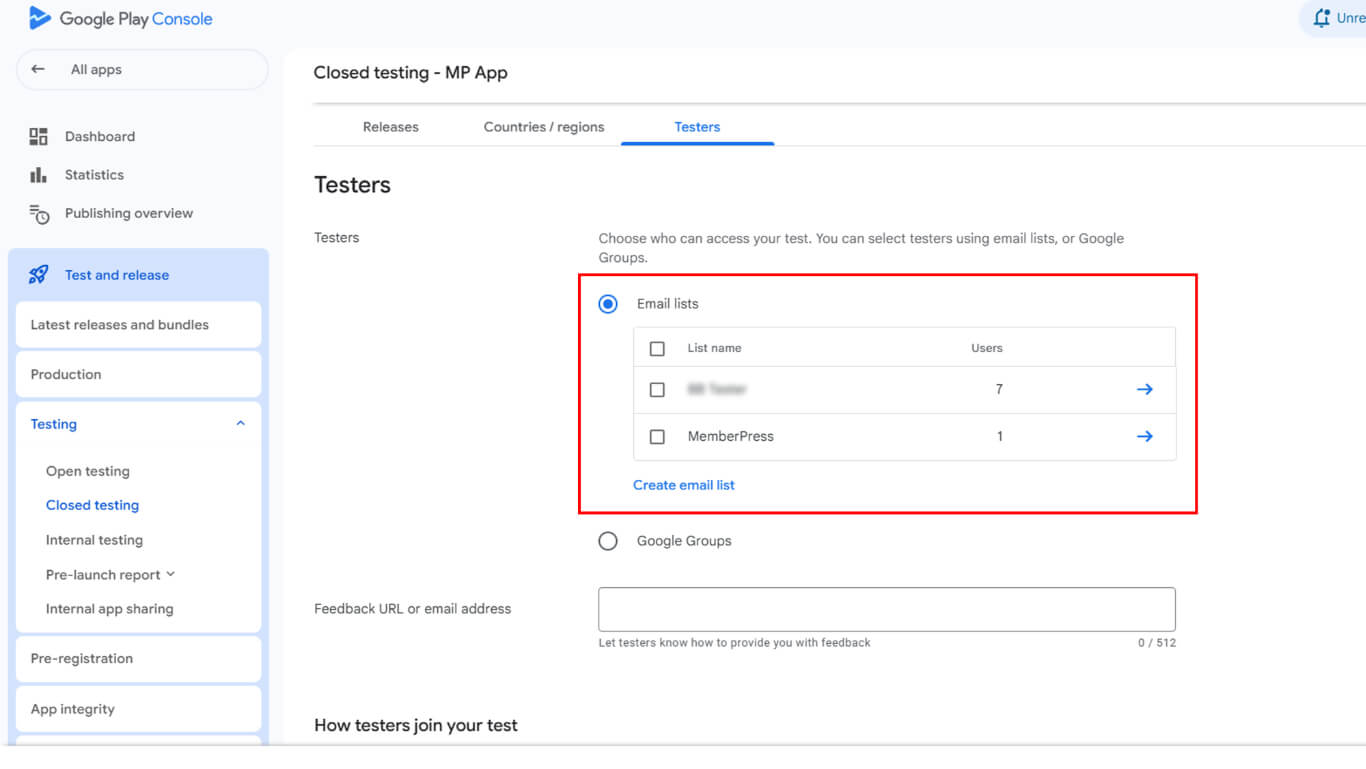
- Wählen Sie eine vorhandene E-Mail-Liste aus oder klicken Sie auf E-Mail-Liste erstellen für eine neue Liste.
- Fügen Sie die E-Mail-Adressen der Tester hinzu, die mit den E-Mail-Adressen ihrer Google Play-Konten übereinstimmen.
- Klicken Sie auf Änderungen speichern die Konfiguration der Testerliste zu speichern.
- Scrollen Sie zu Wie Tester an Ihrem Test teilnehmen Abschnitt.
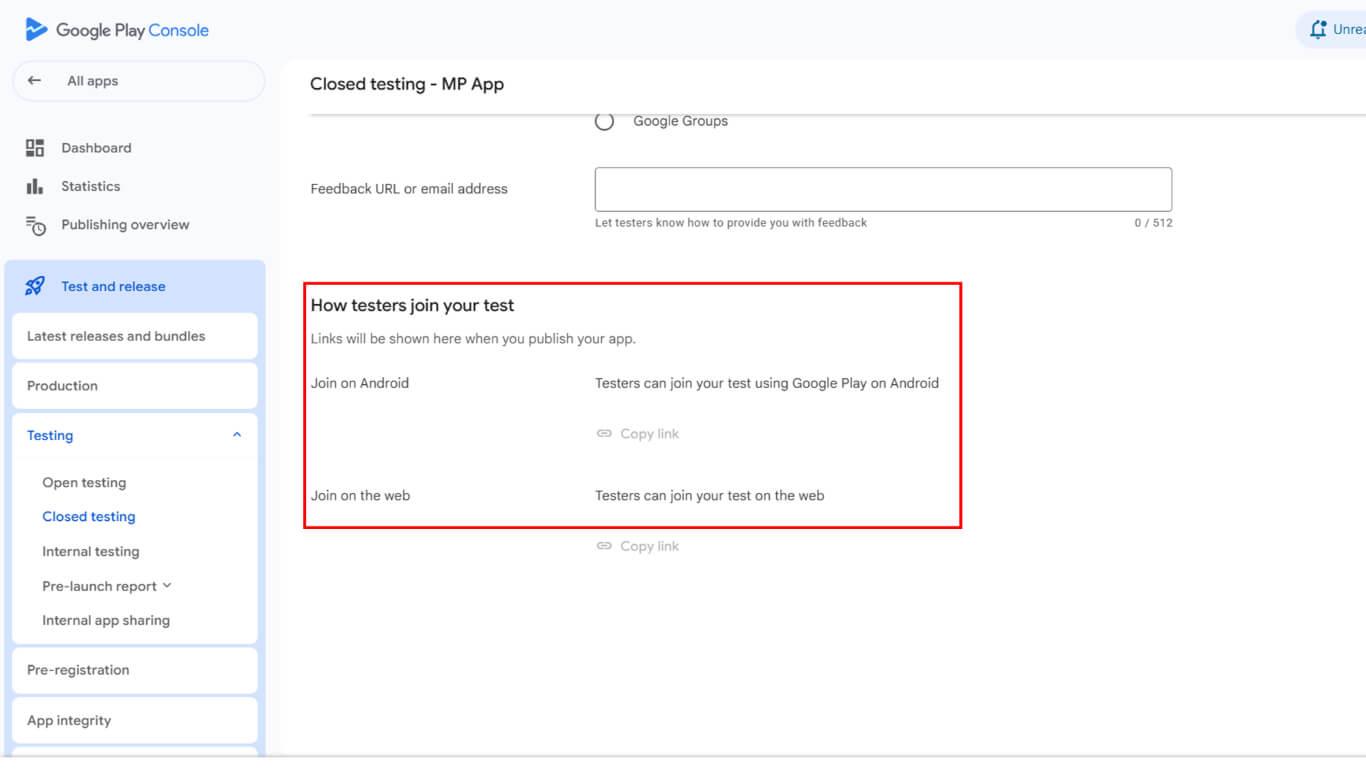
- Kopieren Sie den im Abschnitt angezeigten Beitrittslink.
- Teilen Sie den Beitrittslink über eine sichere Kommunikationsverbindung mit den eingeladenen Testern.
Konfigurieren der Lizenzprüfung
Die Konfiguration der Lizenzprüfung beschränkt den Zugriff auf die App während der Testphase auf autorisierte Tester.
- Gehen Sie zum Dashboard der Google Play Console.
- Navigieren Sie zu Einstellungen > Lizenzprüfung in der Seitenleiste der Google Play Console.
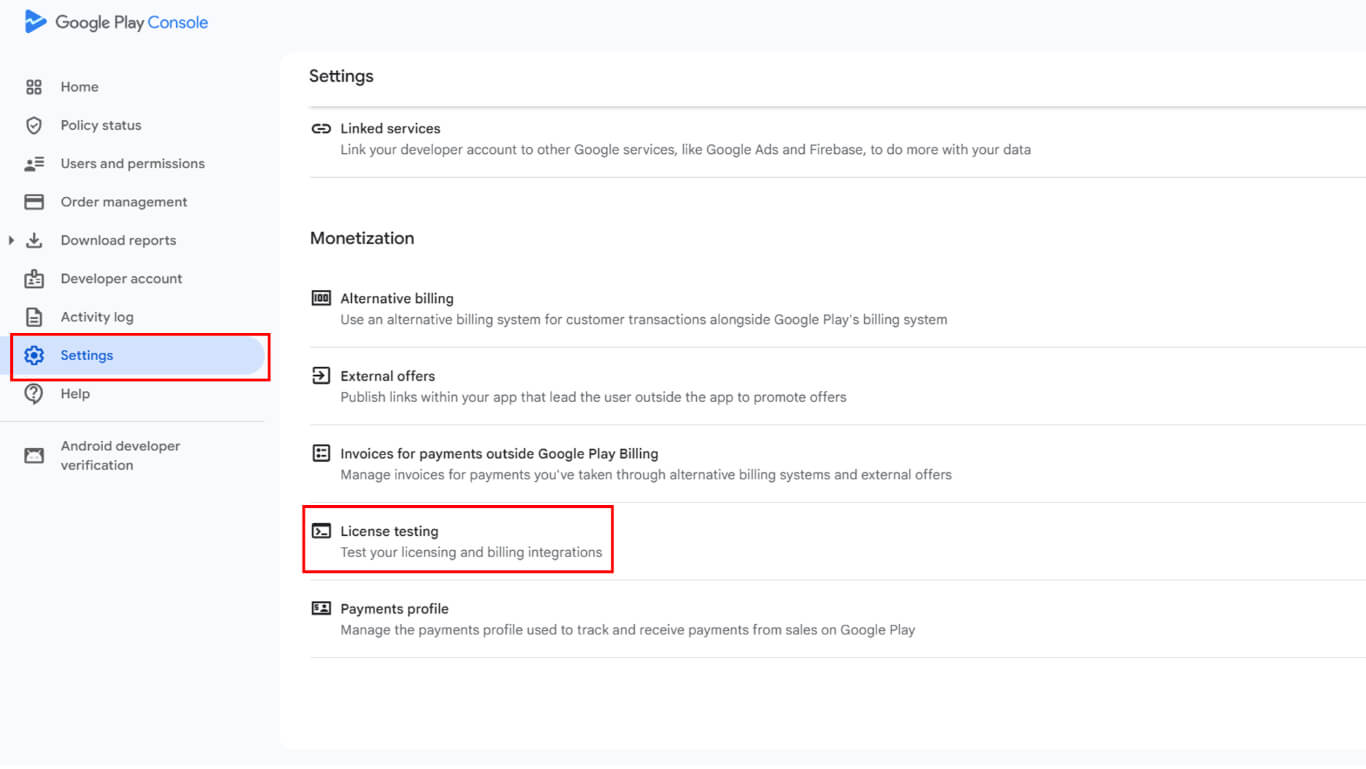
- Fügen Sie dieselben Test-E-Mail-Adressen aus der Testkonfiguration hinzu.
- Überprüfen Sie, ob die E-Mail-Adressen genau mit den E-Mail-Adressen des Google Play-Kontos übereinstimmen.
- Klicken Sie auf Änderungen speichern die Konfiguration der Lizenzprüfung fertigzustellen.
Die Lizenzprüfung stellt sicher, dass nur autorisierte Tester Release-App-Builds während der Testphasen installieren und darauf zugreifen können. Tester können nun Release-Apps mit vollständig aktivierter In-App-Kauffunktion installieren.
Aktualisierung des Test-Tracks mit neuen Builds
Teststrecken-Updates testen, neue Release-App-Versionen für bestehende Tester bereitstellen.
- Navigieren Sie zu Dashboard > MP AppKit > Bauen in WordPress.
- Klicken Sie auf Erstellen anfordern eine neue Release-Version erstellen.
- Wählen Sie die Android Plattform und die App veröffentlichen Bauart.
- Füllen Sie die Build-Anfrage aus und warten Sie, bis sie abgeschlossen ist.
- Laden Sie die neue AAB-Datei herunter von Entstehungsgeschichte.
- Melden Sie sich bei Google Play Console an unter play.google.com/console.
- Navigieren Sie zu Veröffentlichung > Testphase > Geschlossene Testphase.
- Klicken Sie auf Track verwalten neben der Teststrecke.
- Klicken Sie auf Neue Version erstellen mit der Aktualisierung der Version zu beginnen.
- Laden Sie die neue AAB-Datei in den App-Bundles und APKs Abschnitt.
- Vollständige Release-Details mit aktualisierten Release-Hinweisen.
- Klicken Sie auf Start der Einführung für [Name der Strecke] Update veröffentlichen.
- Tester erhalten Update-Benachrichtigungen über ihren Play Store-Testlink.
Aktualisierungen der Teststrecke durchlaufen denselben Genehmigungsprozess wie Erstveröffentlichungen mit ähnlichen Überprüfungsfristen.
Anforderungen an AAB-Dateien verstehen
Die Anforderungen an das AAB-Dateiformat gewährleisten die Kompatibilität mit den Vertriebssystemen von Google Play.
Vorgeschriebenes Format gilt für alle neuen App-Einreichungen seit August 2021. Google Play akzeptiert keine APK-Uploads für neue Anwendungen mehr.
Unterstützung für ältere APK-Versionen gilt weiterhin für Apps, die zuvor im APK-Format veröffentlicht wurden. Bestehende Apps können weiterhin mit APK-Dateien aktualisiert werden, ohne dass eine AAB-Konvertierung erforderlich ist.
Optimierte Lieferung bietet kleinere Download-Größen durch dynamische Funktionsmodule. Das AAB-Format ermöglicht es Google Play, optimierte APKs für verschiedene Gerätekonfigurationen zu generieren.
Versionscode-Inkremente muss bei jedem neuen AAB-Upload erfolgen. Identische oder niedrigere Versionscodes verhindern einen erfolgreichen Upload und die Bereitstellung von Test-Tracks.
Bewährte Verfahren für das Testen von Release-Apps
Effektives Release-App-Testing überprüft die Funktionalität vor der öffentlichen Veröffentlichung.
Testkaufabläufe Vor der öffentlichen Einführung gründlich mit echten Zahlungsmethoden testen. Überprüfen Sie, ob alle Abonnementstufen und Einmalzahlungen korrekt verarbeitet werden.
Überprüfen Sie die Richtigkeit der Preise. in allen Regionen und Währungskonfigurationen. Bestätigen Sie, dass die angezeigten Preise den beabsichtigten Kosten für alle Märkte entsprechen.
Absturzberichte überwachen während der Testphase und der Einführung auf der Strecke, um Stabilitätsprobleme zu identifizieren. Beheben Sie Abstürze, bevor Sie die Verteilung auf ein größeres Publikum ausweiten.
Feedback von Testern sammeln systematisch über festgelegte Kanäle. Eine strukturierte Sammlung von Feedback verbessert die Identifizierung und Lösung von Problemen.
Teststrecken aktualisieren regelmäßig, während die Entwicklung voranschreitet und Fehler behoben werden. Häufige Updates halten die Tester bei der Stange und sorgen für eine kontinuierliche Validierung.
Dokumentieren Sie die Testergebnisse als Referenz bei Entscheidungen über die Veröffentlichung. Umfassende Testdokumentation unterstützt die Zuverlässigkeit der Markteinführung und die Risikobewertung.










 DE
DE  EN
EN  ES
ES  FR
FR  PT
PT 