

Die App-Build-Generierung erstellt installierbare MemberPress-iOS- und Android-Anwendungsdateien mithilfe cloudbasierter Kompilierung. Das Build-System kompiliert Website-Einstellungen, Menüs, Branding und GitHub-Anpassungen in App-Pakete.
In diesem Dokument wird erklärt, wie man sich auf Builds vorbereitet, Testgeräte registriert, die Erstellung von Builds anfordert und auf abgeschlossene Builds zugreift.
Den Erstellungsprozess verstehen
Die Build-Generierung kompiliert die WordPress-Konfiguration zu plattformspezifischen Anwendungspaketen. Cloud-basierte Build-Server übernehmen die Kompilierung, ohne dass eine lokale Entwicklungsumgebung erforderlich ist. Build-Typen dienen unterschiedlichen Zwecken in Entwicklungs- und Distributions-Workflows.
Konfigurationskompilierung integriert Website-Einstellungen, Menüs und Branding in den App-Code. Die Build-Generierung erfasst die aktuelle WordPress-Konfiguration zum Zeitpunkt der Anfrage.
GitHub-Integration enthält benutzerdefinierten Code aus verbundenen Repositorys. Benutzerdefinierte Änderungen werden zusammen mit den Standardfunktionen der App kompiliert.
Zweck des Test-Builds ermöglicht interne Qualitätssicherung und Überprüfung durch Stakeholder. Test Builds werden direkt auf registrierten Geräten installiert, ohne dass sie über den App Store verteilt werden müssen.
Zweck der Release-Build bereitet produktionsreife Pakete für die Einreichung im App Store vor. Release-Builds erfüllen die Vertriebsanforderungen von Apple und Google für die öffentliche Verfügbarkeit.
Bauzeitpunkt In der Regel innerhalb von 15 bis 30 Minuten nach Einreichen der Anfrage abgeschlossen. Komplexe Konfigurationen oder Serverauslastung können die Bearbeitungszeit verlängern.
Verbinden von MemberPress AppKit mit WordPress
- Navigieren Sie zu Dashboard > MP AppKit > Konfigurieren > Verbinden.
- Geben Sie die Anmeldedaten in die dafür vorgesehenen Felder ein.
- Klicken Sie auf Verbinden Sie die Standortverbindung herzustellen.
- Überprüfen Sie, ob die Bestätigung für die erfolgreiche Verbindung angezeigt wird.
Die App-Verbindung ermöglicht dem Build-System den Zugriff auf die WordPress-Konfiguration und -Inhalte.
Registrieren von iOS-Testgeräten
Die Registrierung von iOS-Geräten ermöglicht die Installation von Test-Builds auf bestimmten Geräten.
- Navigieren Sie zu Dashboard > MP AppKit > Konfigurieren > iOS-Geräte.
- Klicken Sie auf die Neues Gerät hinzufügen Taste.
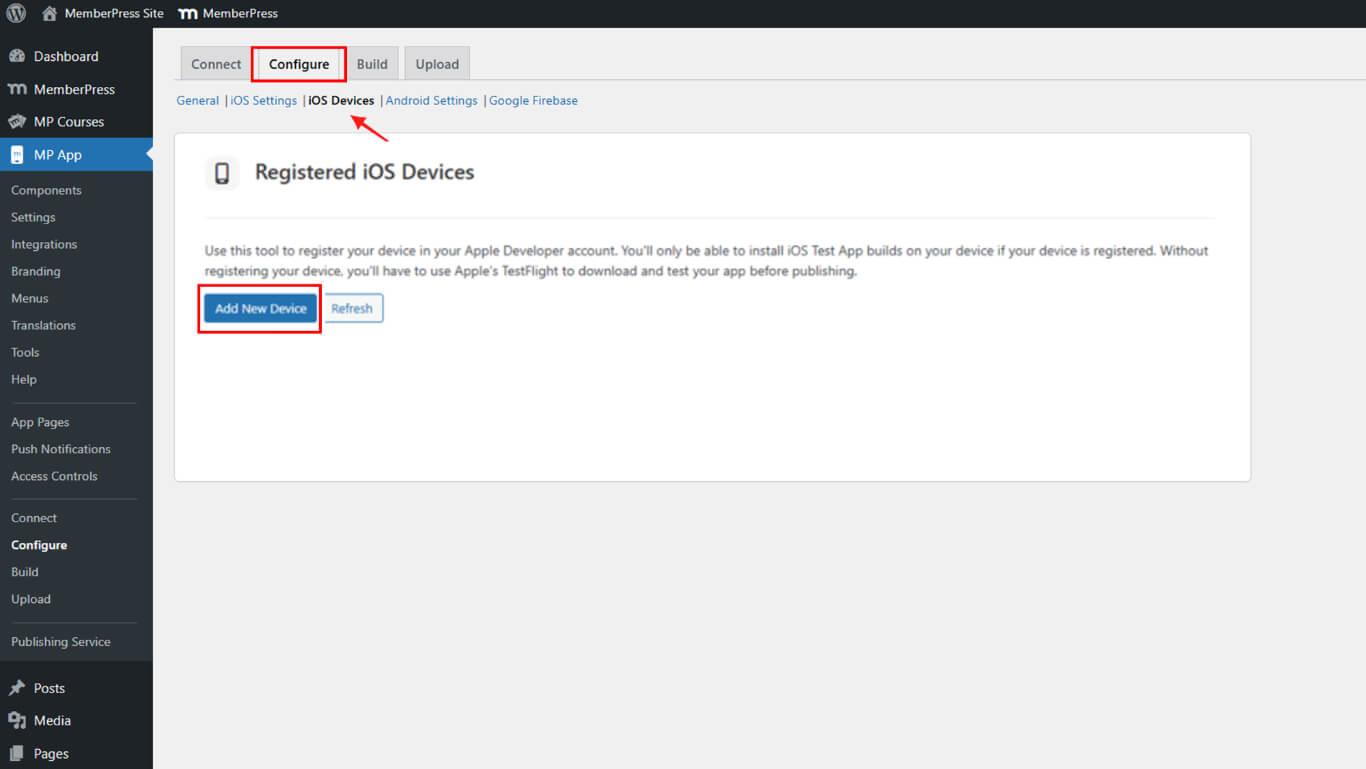
- Geben Sie einen beschreibenden Namen in das Feld Gerätename Feld.
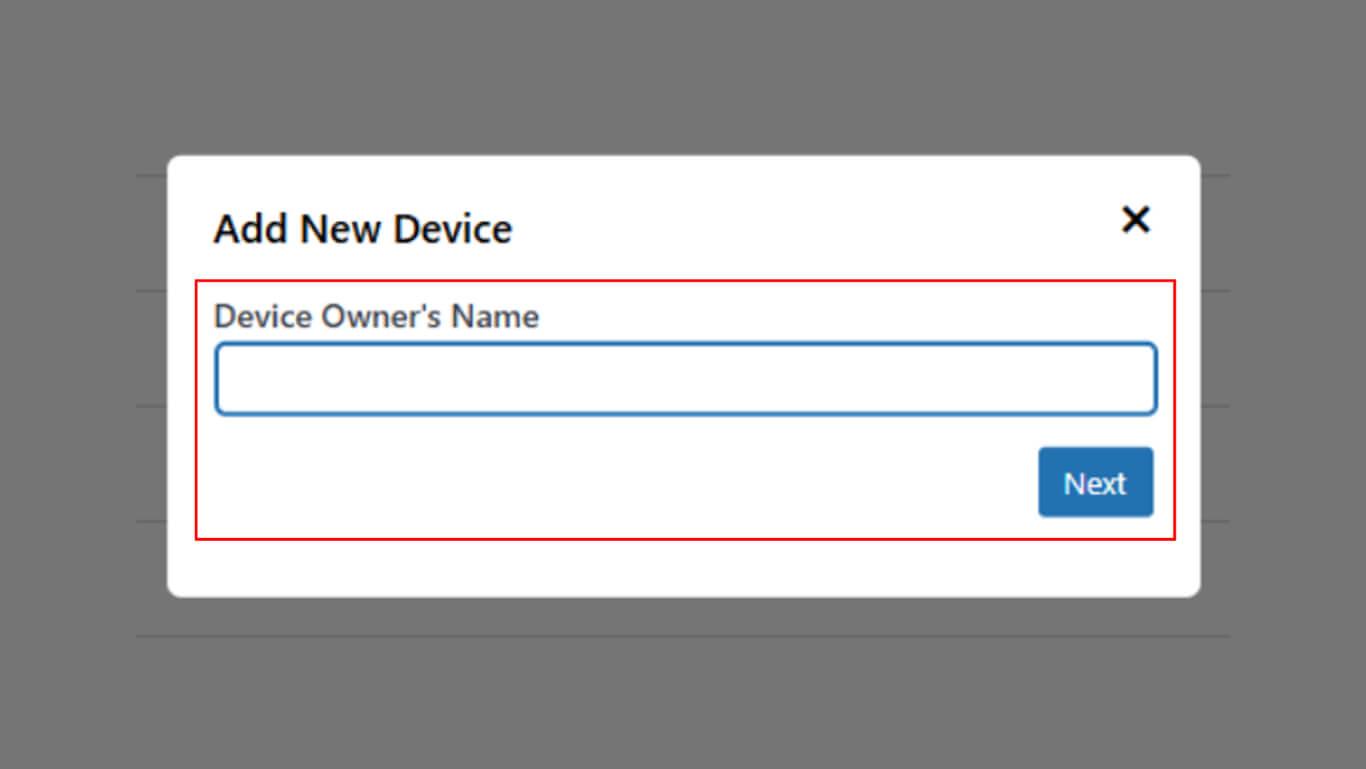
- Klicken Sie auf Weiter zur UDID-Registrierung fortfahren.
- Öffnen Sie die Kamera-App auf dem iPhone.
- Scannen Sie den angezeigten UDID-QR-Code mit der iPhone-Kamera.
- Tippen Sie auf die Benachrichtigung oder den Link, der nach dem Scannen angezeigt wird.
- Befolgen Sie die Anweisungen auf dem Bildschirm, um die Geräteregistrierung abzuschließen.
- Zurück zum WordPress-Browserfenster.
- Überprüfen Sie, ob das Gerät in der Liste der registrierten Geräte aufgeführt ist.
Anforderung der Build-Generierung
Der Build-Auftrag startet den Kompilierungsprozess für ausgewählte Plattformen und Build-Typen.
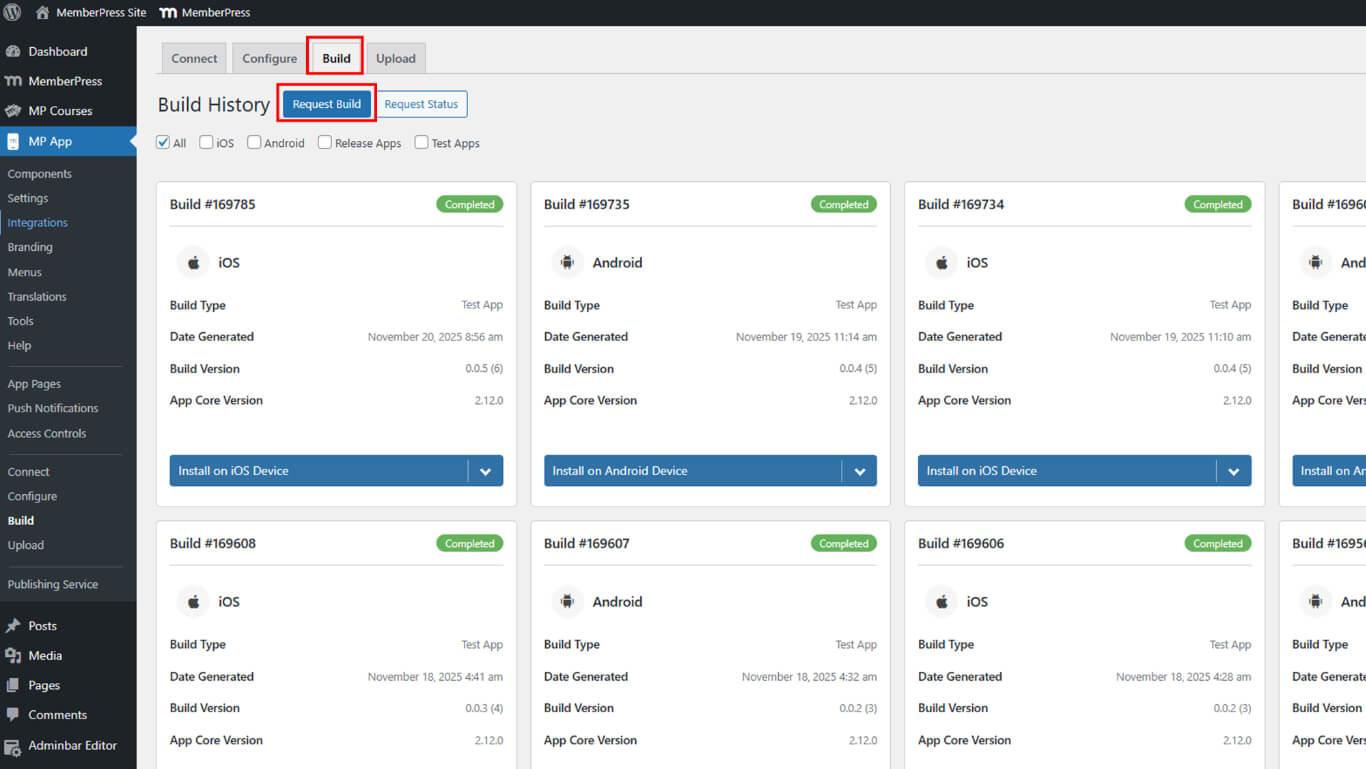
- Navigieren Sie zu Dashboard > MP AppKit > Bauen.
- Klicken Sie auf die Erstellen anfordern Taste.
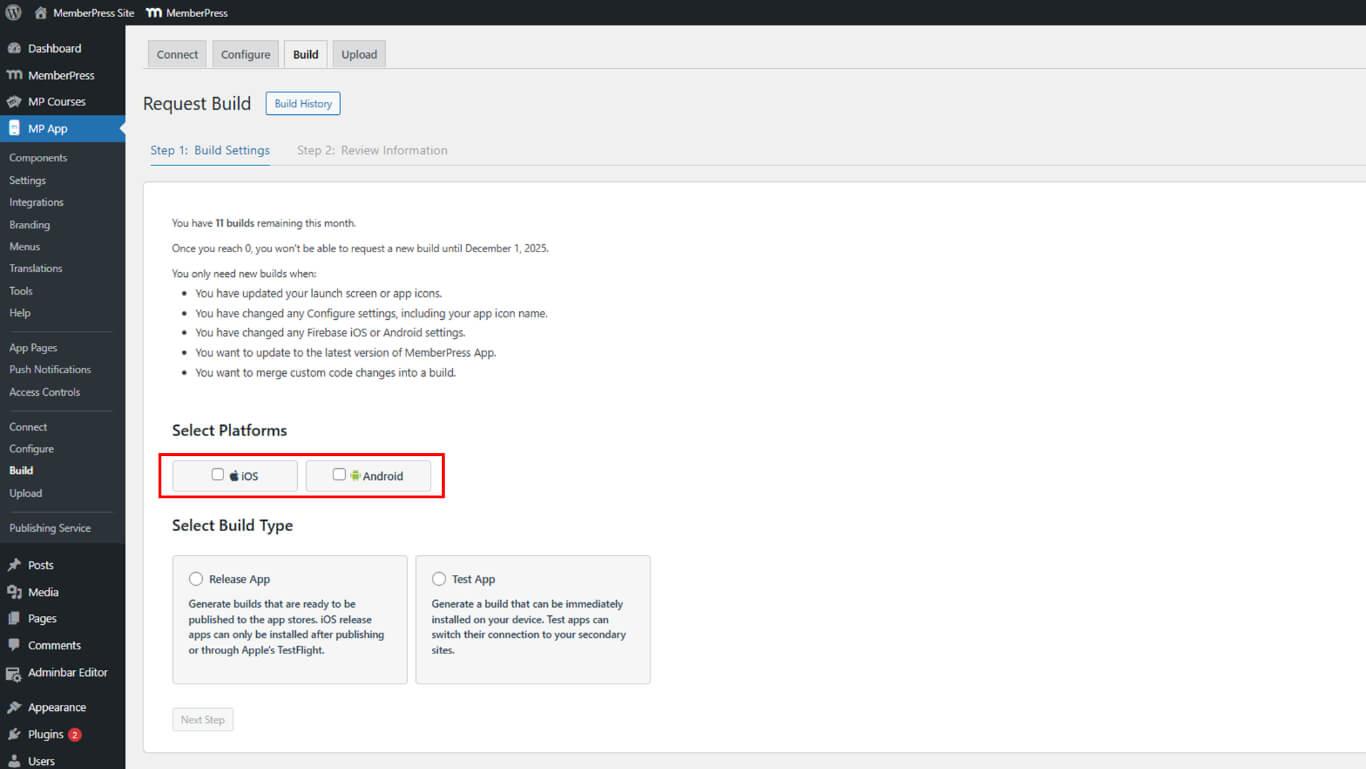
- Plattformoptionen auswählen:
- iOS für iPhone- und iPad-Apps;
- Android für Android-Geräte-Apps;
- Beide für gleichzeitige iOS- und Android-Builds.
- Build-Typ auswählen:
- Test zum Sideloading und internen Testen;
- Freigabe für die Einreichung im App Store.
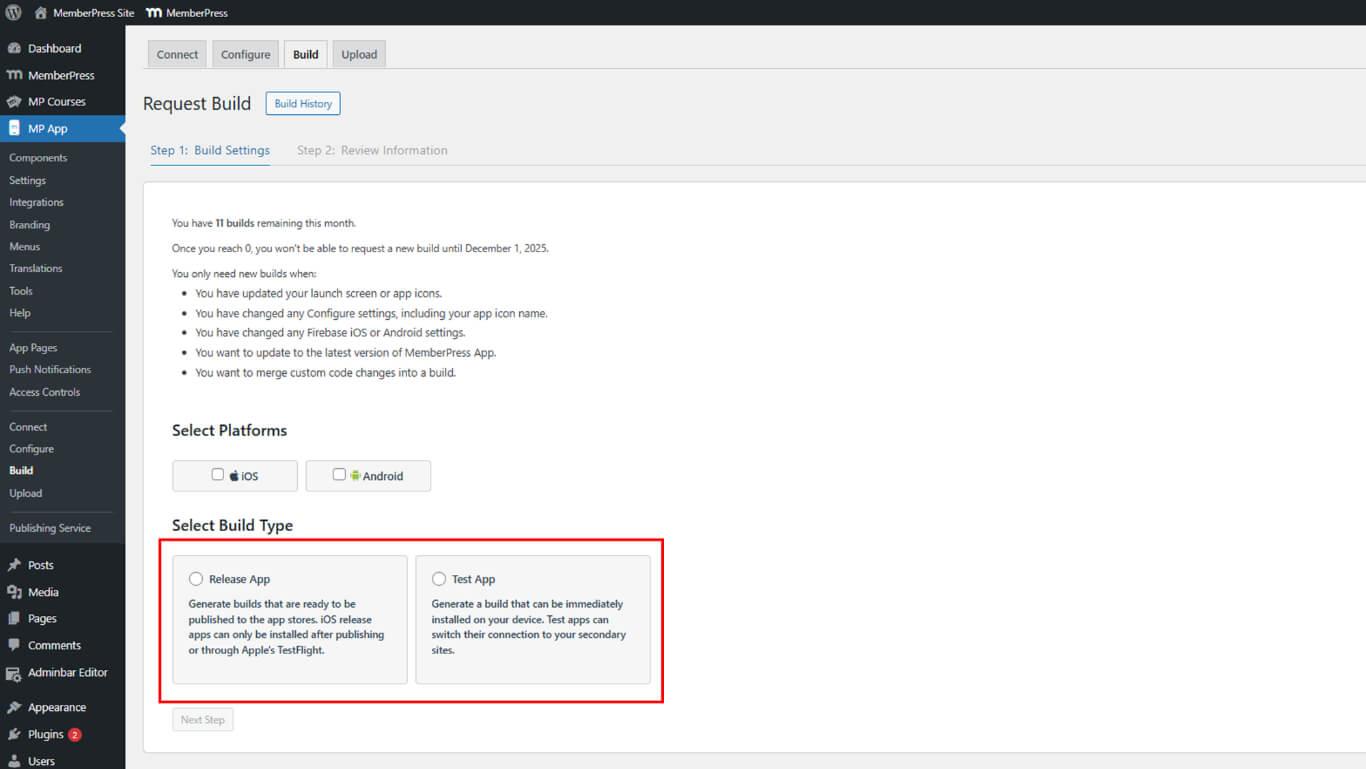
- Klicken Sie auf Weiter zur Konfigurationsüberprüfung übergehen.
- Überprüfen Sie alle auf dem Bestätigungsbildschirm angezeigten Build-Einstellungen.
- Überprüfen Sie, ob die Auswahl der Plattform und des Build-Typs korrekt ist.
- Klicken Sie auf Build-Anfrage senden die Anforderung zur Erstellung der Build-Datei zu übermitteln.
- Warten Sie 15 bis 30 Minuten, bis der Build abgeschlossen ist.
- Klicken Sie auf Status jetzt erneut überprüfen die Anzeige des Build-Fortschritts aktualisieren.
Build-Anforderungen initiieren den Cloud-Kompilierungsprozess und erstellen plattformspezifische Anwendungspakete.
Build-Typen verstehen
Build-Typen erfüllen unterschiedliche Zwecke in Entwicklungs- und Distributions-Workflows.
Testaufbau-Eigenschaften
Test Builds ermöglichen interne Tests ohne Einreichung im App Store.
Sideloading-Installation Ermöglicht die direkte Installation des Geräts über einen QR-Code. Test-Builds umgehen die Verteilung über den App Store, um schnelle Tests zu ermöglichen.
Geräteregistrierungspflicht Gilt nur für iOS-Test-Builds. Registrierte Geräte erhalten eine Bereitstellung, die die Installation von Test-Builds ermöglicht.
Simulierte Käufe Verwenden Sie Platzhalterpreise für Tests von In-App-Käufen. Die Testumgebung validiert Kaufabläufe ohne echte Transaktionen.
Schnelle Iteration unterstützt häufige Updates während der Entwicklung. Test-Builds lassen sich schnell erstellen, was kontinuierliche Testzyklen ermöglicht.
Release-Build-Eigenschaften
Release-Builds bereiten Produktionspakete für den Vertrieb im App Store vor.
Einreichung im App Store Erfordert Release-Build-Dateien, die den Plattformanforderungen entsprechen. Release-Builds umfassen die ordnungsgemäße Signierung und Bereitstellung für den Vertrieb.
Echte Preisauszeichnung Zeigt die tatsächlichen Kosten und Bedingungen für In-App-Käufe an. Release-Builds verbinden sich mit Produktionsabrechnungssystemen.
TestFlight-Verteilung ermöglicht kontrollierte Beta-Tests vor der öffentlichen Markteinführung. Release-Builds können über TestFlight für iOS verteilt werden.
Produktionsqualität umfasst Optimierungen und endgültige Konfigurationen. Release-Builds stellen das Endprodukt für den öffentlichen Vertrieb dar.
- Test-BuildsInstallieren Sie direkt mit dem Test-App installieren Taste.
- Release-Builds: Laden Sie die .ipa- oder .aab-Datei herunter oder verwenden Sie die Veröffentlichungstool an App-Stores übermitteln.
Build-Limits verstehen
Die Erstellung von Generationen unterliegt bestimmten Mengenbeschränkungen pro Konto.
Monatliches Build-Limit Erlaubt bis zu 20 Builds pro Monat. Das Limit umfasst sowohl Test- als auch Release-Builds auf allen Plattformen.
Grenzwertberechnung Zählt jede Plattform separat für Multi-Plattform-Anfragen. Die gemeinsame Anfrage für iOS und Android verbraucht zwei Build-Credits.
Zusätzliche Builds Für eine Erhöhung der Limits muss der Support kontaktiert werden. Bei längeren Entwicklungsprojekten sind möglicherweise höhere monatliche Kontingente erforderlich. Limit zurücksetzen erfolgt zu Beginn jedes Kalendermonats. Die Build-Anzahl wird am ersten Tag des Monats auf Null zurückgesetzt.










 DE
DE  EN
EN  ES
ES  FR
FR  PT
PT 