

Content Delivery Networks (CDNs) verbessern die Leistung von Anwendungen, indem sie Mediendateien über global verteilte Edge-Server bereitstellen. Dieser Ansatz reduziert die Serverlast und beschleunigt die Bereitstellung von Inhalten für Nutzer weltweit.
In diesem Dokument wird erläutert, wie Sie API CDN aktivieren, CDN-Einstellungen konfigurieren und die Medienbereitstellung innerhalb der MP-App optimieren.
Verstehen von API CDN
API CDN leitet Mediendateien wie Bilder, Dokumente und Videos über CDN-Server und nicht über den WordPress-Hosting-Server. Bei der ersten Anforderung werden Medien in das CDN hochgeladen, und bei nachfolgenden Anforderungen werden Inhalte von der CDN-Domäne bereitgestellt. Dieser Prozess verringert die Latenzzeit und verbessert die Ladezeiten für App-Benutzer.
Voraussetzungen
Stellen Sie vor der Konfiguration des API CDN sicher, dass die folgenden Anforderungen erfüllt sind:
- MemberPress AppKit Plugin installiert und aktiviert;
- Aktiver CDN-Dienst Konto (CloudFront, StackPath, BunnyCDN oder ein ähnlicher Anbieter);
- CDN-Basis-URL vom CDN-Dienstanbieter erhalten;
- WordPress-Admin-Zugang um Plugin-Einstellungen zu verwalten.
Aktivieren der API-Leistungskomponente
Die Komponente API-Leistung muss aktiviert werden, bevor die CDN-Konfiguration beginnen kann.
- Navigieren Sie zu Dashboard > MP AppKit > Komponenten.
- Lokalisieren API-Leistung in der Komponentenliste.
- Klicken Sie auf Aktivieren..
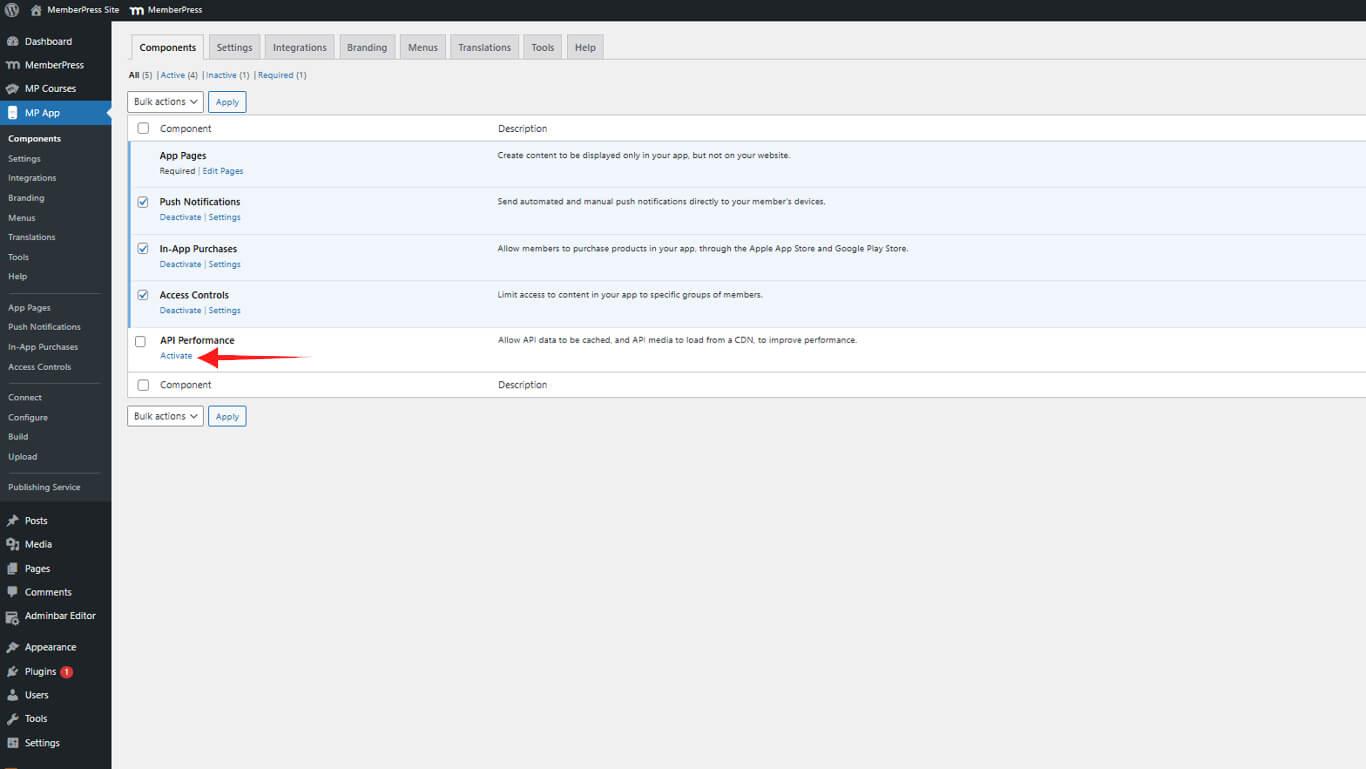
Die Komponente API Performance bietet Optimierungsfunktionen, einschließlich CDN-Integration und Caching-Funktionen.
Konfigurieren der CDN-Einstellungen
Für die CDN-Konfiguration ist die vom CDN-Dienstanbieter bereitgestellte Basis-URL erforderlich.
- Navigieren Sie zu Dashboard > MP AppKit > Einstellungen > API CDN.
- Prüfen Sie die API CDN aktivieren Kontrollkästchen.
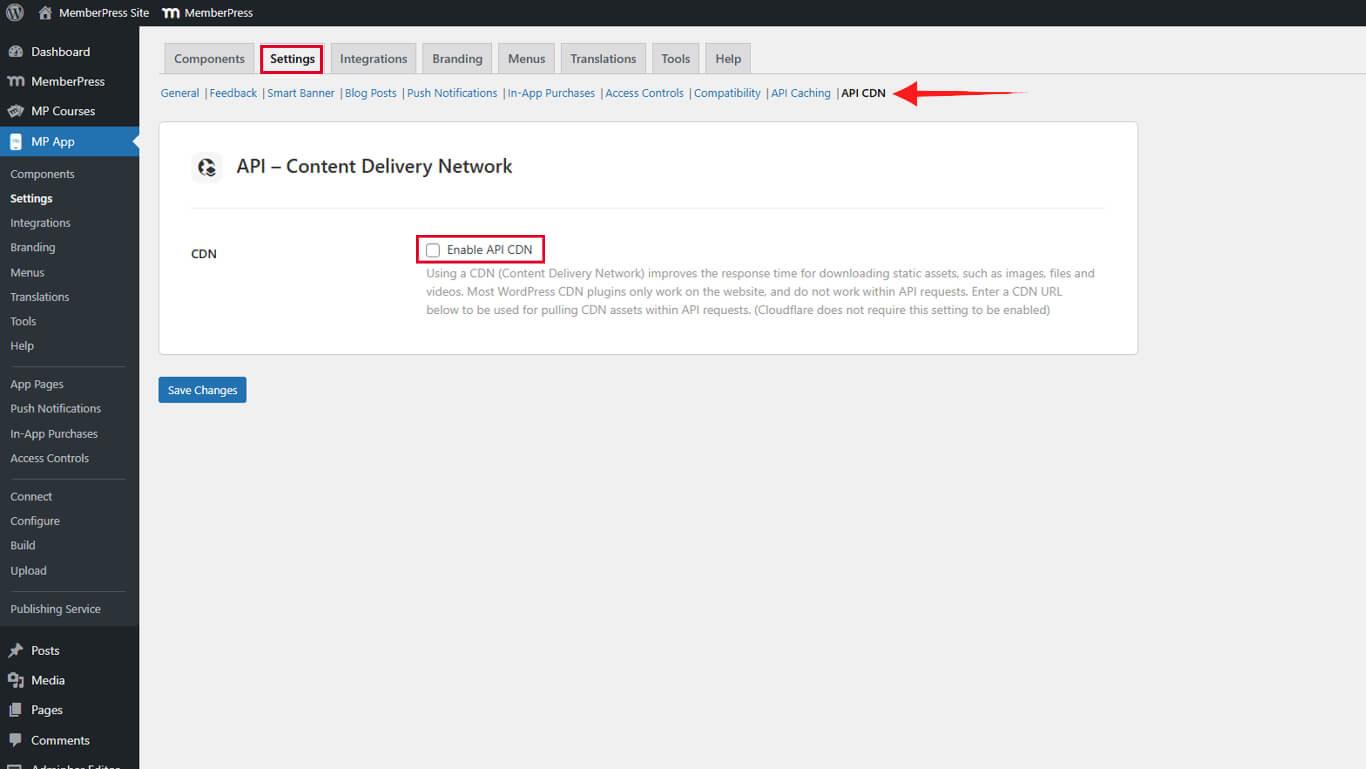
- Geben Sie die CDN-Basis-URL im Feld CDN-Basis-URL ohne abschließenden Schrägstrich.
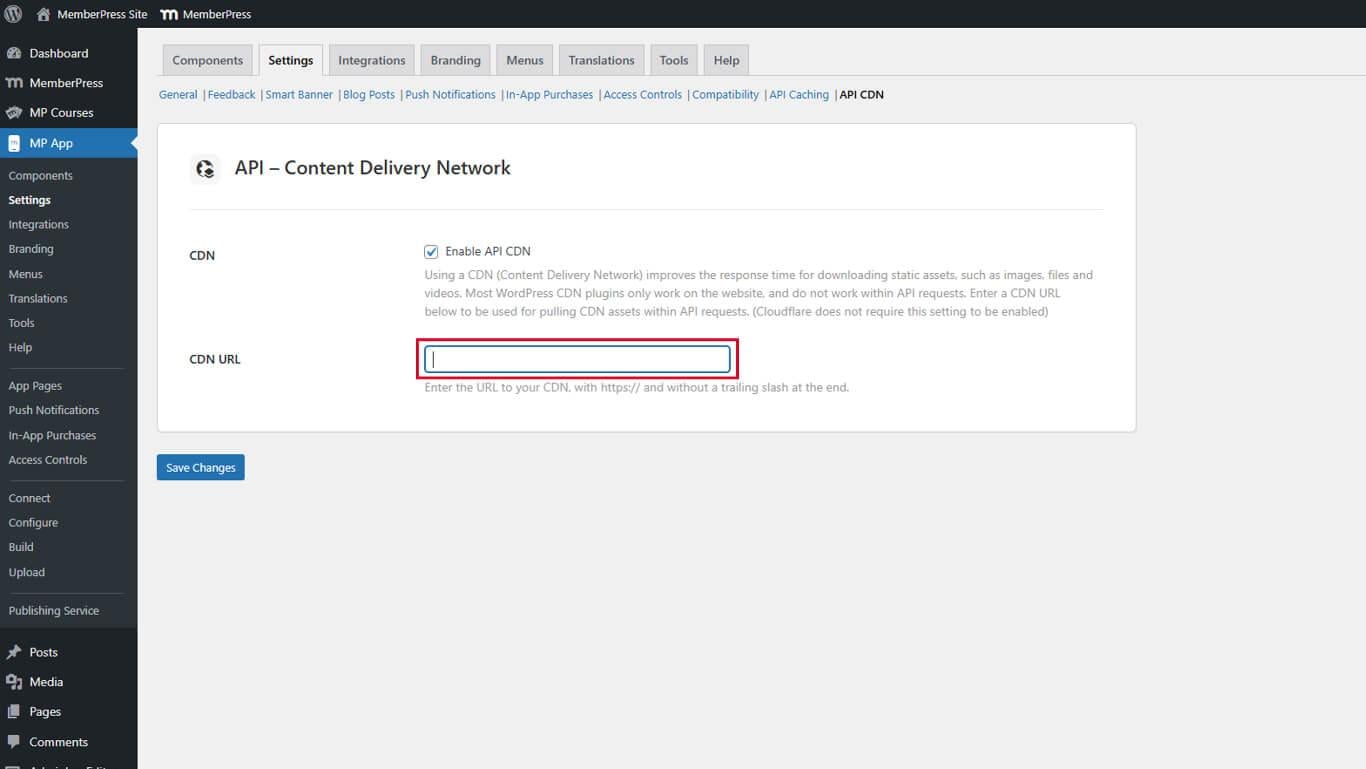
- Klicken Sie auf Änderungen speichern.
Beispiel für CDN-Basis-URLs:
- CloudFront: https://d123456789abcd.cloudfront.net;
- StackPath: https://cdn.example.stackpathcdn.com;
- BunnyCDN: https://example.b-cdn.net.
Verständnis der CDN-Medienbereitstellung
API CDN verarbeitet Medienanforderungen über ein zweistufiges Bereitstellungssystem, das die Leistung nach der Ersteinrichtung optimiert.
Erstes Antragsverfahren
Wenn ein Benutzer zum ersten Mal Medieninhalte anfordert, läuft die folgende Sequenz ab:
- Die App sendet eine Anfrage an die WordPress-Website für die Mediendatei.
- Die WordPress-Website ruft die Medien aus dem lokalen Speicher ab.
- Die Mediendatei wird automatisch in das CDN hochgeladen.
- Das CDN gibt die Medien an den Nutzer zurück.
Bei dieser ersten Anfrage kann es zu normalen Ladezeiten kommen, während die Medien in das CDN hochgeladen werden.
Prozess der nachträglichen Anfrage
Nach dem ersten Upload folgen zukünftige Anfragen einem optimierten Pfad:
- Die App fordert Medien direkt von der CDN-Domäne an.
- Das CDN stellt die zwischengespeicherten Medien vom nächstgelegenen Edge-Server aus bereit.
- Die Nutzer erhalten schnellere Ladezeiten durch die ortsnahe Zustellung.
Das CDN zwischenspeichert Mediendateien entsprechend den im CDN-Dienst konfigurierten Einstellungen für die Cachedauer.
Optimieren der Leistung mit API-Caching
API-Caching ergänzt die CDN-Funktionalität, indem es Datenbankabfragen reduziert und die API-Antwortzeiten beschleunigt. Durch die Kombination beider Funktionen wird die Leistung der App maximiert.
- Navigieren Sie zu Dashboard > MP AppKit > Einstellungen > API-Caching.
- Konfigurieren Sie die Cache-Einstellungen je nach Inhalt.
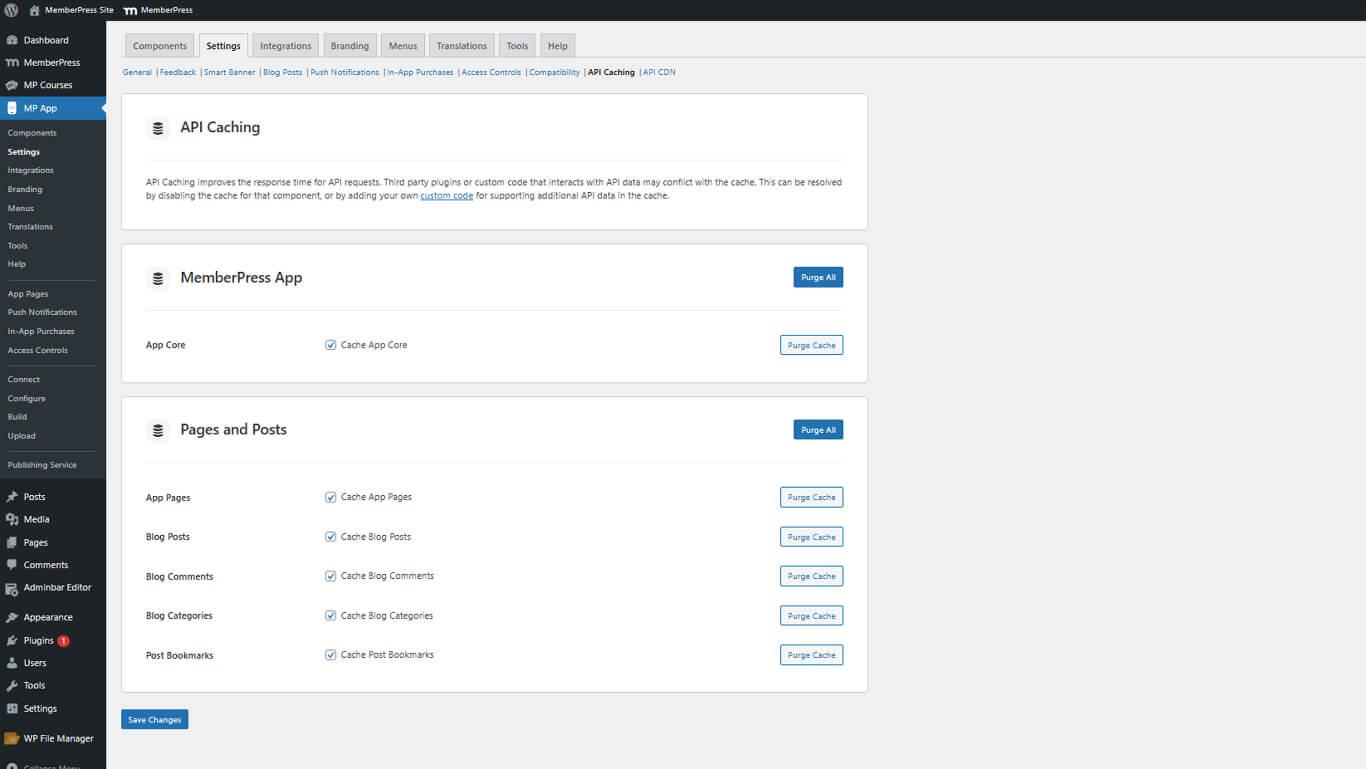
- Klicken Sie auf Änderungen speichern.
Die Einstellungen für die Zwischenspeicherung sollten ein Gleichgewicht zwischen Leistungssteigerung und Anforderungen an die Aktualität der Inhalte herstellen. Überprüfen Sie die API-Caching-Konfigurationsleitfaden für Optimierungsstrategien.










 DE
DE  EN
EN  ES
ES  FR
FR  PT
PT 