

Die Einstellung Kauf erforderlich schränkt den gesamten App-Zugriff hinter einer einzigen Paywall ein. Access Controls bietet granulare, regelbasierte Einschränkungen mithilfe von Mitgliedschaftsplänen und benutzerdefinierter Logik.
In diesem Dokument wird erklärt, wie man von "Require Purchase" zu "Access Controls" unter Verwendung von Zugriffsgruppen und Zugriffsregeln migriert.
Das Verständnis des Migrationsprozesses
Die Funktion "Kauf anfordern" wendet eine einzige Zugriffsbeschränkung auf die gesamte Anwendung an. Access Controls ersetzt diesen Ansatz durch flexible, bedingungsbasierte Einschränkungen. Die Migration umfasst die Dokumentation bestehender Einstellungen für die Kaufanforderung, die Aktivierung von Access Controls, die Erstellung gleichwertiger Zugriffsgruppen und die Konfiguration von Zugriffsregeln, die die vorherige Funktionalität replizieren.
Dokumentation der aktuellen Einstellungen für den Kauf von Requisiten
Die Einstellungen für den Einkauf müssen vor Beginn der Migration dokumentiert werden. Die Umschaltfunktion verschwindet nach der Aktivierung der Zugriffskontrollen.
- Navigieren Sie zu Dashboard > MP AppKit > Einstellungen > In-App-Käufe.
- Beachten Sie die Einstellung "Kauf erforderlich".
- Sobald die Zugriffskontrolle aktiviert ist, verschwindet dieser Schalter, und die Logik muss manuell mit Hilfe von Zugriffsgruppen neu aufgebaut werden.
Eine genaue Dokumentation gewährleistet gleichwertige Zugriffsbeschränkungen nach Abschluss der Migration.
Aktivieren der Komponente Zugriffskontrollen
Mit der Aktivierung der Zugriffskontrollen beginnt der Migrationsprozess.
- Navigieren Sie zu Dashboard > MP AppKit > Komponenten.
- Lokalisieren Zugangskontrollen in der Komponentenliste.
- Prüfen Sie die Zugangskontrollen aktivieren Kontrollkästchen.
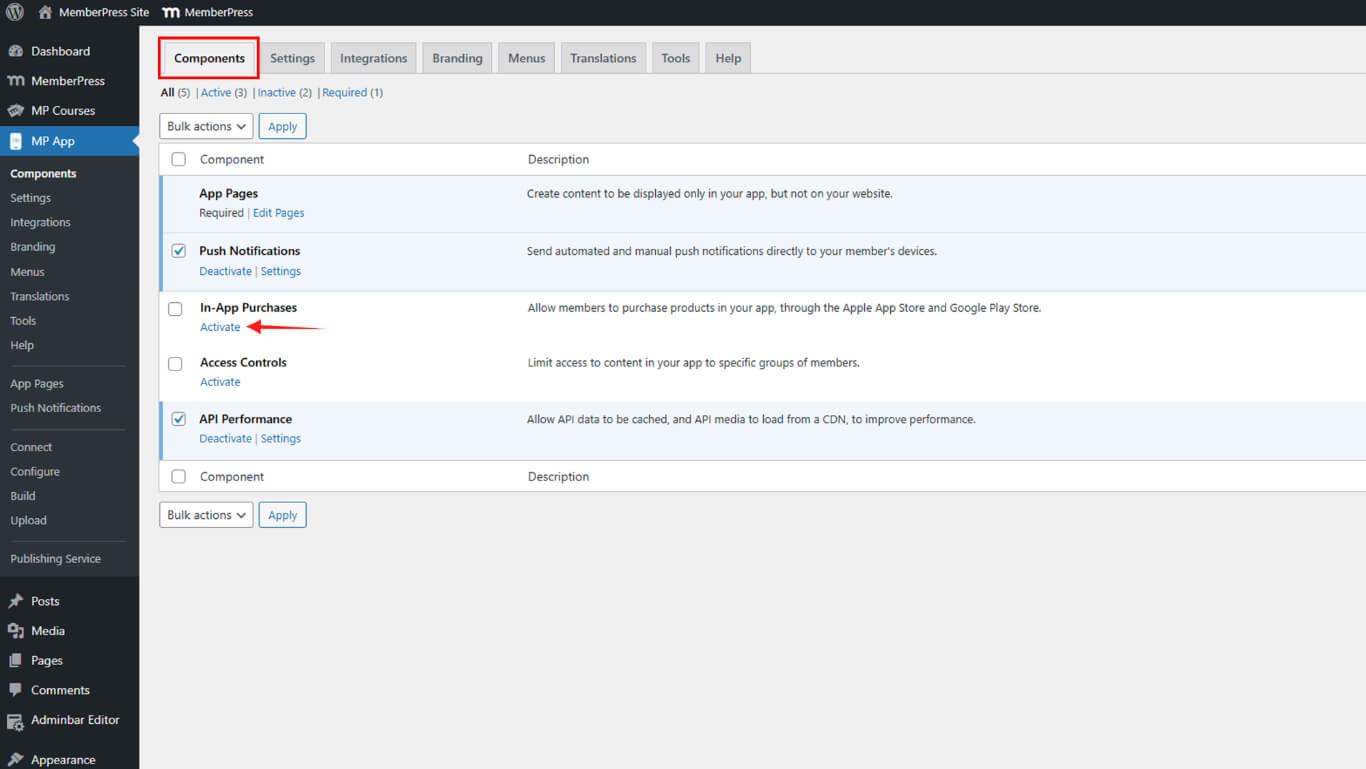
- Klicken Sie auf Änderungen speichern.
Die Auswirkungen der Migration verstehen
Durch die Aktivierung der Zugriffskontrollen wird die Option "Kauf erforderlich" aus den Einstellungen entfernt. Die bisherige Paywall-Logik muss manuell mithilfe von Zugriffsgruppen und Regeln neu erstellt werden. Diese Änderung bietet mehr Flexibilität, erfordert aber einen höheren Konfigurationsaufwand.
Erstellen äquivalenter Zugriffsgruppen
Zugriffsgruppen replizieren die Mitgliedschafts- oder Produktanforderungen aus den Einstellungen "Kauf erforderlich".
- Navigieren Sie zu Dashboard > MP AppKit > Zugriffskontrollen > Zugriffsgruppen.
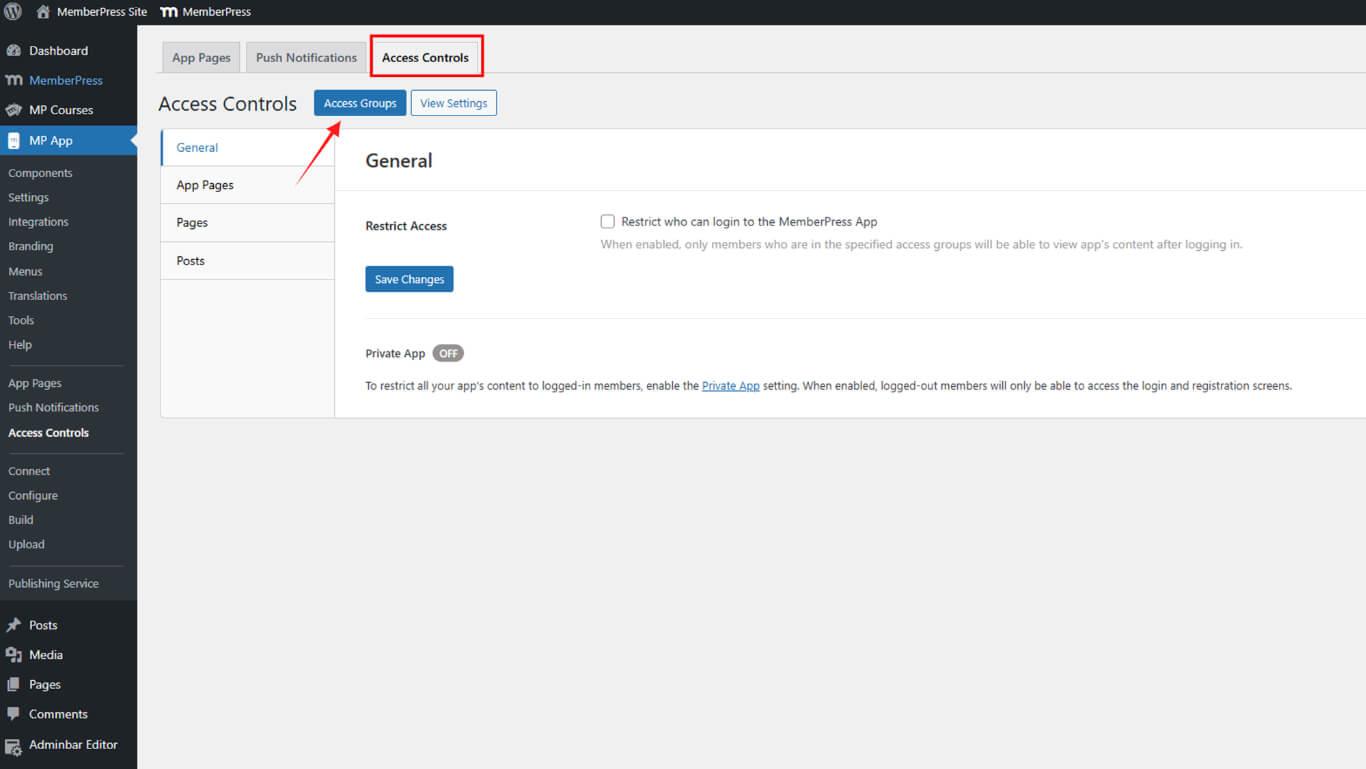
- Klicken Sie auf Gruppe hinzufügen.
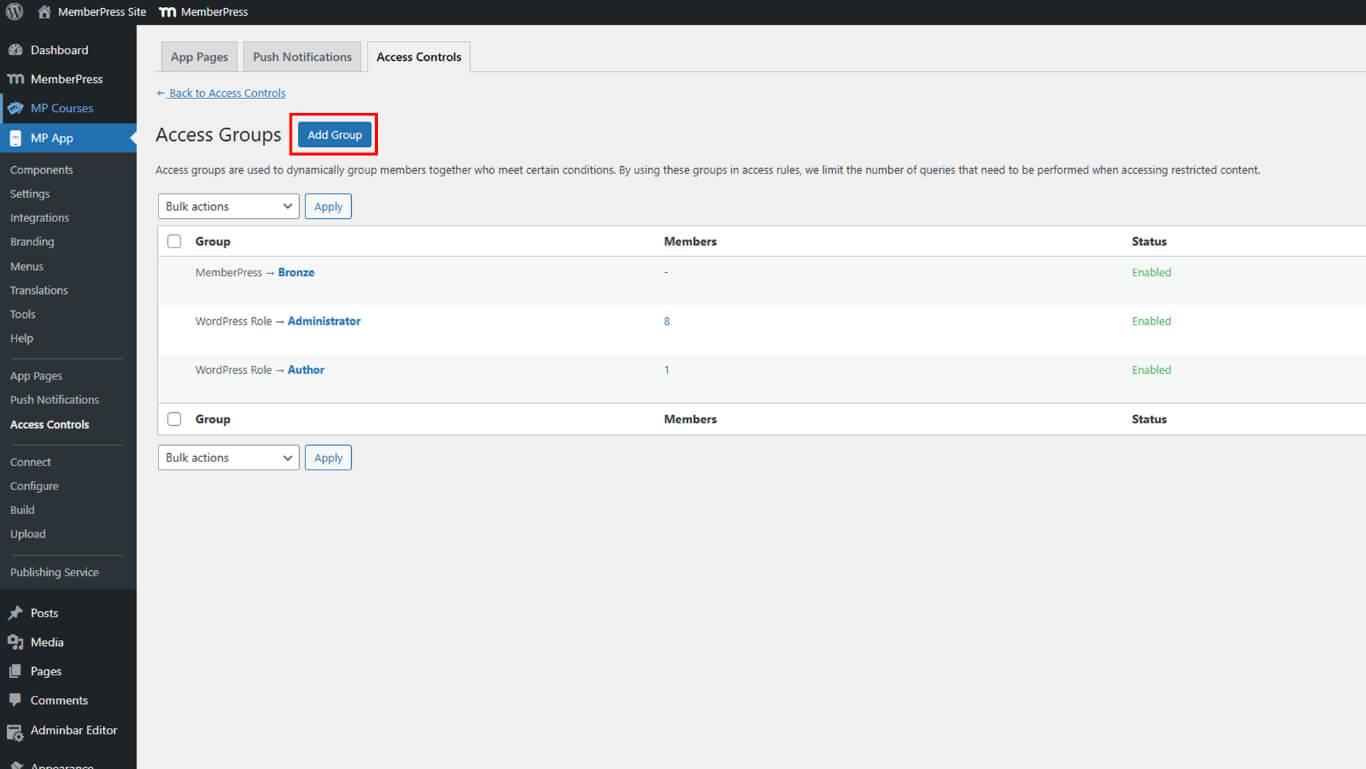
- Geben Sie einen beschreibenden Namen in das Feld Name der Gruppe Feld.
- Wählen Sie die Bedingung Typ die den bisherigen Anforderungen entsprechen:
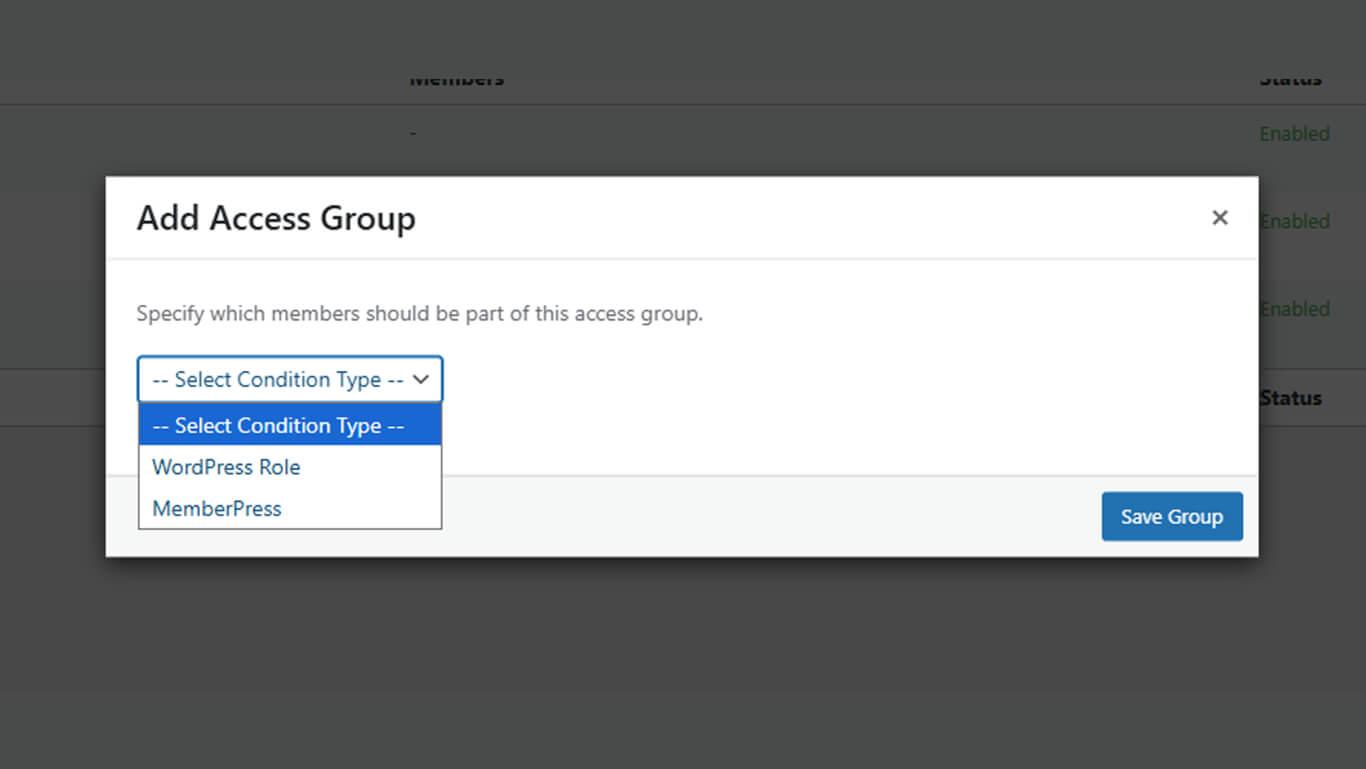
- Mitgliedschaftsplan für mitgliedschaftsbezogene Einschränkungen;
- Benutzer-Rolle wenn ein rollenbasierter Zugriff erforderlich war.
- Wählen Sie aus dem sekundären Dropdown-Menü den gewünschten Mitgliedsplan oder die Rolle aus.
- Klicken Sie auf Gruppe speichern.
- Wiederholen Sie die Schritte 2 bis 6 für jeden Mitgliedschaftsplan oder jede Bedingung, die zuvor erforderlich war.
Jede Zugangsgruppe repräsentiert einen Mitgliedsplan oder eine Bedingung aus der ursprünglichen Konfiguration von Require Purchase.
Konfigurieren der allgemeinen App-Zugriffsbeschränkungen
Die allgemeinen Zugangsbeschränkungen entsprechen der app-weiten Bezahlschranke aus den Einstellungen für "Kauf erforderlich".
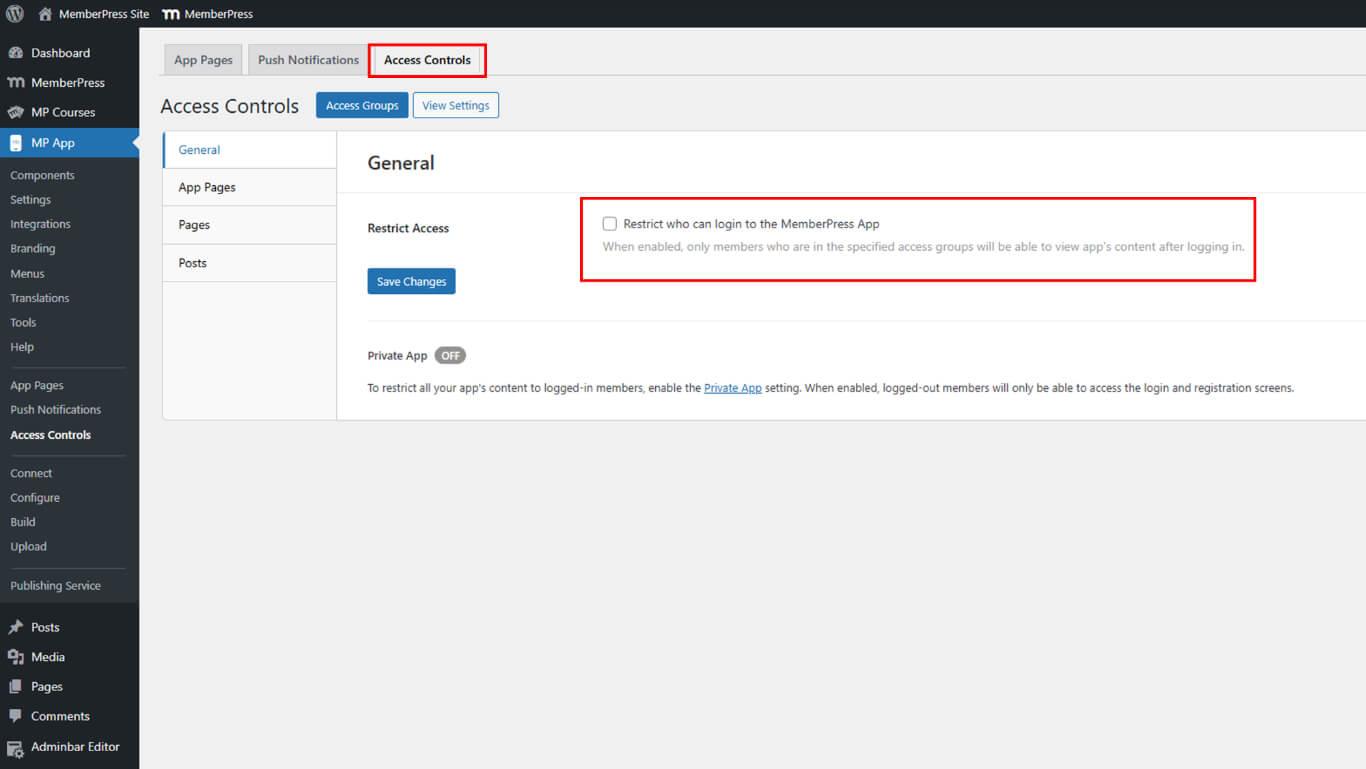
- Navigieren Sie zu Dashboard > MP AppKit > Zugriffskontrollen > Allgemein.
- Prüfen Sie die Zugang einschränken das Kontrollkästchen, um eine Anmeldung zu verlangen.
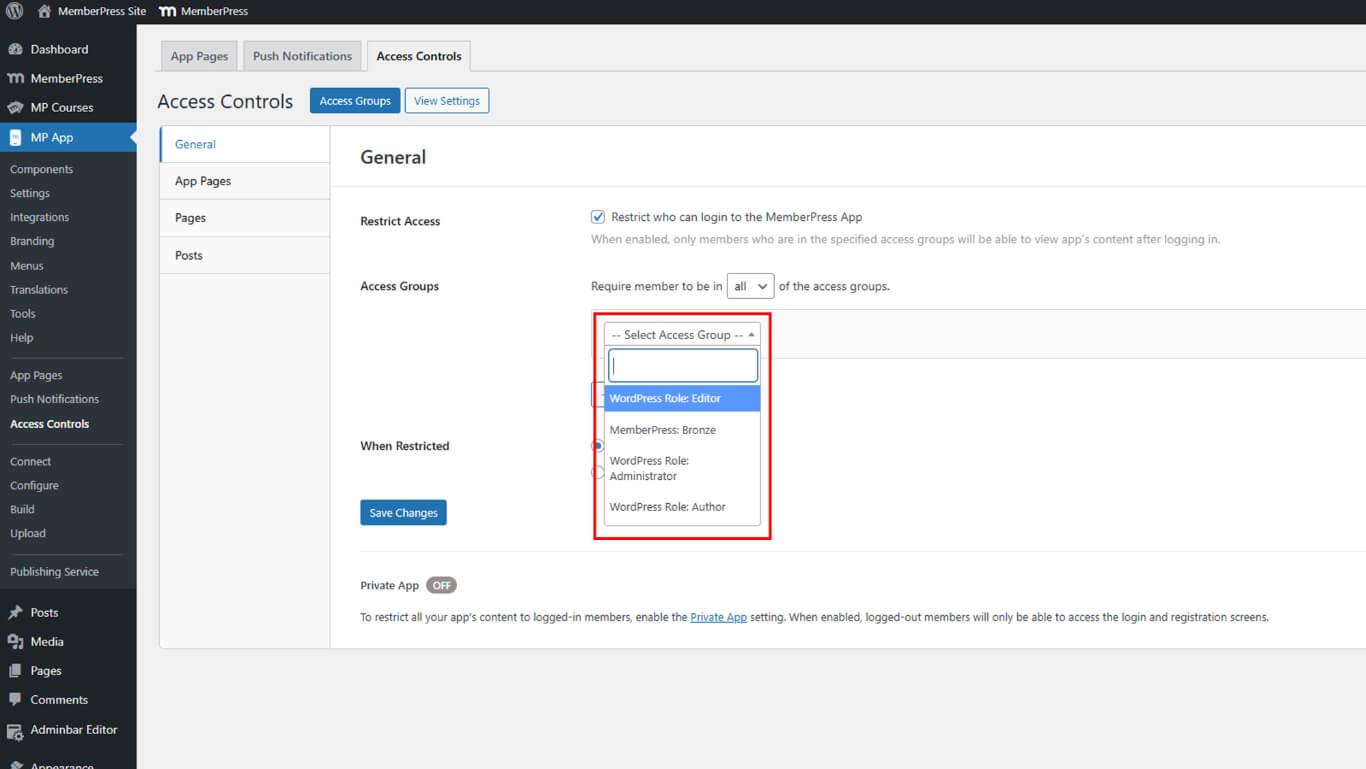
- Unter Zugang Gruppen, Wählen Sie alle im vorherigen Abschnitt erstellten Gruppen aus.
- Wählen Sie eine Eingeschränkte Aktion für nicht autorisierte Benutzer:
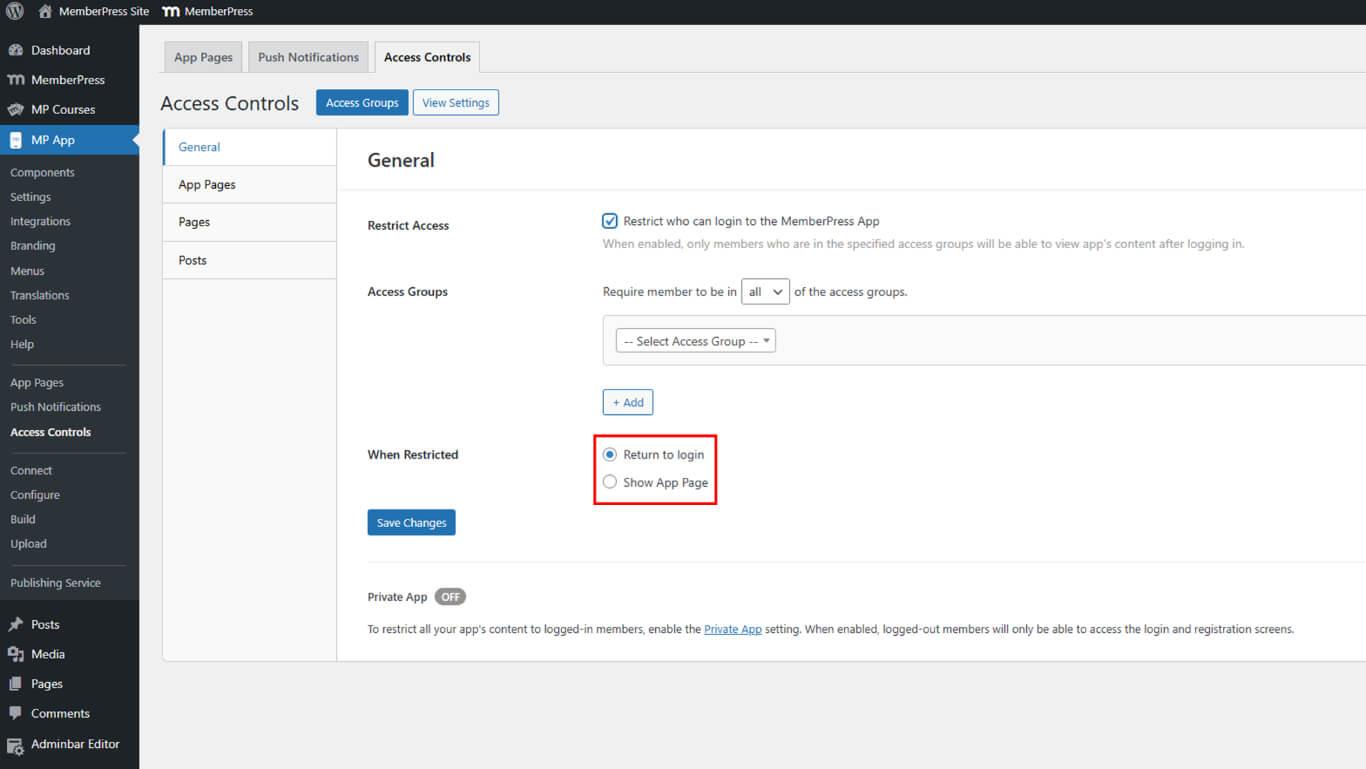
- Zurück zum Login;
- App-Seite anzeigen
- Klicken Sie auf Änderungen speichern.
Diese Einstellungen replizieren die app-weiten Beschränkungen aus der ursprünglichen Konfiguration von Require Purchase.
Geeignete eingeschränkte Aktionen auswählen
Die eingeschränkte Aktion sollte mit dem ursprünglichen Verhalten von Require Purchase übereinstimmen.
Produktbildschirm anzeigen repliziert das Verhalten der Bezahlschranke durch die Anzeige von Mitgliedschaftsoptionen. Diese Aktion entspricht der gebräuchlichsten Konfiguration "Kauf erforderlich", bei der die Benutzer die verfügbaren Pläne sehen.
Zurück zum Login leitet nicht authentifizierte Benutzer auf Anmeldebildschirme um. Diese Aktion eignet sich für Szenarien, in denen ein Kauf außerhalb der App stattfindet und eine Anmeldung nach Abschluss des Kaufs erforderlich ist.
App-Seite öffnen leitet die Benutzer zu benutzerdefinierten Nachrichten oder Informationen. Diese Aktion bietet ein Höchstmaß an Flexibilität bei der Erläuterung von Zugangsvoraussetzungen oder bei der Führung von Benutzern durch Kaufprozesse.
Aktivieren des privaten App-Modus
Der Modus "Private App" verbirgt die App vollständig vor abgemeldeten Nutzern und bietet maximale Zugriffsbeschränkung.
- Navigieren Sie zu Dashboard > MP AppKit > Einstellungen > Allgemein > Datenschutz.
- Prüfen Sie die Private App Kontrollkästchen.
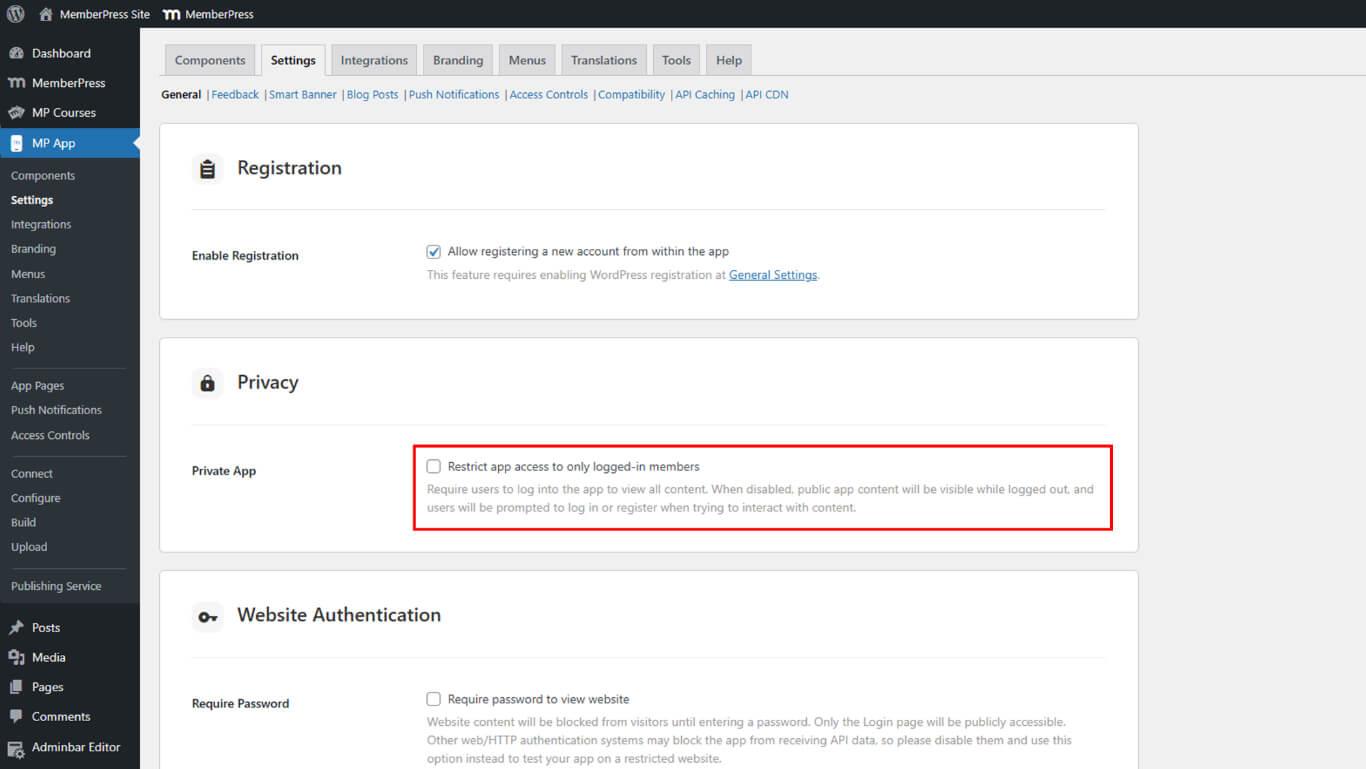
- Klicken Sie auf Änderungen speichern.
Der Modus "Private App" ergänzt die Zugriffskontrollen, indem er die Erkennung von Apps vor der Authentifizierung verhindert. Diese Einstellung erhöht die Sicherheit für Apps, die nur für Mitglieder bestimmt sind.










 DE
DE  EN
EN  ES
ES  FR
FR  PT
PT 