

Les mises à jour de l'application Android de MemberPress permettent aux membres d'avoir accès aux dernières fonctionnalités, aux corrections de bugs et aux mises à jour de prix. Des mises à jour régulières maintiennent la fonctionnalité de l'application et la conformité avec les exigences du Google Play Store.
Ce document explique comment générer de nouvelles versions d'Android, télécharger des fichiers AAB, soumettre des mises à jour à Google Play Console et traiter les commentaires.
Comprendre les mises à jour des applications
Les mises à jour d'applications apportent des améliorations et des correctifs aux installations existantes via le Google Play Store. Les mises à jour conservent le même identifiant d'application et la même clé de signature que la publication originale. Les codes de version doivent augmenter à chaque mise à jour pour permettre une détection et une installation correctes de la mise à jour.
Création d'une nouvelle version d'Android
La génération d'un build de version permet de créer le paquet d'applications mis à jour pour le soumettre à Google Play.
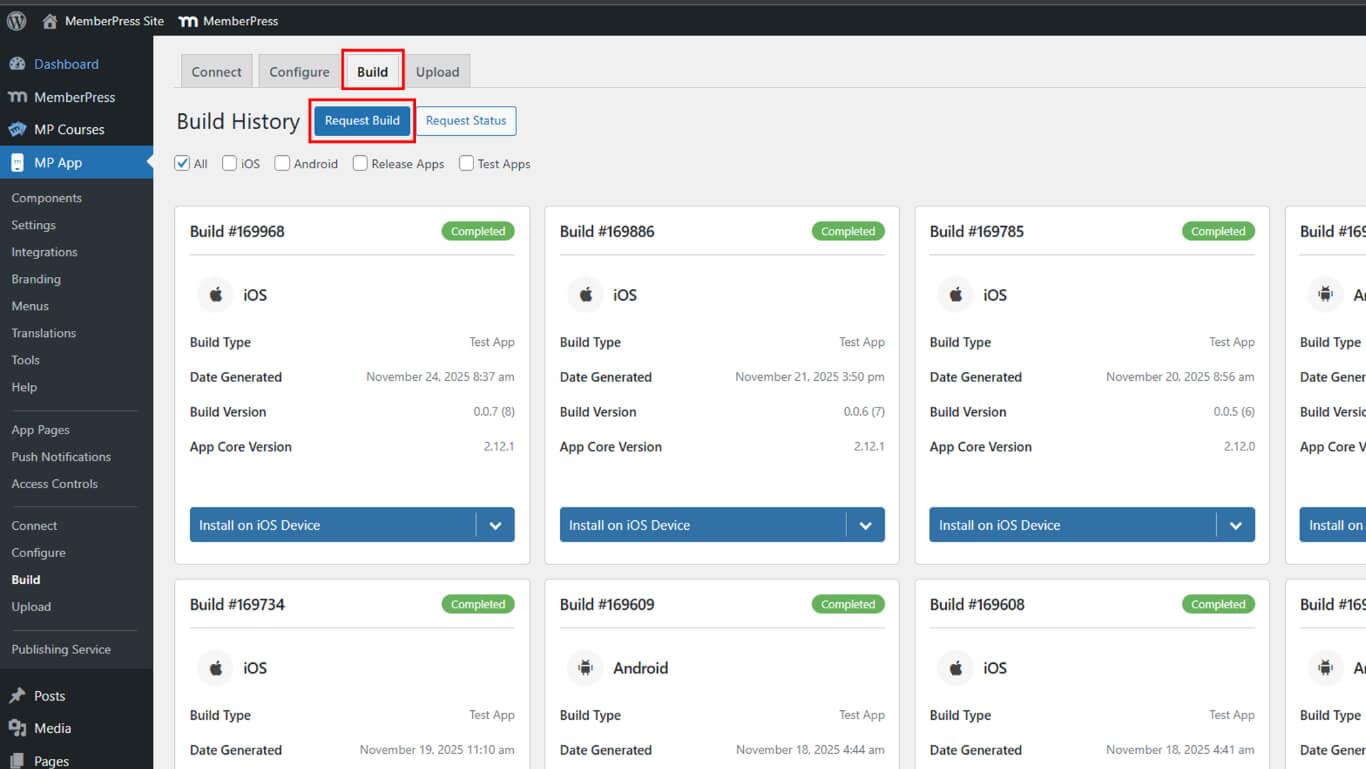
- Naviguez jusqu'à Tableau de bord > MP AppKit > Build.
- Cliquez sur le bouton Demander une compilation bouton.
- Vérifier le Android case à cocher comme plateforme.
- Sélectionner Lancer l'application comme type de construction.
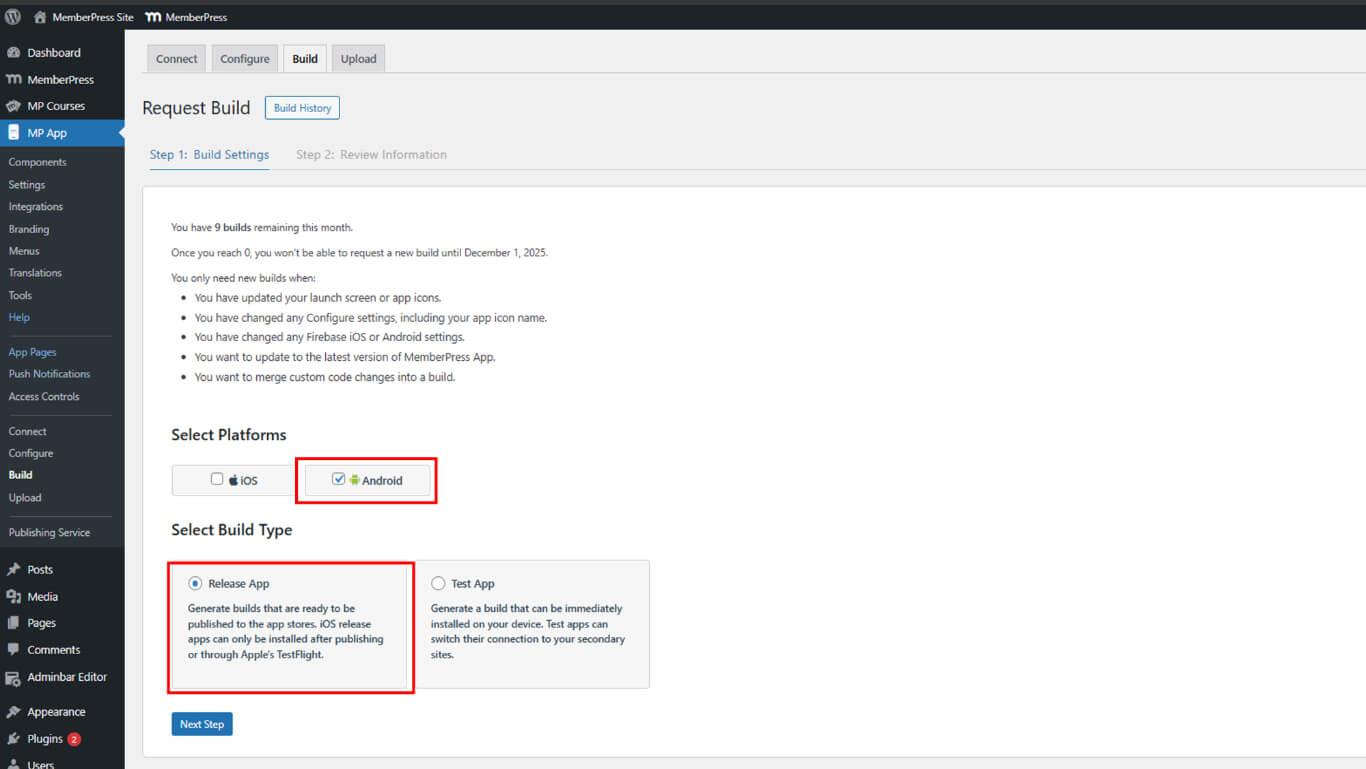
- Cliquez sur Prochaine étape pour passer à la configuration de la construction.
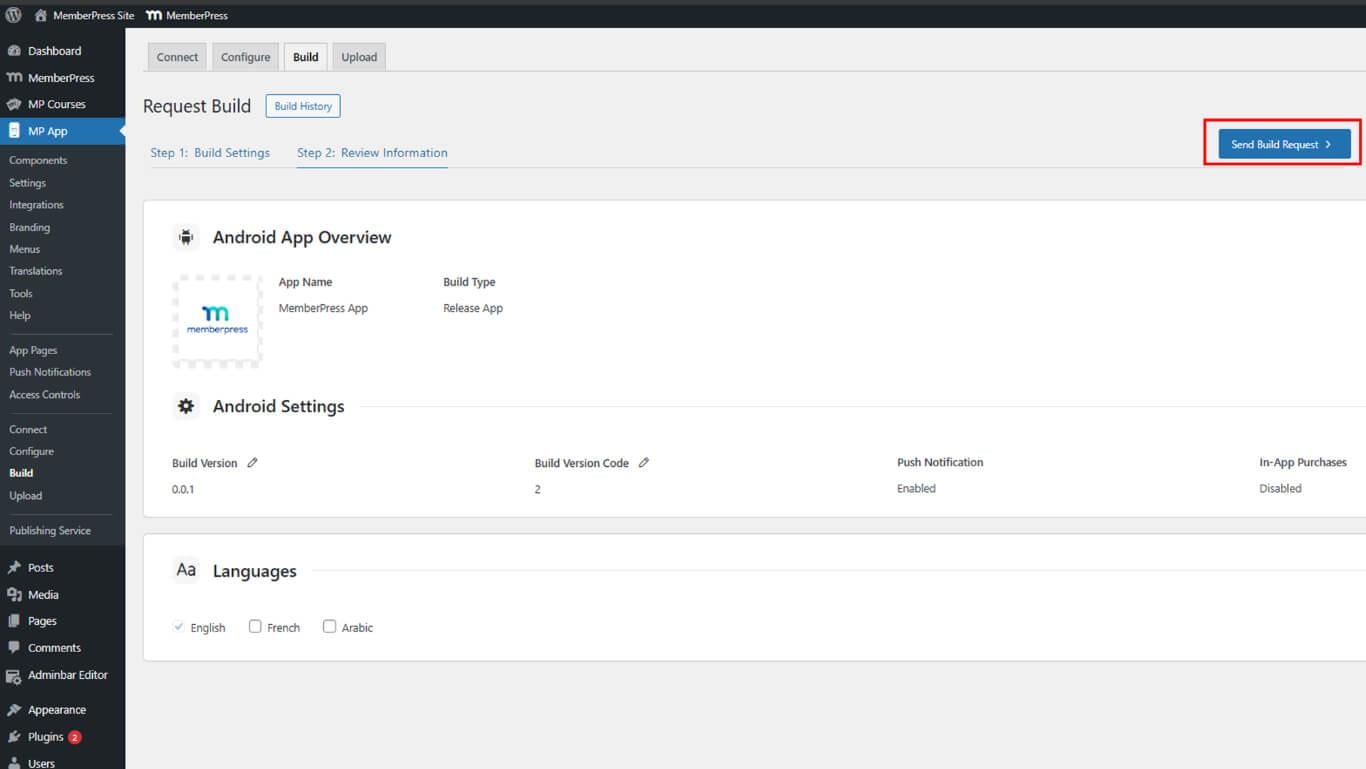
- Cliquez sur Envoyer une demande de construction pour soumettre la demande de compilation.
- Surveillez la progression de la compilation sous Historique de construction.
- Attendez que la compilation soit terminée.
La construction est généralement terminée dans les 5 à 10 minutes suivant la soumission de la demande.
Téléchargement du fichier de construction de l'AAB
Le téléchargement du fichier AAB prépare le paquet d'applications mis à jour pour le téléchargement dans la console Google Play.
- Naviguez jusqu'à Tableau de bord > MP AppKit > Construire > Historique de la construction après l'achèvement de la construction.
- Localisez la version complète dans la liste des versions.
- Cliquez sur Télécharger le fichier AAB à côté de la version.
- Enregistrez le fichier AAB dans un emplacement sûr de l'appareil.
Les deux méthodes de téléchargement fournissent le même fichier AAB pour la soumission.
Soumettre une mise à jour à Google Play Console
La soumission d'une mise à jour envoie la nouvelle version de l'application à Google pour examen.
- Connectez-vous à Google Play Console à l'adresse play.google.com/console.
- Naviguez jusqu'à Toutes les applications et sélectionnez l'application dans la liste.
- Cliquez sur Test et publication > Production dans la barre latérale gauche.
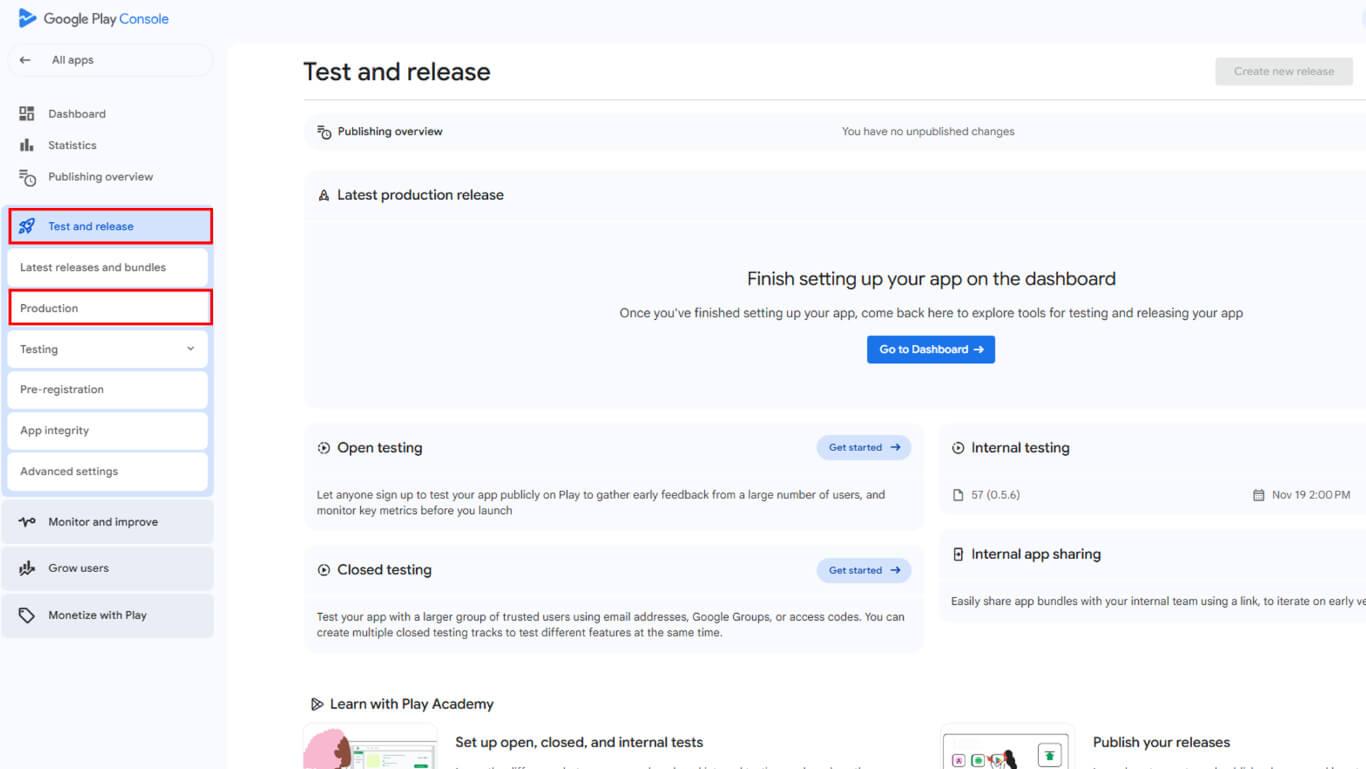
- Cliquez sur Créer une nouvelle version pour la soumission d'une nouvelle mise à jour.
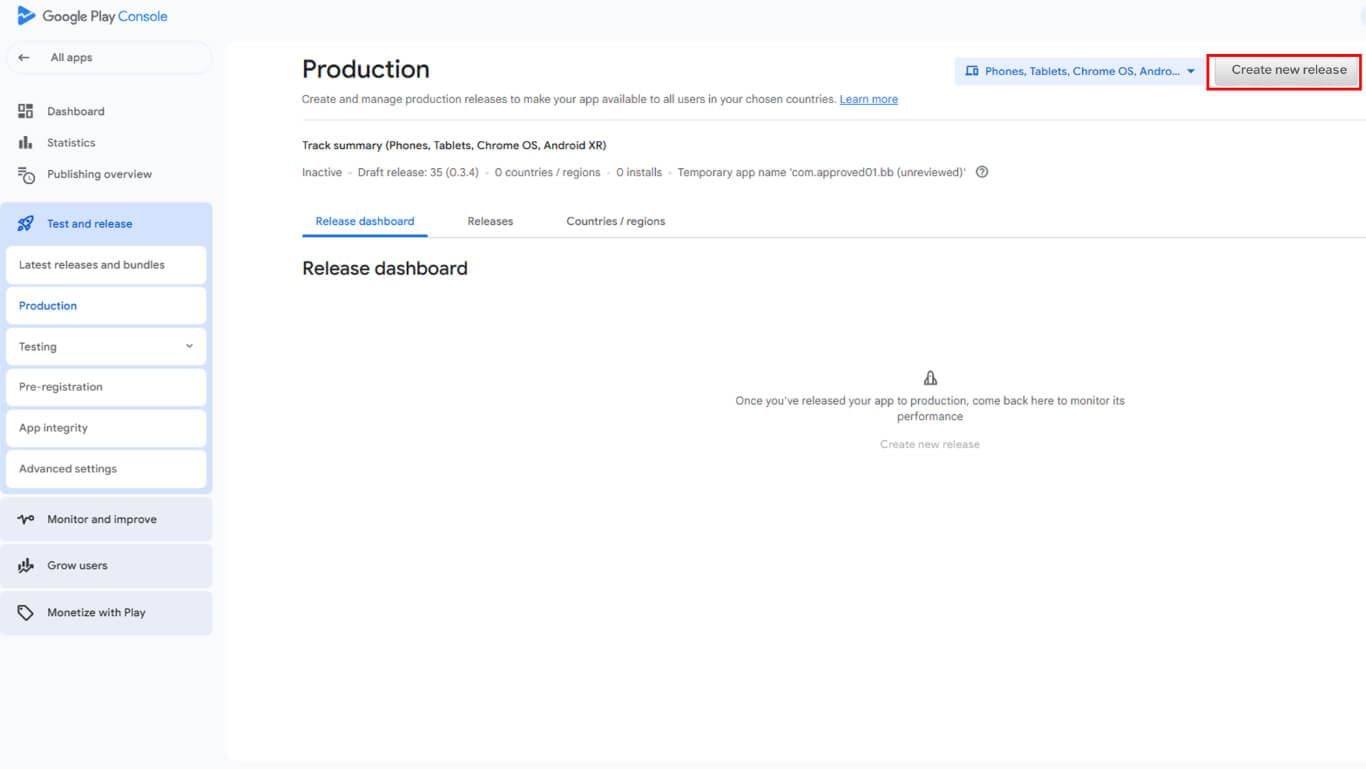
- Cliquez sur Editer la version si un projet de communiqué existant est présent.
- Faites défiler jusqu'à la App bundles et APKs section.
- Cliquez sur Télécharger pour ouvrir la sélection de fichiers.
- Sélectionnez le fichier AAB téléchargé depuis l'appareil.
- Attendre la fin du téléchargement et le traitement du fichier.
- Saisir un Nom de la version dans le champ "release name".
- Entrer Notes de mise à jour décrire les changements et les améliorations.
- Cliquez sur Économiser pour enregistrer le communiqué en tant que projet.
- Cliquez sur Publication de la critique pour passer à l'examen de la demande.
Examen de la configuration des mises à jour
L'examen des mises à jour permet de vérifier la compatibilité des versions et les exigences de mise à jour.
- Examinez la page de résumé de la version pour voir s'il n'y a pas d'erreurs ou d'avertissements.
- Vérifiez que le code de la version est supérieur aux versions précédentes.
- Corrigez toutes les erreurs requises avant la soumission.
- Il est possible de résoudre les avertissements afin d'améliorer la qualité de la mise à jour.
- Confirmer que les notes de mise à jour décrivent correctement les changements.
- Examiner les pays et les régions pour vérifier la disponibilité des mises à jour.
Soumission d'une mise à jour pour examen
La soumission de la mise à jour envoie la publication à l'équipe de révision de Google.
- Examinez tous les détails mis à jour sur la page d'examen.
- Vérifiez qu'aucune erreur de blocage ne subsiste dans la configuration.
- Cliquez sur Début de la mise en production pour soumettre la mise à jour.
- Confirmer la soumission dans la boîte de dialogue de confirmation.
- Contrôler l'état de la soumission dans Google Play Console.
Comprendre les types de rejet
Google peut rejeter des mises à jour pour des raisons de conformité ou des problèmes techniques.
Questions relatives aux métadonnées impliquent le contenu des listes de la boutique, des mises à jour de la politique de confidentialité ou des modifications de la classification du contenu. Les rejets de métadonnées nécessitent des mises à jour de la Play Console sans nouvelles créations d'applications.
Problèmes liés à l'application impliquent des problèmes de code, des violations de politiques ou des défauts de fonctionnalité. Les rejets d'applications nécessitent des corrections de code, de nouveaux développements et une nouvelle soumission complète.










 FR
FR  EN
EN  ES
ES  DE
DE  PT
PT 