

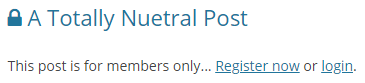
Wenn Sie neben den Titeln Ihrer geschützten Beiträge im Blog, in den Suchergebnissen oder in den Archivansichten ein Schloss-Symbol anzeigen möchten, können Sie dies tun, indem Sie die folgenden Anweisungen befolgen.
Zunächst sollten Sie eine kostenlose WPCode Plugin (Details dazu finden Sie in diesem Artikel: Hinzufügen von benutzerdefinierten Codefragmenten in WPCode).
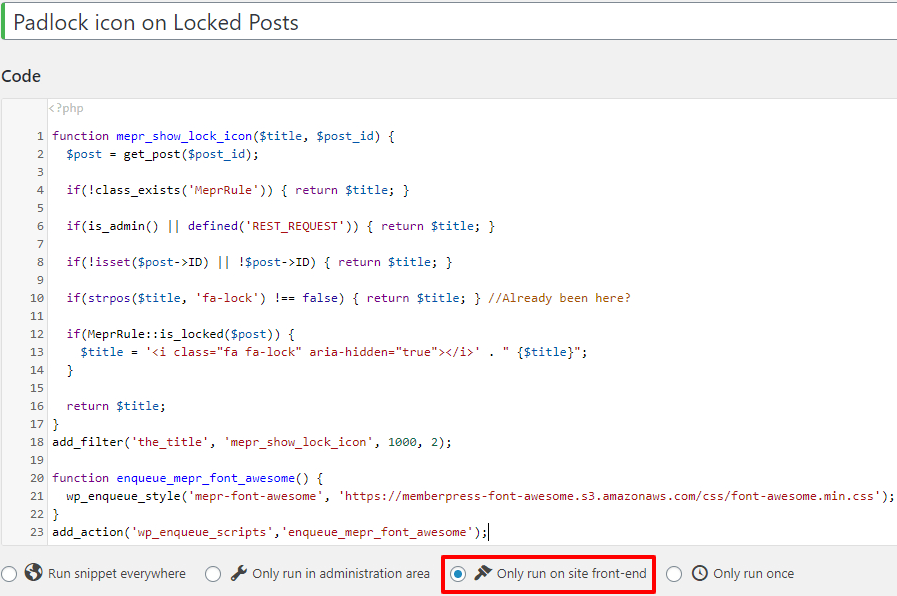
Erstellen Sie nach der Installation ein neues Snippet und fügen Sie den folgenden Text ein:
function mepr_show_lock_icon($itle, $post_id) {
  $post = get_post($post_id);

  if(!class_exists('MeprRule')) { return $itle; }

  if(is_admin() || defined('REST_REQUEST')) { return $itle; }

  if(!isset($post->ID) || !$post->ID) { return $title; }

  if(strpos($title, 'fa-lock') !== false) { return $title; } //Warst du schon mal hier?

  if(MeprRule::is_locked($post)) {
    $title = '' . " {$itle}";
  }
  return $itle;
}
add_filter('the_title', 'mepr_show_lock_icon', 1000, 2);

function enqueue_mepr_font_awesome() {
  wp_enqueue_style('mepr-font-awesome', 'https://memberpress-font-awesome.s3.amazonaws.com/css/font-awesome.min.css');
}
add_action('wp_enqueue_scripts','enqueue_mepr_font_awesome');
Bevor Sie auf "Speichern" klicken, stellen Sie sicher, dass Sie "Frontend" für das Code-Snippet auswählen, wie unten gezeigt
Speichern Sie dann die Änderungen und aktivieren Sie das Snippet.
Das war’s! Deine geschützten Beiträge sollten nun auf deinem Blog vor dem Titel ein Schloss-Symbol anzeigen.
STÖRUNGSBESEITIGUNG:
Falls es nicht funktioniert, sollten Sie möglicherweise die Entwicklertools Ihres Browsers überprüfen, um zu sehen, ob in der Konsole Fehler angezeigt werden.
Möglicherweise nutzt Ihr Theme oder ein anderes Plugin auf der Website bereits Font Awesome, was zu einem Konflikt führt. Sollte dies der Fall sein, können Sie die Zeilen #20–23 löschen und prüfen, ob es dann besser funktioniert.










 DE
DE  EN
EN  ES
ES  FR
FR  PT
PT 