

Les Release Apps iOS de MemberPress permettent de préparer des builds prêts à la production pour la soumission à l'App Store, la distribution TestFlight et la validation précise des achats in-app. Les Release Apps compilent la configuration du site, la marque, les menus et les personnalisations dans des fichiers IPA à l'aide de serveurs de construction basés sur le cloud.
Ce document explique comment créer des builds de l'iOS Release App MemberPress, les télécharger sur App Store Connect, inviter des testeurs TestFlight et gérer les mises à jour des builds.
Comprendre les applications de mise en production et les applications de test
Les Release Apps et les Test Apps ont des objectifs différents dans le cycle de développement et de distribution.
Les Release Apps sont nécessaires pour la soumission à l'App Store et la vérification de la tarification, de la durée et des flux d'achat des abonnements. Les applications de test servent à l'assurance qualité quotidienne et aux aperçus de développement rapide, tandis que les applications de diffusion permettent d'effectuer de véritables transactions d'achat in-app et de tester la distribution officielle. Une configuration adéquate des Release Apps garantit la précision des tests de prépublication et le bon déroulement des processus de soumission à l'App Store.
Caractéristiques de l'application de test
Les Test Apps permettent un déploiement rapide pour les activités de développement et d'assurance qualité.
Assurance qualité quotidienne permet des cycles de test rapides sans délai de soumission à l'App Store. Les applications de test s'installent à l'aide d'un code QR sans qu'il soit nécessaire de les distribuer dans l'App Store.
Aperçus de développement présenter les caractéristiques et les fonctionnalités de l'application pour les processus d'approbation. L'installation directe simplifie le partage avec les parties prenantes et les réviseurs.
Validation du code personnalisé vérifie les personnalisations connectées à GitHub avant le déploiement de la production. Les équipes de développement testent les changements de code sans procédure de publication formelle.
Achats simulés utiliser des prix fictifs sans traiter de transactions réelles. L'environnement de test permet de vérifier le flux d'achat sans implications financières.
Caractéristiques de l'application Release
Les Release Apps fournissent des versions de production pour la distribution et les tests officiels.
Soumission à l'App Store exige des fichiers IPA de Release App pour la publication dans le magasin. Seules les Release Apps répondent aux exigences d'Apple en matière de distribution pour la mise à disposition du public.
Distribution de TestFlight permet de tester les versions contrôlées avant le lancement public. TestFlight fournit un environnement structuré de tests bêta pour les Release Apps.
Affichage des prix réels montre aux testeurs les coûts et les conditions réels de l'abonnement. La vérification des prix permet de s'assurer que les attentes des membres sont exactes avant la diffusion publique.
Transactions d'achat authentiques traiter de vrais paiements d'achats in-app par le biais de la facturation de l'App Store. Les tests de transaction confirment le traitement correct des paiements et la validation des reçus.
Lien de l'ID de l'offre groupée relie les Release Apps aux configurations de produits App Store Connect. Apple associe les achats in-app à des identifiants d'offres groupées de Release App exclusivement.
Créer MemberPress iOS Release App Build
La génération d'une version de l'application crée des fichiers IPA prêts à la production pour la distribution dans l'App Store.
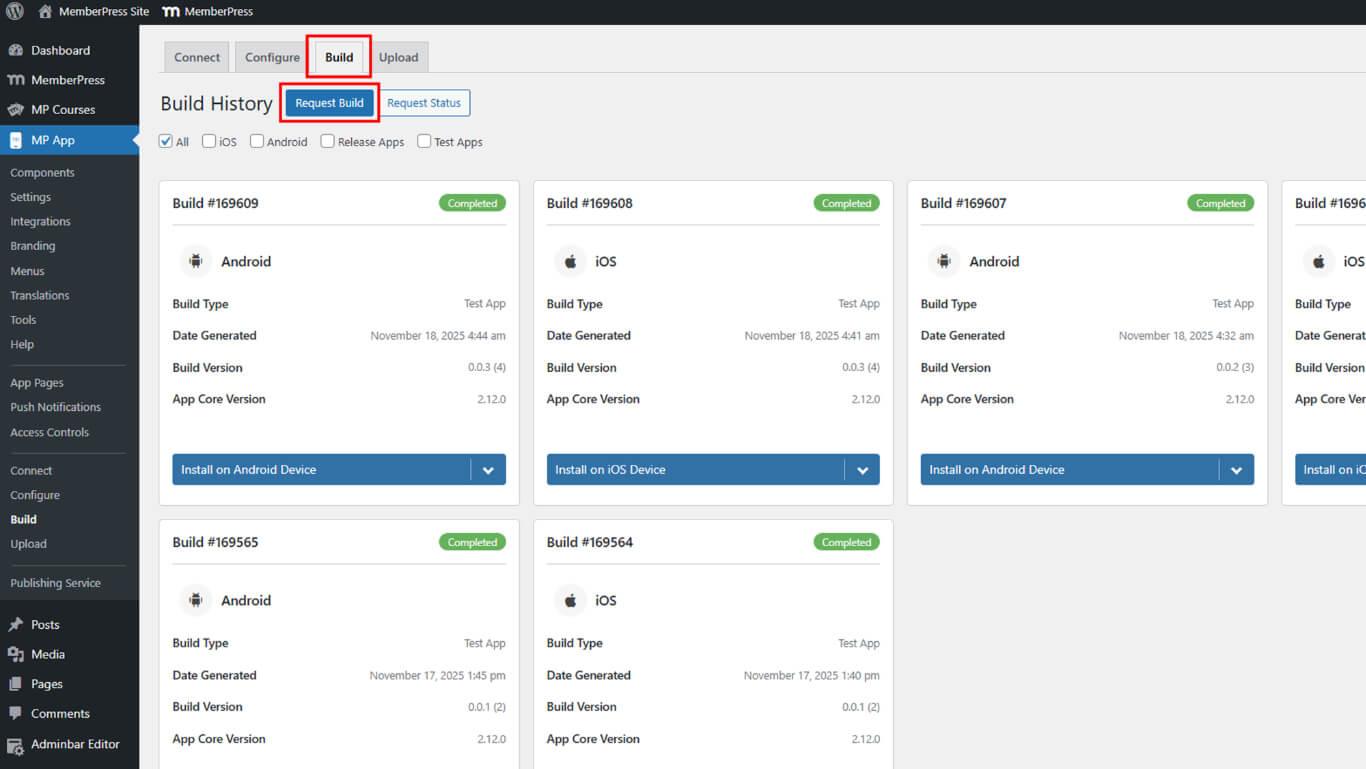
- Naviguez jusqu'à Tableau de bord > MP AppKit > Construire.
- Cliquez sur le bouton Demander une compilation bouton.
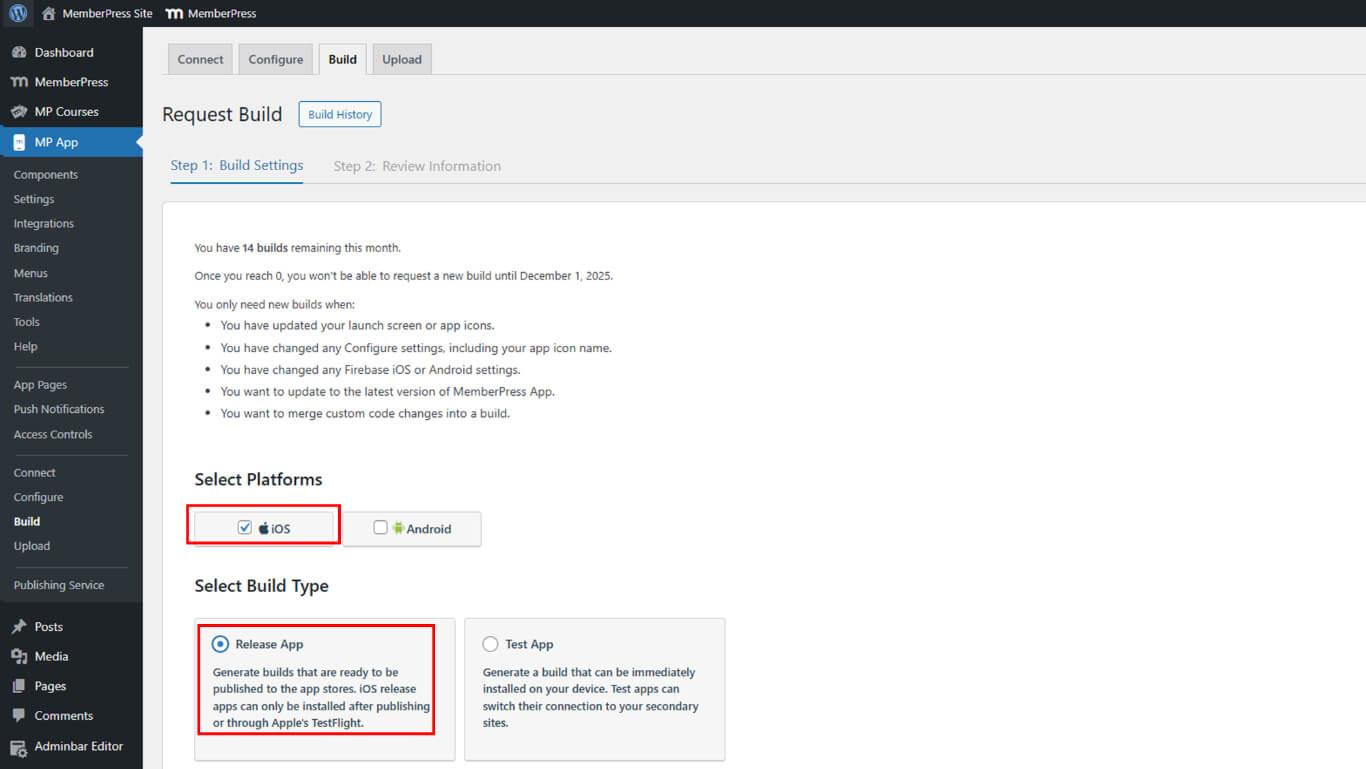
- Sélectionner iOS comme plateforme parmi les options disponibles.
- Sélectionner Lancer l'application comme type de construction.
- Cliquez sur Suivant pour passer à l'examen de la configuration de la construction.
- Passez en revue tous les paramètres de construction affichés sur l'écran de confirmation.
- Cliquez sur Envoyer une demande de construction pour soumettre la demande de compilation.
- Attendre 15 à 60 minutes pour que la construction soit terminée dans la file d'attente.
- Cliquez sur Revérifier le statut maintenant pour rafraîchir l'état de la construction si nécessaire.
Téléchargement du fichier IPA
Le téléchargement du fichier IPA prépare le paquet d'applications pour le téléchargement d'App Store Connect.
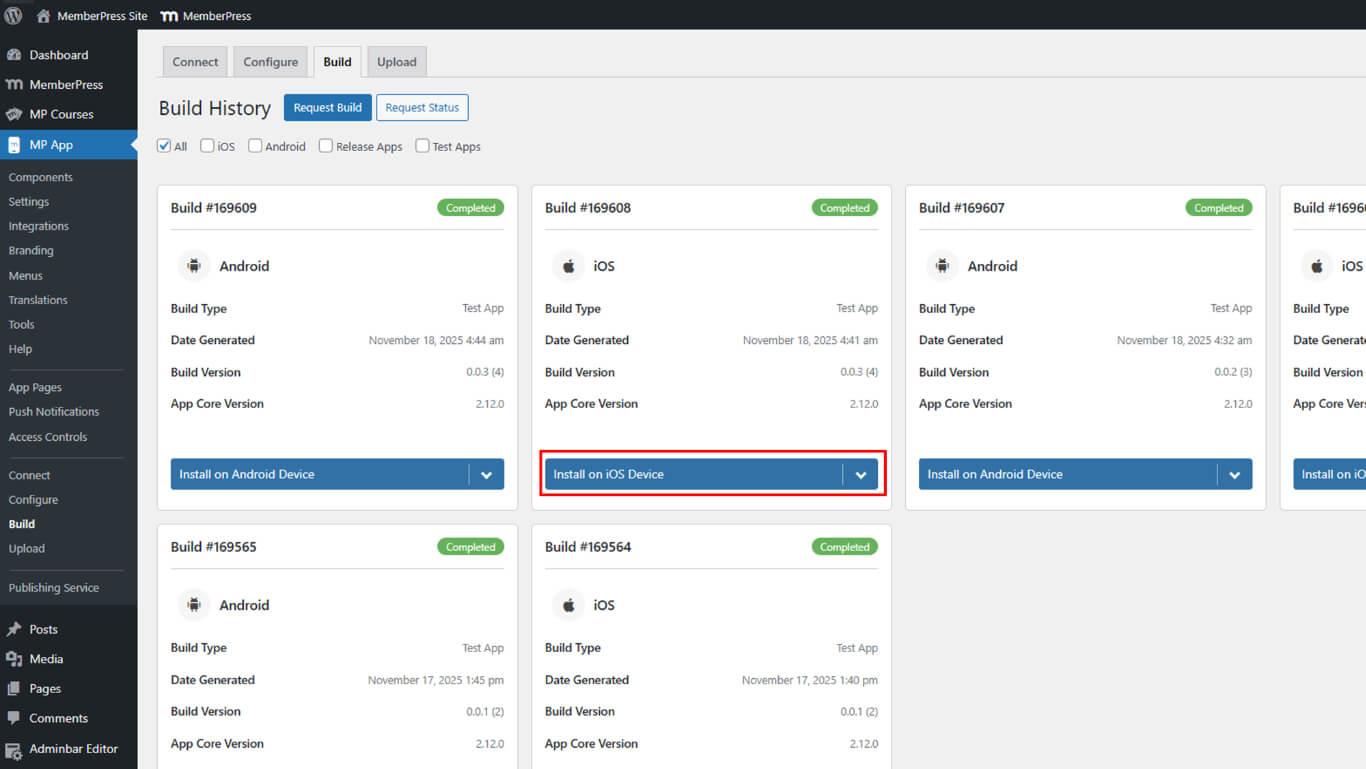
- Naviguez jusqu'à Tableau de bord > MP AppKit > Build > Build History après l'achèvement de la construction.
- Localisez la version achevée dans la liste de l'historique.
- Cliquez sur Installer sur un appareil iOS à côté de la version finale.
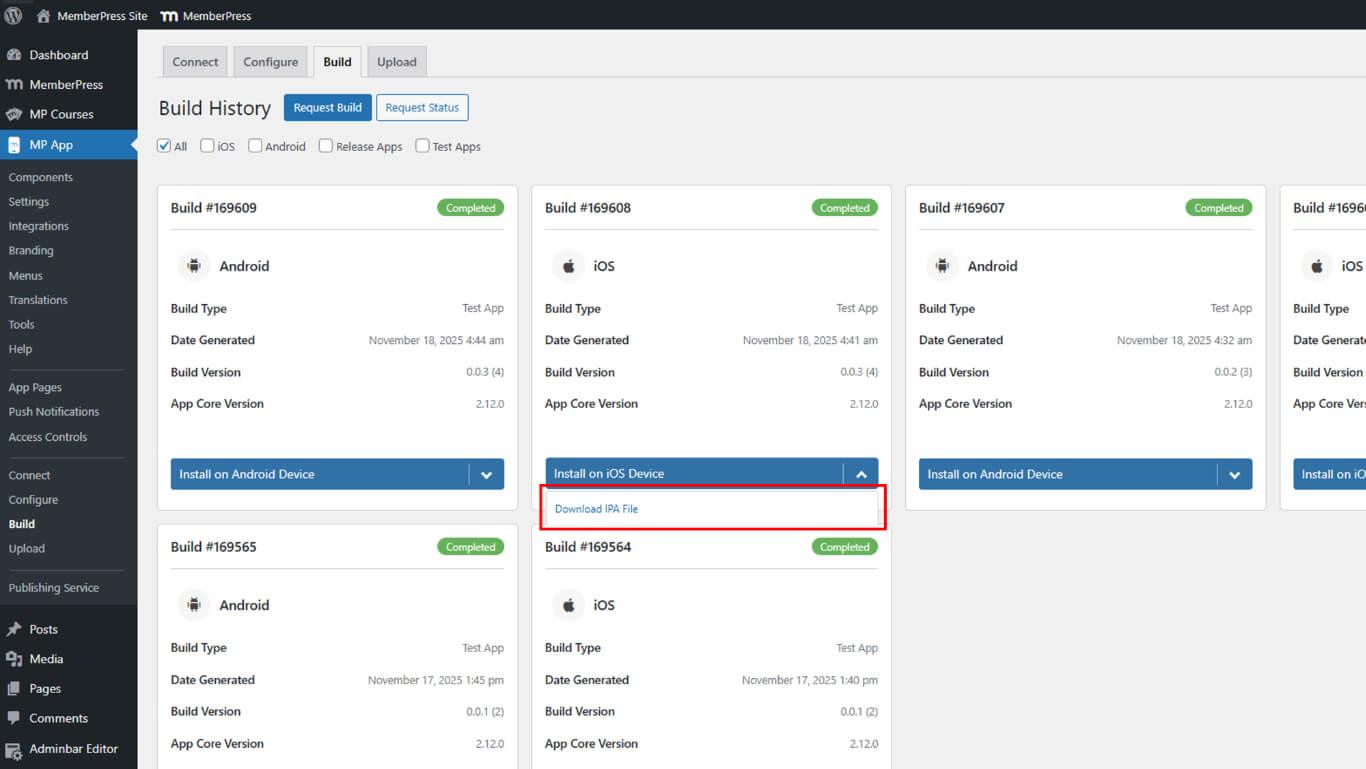
- Cliquez sur Télécharger le fichier IPA dans les options d'installation.
- Enregistrez le fichier IPA dans un endroit sûr de votre ordinateur.
Les fichiers IPA contiennent l'application iOS compilée, prête à être distribuée par TestFlight et l'App Store.
Téléchargement sur App Store Connect
Le téléchargement d'App Store Connect permet la distribution de TestFlight et la préparation de la soumission à l'App Store.
- Naviguez jusqu'à Tableau de bord > MP AppKit > Télécharger.
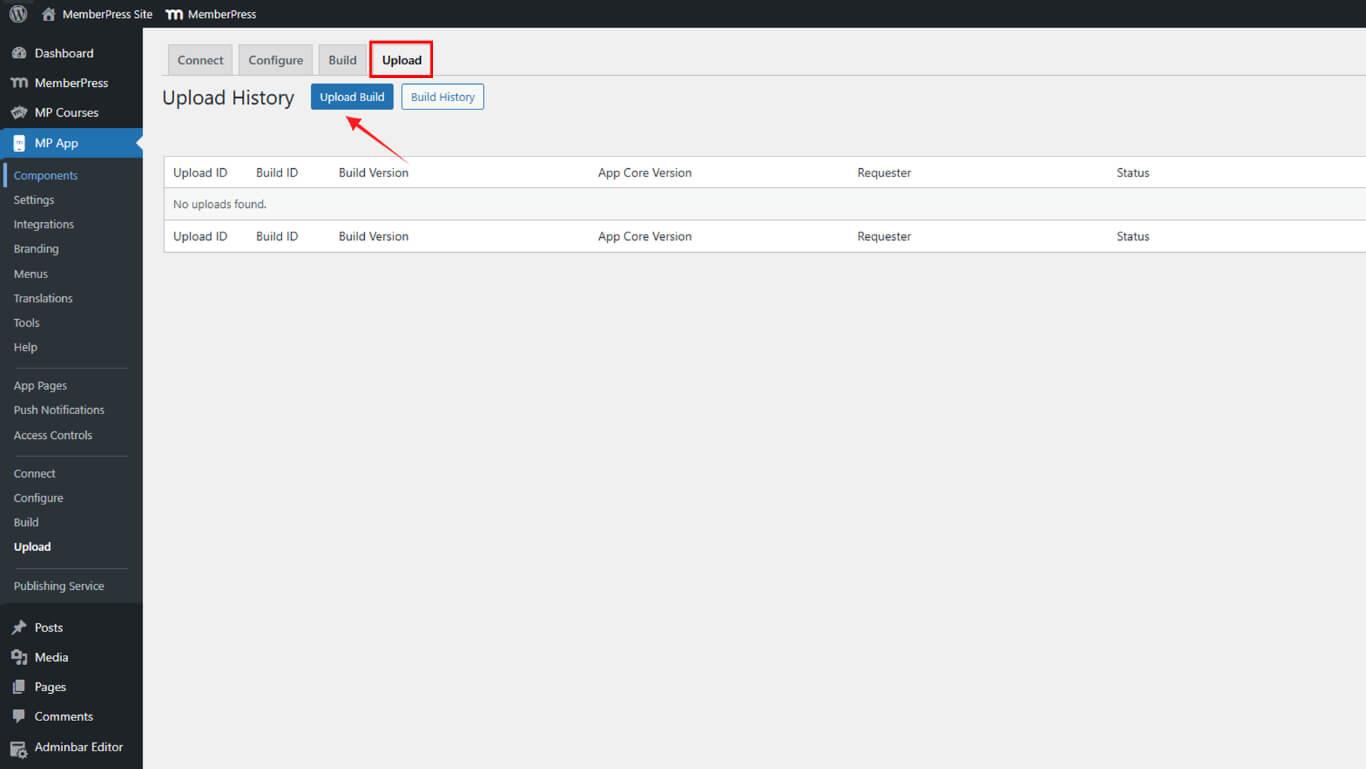
- Naviguez jusqu'à l'Apple App Store.
- Sélectionnez le Release Build généré dans la liste des Builds disponibles.
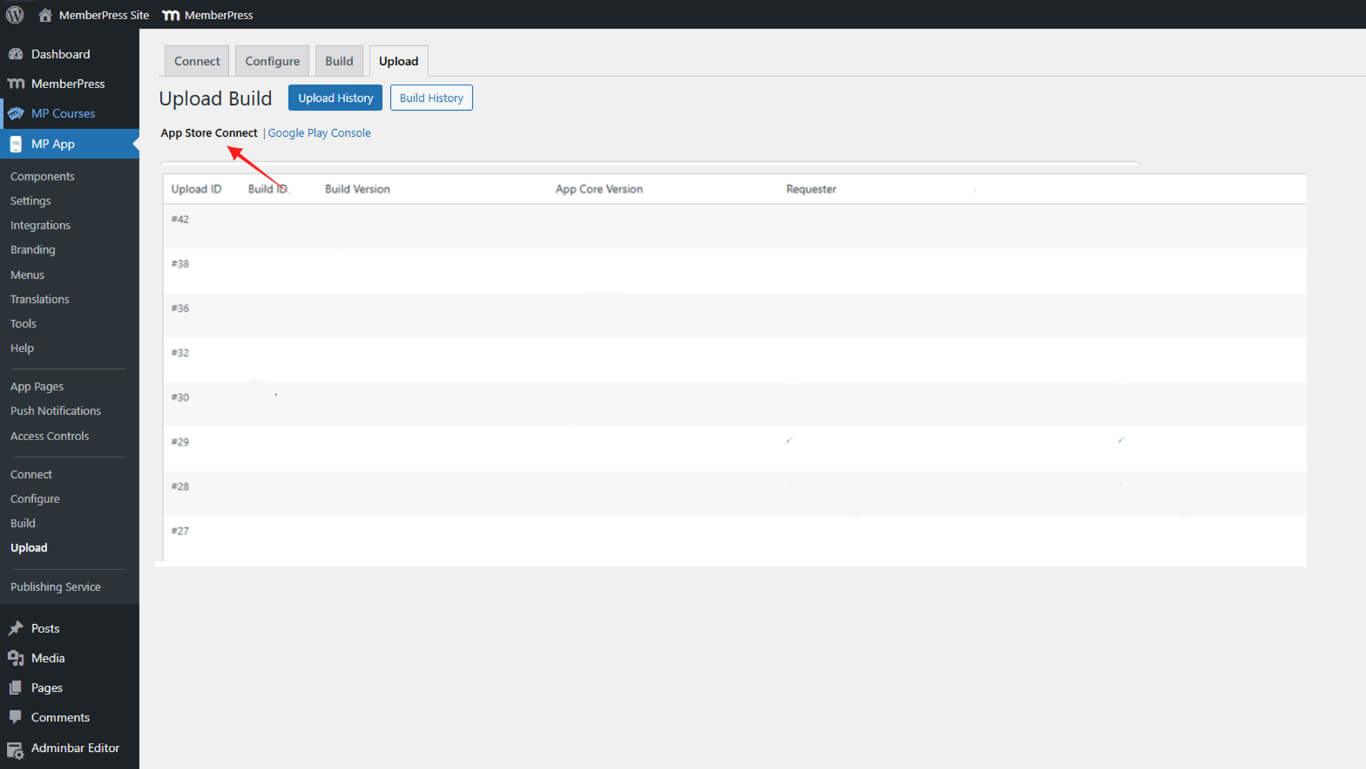
- Vérifiez que l'application existe dans le compte App Store Connect avant de poursuivre.
- Cliquez sur Télécharger la version pour lancer le processus de téléchargement.
- Attendez environ 15 minutes pour que le téléchargement soit terminé.
- Naviguez vers App Store Connect pour vérifier que la version apparaît dans TestFlight.
Ajouter des testeurs dans TestFlight
L'ajout d'un testeur TestFlight permet à des utilisateurs spécifiques d'accéder aux builds de Release App et de les tester.
- Connectez-vous à App Store Connect à l'adresse appstoreconnect.apple.com.
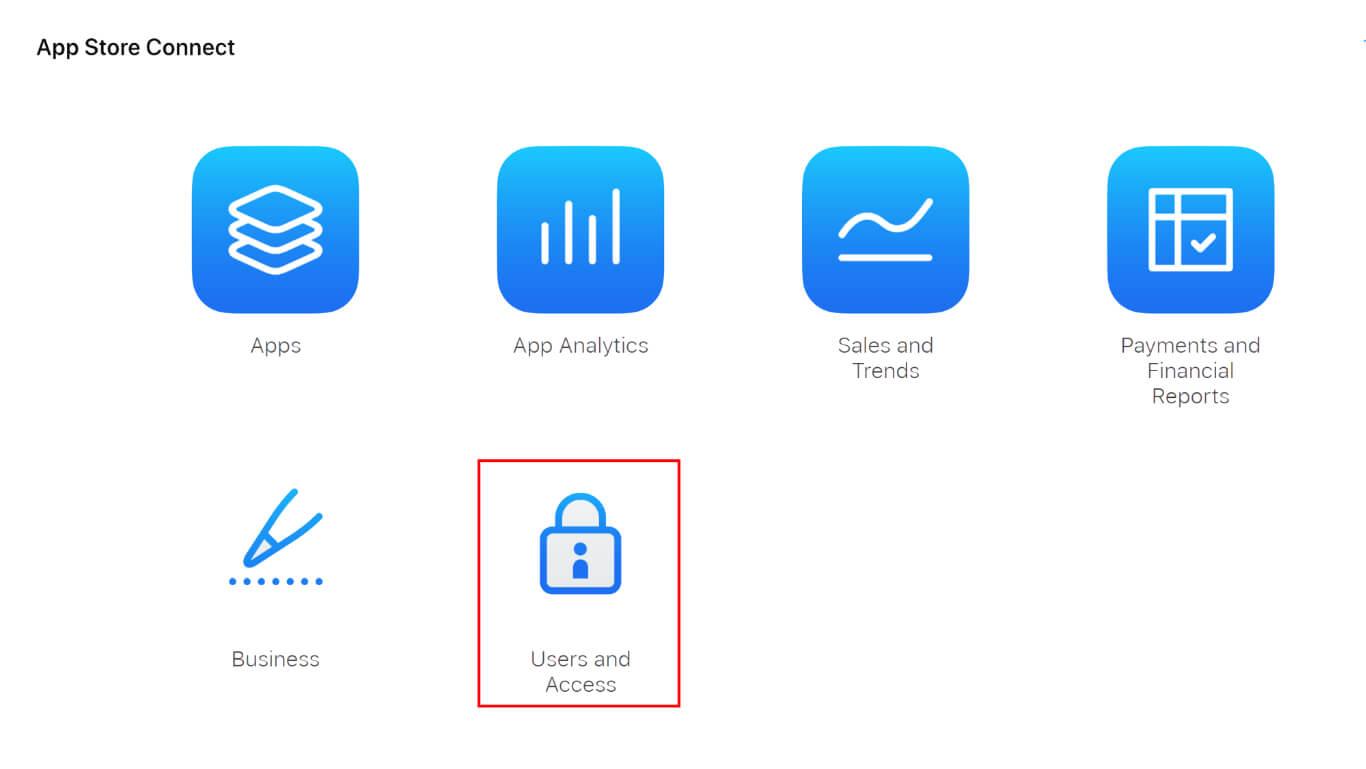
- Naviguez jusqu'à Utilisateurs et accès > Personnes dans la navigation.
- Cliquez sur le bouton + pour inviter de nouveaux testeurs.
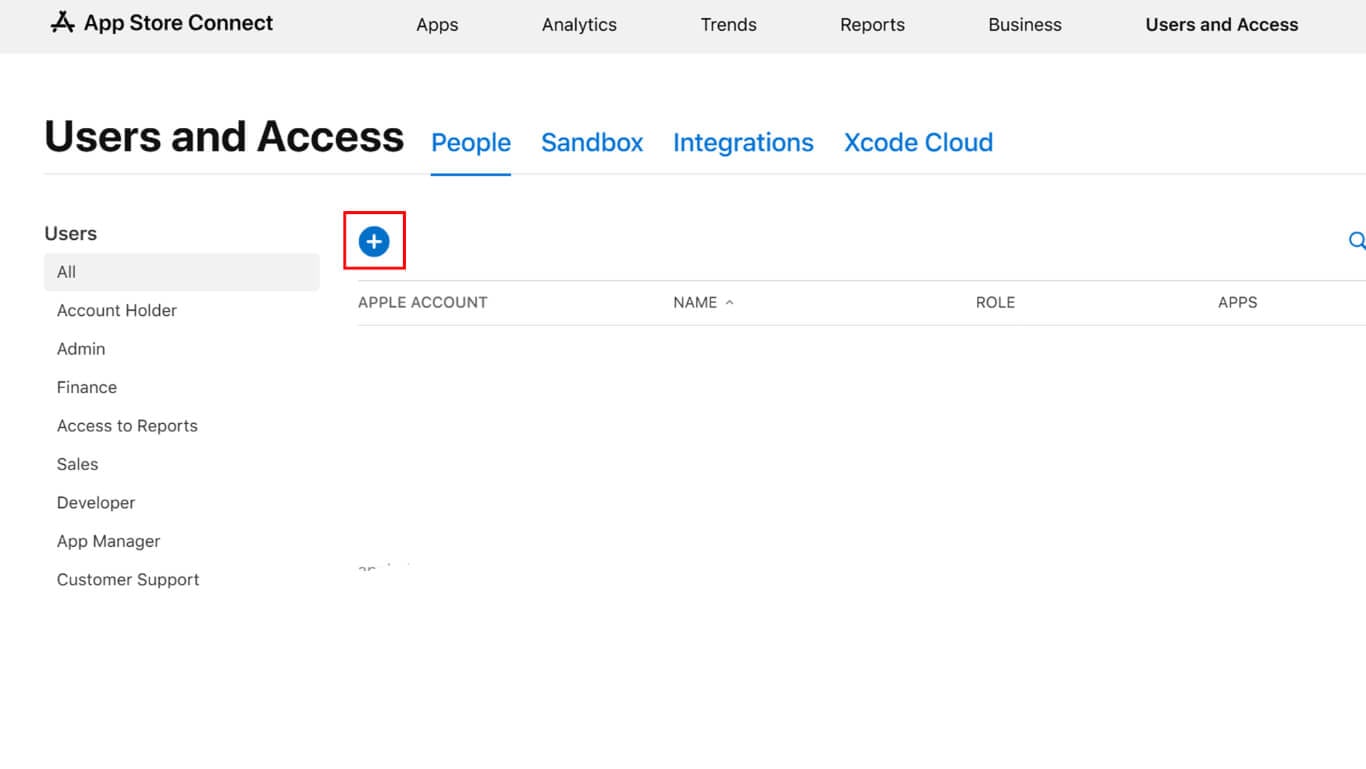
- Saisir le nom du testeur.
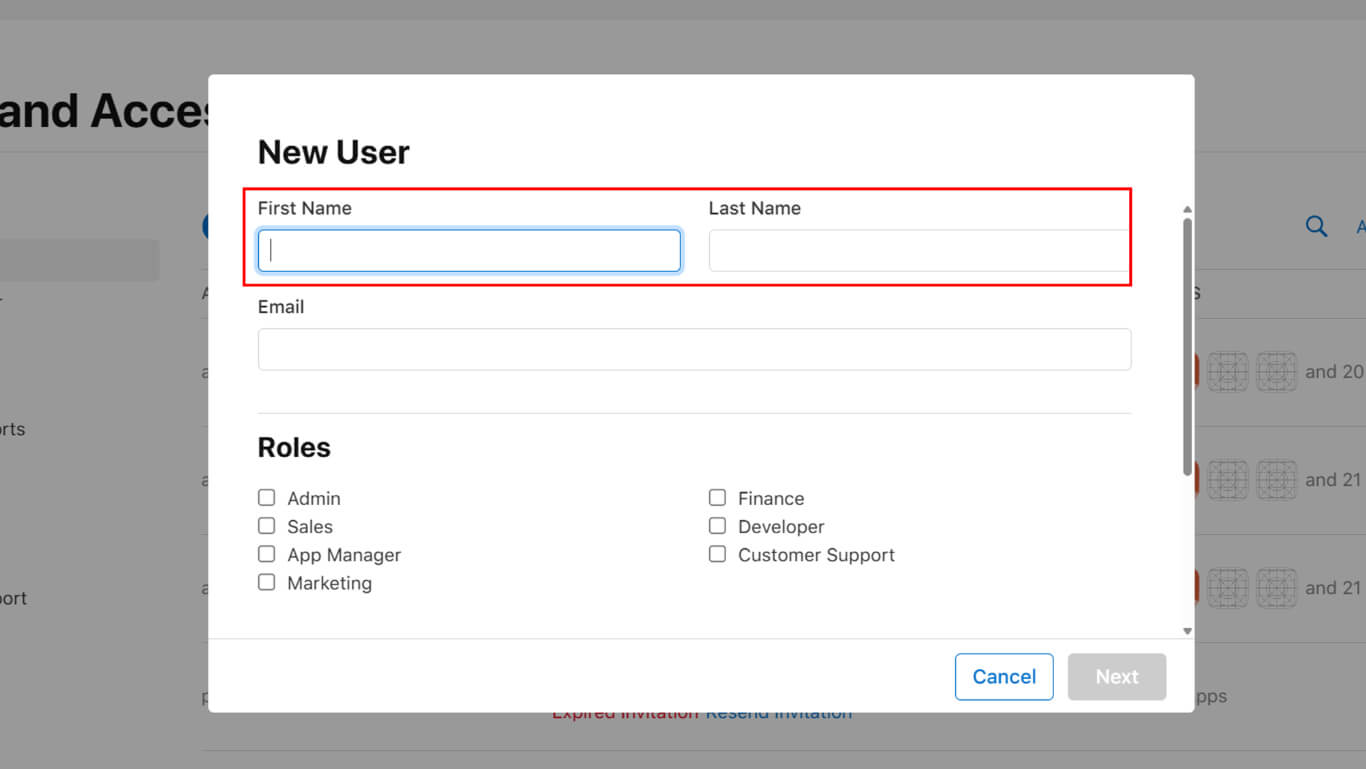
- Saisissez l'adresse électronique de l'Apple ID du testeur dans le champ e-mail.
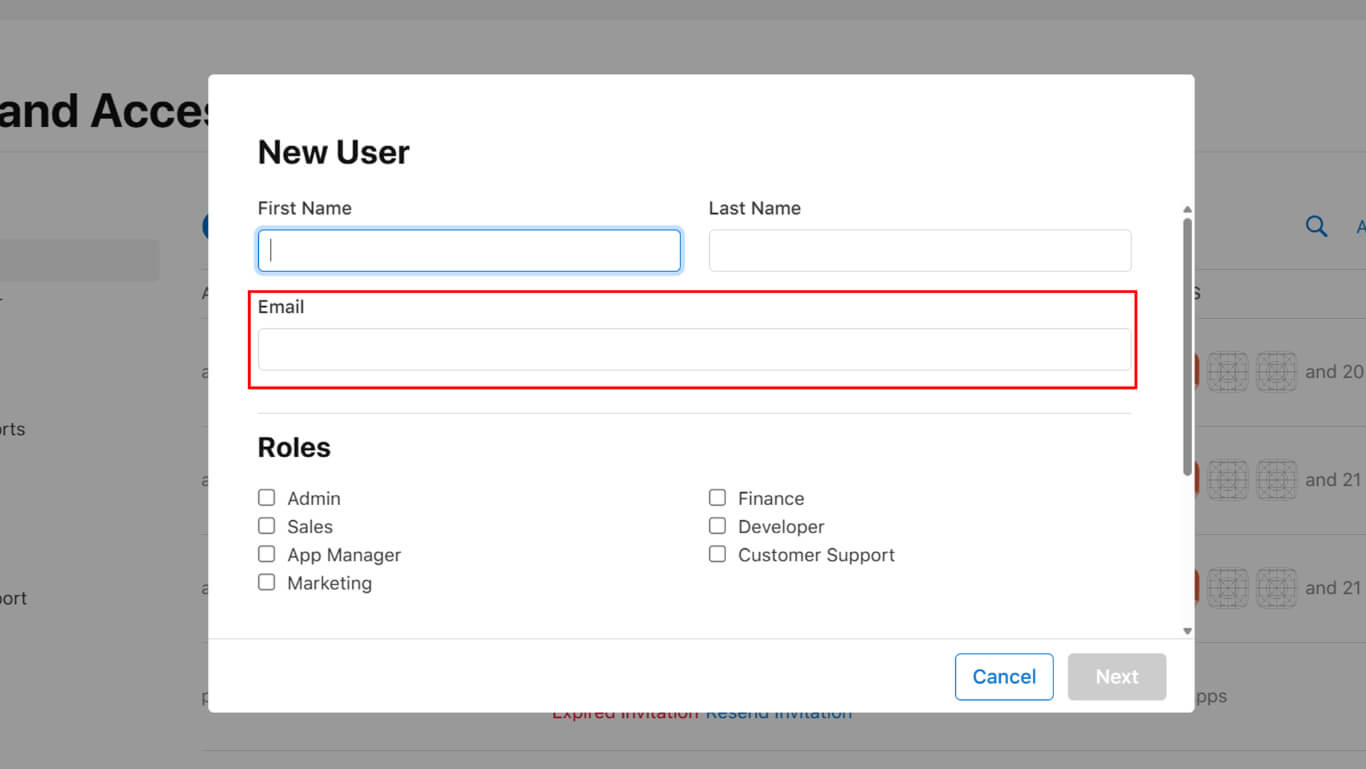
- Attribuez un rôle approprié parmi les options disponibles, par exemple Développeur.
- Sélectionnez l'application dans la liste d'accès aux applications.
- Cliquez sur Inviter envoyer l'invitation.
- Naviguez jusqu'à Mes applications et sélectionnez l'application.
- Cliquez sur TestFlight dans la barre latérale.
- Naviguez jusqu'à la page Tests internes section.
- Cliquez sur Testeurs pour gérer la liste des testeurs.
- Cliquez sur le bouton + pour ajouter les utilisateurs invités au groupe de test.
- Sélectionnez les testeurs dans la liste des personnes.
- Cliquez sur Ajouter pour confirmer les ajouts de testeurs.
Installation via TestFlight
L'installation de TestFlight permet aux testeurs d'accéder aux builds de Release App et de les utiliser.
- Les testeurs téléchargent l'application TestFlight sur l'App Store d'Apple.
- Les testeurs ouvrent l'application TestFlight sur leur appareil iOS.
- Les testeurs vérifient leur courrier électronique pour voir s'ils ont reçu une invitation d'App Store Connect.
- Les testeurs acceptent l'invitation par le biais d'un lien électronique ou de l'application TestFlight.
- Release App apparaît dans la liste des tests disponibles de l'application TestFlight.
- Robinet testeur Installer à côté du nom de l'application.
- Attendez la fin de l'installation sur l'appareil.
- Robinet testeur Ouvrir pour lancer l'application de validation.
Les Release Apps affichent les prix réels des achats in-app et le comportement de l'application de production correspondant à la fonctionnalité post-publication.
Téléchargement de nouvelles versions
Publication des mises à jour, déploiement des nouvelles versions auprès des testeurs TestFlight existants.
- Naviguez jusqu'à Tableau de bord > MP AppKit > Build dans WordPress.
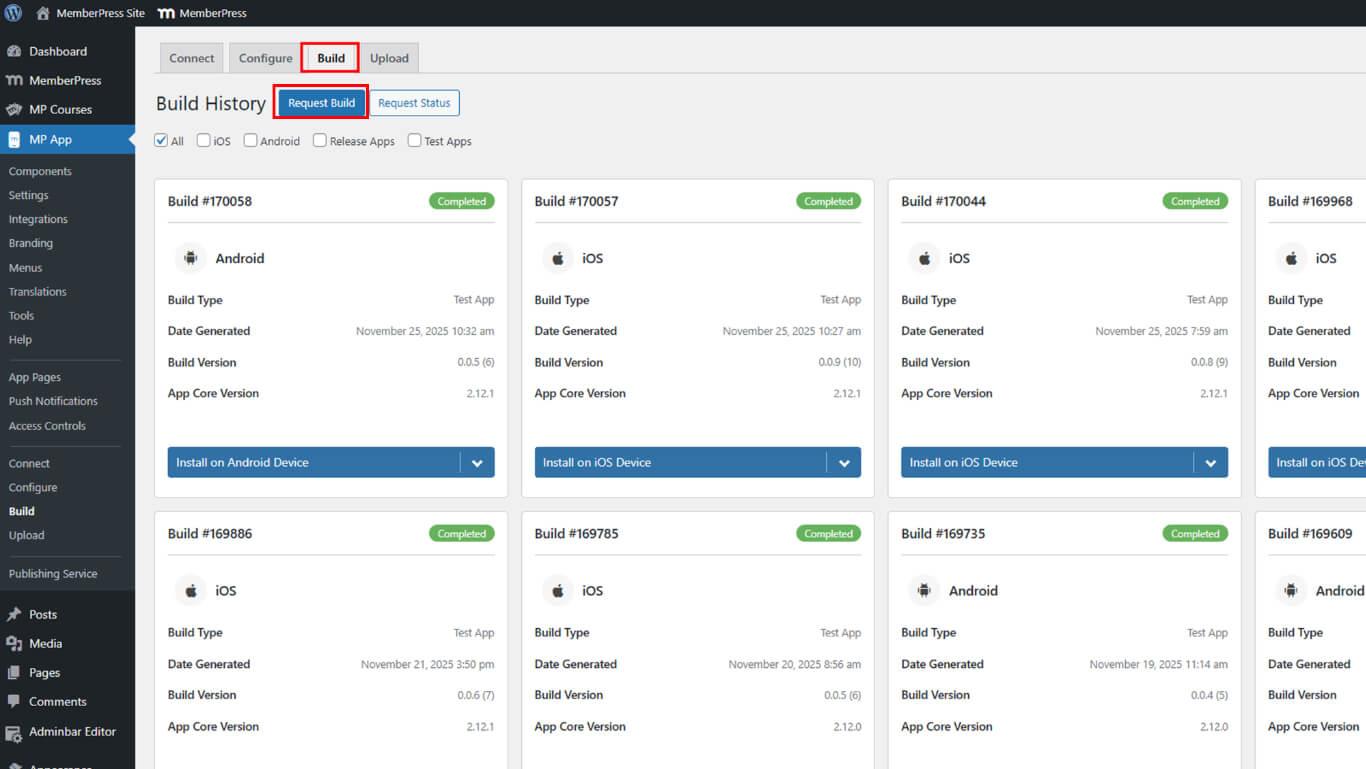
- Cliquez sur Demander une compilation pour créer une nouvelle version.
- Sélectionnez l'option iOS plateforme et Lancer l'application type de construction.
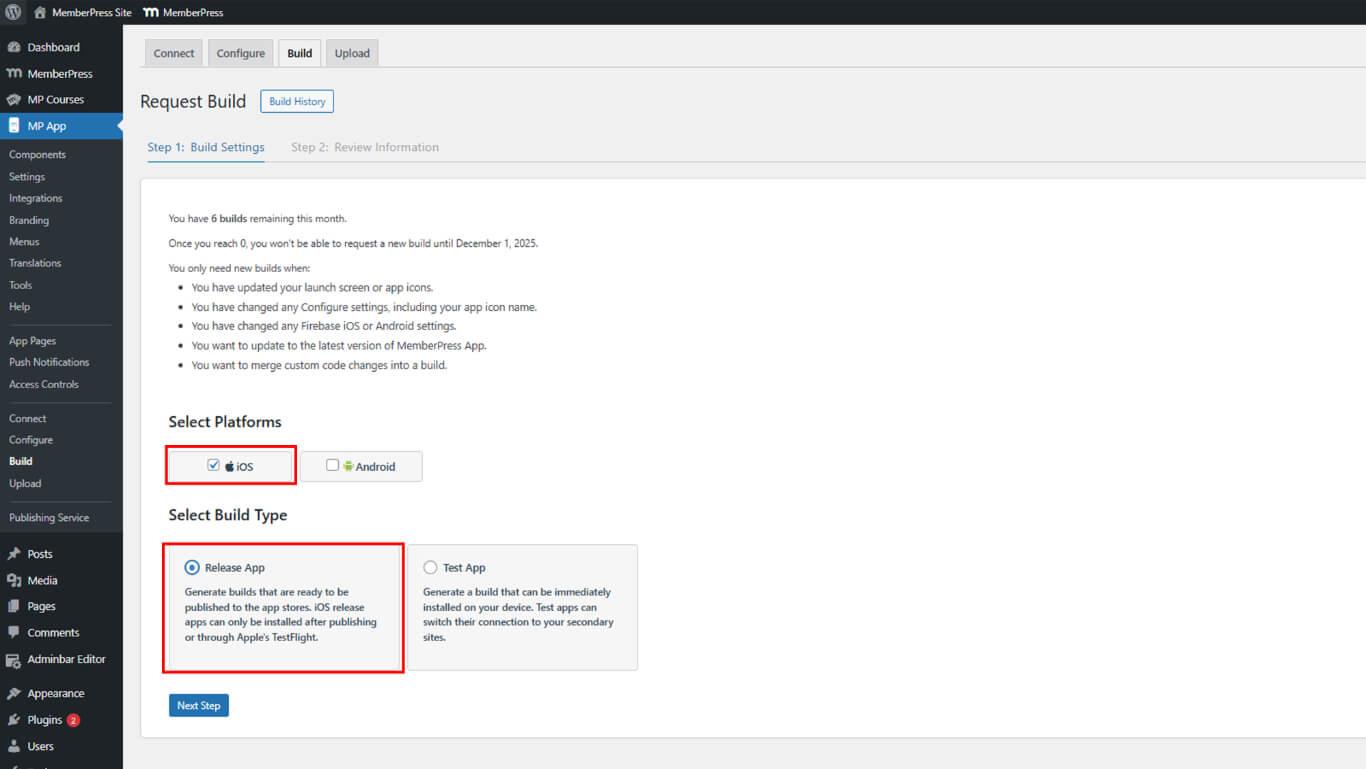
- Complétez la demande de construction et attendez qu'elle soit terminée.
- Téléchargez le nouveau fichier IPA à partir de Historique de construction.
- Naviguez jusqu'à Tableau de bord > MP AppKit > Télécharger > Apple App Store.
- Sélectionnez la nouvelle version (Release Build) dans la liste des versions (Builds).
- Cliquez sur Télécharger la version pour lancer le processus de téléchargement.
- Attendez la fin du traitement du téléchargement.
- Les testeurs reçoivent une notification de mise à jour dans l'application TestFlight.
- Robinet testeur Mise à jour dans TestFlight pour installer la nouvelle version.
TestFlight notifie automatiquement les testeurs lorsque de nouvelles versions sont disponibles pour les tests.
Comprendre la distribution de TestFlight
TestFlight fournit un environnement de bêta-test structuré pour les Release Apps iOS.
Tests internes permet une distribution rapide à un maximum de 100 testeurs de l'équipe de développement. Les testeurs internes bénéficient d'un accès immédiat sans délai de révision par Apple.
Tests externes distribue des versions préliminaires à un maximum de 10 000 bêta-testeurs externes. Les tests externes sont soumis à l'examen d'Apple avant d'être accessibles aux testeurs.
Mises à jour automatiques avertir les testeurs lorsque de nouvelles versions sont disponibles. TestFlight rationalise la distribution des mises à jour sans coordination manuelle des testeurs.
Rapport d'accident fournit des journaux de collisions détaillés et des données de diagnostic. Les analyses de TestFlight permettent d'identifier et de résoudre les problèmes de stabilité avant la diffusion publique.
Durée des tests permet des périodes de test de 90 jours par version. Les versions expirent au bout de 90 jours, ce qui nécessite le téléchargement d'une nouvelle version pour poursuivre les tests.










 FR
FR  EN
EN  ES
ES  DE
DE  PT
PT 