

A coleta de feedback dos usuários do aplicativo ajuda a identificar problemas, melhorar a experiência e oferecer melhor suporte à comunidade. O recurso Send Us Feedback no aplicativo MemberPress para iOS/Android permite que os usuários enviem comentários, anexos de mídia e detalhes do dispositivo diretamente para a sua caixa de entrada.
Este guia o orienta na ativação do recurso no AppKit do MemberPress e explica como os usuários podem enviar feedback no aplicativo móvel.
Entendendo o recurso Envie-nos comentários
Os requisitos do recurso Send Us Feedback definem as configurações para permitir a coleta e o envio de feedback enviado pelos membros aos administradores.
Capacitação para coleta de feedback ativa uma interface de envio de feedback no aplicativo, oferecendo aos membros um canal de comunicação direto. O recurso de feedback transforma os membros em colaboradores ativos, melhorando a qualidade do aplicativo.
Configuração de entrega de e-mails direciona o feedback enviado para o endereço do destinatário designado para análise e resposta. A configuração adequada do e-mail garante que o feedback chegue prontamente aos administradores responsáveis.
Suporte para anexos de mídia permite que os membros incluam imagens ou vídeos ilustrando problemas ou sugestões. O feedback visual fornece contexto, melhorando a compreensão e a resolução dos problemas.
Inclusão de informações sobre o dispositivo anexa automaticamente detalhes técnicos aos envios de feedback, auxiliando na solução de problemas. Os dados da plataforma, da versão e do dispositivo ajudam a diagnosticar com eficiência os problemas relatados.
Configuração personalizada do assunto permite a organização e a filtragem de e-mails de feedback na caixa de entrada do destinatário. A personalização de assuntos melhora o gerenciamento de feedback e os fluxos de trabalho de priorização.
Configuração das definições de feedback
A configuração das definições de feedback estabelece a entrega de e-mail e a ativação de recursos para os envios de feedback dos membros.
- No WordPress, vá para Painel de controle > MP AppKit > Configurações > Feedback.
- Verificar Envie-nos seu feedback para ativar o recurso.
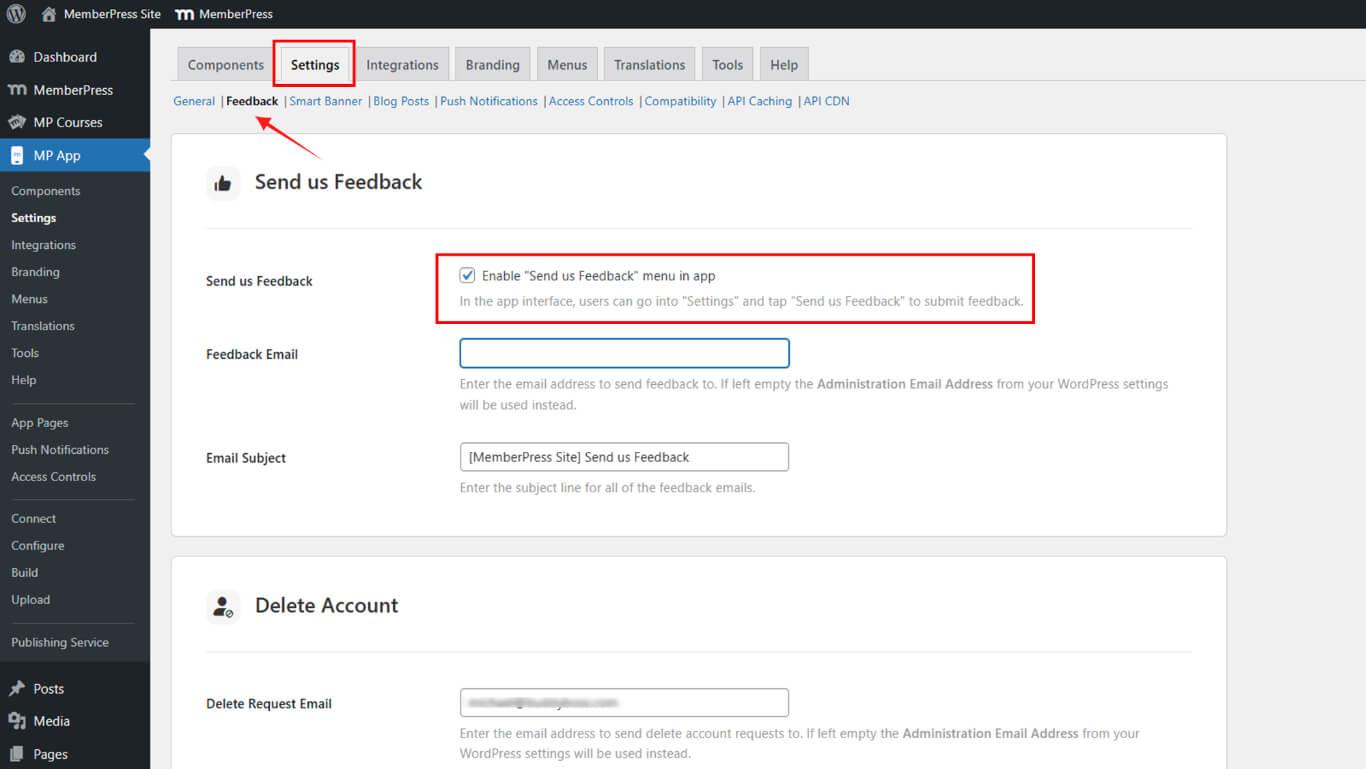
- No E-mail de feedback, Digite o endereço para o qual o feedback deve ser enviado.
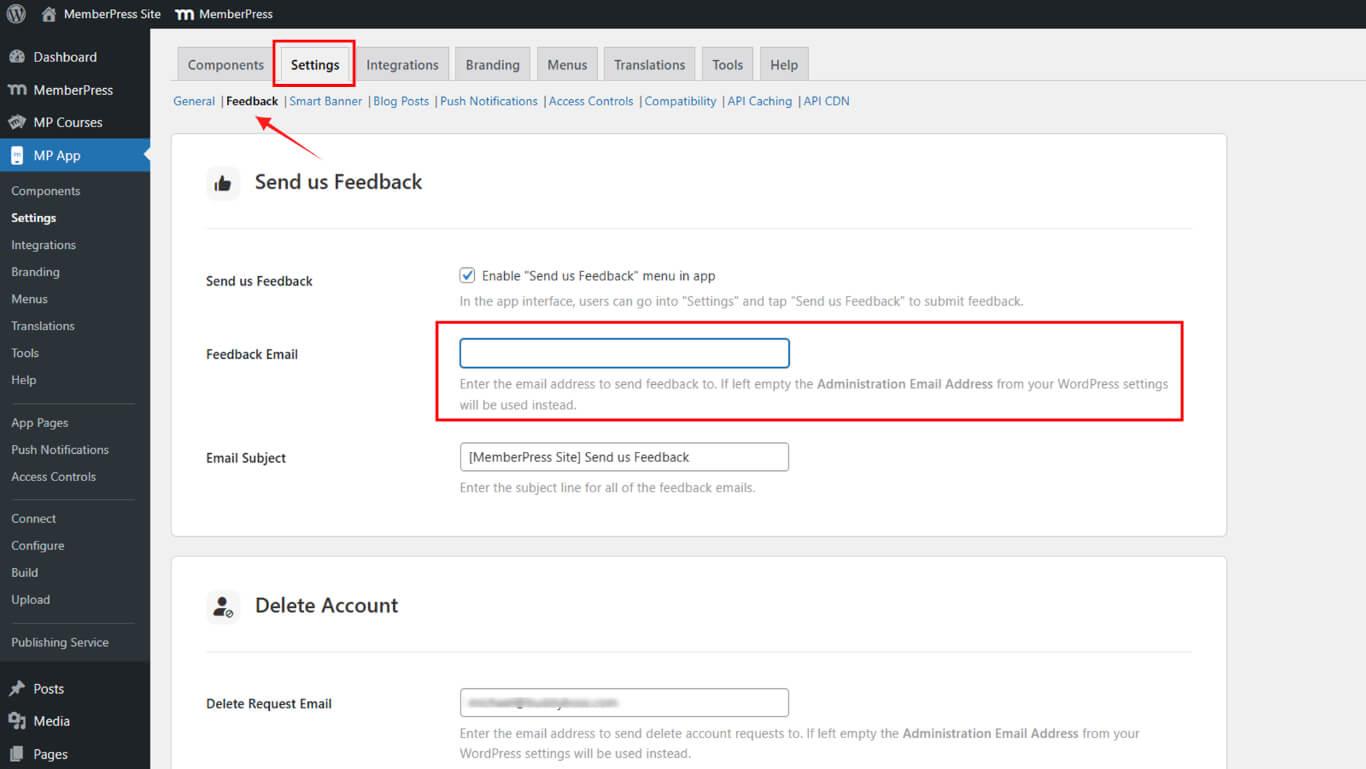
- Opcionalmente, adicione um Assunto do e-mail para mensagens de feedback recebidas.
- Clique em Salvar alterações.
Envio de comentários a partir do aplicativo móvel
O envio de feedback ocorre por meio das configurações do aplicativo móvel, proporcionando comunicação direta dos membros com os administradores.
- Abra o aplicativo MemberPress para iOS/Android em seu dispositivo móvel.
- Ir para Configurações no menu More (Mais).
- Toque Envie-nos seu feedback.
- Digite sua mensagem na caixa de comentários.
- Opcionalmente, toque em Carregar imagem ou vídeo para anexar mídia.
- Toque Enviar para enviar o feedback.
Os e-mails enviados deverão incluir:
- Mensagem de feedback
- ID Apple ou conta do Google do usuário
- Plataforma (iOS/Android)
- Versão do aplicativo e do sistema operacional
- Modelo do dispositivo
- Endereço de e-mail do usuário










 PT
PT  EN
EN  ES
ES  FR
FR  DE
DE 