

Seu aplicativo MemberPress (iOS/Android) espelha seu site público, de modo que os visitantes podem visualizar o conteúdo sem fazer login. A ativação do acesso privado ao aplicativo garante que somente usuários autenticados possam visualizar ou interagir com qualquer conteúdo. Essa configuração melhora a segurança, aumenta os registros e mantém sua comunidade restrita a membros aprovados.
Este guia o orienta na ativação do recurso de acesso a aplicativos privados do AppKit do MemberPress.
Entendendo o recurso de acesso a aplicativos privados
Os requisitos do recurso de acesso a aplicativos privados definem configurações para restringir a visibilidade do conteúdo e a interação apenas a membros autenticados.
Ativação da restrição de acesso impede que usuários não autenticados visualizem ou interajam com qualquer conteúdo do aplicativo. A restrição transforma o aplicativo público em um ambiente exclusivo para membros, melhorando a segurança do conteúdo.
Aprimoramento da segurança protege o conteúdo sensível contra acesso não autorizado por meio de uma exigência de autenticação. A segurança aprimorada garante que apenas membros aprovados tenham acesso aos recursos da comunidade.
Incentivo ao registro remove a opção de acesso de convidado, aumentando a motivação para a criação e autenticação da conta. A exigência de login converte visitantes casuais em membros registrados.
Proteção da comunidade mantém um ambiente exclusivo para membros aprovados, reduzindo spam e participação não autorizada. O acesso restrito preserva a integridade da comunidade e a qualidade da experiência dos membros.
Aplicação do login exibe a tela de autenticação imediatamente após o lançamento do aplicativo, impedindo a visualização prévia do conteúdo. A autenticação forçada garante a conformidade com as restrições de acesso desde a primeira interação.
Habilitando o acesso a aplicativos privados
A ativação do acesso privado ao aplicativo ativa os requisitos de autenticação para toda a visualização de conteúdo e interação dentro do aplicativo móvel.
- No seu painel do WordPress, vá para Painel de controle > MP AppKit > Configurar > Geral.
- Role até o Privacidade seção.
- Marque a caixa: Restringir o acesso ao aplicativo apenas aos membros conectados.
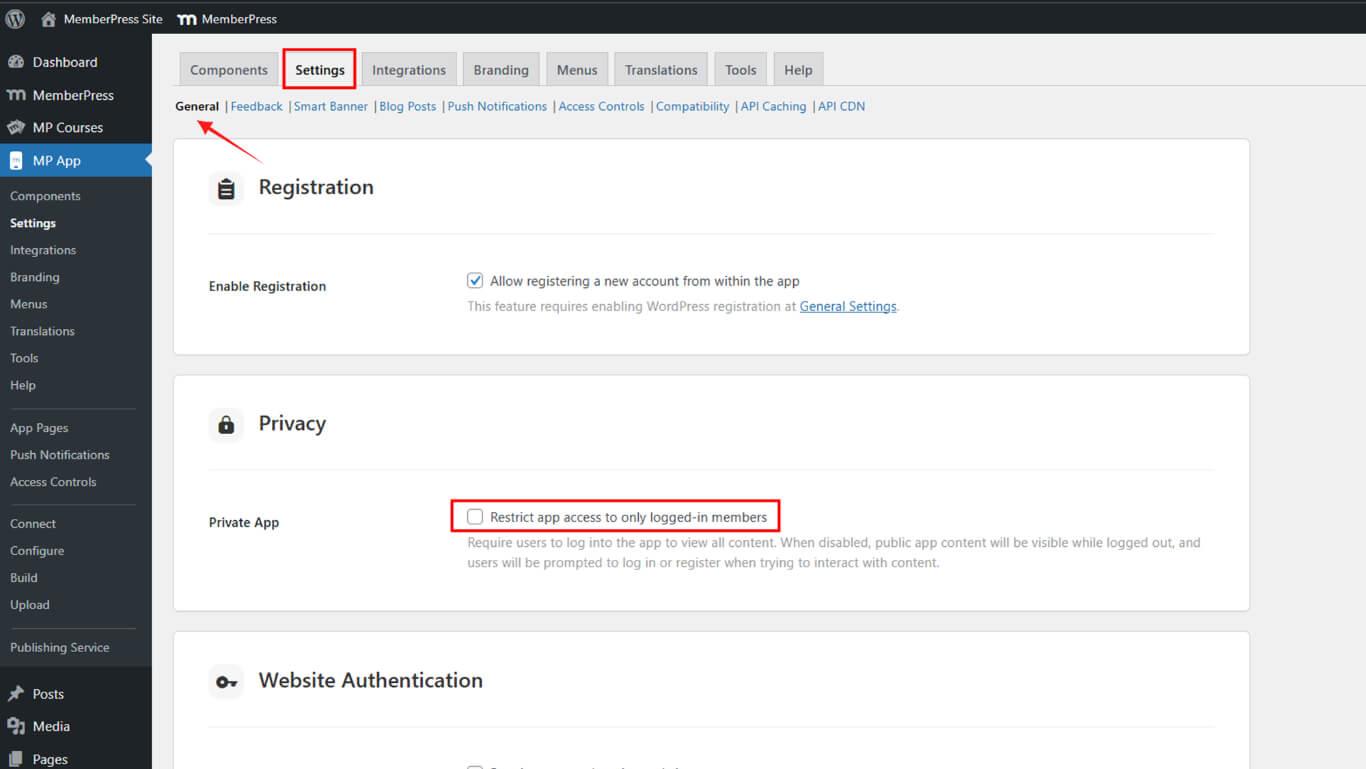
- Clique em Salvar alterações.
Verificando o comportamento de aplicativos privados
A verificação do comportamento do aplicativo privado confirma que o requisito de autenticação funciona corretamente, impedindo o acesso não autenticado ao conteúdo.
- Forçar o encerramento do aplicativo MemberPress para iOS/Android em seu dispositivo móvel.
- Reinicie o aplicativo para verificar se você está no Login tela.
- Verifique se o “Continuar sem fazer login” está oculta.
- Tente toque em qualquer conteúdo.
Você deverá fazer login antes de acessar qualquer conteúdo.










 PT
PT  EN
EN  ES
ES  FR
FR  DE
DE 