


Ne perdez plus l'engagement de votre site au profit des médias sociaux. Apprenez à ajouter facilement un forum à votre site WordPress en 4 étapes et augmentez la rétention des membres.
Je suis un fureteur avide de la section des commentaires. J'ai réalisé à quel point cette habitude était profonde l'autre jour en regardant les informations en direct à la télévision.
J'ai ressenti une véritable frustration à l'idée qu'il n'y ait pas encore de section de commentaires ou de fil de discussion Reddit dans lequel s'engouffrer.
Et je sais que je ne suis pas seul.
Les médias sociaux ont fait du “second screening” une habitude omniprésente. Quel que soit le contenu que nous consommons, nous avons un besoin inné de vérifier, de voir ce que les autres disent et de partager l'expérience en temps réel.
Qu'est-ce que cela signifie pour votre site WordPress ?
Si vous ne disposez pas d'un espace communautaire dédié, vous êtes probablement confronté à l'un des deux scénarios suivants :
- Vous manquez totalement d'engagement.
- Vous perdez la conversation au profit de sites de médias sociaux externes.
Les forums offrent à vos visiteurs un point d'ancrage pour créer une communauté autour de votre contenu.
Ils invitent les “rôdeurs” à adhérer à votre association pour qu'ils puissent enfin contribuer, ce qui renforce leur lien avec votre marque et leur permet de se sentir plus à l'aise dans votre entreprise. réduire considérablement le taux de désabonnement en leur donnant une raison de rester.
Pour cours en ligne et sites d'entraînement, Il favorise l'engagement des pairs, l'encouragement et le travail en réseau, autant d'éléments qui permettent à vos étudiants et à vos clients de rester fidèles à votre matériel.
Cela signifie que le taux d'achèvement des cours est plus élevé et que le taux de réussite des coachs est plus élevé.
Bonjour, MemberPress ClubCircles™
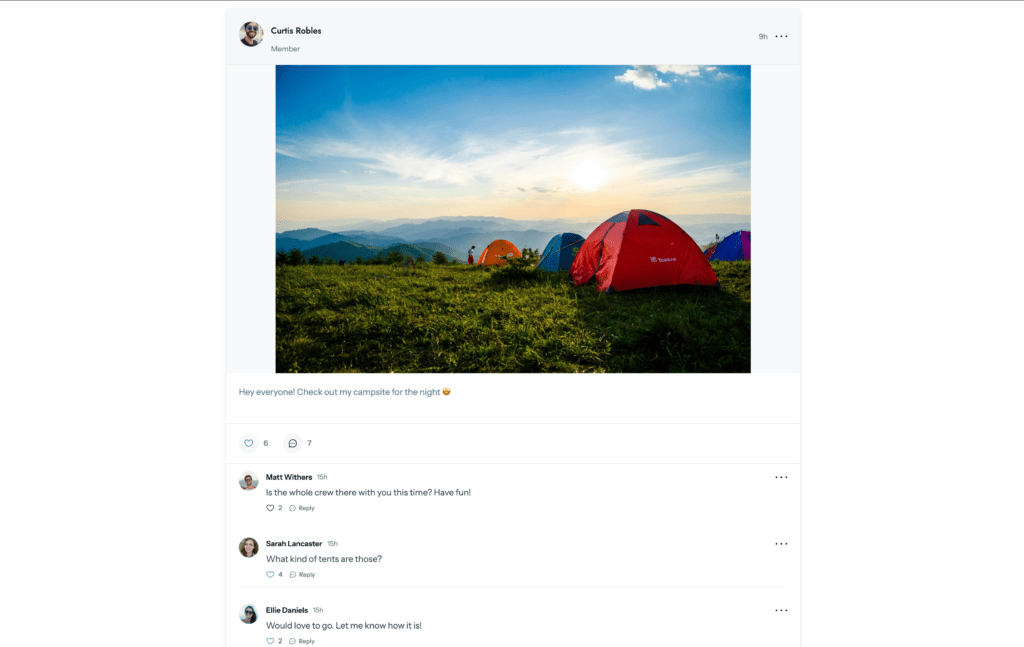
Lorsque Blair a annoncé l'arrivée des forums sur la plateforme, j'étais ravi pour nos utilisateurs.
ClubCircles™ est la solution de forum native de MemberPress. Puisque les communautés et les adhésions vont de pair, vous pouvez maintenant créer les deux au sein d'un seul plugin, en abandonnant enfin ces solutions “patchwork” encombrantes de tierces parties.
Je parie que c'est plus facile que vous ne le pensez à mettre en place, et je vais vous montrer exactement comment le faire !
Pourquoi utiliser MemberPress ClubCircles™ ?
Avant l'arrivée de ClubCircles™, nous recommandions l'utilisation de bbPress et de le relier à vos adhésions. Cela fonctionnait, mais on avait toujours l'impression d'une “solution de contournement”. Voici pourquoi ClubCircles™ est une amélioration totale :
1. Restrictions d'accès pour les autochtones
Avec les plugins tiers, vous devez souvent jouer les intermédiaires, en associant manuellement des forums spécifiques à vos règles d'adhésion. Un mauvais réglage et votre forum privé “VIP” peut accidentellement devenir public.
Parce que ClubCircles™ est natif, Il “parle” automatiquement au moteur MemberPress. Il reconnaît exactement qui sont vos membres et ce qu'ils ont payé.
Que vous souhaitiez ouvrir un forum à tout le monde ou le cloisonner à un groupe de personnes spécifiques, vous pouvez le faire en toute sécurité. adhésion de haut niveau, En outre, tout est géré en un seul endroit, sans qu'aucun patchwork ne soit nécessaire.
2. Créez autant de cercles que nécessaire
L'une des choses que je préfère dans ClubCircles™, c'est qu'il ne vous enferme pas. Vous pouvez créer des forums de discussion illimités (que nous appelons “cercles”).
Vous voulez un “Inner Circle” caché, réservé à vos meilleurs clients ? C'est également possible. Vous n'aurez jamais à vous soucier d'atteindre un plafond ou de payer un supplément lorsque votre communauté s'agrandira.
Vous avez besoin d'un cercle “Watercooler” général pour tout le monde ? C'est facile.
Vous voulez 10 “groupes d'étude” différents pour 10 cours en ligne différents ? C'est ce que vous pouvez faire.
3. Communautés connectées – Forums et profils
ClubCircles™ fait partie de ClubSuite™, qui est en fait une “communauté en boîte” pour votre site :
- ClubDirectory™ crée les “Pages Jaunes” de votre communauté (profils et listes de membres).
- ClubCircles™ crée le “Town Square” (les forums de discussion proprement dits).
Comme ils font partie de la même suite, ils fonctionnent en parfaite harmonie.
Lorsqu'un membre rejoint un cercle, son profil est déjà présent. Les autres membres peuvent simplement cliquer sur un profil pour voir avec qui ils parlent et se connecter.
Auparavant, la mise en place de ce type de réseau professionnel nécessitait trois ou quatre plugins distincts qui s'entrechoquaient souvent ; aujourd'hui, il s'agit d'une expérience tout-en-un.
4. Une monétisation sans faille
La monétisation est notre mission #1 chez MemberPress. Nous voulons rendre aussi facile que possible la transformation de l'engagement en revenu. Grâce à ClubCircles™, la vente incitative semble faire partie intégrante de l'expérience utilisateur.
Par exemple, vous pouvez configurer votre communauté de manière à ce qu'un “rôdeur” puisse voir les titres alléchants des forums, mais qu'il doive cliquer sur un bouton “Adhérer” pour participer réellement.
Il s'agit d'un outil de conversion massif qui transforme la curiosité en ventes, et il est bien moins compliqué que d'essayer de mettre en place un contenu “accrocheur” avec des outils de forum externes.
5. Moins d'entretien et moins d“” angoisse liée aux mises à jour »
À chaque mise à jour de WordPress, vous deviez croiser les doigts pour que votre thème, votre plugin d'adhésion et votre plugin de forum restent compatibles.
En passant à une solution native MemberPress, vous réduisez de moitié la liste des “choses qui risquent de casser”. Vous obtenez un aspect unifié et professionnel qui reste stable à chaque mise à jour.
4 étapes pour ajouter un forum à votre site WordPress
Et maintenant, la raison pour laquelle nous sommes tous ici. Comment ajouter un forum à votre site WordPress ?
1. Obtenir MemberPress
Choisissez un plan qui offre ClubCircles™ - notre plan “Croissance” le plus populaire, par exemple.
Pendant que vous y êtes, regardez toutes les autres possibilités de monétisation que vous offre MemberPress ! Vous pourriez décider, par exemple, de migrer votre LMS ou le programme de coaching sur MemberPress et consolidez encore plus vos plugins.
Dans ce cas suivre les étapes pour activer votre licence et mettre en place votre première adhésion.
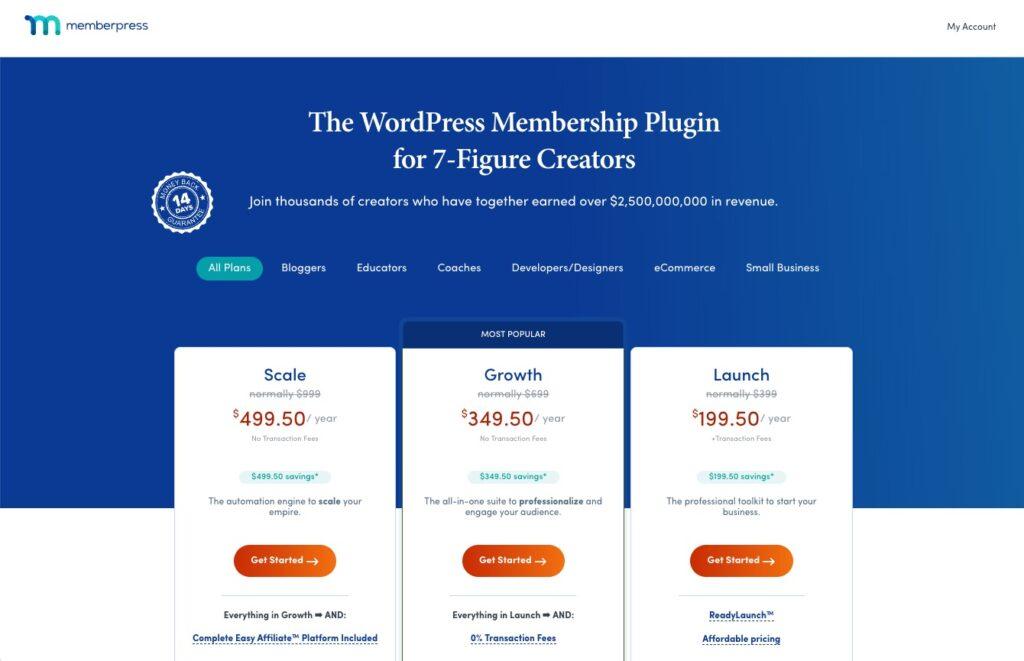
2. Activer les modules complémentaires de ClubSuite™
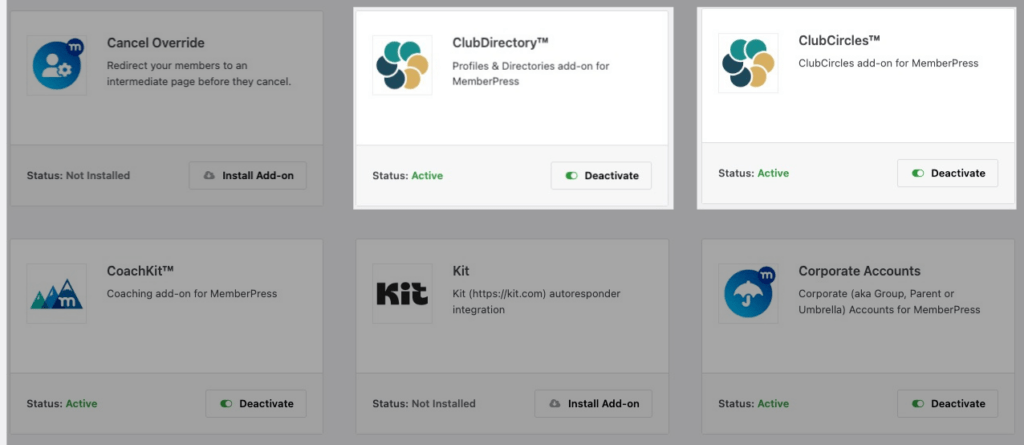
Une fois que vous avez téléchargé et configuré MemberPress, allez sur MemberPress > Modules complémentaires et rechercher ClubDirectory™ et ClubCircles™ et appuyer sur le bouton pour les activer.
Remarque : ClubDirectory™ est ce qui alimente les profils et les annuaires, dont vous aurez besoin pour que les membres puissent publier sur les Cercles.
Une fois qu'il est actif, un nouveau menu “ClubSuite™” apparaît dans votre tableau de bord WordPress.
3. Créer le premier cercle
Depuis votre tableau de bord WordPress, rendez-vous sur MemberPress > ClubSuite™ > Cercles > et cliquez sur Ajouter un nouveau. Donnez un titre au forum - quelque chose comme “VIP Mastermind” ou “General Discussion” - et ajoutez une brève description.
Vous pouvez également ajouter une image vedette et une vignette pour votre cercle dans la barre latérale des paramètres.
Et avec MemberPress Style de page ReadyLaunch™, Votre page “Circles” (le nom d'un groupe communautaire dans MemberPress) sera automatiquement stylisée avec le logo et les couleurs de votre marque.
4. Publier
Frapper Publier, et l'espace de discussion est en ligne !
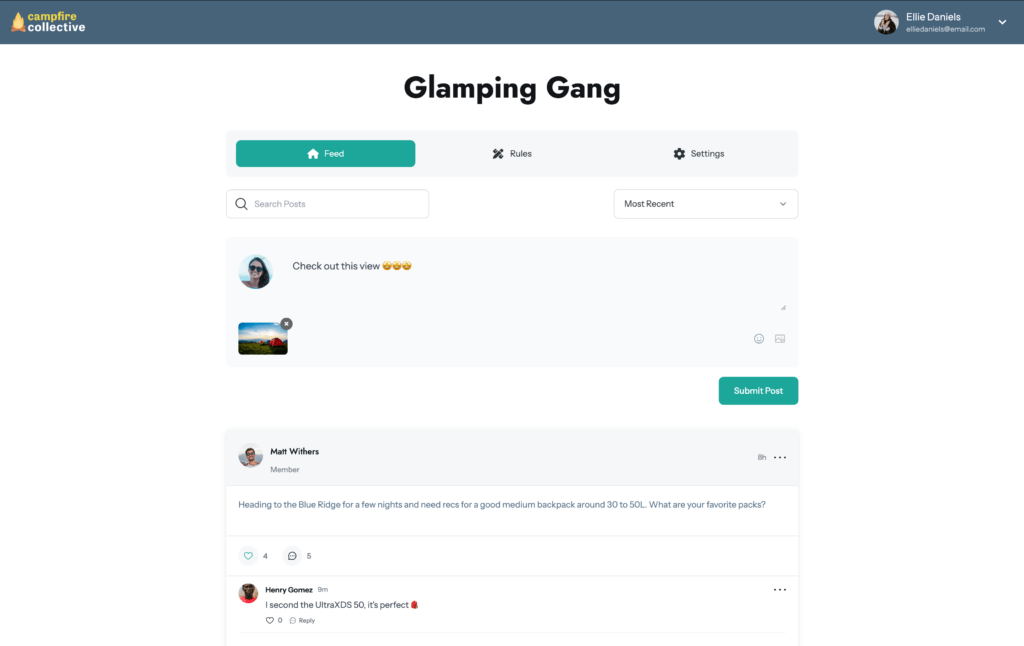
Et c'est tout !
Comment restreindre l'accès à vos forums
L'intérêt d'utiliser MemberPress pour vos forums est qu'il est très facile de restreindre l'accès et de définir des autorisations précises pour les membres et les non-membres.
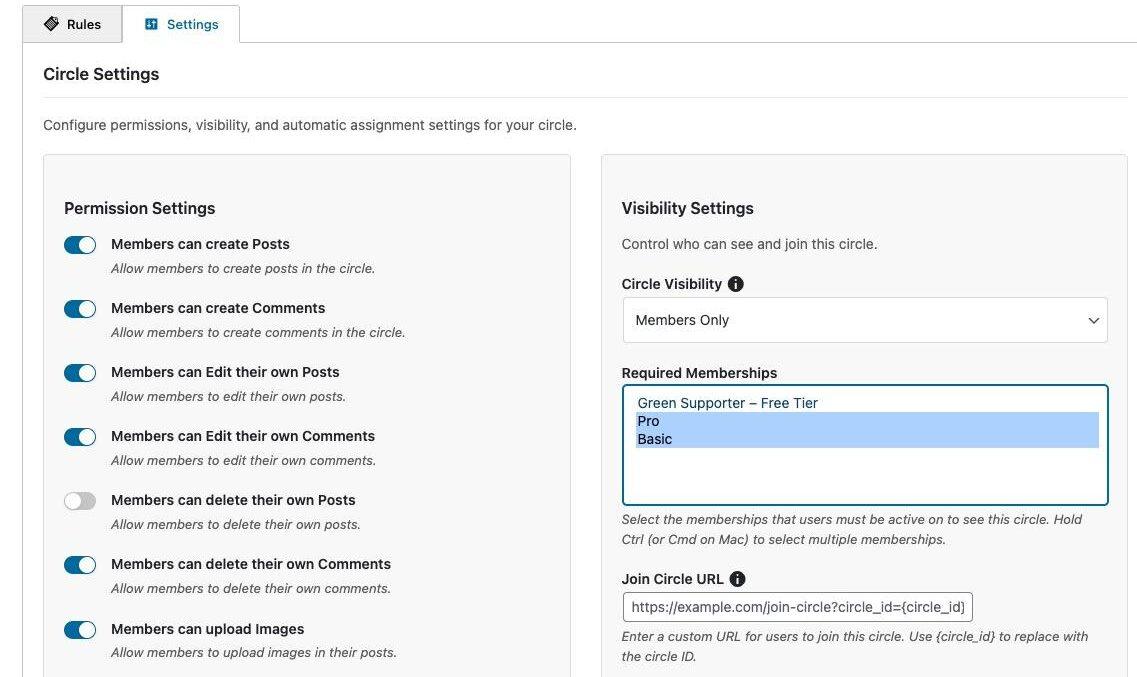
Lorsque vous créez ou modifiez votre cercle, faites défiler vers le bas jusqu'à la rubrique Configuration du cercle et cliquez sur le bouton Paramètres tabulation.
Vous y verrez Paramètres des autorisations où vous pouvez configurer des éléments tels que la possibilité pour un membre de modifier ou de partager des liens dans ses messages ou ses commentaires.
Mais vous verrez aussi Paramètres de visibilité qui vous permet de verrouiller votre contenu afin que seuls les membres (ou certains membres) puissent interagir dans votre forum.
Pour restreindre l'accès à votre forum, sélectionnez “Membres seulement” dans le menu déroulant, puis sélectionnez le(s) membre(s) dont vous souhaitez restreindre l'accès.
Conseils pour la gestion des discussions au sein de la communauté
Il est essentiel que votre communauté soit exempte de trolls pour créer un espace que les gens voudront visiter encore et encore.
Voici comment ClubSuite™ est configuré pour vous aider à gérer les discussions et à faire en sorte que vos cercles restent un espace de connexion authentique :
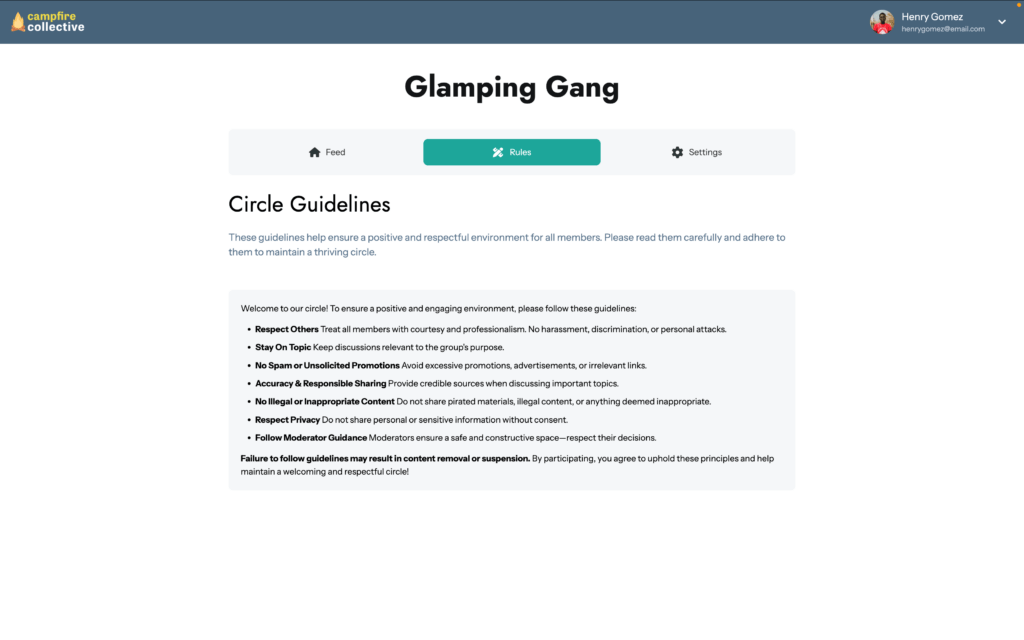
- Fixer des règles communautaires : Rédigez vos propres lignes directrices et définissez ce que les membres peuvent publier dans chaque cercle.
- Paramètres du modérateur : Contrôler si les modérateurs peuvent bannir et débanquer des membres, et supprimer des commentaires ou des messages dans la rubrique Paramètres des autorisations lorsque vous modifiez un cercle.
- Tableau de bord du modérateur: Obtenez une vue d'ensemble des contenus signalés dans tous les cercles à partir de votre tableau de bord WordPress. ClubSuite™> Modération
Regarder la vidéo du tutoriel ClubCircles™
Si vous souhaitez une présentation plus approfondie de la mise en place et de la configuration d'un forum avec ClubCircles™, je vous recommande de regarder notre tutoriel vidéo complet.
Vous aurez ainsi une idée de la facilité avec laquelle il est possible de le mettre en place, et vous aurez un aperçu de ce à quoi ressemblent les cercles une fois qu'ils sont en place :
Réflexions finales
L'objectif du ClubCircles™ est de mettre fin au “Tetris branché” auquel nous jouons tous depuis des années.
Ce patchwork d'outils que vous devez continuellement mettre à jour et résoudre pour que les intégrations fonctionnent comme vous le souhaitez appartient désormais au passé.
En ajoutant une communauté à votre site WordPress, vous vous ouvrez à bien plus de possibilités. engagement, et de créer quelque chose d'encore plus précieux pour vos membres.
Je parle des conversations, des moments “aha !” dans les groupes d'étude, et même des discussions aléatoires au bord de l'eau qui transforment un client ponctuel en un membre à long terme qui ne songerait jamais à cliquer sur “se désabonner”.”
Avec ClubCircles™, vos forums sont intégrés à l'expérience des membres. Vous pouvez ajouter, modifier et ajuster vos cercles en toute simplicité, ce qui vous donne la liberté d'expérimenter au fur et à mesure que votre communauté grandit ou que votre vision de l'entreprise évolue.
Cessez donc d'envoyer votre engagement dans les médias sociaux. Ouvrez un cercle, invitez vos membres à y participer et voyez enfin ce qu'ils ont à dire.
Prêt à donner à vos “rôdeurs” un espace de discussion ? Grab MemberPress et commencer avec ClubCircles™ aujourd'hui”
Si vous avez trouvé cet article utile, suivez-nous sur Facebook, X, Instagramet LinkedIn!
Comme toujours, n'hésitez pas à me faire part de vos questions dans les commentaires !











 FR
FR  EN
EN  ES
ES  DE
DE  PT
PT 
Bonjour Victoria,
Excellent article et félicitations à l'équipe pour le lancement de ClubCircles™. L'intégration native avec MemberPress est un grand pas en avant, en particulier pour les créateurs de cours qui veulent garder leur communauté à l'intérieur de leur propre écosystème au lieu de s'appuyer sur des plateformes externes.
Je dirige une entreprise de formation en ligne, et l'engagement de la communauté est en effet un facteur clé pour les taux d'achèvement et la rétention à long terme. ClubCircles™ semble très prometteur pour créer des groupes d'étude structurés et un soutien par les pairs.
Une fonction qui le rendrait encore plus puissant, d'un point de vue pratique, serait les notifications push mobiles en temps réel - similaires à WhatsApp ou à une application de messagerie communautaire.
Aujourd'hui, l'une des principales raisons pour lesquelles les apprenants restent actifs sur WhatsApp ou des outils similaires est l'expérience des notifications instantanées :
Alertes de nouveaux messages sur le téléphone
Réactions et participation rapides
Le sentiment d'une “énergie de groupe vivante”
Si ClubCircles™ pouvait envoyer des notifications push mobiles instantanées (ou prendre en charge une expérience de type PWA/app) lorsqu'il y a un nouveau message ou une nouvelle réponse, cela pourrait augmenter considérablement l'engagement et réduire le besoin d'outils externes.
En d'autres termes, la pièce manquante pour de nombreux créateurs de cours est la suivante :
Structure du forum + immédiateté au niveau de WhatsApp.
Cette combinaison ferait de ClubCircles™ un véritable pôle central pour les communautés d'apprentissage.
L'équipe envisage-t-elle d'inclure dans sa feuille de route une notification mobile en temps réel ou une expérience de type application ?
Merci encore pour votre excellent travail - cette fonctionnalité a un énorme potentiel pour les entreprises d'éducation en ligne.
Le meilleur,
Terik
Merci beaucoup d'avoir partagé cette information, Terik ! J'ai transmis vos commentaires à l'équipe afin qu'ils puissent voir comment cela pourrait soutenir des communautés d'apprentissage comme la vôtre. Nous sommes ravis que vous construisiez votre entreprise de formation sur MemberPress et ClubCircles™.
C'est un ajout que nous attendions depuis longtemps. S'il vous plaît, s'il vous plaît, aidez-nous aussi à obtenir un plugin/mise à jour des forums pour envoyer des récapitulatifs hebdomadaires/quotidiens comme Circle le fait pour les membres. J'adore Memberpress !
Merci pour l'amour ! Et oui, celui-ci figurait sur de nombreuses listes de souhaits. Nous sommes vraiment heureux que ClubCircles soit le genre de moment “enfin !” que vous attendiez.