

Fundação de IA MemberPress adiciona uma camada de integração de IA aos sites do MemberPress. O plug-in disponibiliza as funcionalidades do MemberPress por meio do Protocolo de Contexto de Modelo (MCP). Clientes de IA, como o Claude Desktop e o Cursor, passam então a gerenciar associações, membros, transações e conteúdo por meio da linguagem natural.
Este guia aborda o que o AI Foundation oferece, qual é o seu lugar na suíte MemberPress AI, os pré-requisitos, as etapas de instalação e uma breve visão geral do Assistente de Configuração do MCP.
Nota terminológica: O plug-in é o “AI Foundation”, e não o “MCP”. O MCP é uma das quatro funcionalidades oferecidas pelo plug-in. A documentação se refere ao plug-in como “AI Foundation” e ao protocolo como “MCP”. Os futuros plug-ins do MemberPress AI Suite compartilharão a infraestrutura do AI Foundation sem necessariamente expor o MCP por conta própria.
O que a AI Foundation oferece
A AI Foundation oferece quatro funcionalidades visíveis ao cliente, além de uma camada de infraestrutura de suporte.
Visão geral dos componentes
| Componente | O que ele faz | Terminal ou localização |
|---|---|---|
| Servidor MCP | Exibe o catálogo de ferramentas do MCP por meio do JSON-RPC 2.0 — 41 ferramentas principais, além de outras disponíveis como complementos | /wp-json/mp-mcp/v1/mcp |
| Endpoint público do MCP | Exibe quatro ferramentas de catálogo somente para leitura sem autenticação | /wp-json/mp-mcp/v1/public-mcp |
| Sistema de créditos de IA | Geração com tecnologia Mastermind (não MCP) | Barra de administração do WordPress + widget do painel de controle |
| Camada de segurança do agente | Quatro medidas que regem as operações destrutivas | Integrado ao servidor MCP |
| Sistema de autenticação | OAuth 2.1 PKCE, tokens Bearer, senhas de aplicativo | /wp-json/mp-mcp/v1/authorize + /token |
| Camada de serviço PHP compartilhada | Serviços básicos para desenvolvedores de plug-ins | mpai() global + MemberPressAI\Fundação fachada |
| Integração da API de habilidades | As ferramentas também são disponibilizadas por meio do adaptador MCP do WordPress.org | Funciona apenas no WordPress 6.9 ou versões posteriores |
| Interface do usuário de administração | Configuração, clientes, ajustes, créditos | MemberPress > Configurações de IA |
Servidor MCP
O servidor MCP disponibiliza seu catálogo de ferramentas por meio do JSON-RPC 2.0 em /wp-json/mp-mcp/v1/mcp:
- 41 ferramentas essenciais — membros, associações, assinaturas, transações, regras, cupons, relatórios, conteúdo, webhooks, lembretes, importações, informações do sistema, análise de dados por IA;
- 13 ferramentas condicionais complementares — registrar quando o complemento correspondente estiver ativo: Cursos (8), Contas Corporativas (3), Downloads (2);
- 4 ferramentas públicas somente para leitura — abordado no endpoint público separado abaixo.
O catálogo autenticado, portanto, varia de acordo com o site: 41 ferramentas em uma instalação apenas com o núcleo, até 54 com todos os complementos compatíveis ativados. Um número menor em um determinado site reflete a quantidade de complementos, e não uma instalação com falhas.
Cada ferramenta declara um escopo obrigatório e uma capacidade obrigatória do WordPress. O servidor verifica ambos antes de executar a operação. As ferramentas de gravação são configuradas por padrão para visualização. Gravações destrutivas exigem um token de confirmação. Consulte o Referência das Ferramentas MCP para ver o inventário completo.
Endpoint público do MCP
O endpoint público em /wp-json/mp-mcp/v1/public-mcp exibe até 4 ferramentas somente para leitura sem autenticação: lista_de_associações_da_memberpress e memberpress_get_membership em todas as instalações, além de lista_de_cursos_para_membros e memberpress_get_course enquanto o MemberPress Courses estiver ativo.
Comportamento principal:
- Desativado por padrão. Os administradores do site podem ativar essa função na página “Configurações de IA”;
- Devoluções
404quando desativado. O/.well-known/mcp.jsono documento de descoberta também permanece oculto; - Exibe apenas as associações e os cursos publicados que o administrador optar por disponibilizar. Nunca expõe dados dos membros;
- A opção de exclusão por produto está disponível em cada tela de edição de assinatura e curso.
Caso de uso: clientes em potencial perguntam a um cliente de IA sobre os planos de assinatura disponíveis sem precisar fornecer dados de identificação.
Sistema de créditos de IA
Medidor de créditos de IA: geração de IA com tecnologia Mastermind. O Course Copilot consome créditos ao gerar conteúdo do curso.
As chamadas à ferramenta MCP não consomem créditos. Todas as ferramentas em ambos os terminais do MCP funcionam gratuitamente, independentemente do saldo de crédito.
O painel de créditos aparece em dois lugares:
- Um indicador de saldo na barra de administração do WordPress;
- Um widget no painel principal do WordPress.
As compras utilizam o mesmo processo de finalização de compra baseado na plataforma Stripe que o Course Copilot.
Camada de Segurança do Agente
Quatro medidas impedem que operações destrutivas sejam executadas sem controle.
| Medida | Nome | O que ele faz |
|---|---|---|
| A | Tokens de confirmação | As ferramentas de gravação destrutiva exigem um fluxo de duas chamadas: a primeira chamada retorna uma pré-visualização e um token de uso único; a segunda chamada deve incluir o token |
| B | Configurações padrão do teste simulado | As ferramentas de escrita exibem a visualização por padrão. O cliente de IA opta por executar por meio de executar: true (não destrutivo) ou o fluxo de token de confirmação (destrutivo) |
| C | Escopos granulares | Os tokens de conexão possuem escopos específicos (ler, escrever:membros, escrever:faturamento, escrever:importações, escrever:webhooks, escrever:conteúdo, escrever:cursos) em vez de acesso irrestrito |
| D | Interruptor de emergência | Os administradores suspendem todas as gravações destrutivas a partir da página de administração “Clientes Conectados”. As chamadas destrutivas suspensas retornam WRITES_PAUSED |
Ferramentas destrutivas que exigem a Medida A: excluir_membro, transação_de_reembolso, excluir_webhook, reiniciar_o_progresso_do_curso, gerenciar_subconta, gerenciar_assinatura.
Veja o Referência sobre medidas de segurança para agentes para uma cobertura completa de cada medida.
Infraestrutura de apoio
| Superfície | Objetivo |
|---|---|
| Autenticação | OAuth 2.1 PKCE (S256) como método principal; tokens Bearer por meio do assistente; senhas de aplicativo como alternativa |
| Camada de serviço | mpai() global e MemberPressAI\Fundação interface para desenvolvedores de plug-ins |
| Integração da API de habilidades | Funciona no WordPress 6.9 ou superior; as ferramentas também estão disponíveis por meio do adaptador MCP do WordPress.org |
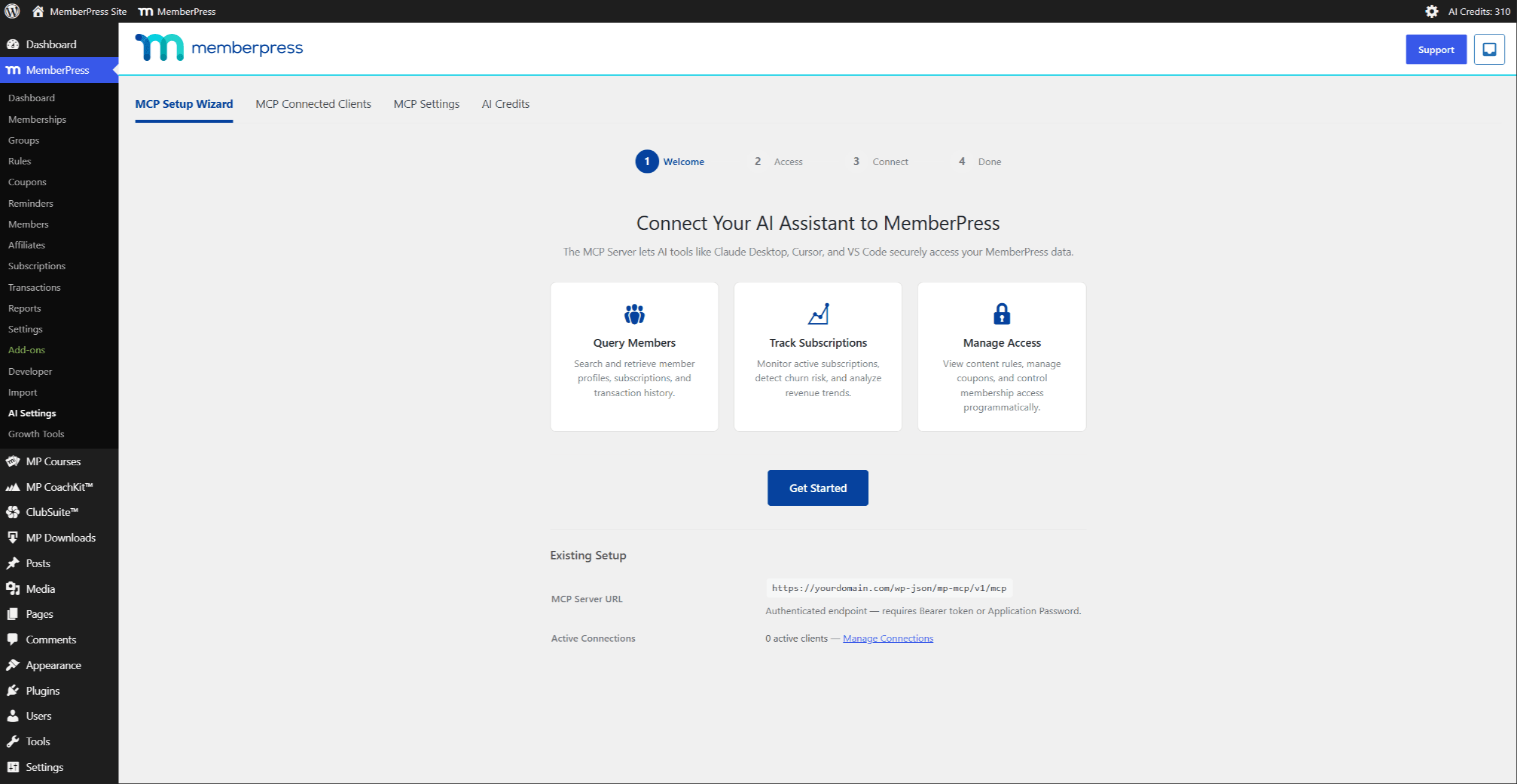
| Interface do usuário de administração | Quatro abas em MemberPress > Configurações de IA: Assistente de configuração do MCP, Clientes conectados ao MCP, Configurações do MCP, Créditos de IA |
Configurações do MCP
O Configurações do MCP A guia contém os controles de configuração do servidor:
| Configuração | Padrão | Objetivo |
|---|---|---|
| Teto de acesso | Somente leitura | Limita o escopo que qualquer nova conexão pode receber. Os escopos de gravação só estão disponíveis quando a configuração está definida como “Acesso total”. O assistente de configuração oculta as opções de gravação enquanto a configuração estiver definida como “Somente leitura”. Consulte o Referência sobre medidas de segurança para agentes |
| Vencimento do token | Nunca | Vigência dos tokens de conexão emitidos. A opção “Nunca” emite tokens sem prazo de validade |
| Retenção de registros | 30 dias | Por quanto tempo o registro de atividades do MCP mantém as entradas |
| Funções de acesso do MCP | Administrador | Quais funções de usuário do WordPress podem conectar clientes de IA por meio do MCP? A função de Administrador está sempre habilitada; as demais funções são opcionais. É possível definir configurações específicas por usuário com o plugin Members |
| Limitação de taxa | Ativado, 120 solicitações por minuto | Limita o número de solicitações MCP por token por minuto no endpoint autenticado. O limite é configurável, e a limitação de taxa pode ser totalmente desativada |
| Ativar o endpoint do catálogo público de IA | Desligado | Exibe o catálogo público não autenticado (consulte Endpoint público do MCP (acima) |
O limite de acesso é o mecanismo de controle mais importante: é ele que determina se uma conexão pode, de fato, gravar dados. Alterá-lo não afeta as conexões existentes — o escopo de uma conexão é definido no momento de sua criação; portanto, para aumentar o limite e permitir gravações, é necessário estabelecer uma nova conexão.
O Pacote de IA MemberPress
O AI Foundation é o primeiro plug-in do MemberPress AI Suite — uma família planejada de complementos baseados em IA que abrange todo o ciclo de vida do conteúdo MemberPress.
| Plug-in | Status |
|---|---|
| Gerador de Cursos de IA MemberPress (Course Copilot) | Lançamento previsto para o primeiro trimestre de 2026 — utiliza o AI Foundation |
| Fundação de IA MemberPress | Enviado em julho de 2026 (esta documentação) |
| Co-Pilot V2 | Escopo definido, desenvolvimento pós-lançamento |
| Inteligência de Conteúdo | Análise do arremesso |
| Mentor de IA | Análise do arremesso |
| Reutilização de conteúdo | Fase de concepção |
Os futuros produtos da AI Suite utilizarão o AI Foundation desde o início. Para os administradores do site, a instalação posterior de plug-ins adicionais da AI Suite requer:
- Sem conexões duplicadas;
- Não são permitidas compras duplicadas a crédito;
- Não há configuração duplicada do cliente de IA.
Pré-requisitos
| Requisito | Mínimo | Notas |
|---|---|---|
| WordPress | 6.5 | A integração da API de habilidades requer a versão 6.9 ou superior. Em versões anteriores, o servidor MCP continua funcionando plenamente, sem o registro de habilidades |
| PHP | 8.0 | Atende ao requisito básico do PHP MemberPress |
| Núcleo MemberPress | Instalação ativa | A AI Foundation depende do MemberPress para o modelo de dados |
| HTTPS | Necessário para a produção | O OAuth 2.1 exige HTTPS. No desenvolvimento local, é possível usar HTTP apenas para fins de teste |
| Links permanentes | Nome da postagem ou mais detalhes | Os endpoints do MCP utilizam a API REST do WordPress, que exige permalinks não padrão |
Os complementos opcionais disponibilizam ferramentas adicionais quando ativados:
| Complemento | Ferramentas adicionadas |
|---|---|
| Cursos do MemberPress | 8 ferramentas: get_course, lista_de_cursos, get_lesson, list_aulas, get_student_progress, lista_de_alunos_do_curso, lição_completa, reiniciar_o_progresso_do_curso |
| MemberPress Contas corporativas | 3 ferramentas: obter_conta_corporativa, list_sub_accounts, gerenciar_subconta |
| Downloads do MemberPress | 2 ferramentas: lista_de_downloads, get_download_stats |
O registro de ferramentas da AI Foundation utiliza um class_exists() verifique cada complemento. Quando um complemento está inativo, as ferramentas desse complemento não aparecem no ferramentas/lista resposta.
Instalação
A AI Foundation é instalada por meio do fluxo de trabalho padrão de complementos MemberPress: abrir MemberPress > Complementos, localize o Fundação de IA cartão e clique em Instalar o complemento. Para um site que não consiga acessar os servidores de download, faça o upload do arquivo ZIP do plug-in a partir do portal da conta MemberPress por meio de Plug-ins > Adicionar novo > Fazer upload de plug-in.
O slug do plugin é memberpress-ai-foundation. O arquivo principal do plugin é memberpress-ai-foundation/memberpress-ai-foundation.php.
Após a ativação, MemberPress > Configurações de IA aparece na barra lateral de administração com Assistente de configuração do MCP como sua primeira guia. Para confirmar se o endpoint está ativo, faça uma solicitação ao servidor MCP em https://[site-url]/wp-json/mp-mcp/v1/mcp sem autenticação; um endpoint ativo retorna um 401 Resposta não autorizada. Se a ativação falhar, consulte Erros do MCP e resolução de problemas para as etapas do diagnóstico.
Para obter o guia completo para o usuário final com capturas de tela — instalação, nível de acesso e conexão com o Claude Desktop — consulte Configurando o Claude Desktop com o MemberPress.
Assistente de configuração do MCP (breve visão geral)
O Assistente de Configuração do MCP em MemberPress > Configurações de IA > Assistente de configuração do MCP orienta cada conexão por quatro etapas. O nível de acesso é definido separadamente em Configurações do MCP e determina quais escopos o assistente oferece.
| Etapa | Objetivo | Ações-chave |
|---|---|---|
| 1. Bem-vindo | Mostrar detalhes da configuração atual | Clique em Começar a usar |
| 2. Acesso | Refletir o nível de acesso definido nas Configurações do MCP | A leitura é sempre permitida; os escopos de gravação só aparecem quando o nível de acesso é Acesso total; Clique Continuar |
| 3. Conectar | Copie a URL do servidor e conecte o cliente | Copie a URL do servidor MCP; conclua a conexão no cliente (o Claude Desktop usa o painel “Conectores”); aprove a autorização OAuth |
| 4. Concluído | Confirme a conexão | Verifique o resumo da conexão; Clique em Feito |
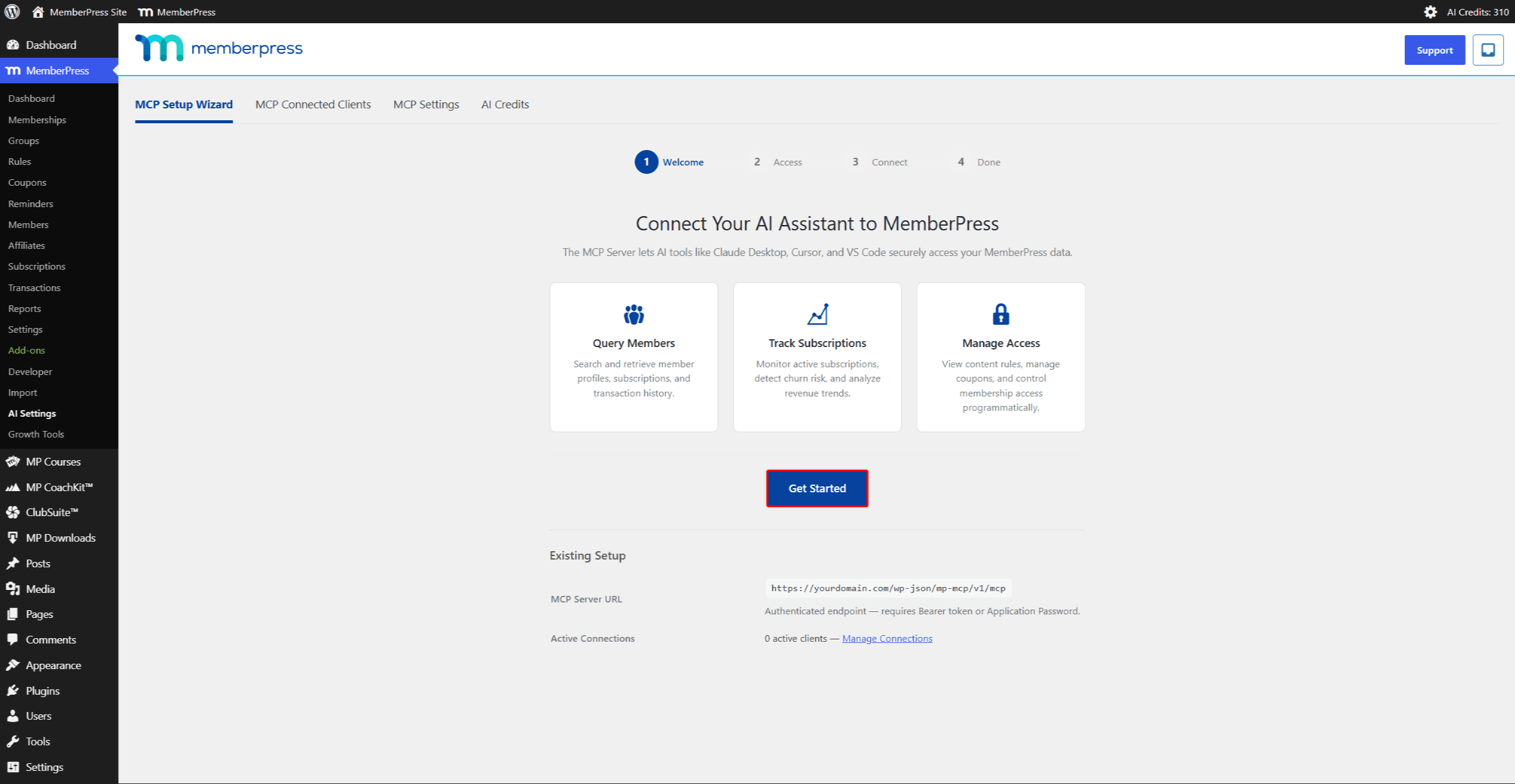
Para obter instruções passo a passo com capturas de tela, consulte Configurando o Claude Desktop com o MemberPress. Os desenvolvedores que estiverem configurando o Cursor, o VS Code, o Windsurf ou o Claude Code devem seguir as Conectando clientes de IA ao MemberPress consulte a documentação para desenvolvedores.
Para onde ir a seguir
Documentos de referência para desenvolvedores:
| Documento | Cobertura |
|---|---|
| Conectando clientes de IA ao MemberPress: Referência para desenvolvedores | Fluxo PKCE do OAuth 2.1, tokens Bearer, recurso alternativo de senha de aplicativo, configuração específica para cada cliente compatível |
| Referência das Ferramentas MCP | Inventário completo de ferramentas por tipo (Leitura/Gravação/Gravação destrutiva), escopos, recursos e exemplos de código |
| Referência sobre medidas de segurança para agentes | Análise detalhada das quatro medidas de segurança, do pipeline de execução de três etapas e da seção “Recursos relacionados” |
| Erros do MCP e resolução de problemas | Referência de códigos de erro (WRITES_PAUSED, CAPACIDADE_INSUFICIENTE, créditos_insuficientes, erros de OAuth, erros de limite de taxa), solução de problemas na semana de lançamento |
Guias de configuração para o usuário final:
| Documento | Cobertura |
|---|---|
| Configurando o Claude Desktop com o MemberPress | Instalação do AI Foundation, configuração do nível de acesso e fluxo completo de conexão dos conectores, com capturas de tela |










 PT
PT  EN
EN  ES
ES  FR
FR  DE
DE 