

Os aplicativos de lançamento para Android do MemberPress permitem a preparação de compilação pronta para produção para envio ao Google Play, testes no mundo real e validação precisa de compras no aplicativo. Os aplicativos de versão compilam a configuração do site, a marca, os menus e as personalizações em arquivos do Android App Bundle usando servidores de compilação baseados em nuvem.
Este documento explica como criar compilações do aplicativo Android Release, carregá-las nas trilhas de teste do Google Play, convidar testadores e gerenciar atualizações de compilação.
Entendendo aplicativos de lançamento e de teste
Os aplicativos de lançamento e os aplicativos de teste têm finalidades diferentes no ciclo de vida do desenvolvimento e da distribuição.
Os aplicativos de lançamento são necessários para o envio à Google Play Store e para a verificação do preço real da assinatura, das durações e dos fluxos de compra. Os aplicativos de teste servem para garantia de qualidade diária e visualizações rápidas de desenvolvimento, enquanto os aplicativos de lançamento permitem transações genuínas de compra no aplicativo e testes oficiais de distribuição. A configuração adequada do Release App garante testes precisos de pré-publicação e processos de envio do Google Play sem problemas.
Características do aplicativo de teste
Os aplicativos de teste proporcionam uma rápida implementação para atividades de desenvolvimento e garantia de qualidade.
Garantia de qualidade diária permite ciclos de teste rápidos sem atrasos no envio à loja de aplicativos. Os aplicativos de teste são instalados por meio de código QR sem a necessidade de distribuição do Google Play.
Demonstrações das partes interessadas Mostre os recursos e a funcionalidade do aplicativo para processos de aprovação. A instalação direta simplifica o compartilhamento com revisores não técnicos.
Visualizações de código personalizado validar as personalizações conectadas ao GitHub antes da implantação da produção. As equipes de desenvolvimento testam as alterações de código sem procedimentos formais de liberação.
Compras simuladas Use preços provisórios sem processar transações reais. O ambiente de teste permite a verificação do fluxo de compras sem implicações financeiras.
Características do aplicativo de lançamento
Os aplicativos de lançamento fornecem compilações de nível de produção para distribuição e testes oficiais.
Envio para o Google Play requer arquivos AAB do aplicativo de versão para publicação na loja. Somente os aplicativos de versão atendem aos requisitos de distribuição do Google para disponibilidade pública.
Testes no mundo real valida a funcionalidade do aplicativo em ambientes equivalentes aos de produção. As trilhas de teste permitem a distribuição controlada de aplicativos de lançamento antes do lançamento público.
Exibição dos preços reais mostra os custos reais da assinatura e os termos aos testadores. A verificação do preço garante que as expectativas dos membros sejam precisas antes do lançamento público.
Transações de compra genuínas processar pagamentos reais de compras no aplicativo por meio do faturamento do Google Play. Os testes de transação confirmam o processamento adequado do pagamento e a validação do recibo.
Formato de arquivo AAB atende aos requisitos do Google Play desde agosto de 2021. O formato Android App Bundle permite a entrega otimizada de aplicativos e tamanhos de download reduzidos.
Criação de compilação de aplicativo de lançamento do Android
A geração de compilação do aplicativo de lançamento cria arquivos AAB prontos para produção para distribuição no Google Play.
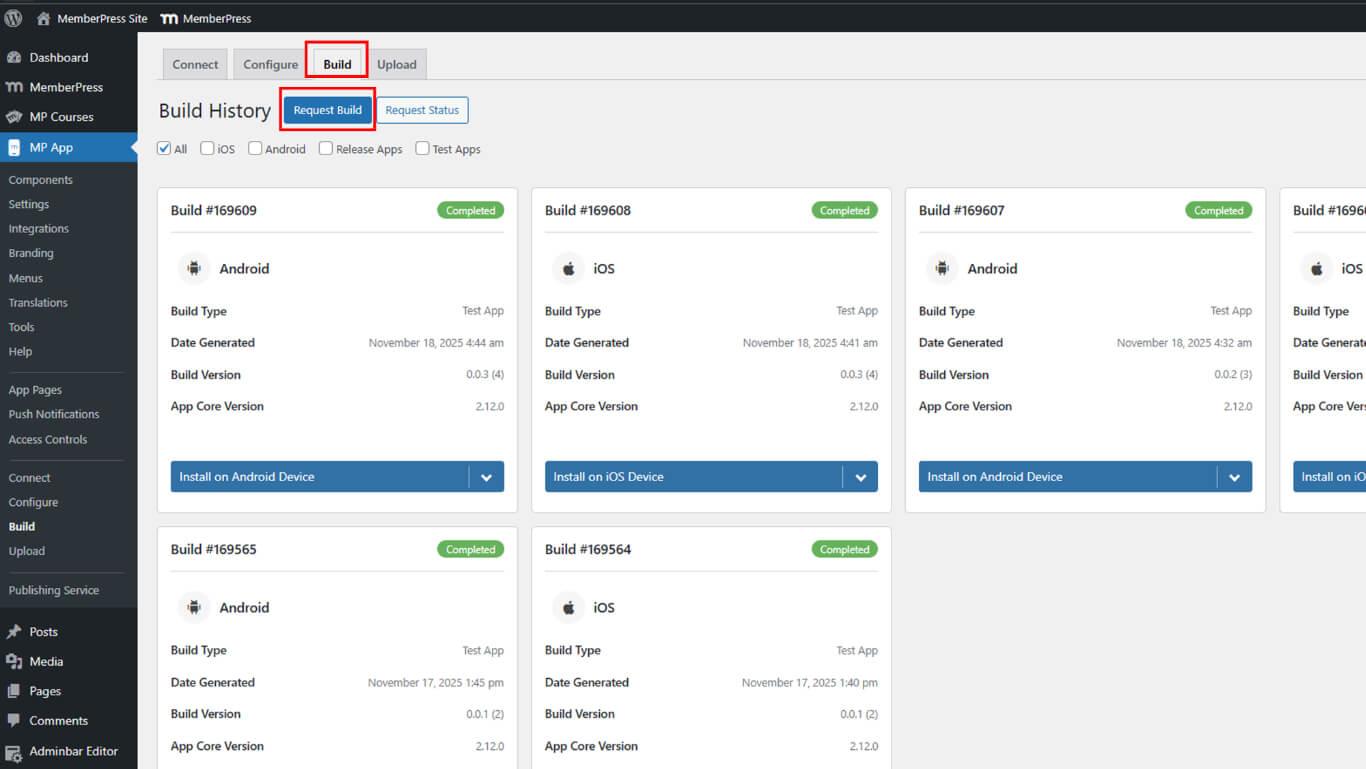
- Navegue até Painel de controle > MP AppKit > Construir.
- Clique no botão Solicitar compilação botão.
- Selecione Android como a plataforma entre as opções disponíveis.
- Selecione Lançar aplicativo como o tipo de compilação.
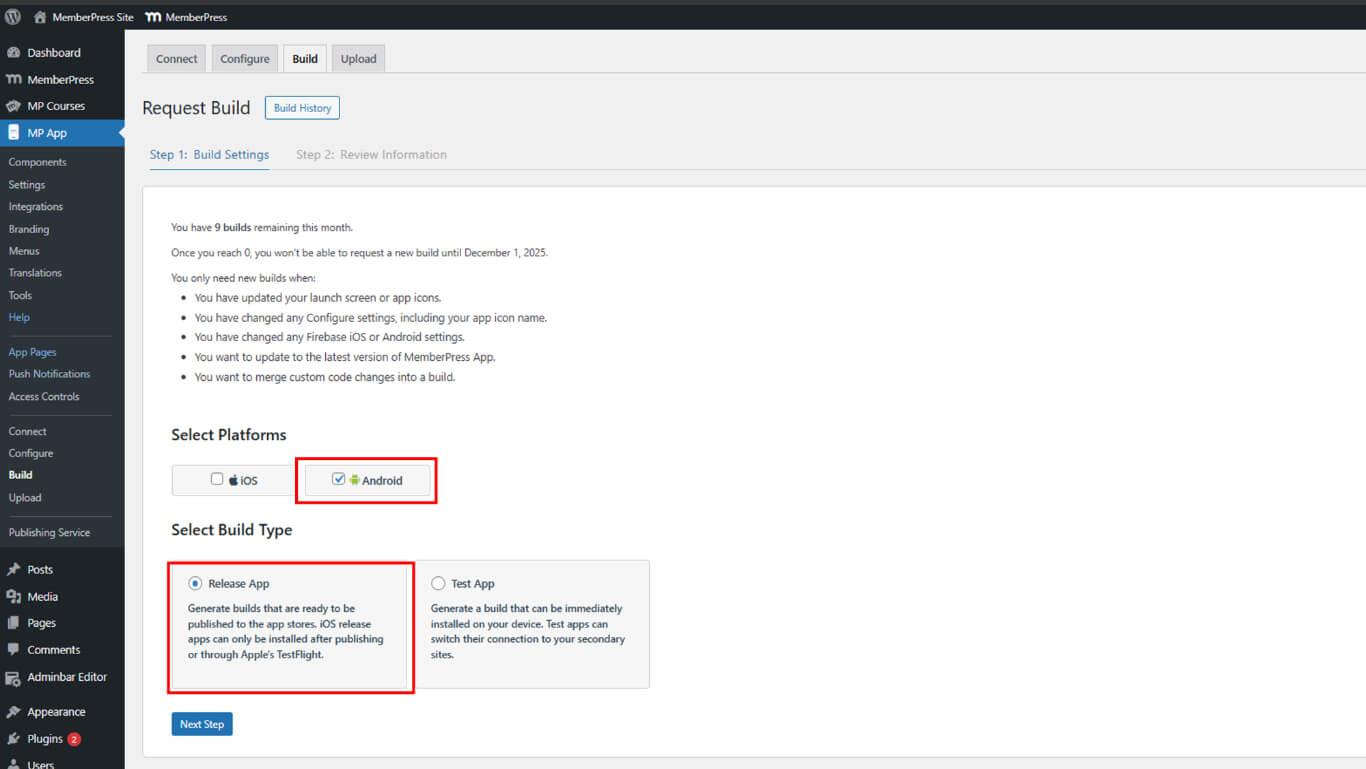
- Clique em Próxima etapa para prosseguir com a configuração da compilação.
- Clique em Enviar solicitação de compilação para enviar a solicitação de compilação.
- Aguardar a conclusão da compilação na fila de compilação.
- Navegue até a seção Histórico de construção seção.
- Localize a versão finalizada na lista de histórico.
- Clique em Instalar no dispositivo Android.
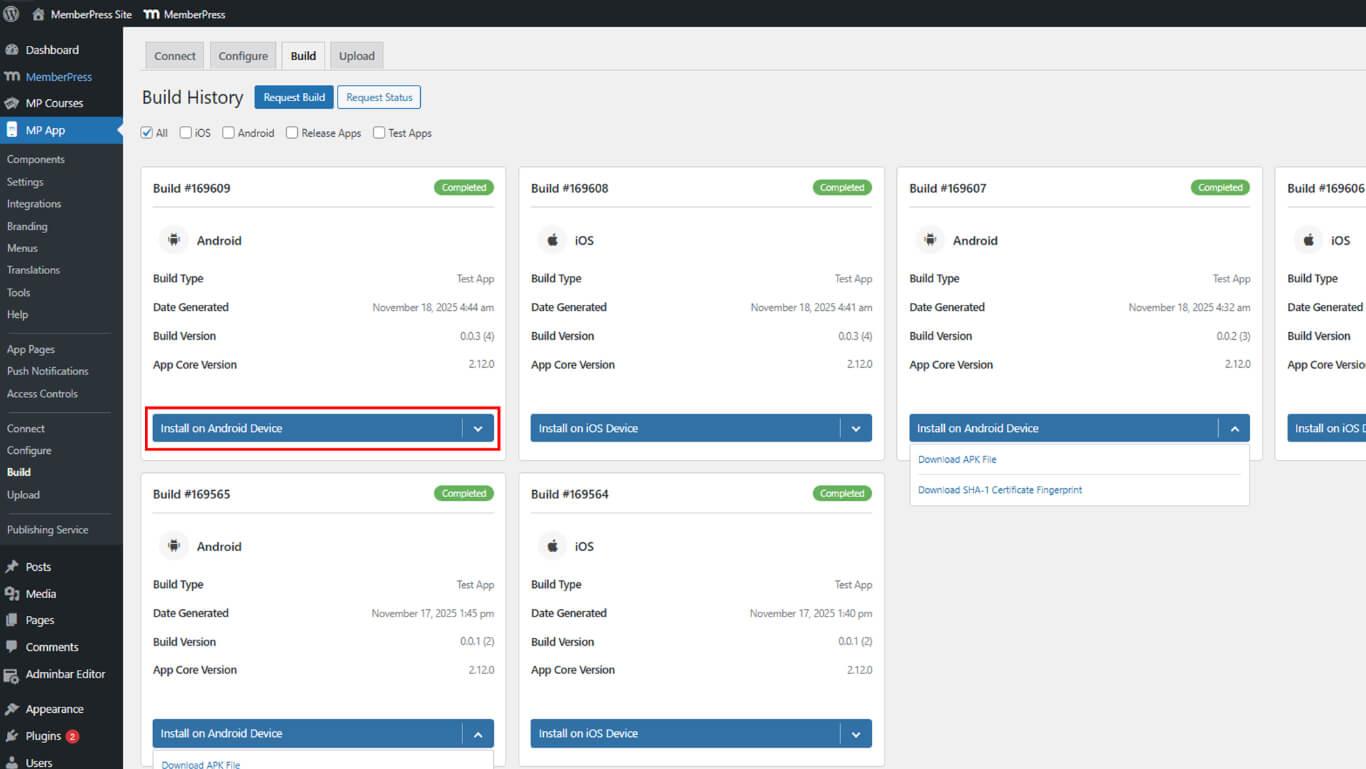
- Baixar o arquivo AAB ao lado da versão finalizada.
- Salve o arquivo AAB em um local seguro no dispositivo.
Carregamento do AAB na trilha de teste do Google Play
O upload da trilha de teste permite o teste de liberação controlada antes da distribuição pública.
- Faça login no Google Play Console em play.google.com/console.
- Navegue até Todos os aplicativos e selecione o aplicativo na lista.
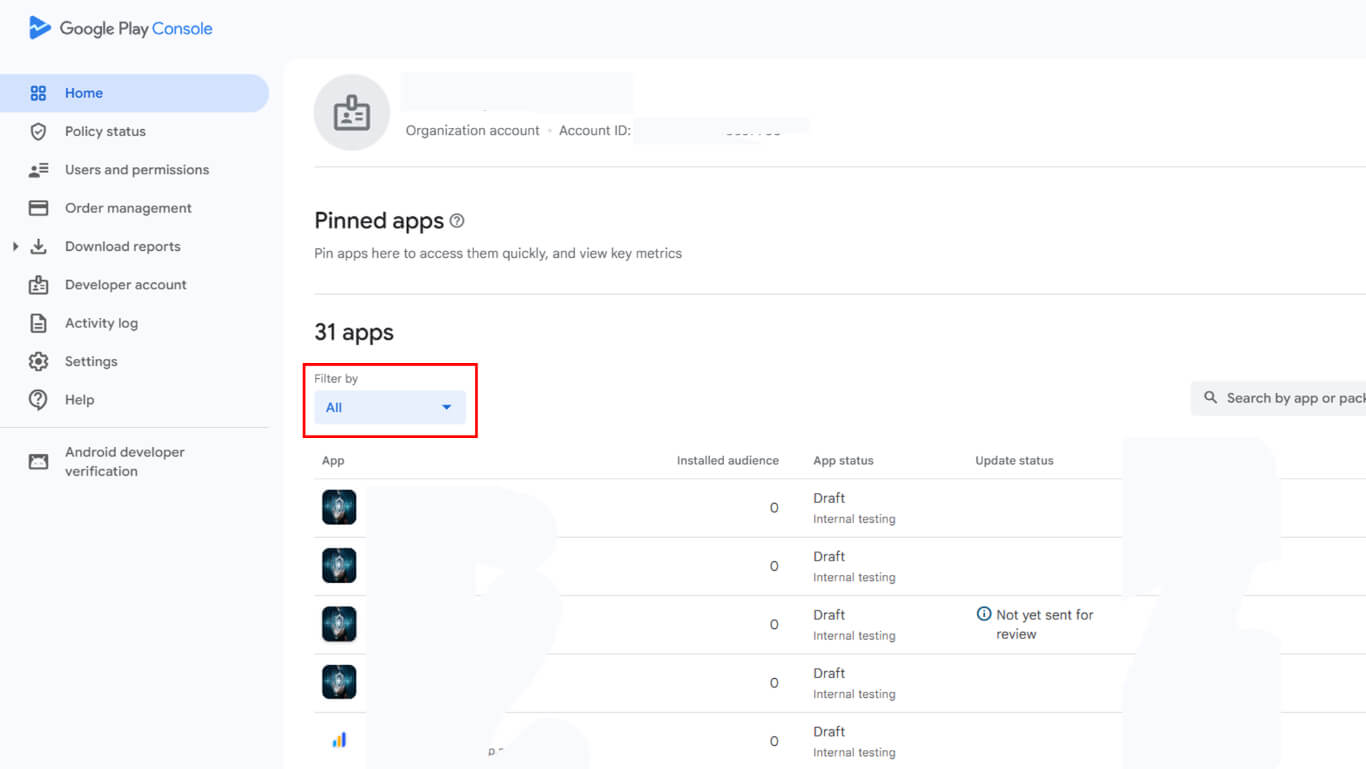
- Navegue até Teste e liberação > Produção para verificar as configurações de país e região.
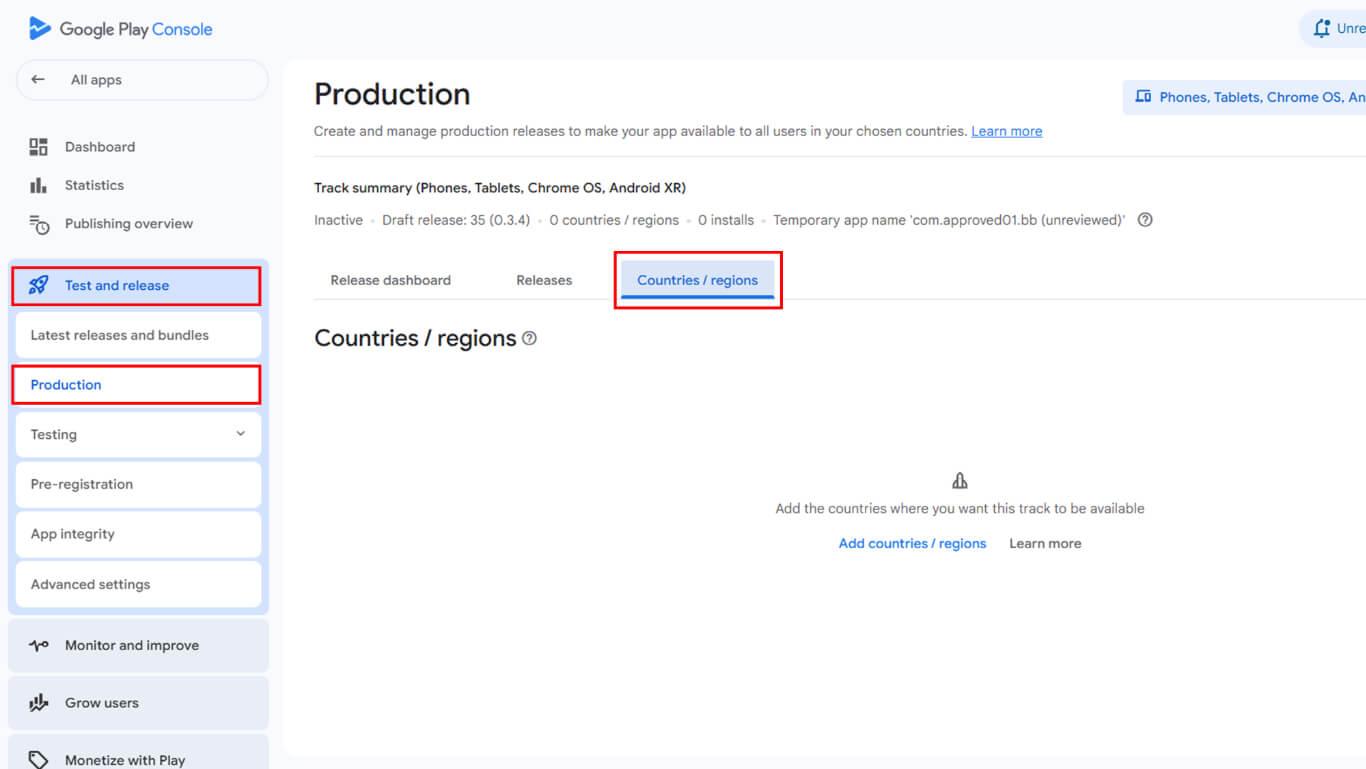
- Confirme se os países e regiões de destino estão configurados corretamente.
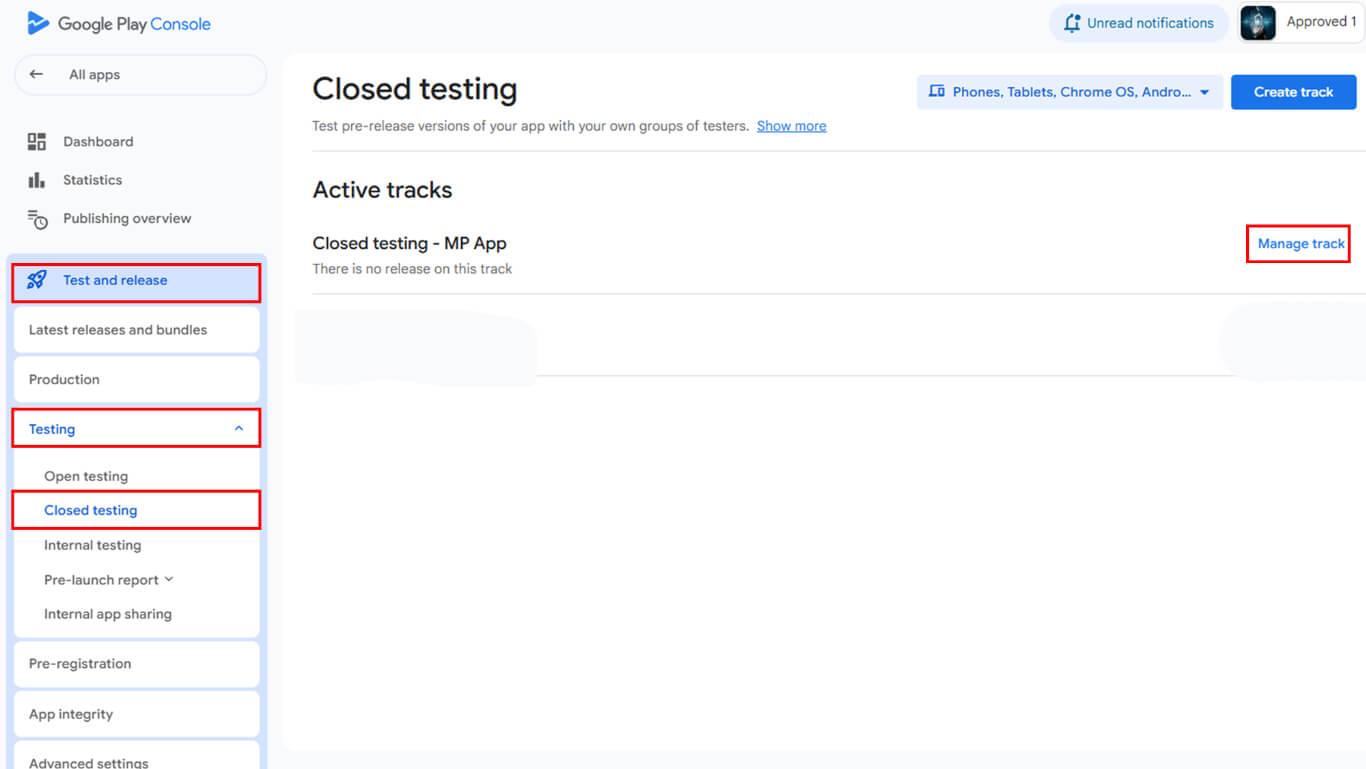
- Navegue até Liberação > Testes na barra lateral.
- Selecione o Teste fechado rastrear para garantir a qualidade da compra no aplicativo.
- Clique em Gerenciar trilha ao lado do nome da trilha de teste desejada.
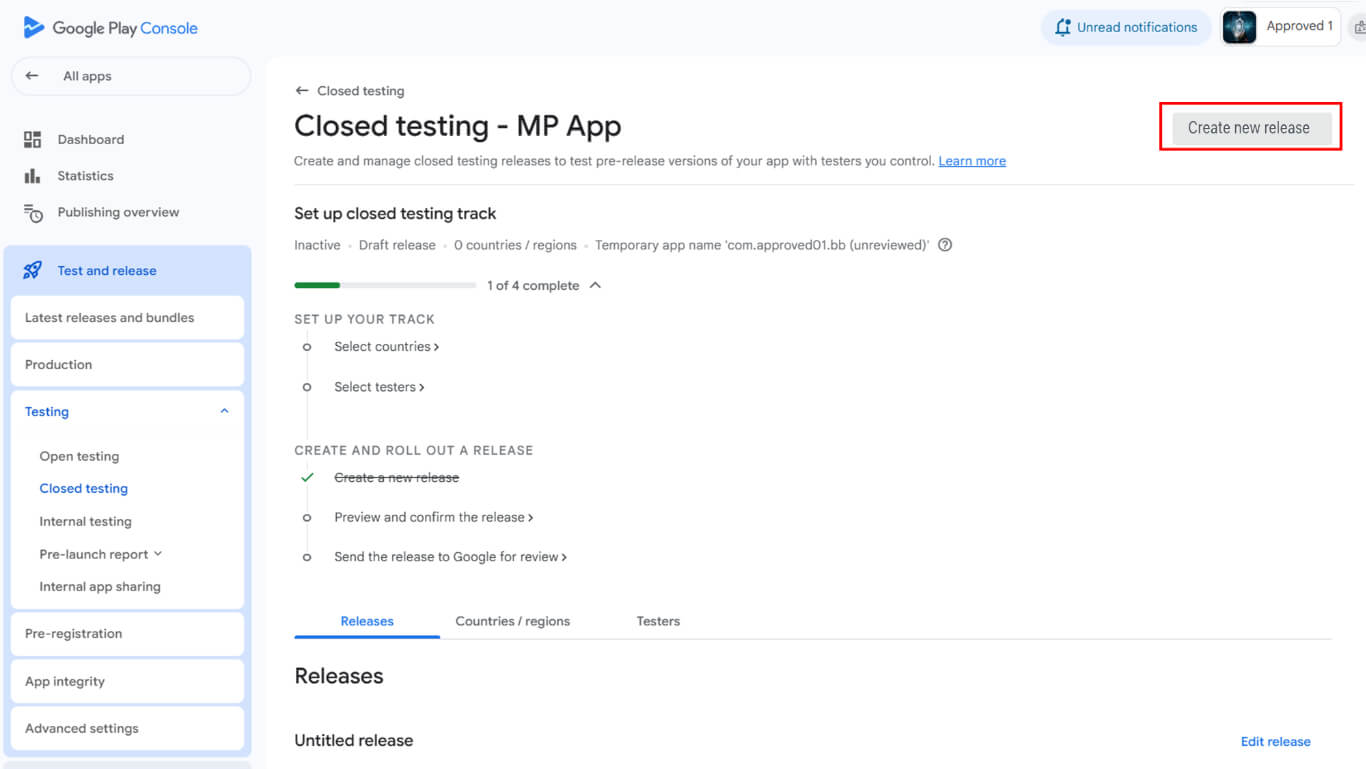
- Clique em Criar nova versão para iniciar a criação da versão.
- Localize o Pacotes de aplicativos e APKs seção.
- Clique em Carregar para selecionar o arquivo AAB baixado.
- Navegue até a seção Detalhes da versão após a conclusão do upload.
- Deixe o nome da versão preenchido automaticamente inalterado.
- Cole as notas de versão no campo Notas de versão campo.
- Clique em Salvar para armazenar a configuração da versão.
- Clique no botão Lançamento da revisão para prosseguir para a tela de revisão.
- Clique em Iniciar a distribuição para [nome da trilha] para publicar na trilha de teste.
- Aguarde a aprovação do Google para a liberação da trilha de teste.
Convidando os testadores para a trilha de teste
O convite para testador permite que usuários específicos acessem e instalem versões de teste.
- Navegue até Release > Testes > Testes fechados no Google Play Console.
- Clique no botão Testadores guia.
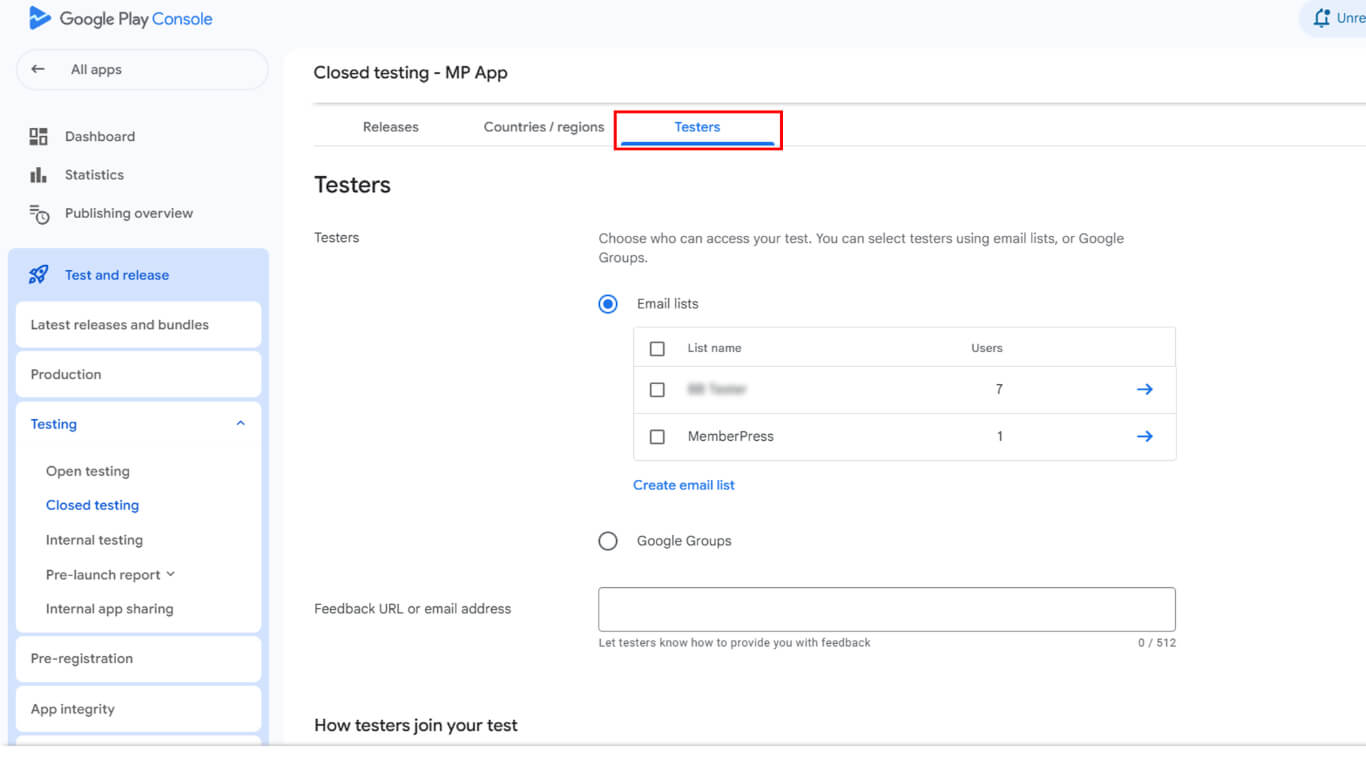
- Localize o Listas de e-mail seção.
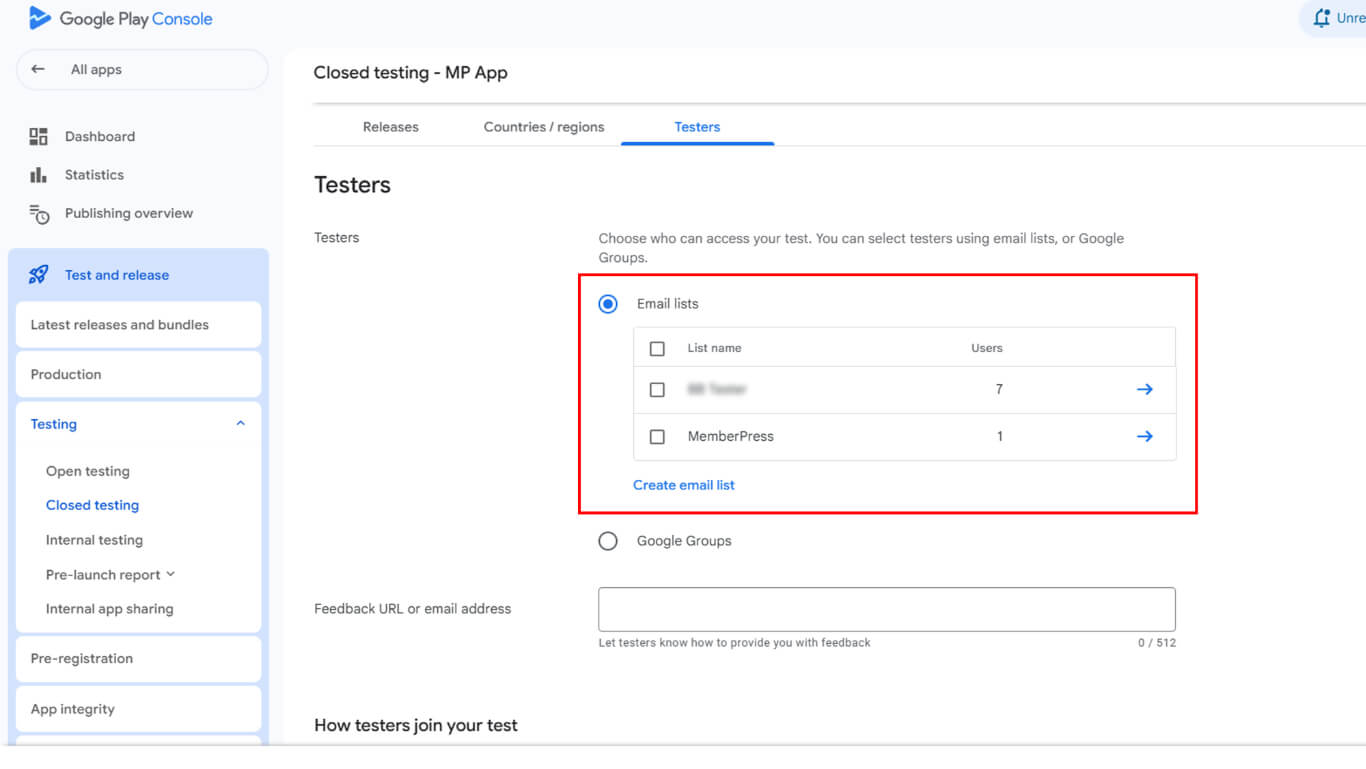
- Selecione uma lista de e-mail existente ou clique em Criar lista de e-mail para uma nova lista.
- Adicione endereços de e-mail de testadores que correspondam aos e-mails de suas contas do Google Play.
- Clique em Salvar alterações para armazenar a configuração da lista de testadores.
- Role para Como os testadores participam do seu teste seção.
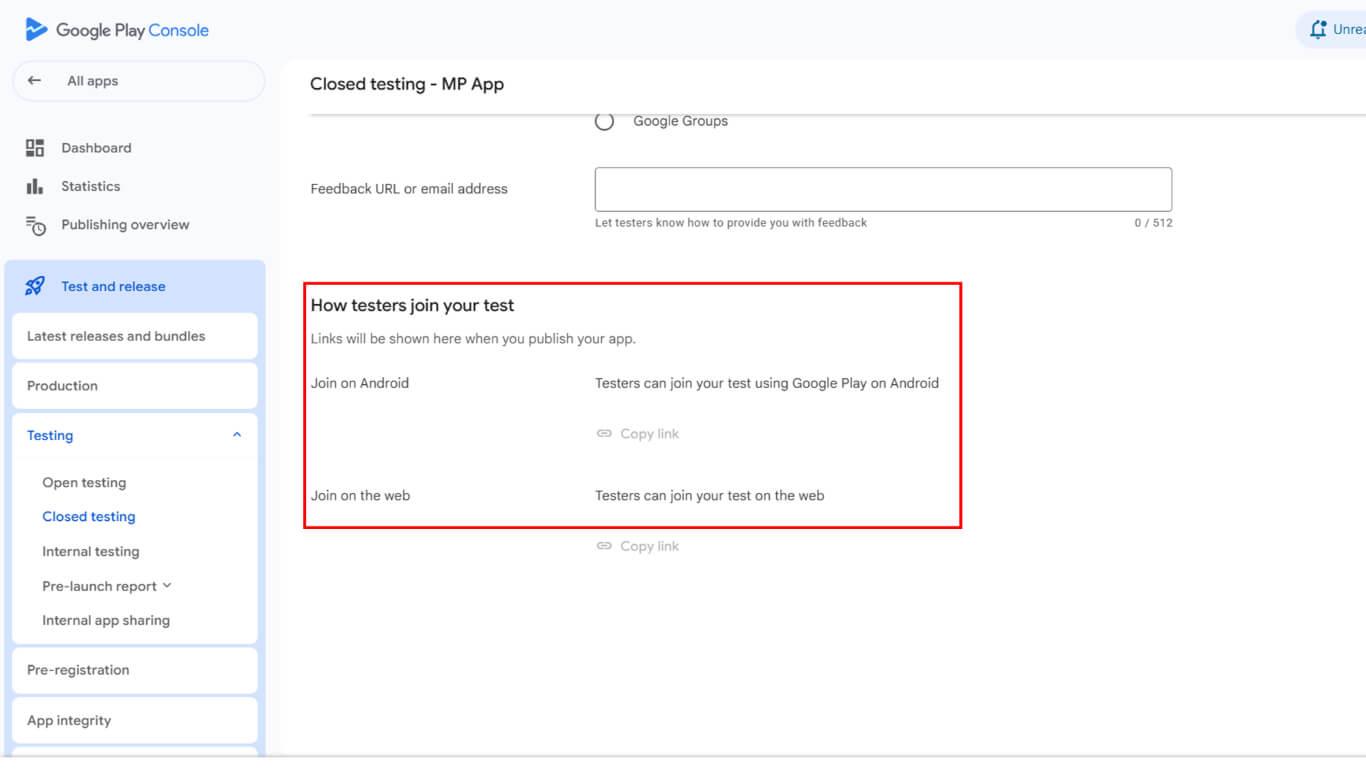
- Copie o link de associação exibido na seção.
- Compartilhe o link de participação com os testadores convidados por meio de comunicação segura.
Configuração do teste de licença
A configuração de teste de licença restringe o acesso ao aplicativo a testadores autorizados durante os períodos de teste.
- Vá para o painel do Google Play Console.
- Navegue até Configurações > Teste de licença na barra lateral do Google Play Console.
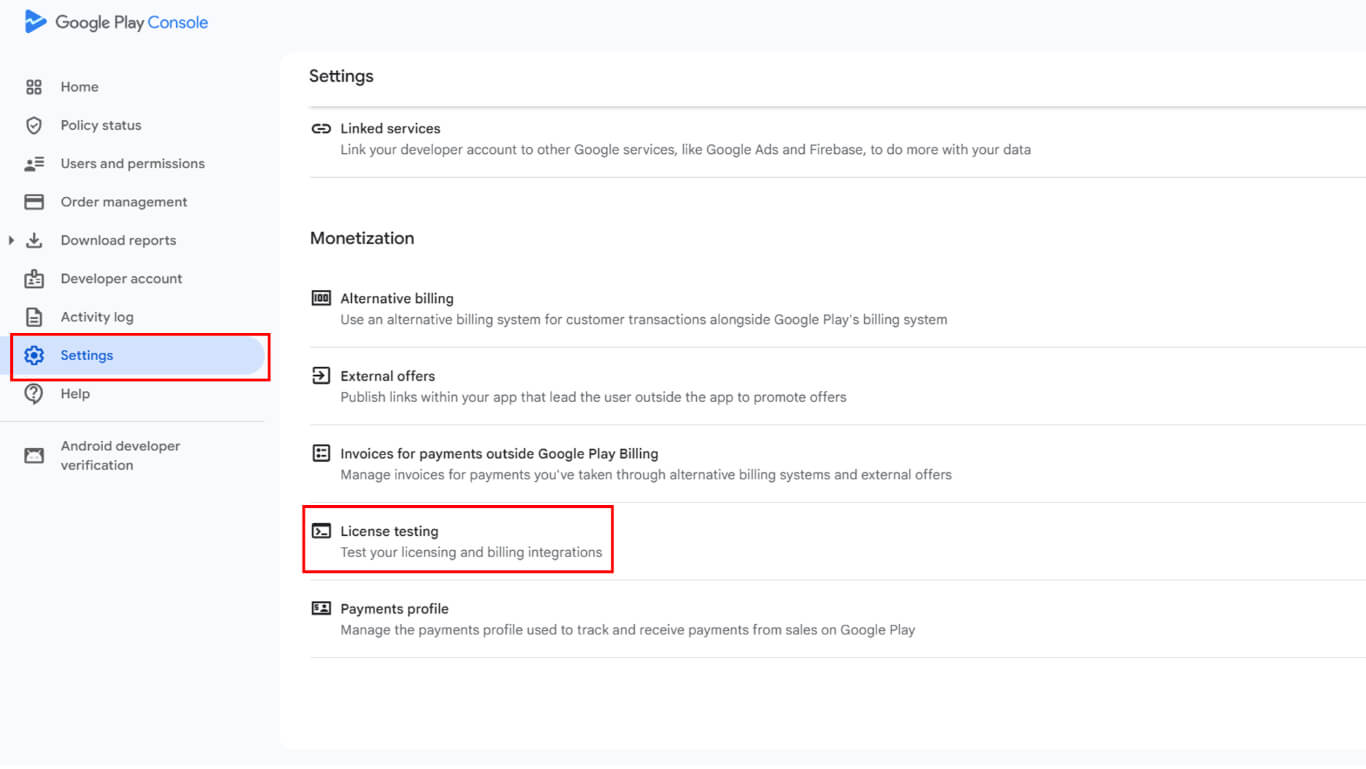
- Adicione os mesmos endereços de e-mail do testador da configuração da trilha de teste.
- Verifique se os endereços de e-mail correspondem exatamente aos e-mails da conta do Google Play.
- Clique em Salvar alterações para finalizar a configuração do teste de licença.
O teste de licença garante que somente testadores autorizados possam instalar e acessar compilações de aplicativos de versão durante as fases de teste. Os testadores agora podem instalar os aplicativos de versão com a funcionalidade completa de compra no aplicativo ativada.
Atualização do controle de testes com novas compilações
Testar atualizações de rastreamento, implementar novas versões do aplicativo de lançamento para os testadores existentes.
- Navegue até Painel de controle > MP AppKit > Construir em WordPress.
- Clique em Solicitar compilação para criar uma nova versão de lançamento.
- Selecione o Android e a plataforma Lançar aplicativo tipo de construção.
- Conclua a solicitação de compilação e aguarde a conclusão.
- Faça o download do novo arquivo AAB em Histórico de construção.
- Faça login no Google Play Console em play.google.com/console.
- Navegue até Release > Testes > Testes fechados.
- Clique em Gerenciar trilha ao lado da pista de testes.
- Clique em Criar nova versão para começar a atualizar a versão.
- Carregue o novo arquivo AAB na pasta Pacotes de aplicativos e APKs seção.
- Detalhes completos da versão com notas de versão atualizadas.
- Clique em Iniciar a distribuição para [nome da trilha] para publicar a atualização.
- Os testadores recebem notificações de atualização por meio de seu link de teste da Play Store.
As atualizações do rastreamento de testes seguem o mesmo processo de aprovação das versões iniciais, com cronogramas de revisão semelhantes.
Entendendo os requisitos do arquivo AAB
Os requisitos do formato de arquivo AAB garantem a compatibilidade com os sistemas de distribuição do Google Play.
Formato obrigatório aplica-se a todos os novos envios de aplicativos desde agosto de 2021. O Google Play não aceita mais envios de APK para novos aplicativos.
Suporte a APK herdado continua para aplicativos publicados anteriormente com o formato APK. Os aplicativos existentes podem continuar sendo atualizados com arquivos APK sem a necessidade de conversão para AAB.
Entrega otimizada oferece tamanhos de download menores por meio de módulos de recursos dinâmicos. O formato AAB permite que o Google Play gere APKs otimizados para diferentes configurações de dispositivos.
Incrementos no código da versão deve ocorrer a cada novo upload de AAB. Códigos de versão idênticos ou inferiores impedem o upload bem-sucedido e o teste da implantação da trilha.
Práticas recomendadas para testes de aplicativos de versão
Lançamento eficaz O teste do aplicativo valida a funcionalidade antes da distribuição pública.
Testar fluxos de compra com métodos de pagamento reais antes do lançamento público. Verifique se todos os níveis de assinatura e compras únicas são processados corretamente.
Verificar a precisão dos preços em todas as regiões e configurações de moeda. Confirme se os preços exibidos correspondem aos custos pretendidos para todos os mercados.
Monitorar relatórios de acidentes durante os testes e acompanhe a implantação para identificar problemas de estabilidade. Resolva as falhas antes de expandir a distribuição para públicos maiores.
Coletar feedback do testador sistematicamente por meio de canais designados. A coleta de feedback estruturado melhora a identificação e a resolução de problemas.
Atualizar as trilhas de teste regularmente à medida que o desenvolvimento avança e as correções são implementadas. Atualizações frequentes mantêm os testadores envolvidos e fornecem validação contínua.
Documentar os resultados dos testes para referência durante as decisões de liberação pública. A documentação abrangente de testes dá suporte à confiança no lançamento e à avaliação de riscos.










 PT
PT  EN
EN  ES
ES  FR
FR  DE
DE 