

Os Web Fallbacks exibem páginas do WordPress e tipos de post personalizados no aplicativo móvel. Essas páginas são carregadas de forma responsiva, com os cabeçalhos e rodapés do site automaticamente ocultos.
Este documento explica como configurar Web Fallbacks e entender seus casos de uso em comparação com as App Pages nativas.
Entendendo os fallbacks da Web
Os Web Fallbacks incorporam o conteúdo existente do WordPress na interface do aplicativo. As páginas são exibidas com o cabeçalho nativo do aplicativo, enquanto os cabeçalhos e rodapés do site permanecem ocultos. Os Web Fallbacks suportam construtores de páginas e conteúdo existente sem exigir desenvolvimento personalizado.
Comparação entre fallbacks da Web e páginas de aplicativos
Os fallbacks da Web e as páginas de aplicativos têm finalidades diferentes com vantagens distintas.
Características do Web Fallback
Integração de conteúdo existente permite que as páginas do WordPress sejam exibidas no aplicativo. O conteúdo criado com construtores de páginas ou com o editor padrão do WordPress funciona sem modificações.
É necessário ter conectividade com a Internet para carregamento do Web Fallback. As páginas obtêm conteúdo do servidor sempre que os membros as acessam.
Depende da velocidade do site O desempenho varia de acordo com a hospedagem e a otimização da página. Páginas complexas podem carregar mais lentamente do que as alternativas nativas.
Eficiência no desenvolvimento elimina a necessidade de desenvolvimento de aplicativos personalizados. As páginas da Web existentes se integram diretamente à navegação do aplicativo.
Características da página do aplicativo
Experiência de tela nativa oferece navegação suave com carregamento instantâneo. As App Pages criadas com App Blocks são carregadas a partir do cache local.
Disponibilidade off-line permite o acesso ao conteúdo sem uma conexão com a Internet. O conteúdo armazenado em cache permanece acessível durante períodos off-line.
Otimização do desempenho oferece carregamento mais rápido do que o conteúdo da Web. A renderização nativa elimina as solicitações de servidores externos.
É necessário trabalho personalizado para criar uma página de aplicativo usando blocos de aplicativos. As páginas devem ser criadas especificamente para a exibição do aplicativo.
Acesso à configuração do menu
Os Web Fallbacks são adicionados por meio de interfaces de configuração de menu.
- Navegue até Painel de controle > MP AppKit > Menus.
- Selecione Menu da barra de guias ou Menu Mais telas.
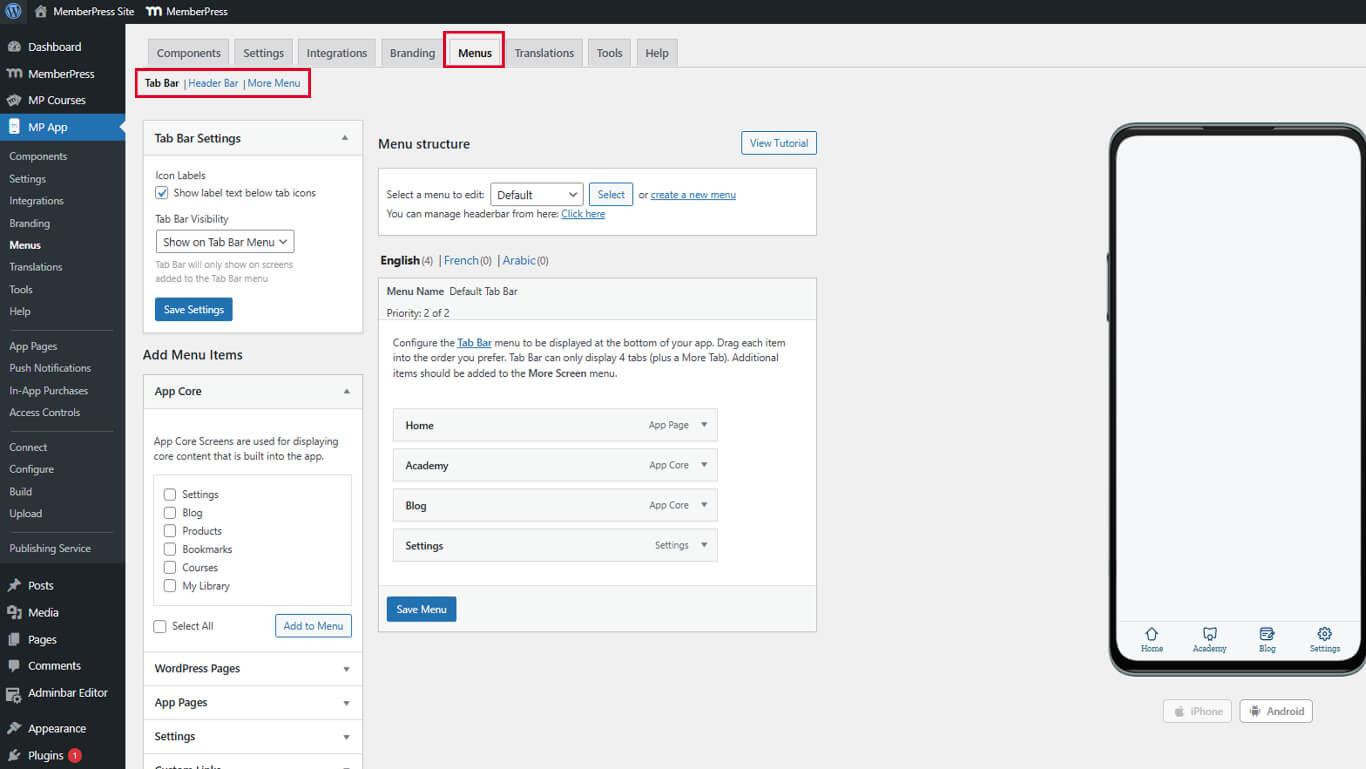
- Clique no botão Salvar menu se as alterações anteriores precisarem ser salvas.
Adição de páginas Web Fallback à navegação
As páginas do Web Fallback são adicionadas como itens de menu com links para o conteúdo do WordPress.
- Navegue até Painel de controle > MP AppKit > Menus.
- Selecione o menu que requer a adição do Web Fallback.
- Localize as páginas disponíveis em Páginas do WordPress ou MemberPress AppKit seções.
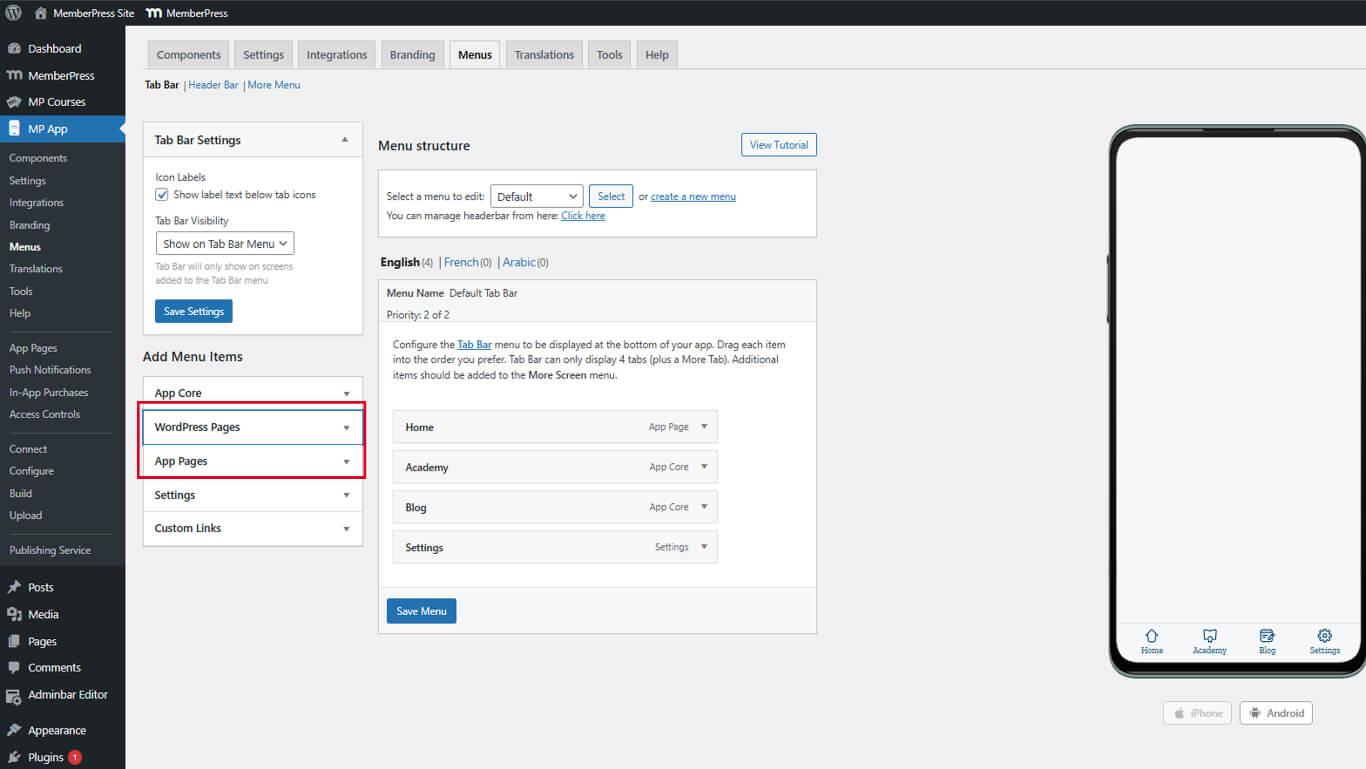
- Localize a página a ser exibida como Web Fallback.
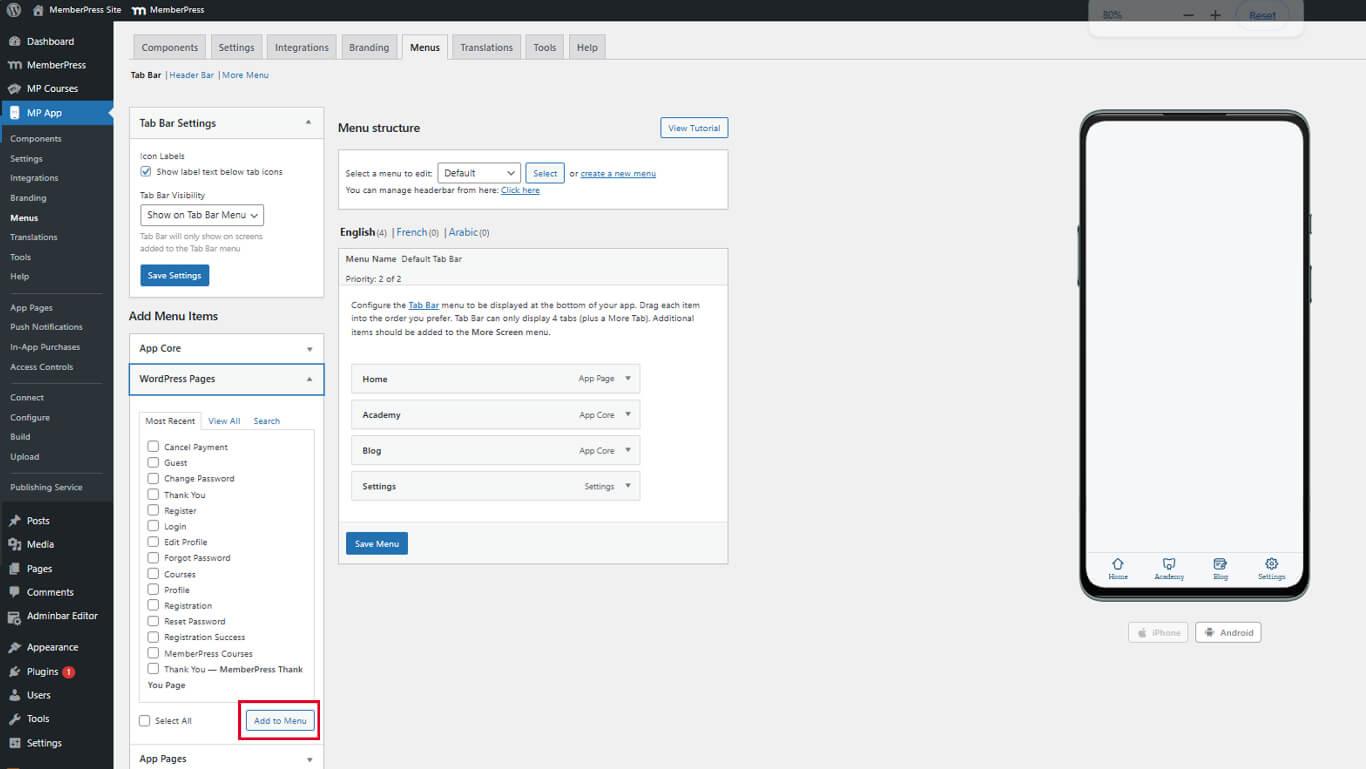
- Clique em Adicionar ao menu ao lado do nome da página.
- Arraste o item de menu para a posição de navegação desejada.
- Clique no botão Salvar menu para finalizar as alterações.
Os usos comuns do Web Fallback incluem páginas de lojas, bibliotecas de recursos e arquivos de tipos de post personalizados.
Pré-visualização do conteúdo do Web Fallback
A verificação do Web Fallback garante a exibição adequada na interface do aplicativo.
- Abra o aplicativo MemberPress para iOS/Android em um dispositivo móvel.
- Navegue até o menu que contém o item do Web Fallback.
- Toque no item de menu Web Fallback para abrir a página.
- Verifique se a página é carregada sem o cabeçalho e o rodapé do site.
- Confirme a exibição do cabeçalho nativo do aplicativo acima do conteúdo.
- Toque nos links de conteúdo para navegar no Web Fallback.
- Use a seta para trás do aplicativo para retornar às telas anteriores.
As páginas do Web Fallback mantêm o design responsivo e a otimização móvel da página original do WordPress.
Entendendo o comportamento do Deep Linking
O deep linking conecta o conteúdo do Web Fallback a telas de aplicativos nativos, quando aplicável.
Detecção de tela nativa ocorre quando os links do Web Fallback correspondem aos URLs da tela do aplicativo. O aplicativo abre a tela nativa apropriada em vez de carregar o conteúdo da Web.
Transições perfeitas proporcionam uma navegação suave entre conteúdo nativo e da Web. Os membros têm uma interface consistente, independentemente da fonte de conteúdo.
Reconhecimento automático de URL identifica as telas nativas suportadas a partir de destinos de links. Nenhuma configuração adicional é necessária para a funcionalidade de deep link.
Comparação entre telas nativas e fallbacks da Web
| Recurso | Falhas na Web | Páginas de aplicativos nativos |
| Complexidade da configuração | Fácil - Use as páginas existentes | Avançado - requer API REST + codificação |
| Desempenho | Mais lento, dependente da Internet | Rápido e responsivo |
| Disponibilidade off-line | Não suportado | Totalmente suportado |
| Integração visual | Combina com o layout do aplicativo, mas não é perfeito | Totalmente integrado |
| Construtores de páginas | Suportado (Elementor, Gutenberg) | Não se aplica |










 PT
PT  EN
EN  ES
ES  FR
FR  DE
DE 