

Per Banküberweisung bezahlen ist eine Echtzeit-Zahlungsmethode, die auf dem britischen System basiert Open Banking. Damit können Kunden im Vereinigten Königreich direkt von ihrem Bankkonto aus bezahlen. Die Kunden bestätigen die Zahlungen in ihrer Banking-App, ohne eine Karte zu verwenden.
Die Integration von MemberPress in Stripe ermöglicht es Ihnen, Zahlungen über „Pay by Bank“ entgegenzunehmen. In diesem Dokument wird erläutert, wie Sie „Pay by Bank“ auf Ihrer Mitglieder-Website aktivieren können. Außerdem werden die Voraussetzungen und Einschränkungen dieser Zahlungsmethode behandelt.
Zahlungen über „Pay by Bank“ entgegennehmen
MemberPress unterstützt die Zahlungsart „Pay by Bank“ ausschließlich über die integrierte Stripe-Anbindung. Bevor Sie daher „Pay by Bank“ aktivieren, Stripe mit MemberPress auf Ihrer Website verbinden. Auch, Testen Sie die Verbindung um zu überprüfen, ob es ordnungsgemäß funktioniert.
Sobald Ihre Stripe-Verbindung eingerichtet ist, führen Sie die folgenden Schritte aus, um „Pay by Bank“ in Stripe zu aktivieren:
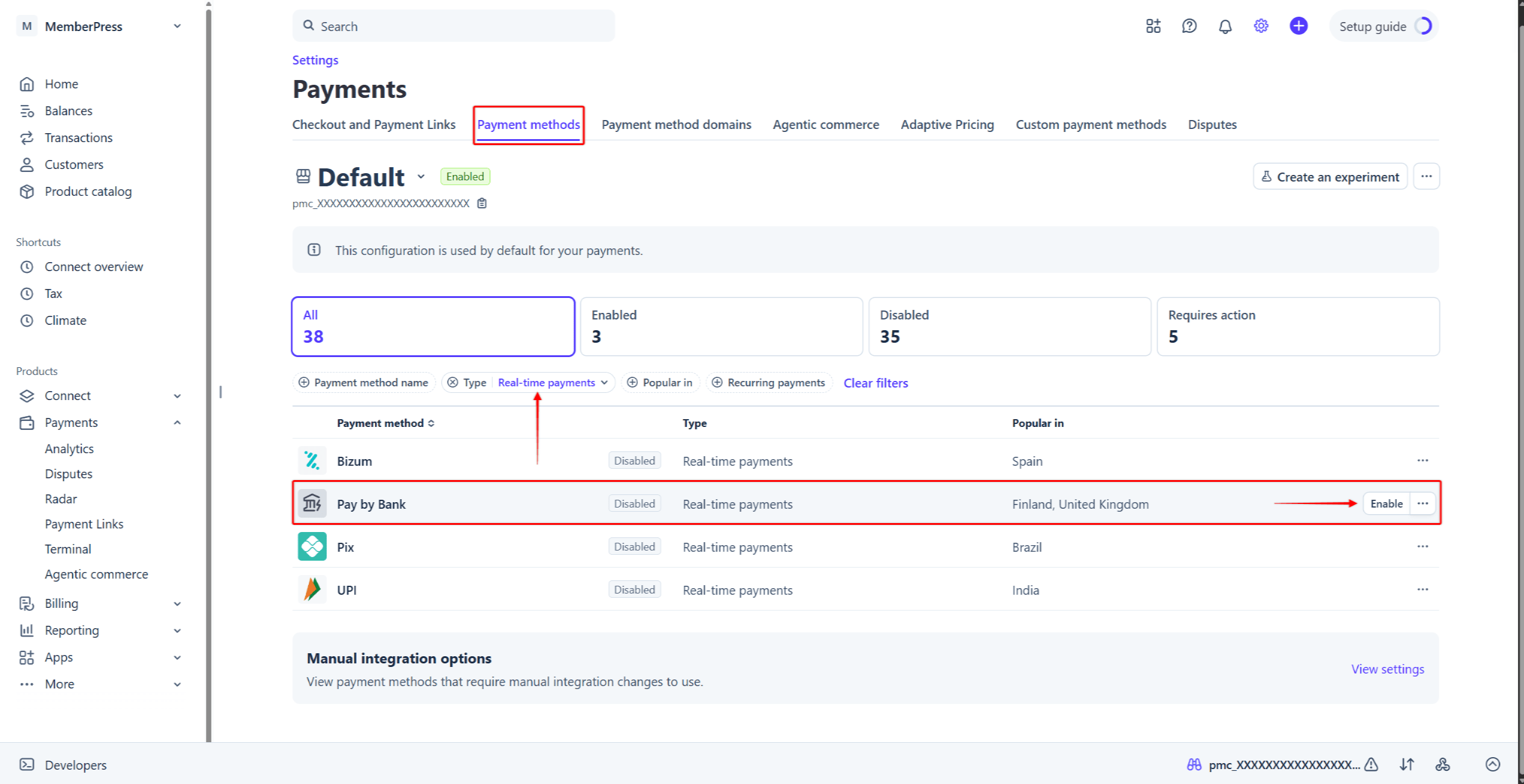
- Melden Sie sich bei Ihrem Stripe-Konto an und navigieren Sie zu Stripe-Dashboard > Einstellungen > Zahlungen > Registerkarte „Zahlungsmethoden“.
- finden. Per Banküberweisung bezahlen in der Liste der Zahlungsmethoden. Um es schneller zu finden, klicken Sie auf das Typ Filter, aktivieren Sie das Kontrollkästchen “Zahlungen in Echtzeit”Option“ und klicken Sie auf Bewerbung.
- Mit der Maus darüberfahren Per Banküberweisung bezahlenund klicken Sie auf die Schaltfläche Aktivieren Sie Schaltfläche. Alternativ können Sie auf die Dreipunkt-Symbol neben der Zahlungsmethode und wählen Sie die Aktivieren Sie Option.
Als nächstes aktivieren Sie die Per Banküberweisung bezahlen Schaltfläche in Ihren MemberPress-Einstellungen. Die detaillierten Schritte finden Sie unter Aktivierung von Zahlungsmethoden mit Stripe und MemberPress im zugehörigen Dokument.
Bezahlung per Banküberweisung an der Kasse
Sobald die Zahlungsmethode „Per Banküberweisung“ aktiviert ist, wird diese Zahlungsoption in den Anmeldeformularen für Ihre Einmal-Mitgliedschaften angezeigt. „Per Banküberweisung“ funktioniert sowohl mit Streifenelemente und Streifenkasse Formulare. Auf dem Zahlungsformular lautet die Option “Bezahlen per Bank-App“.
Wenn Benutzer die Option “Bezahlen per Bank-App”Bei Auswahl der Option „“ wird im Formular eine Liste britischer Banken angezeigt. Die Nutzer müssen ihre Bank auswählen und das Registrierungsformular absenden.
Als Nächstes wird den Benutzern die “Zahlung abschließen” – ein Pop-up-Fenster mit Zahlungsanweisungen und einem QR-Code. Nutzer können den QR-Code mit ihrer Handykamera scannen und die Zahlung in ihrer Banking-App bestätigen. Alternativ können sie auf die Schaltfläche “Weiter im Web”“-Schaltfläche, um die Zahlung im Browser abzuschließen.
Die Bank bestätigt Zahlungen über „Pay by Bank“ asynchron. Daher kann die Zahlungsbestätigung bis zu 60 Sekunden dauern. Sobald die Bank die Zahlung bestätigt hat, leitet MemberPress die Nutzer auf die Dankeseite weiter.
Was muss man über die Nutzung von „Pay by Bank“ wissen?
Die Option „Per Banküberweisung bezahlen“ wird an der Kasse nur angezeigt, wenn alle Bedingungen erfüllt sind. Die Integration unterliegt mehreren Einschränkungen seitens Stripe.
„Pay by Bank“ unterstützt ausschließlich einmalige Zahlungen. Daher wird diese Zahlungsmethode auf den Registrierungsseiten Ihrer wiederkehrenden Mitgliedschaften nicht angezeigt. Außerdem unterstützt „Pay by Bank“ keine Zahlungsaufschübe. Dementsprechend gilt für diese Zahlungsoption wird nicht für kostenlose oder kostenpflichtige Testmitgliedschaften verfügbar sein.
Um „Pay by Bank“ mit MemberPress nutzen zu können, müssen Sie außerdem Folgendes einstellen: die Währung in den MemberPress-Einstellungen zu GBP. Stripe unterstützt Zahlungen per Banküberweisung in Euro. Die MemberPress-Integration unterstützt derzeit jedoch ausschließlich britische Pfund.
Außerdem steht die Zahlungsart „Per Banküberweisung“ nur für Zahlungen zur Verfügung zwischen 0,50 £ und 10.000 £. Diese Zahlungsoption wird bei Mitgliedschaften, deren Preis außerhalb dieses Bereichs liegt, nicht angezeigt.
Sie finden weitere Informationen über Zahlungen per Banküberweisung in der Stripe-Dokumentation.









 DE
DE  EN
EN  ES
ES  FR
FR  PT
PT 