

Paiement par virement bancaire est un moyen de paiement en temps réel basé au Royaume-Uni banque ouverte. Ce service permet aux clients du Royaume-Uni d'effectuer des paiements directement depuis leur compte bancaire. Les clients valident leurs paiements via leur application bancaire, sans avoir à utiliser de carte.
L'intégration de MemberPress à Stripe vous permet de recevoir des paiements via « Pay by Bank ». Ce document explique comment activer « Pay by Bank » sur votre site d'adhésion. Il présente également les conditions requises et les restrictions liées à ce mode de paiement.
Recevoir des paiements via « Pay by Bank »
MemberPress ne prend en charge le paiement par virement bancaire que via l'intégration Stripe intégrée. Par conséquent, avant d'activer le paiement par virement bancaire, connectez Stripe à MemberPress sur votre site. En outre, tester la connexion pour vérifier que cela fonctionne correctement.
Une fois votre connexion Stripe configurée, suivez ces étapes pour activer le paiement par virement bancaire dans Stripe :
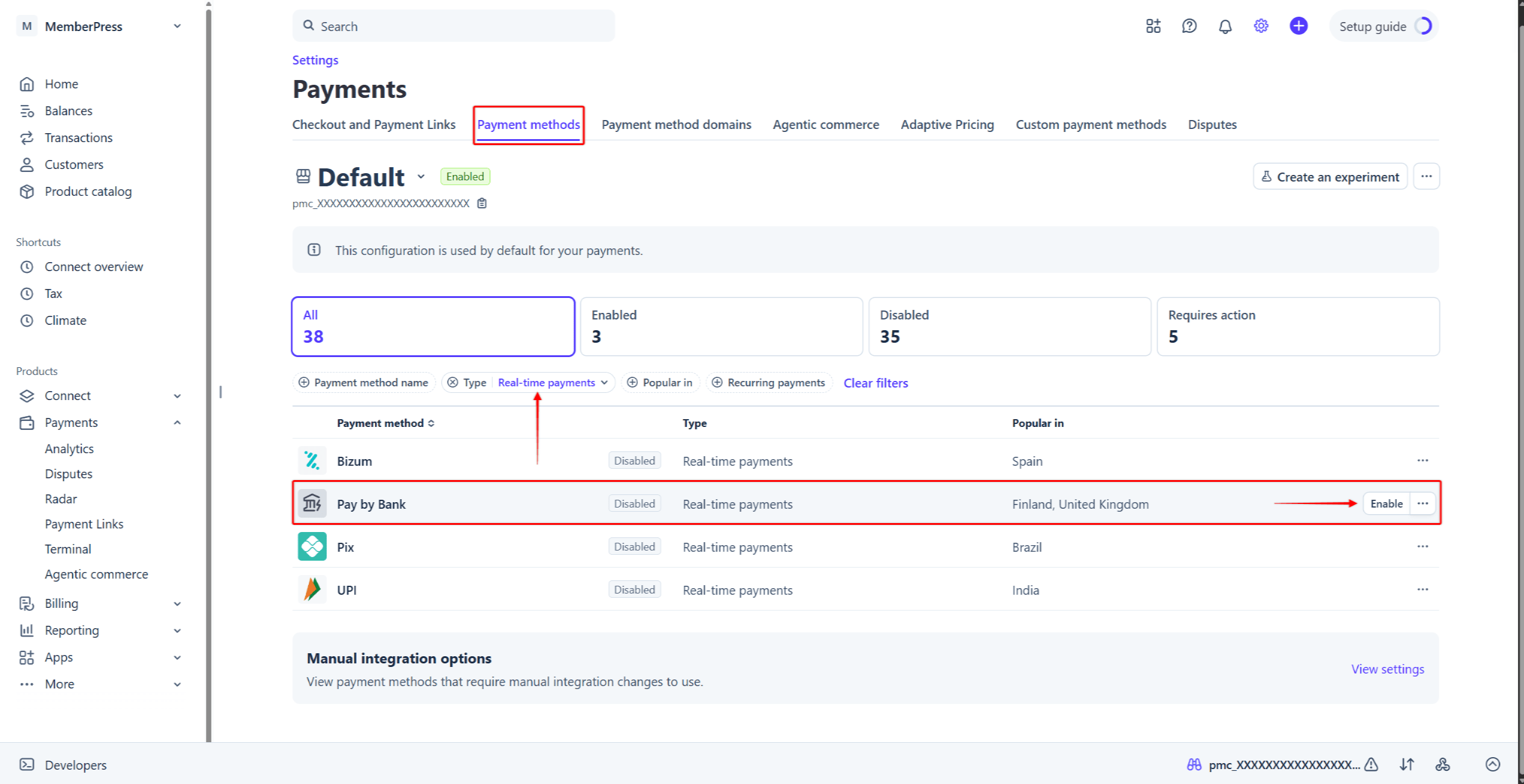
- Connectez-vous à votre compte Stripe, puis accédez à Tableau de bord Stripe > Paramètres > Paiements > onglet « Modes de paiement ».
- Trouver Paiement par virement bancaire dans la liste des modes de paiement. Pour le trouver plus rapidement, cliquez sur le Type filtre, cochez la case “Paiements en temps réel”, puis cliquez sur Appliquer.
- Passez la souris sur Paiement par virement bancaireet cliquez sur le bouton Activer bouton. Vous pouvez également cliquer sur le icône à trois points à côté du mode de paiement, puis sélectionnez le Activer option.
Ensuite, activez la fonction Paiement par virement bancaire basculer dans vos paramètres MemberPress. Vous trouverez les étapes détaillées sur activation des modes de paiement avec Stripe et MemberPress dans le document correspondant.
Payer par virement bancaire lors du paiement
Une fois l'option « Paiement par virement bancaire » activée, cette option de paiement apparaîtra sur les formulaires d'inscription à vos abonnements ponctuels. L'option « Paiement par virement bancaire » fonctionne à la fois avec Éléments de rayures et Paiement par carte de crédit formulaires. Sur le formulaire de paiement, cette option est intitulée “Application « Pay By Bank »“.
Lorsque les utilisateurs sélectionnent l’option “Application « Pay By Bank »” », le formulaire affiche une liste des banques britanniques. Les utilisateurs doivent sélectionner leur banque et valider le formulaire d'inscription.
Ensuite, les utilisateurs verront la “Effectuer le paiement” Une fenêtre contextuelle s'affiche alors, contenant les instructions de paiement et un code QR. Les utilisateurs peuvent scanner le code QR avec l'appareil photo de leur téléphone et valider le paiement depuis leur application bancaire. Ils peuvent également cliquer sur le bouton “Continuer sur le Web”Cliquez sur le bouton « » pour finaliser le paiement dans le navigateur.
La banque valide les paiements « Pay by Bank » de manière asynchrone. Par conséquent, la confirmation du paiement peut prendre jusqu'à 60 secondes. Une fois le paiement validé par la banque, MemberPress redirige les utilisateurs vers la page de remerciement.
Que faut-il savoir sur l'utilisation du paiement par virement bancaire ?
L'option « Paiement par virement bancaire » n'apparaîtra lors du paiement que lorsque toutes les conditions seront remplies. Cette intégration comporte plusieurs restrictions imposées par Stripe.
Le paiement par virement bancaire ne prend en charge que les paiements ponctuels. Par conséquent, ce mode de paiement n'apparaîtra pas sur les pages d'inscription à vos abonnements récurrents. De plus, l'option « Paiement par virement bancaire » ne prend pas en charge les paiements différés. Par conséquent, cette option de paiement ne sera pas disponible pour les adhésions avec essais gratuits ou payants.
De plus, pour utiliser le paiement par virement bancaire avec MemberPress, configurez la devise dans les paramètres MemberPress à GBP. Stripe prend en charge les paiements « Pay by Bank » en euros. En revanche, l'intégration MemberPress ne prend actuellement en charge que la livre sterling.
Par ailleurs, le paiement par virement bancaire n'est disponible que pour les paiements entre 0,50 £ et 10 000 £. Cette option de paiement ne sera pas visible pour les abonnements dont le prix se situe en dehors de cette fourchette.
Vous pouvez trouver plus d'informations sur Paiement par virement bancaire dans la documentation de Stripe.










 FR
FR  EN
EN  ES
ES  DE
DE  PT
PT 