

Strip Link ist eine Stripe-Funktion, mit der Kunden ihre Zahlungsdaten sicher speichern können. Auf Link-fähigen Websites können Kunden die gespeicherten Daten wiederverwenden, anstatt sie erneut einzugeben. Dies beschleunigt den Bezahlvorgang und kann Ihre Konversionsrate verbessern.
Die MemberPress-Integration mit Stripe unterstützt Stripe Link. In diesem Dokument wird erläutert, wie Sie Stripe Link auf Ihrer Mitglieder-Website aktivieren können. Außerdem werden die Voraussetzungen und Einschränkungen dieser Funktion behandelt.
Stripe-Verbindung aktivieren
MemberPress unterstützt Stripe Link ausschließlich über die integrierte Stripe-Integration. Bevor Sie Stripe Link aktivieren, Stripe mit MemberPress auf Ihrer Website verbinden. Stripe Link funktioniert sowohl mit Stripe-Elemente und Stripe-Kasse Zahlungsarten.
Sobald Ihre Stripe-Verbindung eingerichtet ist, führen Sie die folgenden Schritte aus, um Stripe Link zu aktivieren:
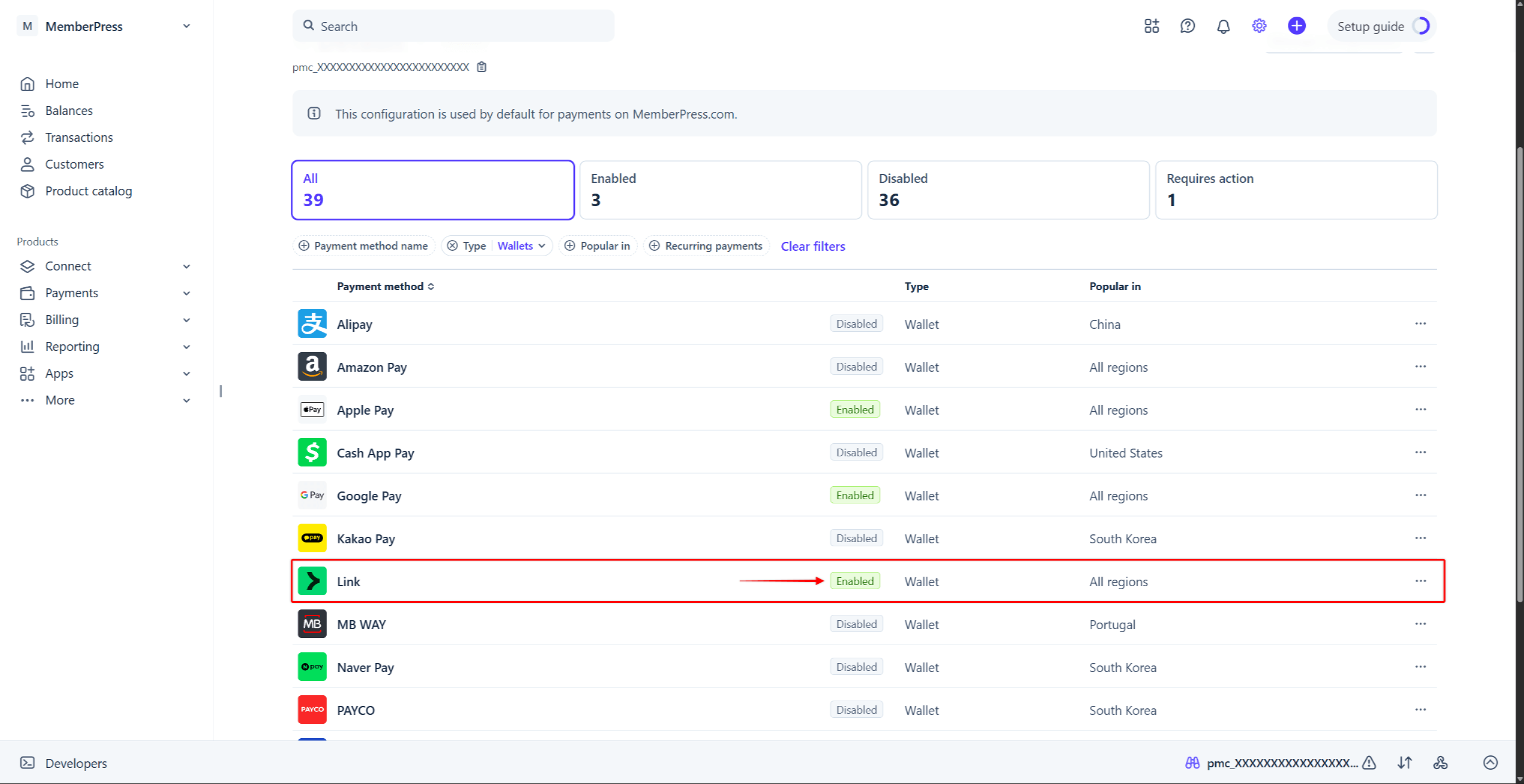
- Melden Sie sich bei Ihrem Stripe-Konto an und navigieren Sie zu Stripe-Dashboard > Einstellungen > Zahlungen > Registerkarte „Zahlungsmethoden“.
- finden. Link in der Liste der Zahlungsmethoden. Um es schneller zu finden, klicken Sie auf das Typ Filter, aktivieren Sie das Kontrollkästchen “Geldbörsen”Option“ und klicken Sie auf Bewerbung.
- Mit der Maus darüberfahren Linkund klicken Sie auf die Schaltfläche Aktivieren Sie Schaltfläche. Alternativ können Sie auf die Dreipunkt-Symbol neben der Zahlungsmethode und wählen Sie die Aktivieren Sie Option.
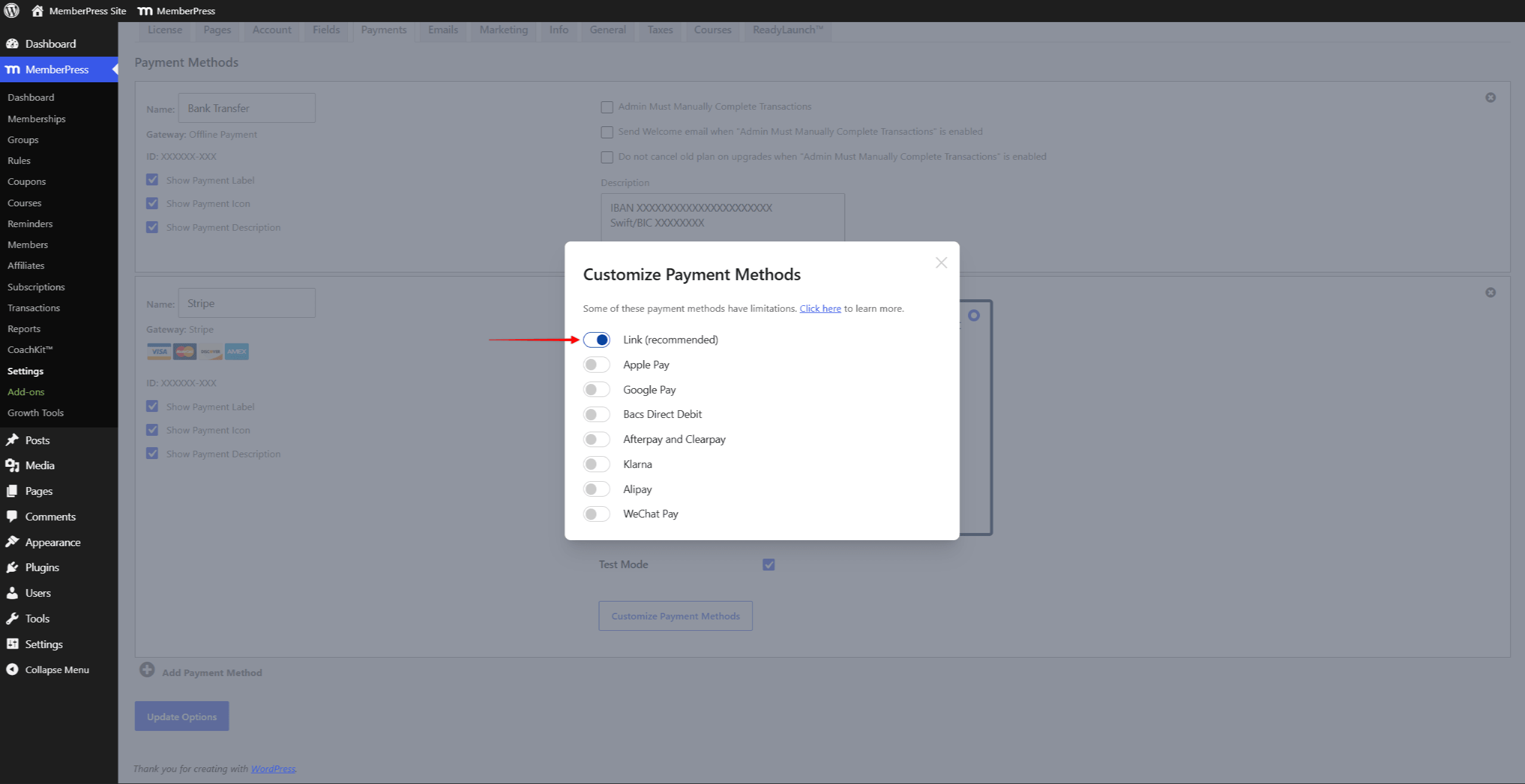
- Navigieren Sie auf Ihrer Website zu Dashboard > MemberPress > Einstellungen > Registerkarte Zahlungen, und scrollen Sie zu den Einstellungen für Ihr Stripe-Gateway.
- Klicken Sie auf die Zahlungsarten anpassen um ein Pop-up-Fenster zu öffnen.
- Aktivieren Sie die Option “Link (empfohlen)”-Schaltfläche und klicken Sie auf die Update Taste.
Weitere Informationen finden Sie unter Aktivierung von Zahlungsmethoden mit Stripe und MemberPress im zugehörigen Dokument.
Stripe-Link an der Kasse
Sobald Stripe Link aktiviert ist, wird in Ihren Registrierungsformularen das zusätzliche Feld “Bank”Option“ neben „Karte“. Mit dieser Option können Kunden über Link direkt von ihrem US-Bankkonto bezahlen. Dazu müssen sie ihre Bank auswählen und die Zahlung bestätigen.
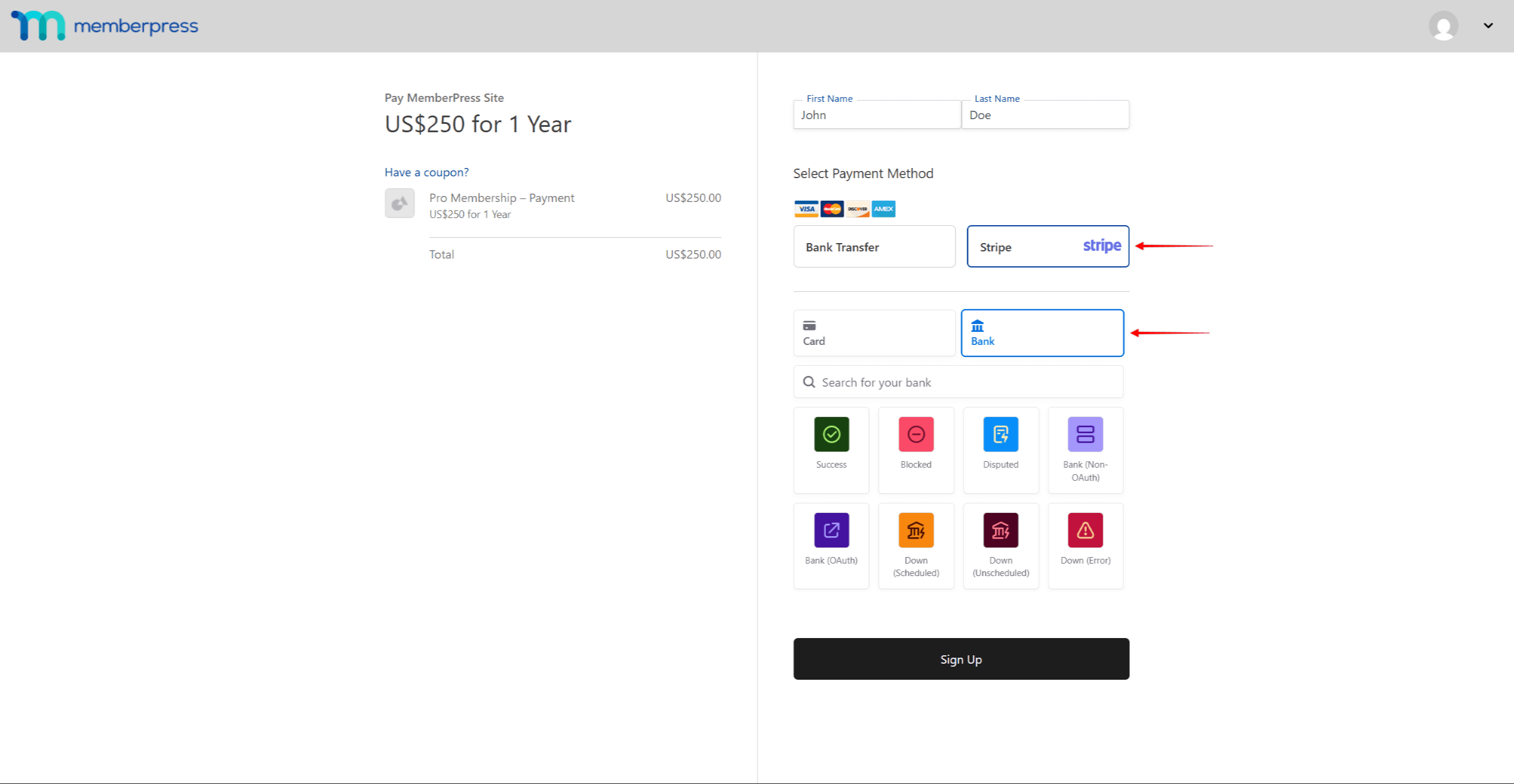
Außerdem können Kunden ihre Zahlungsdaten beim Bezahlvorgang über „Link“ speichern. Diese Daten werden von Stripe gespeichert, nicht von MemberPress. Wiederkehrende „Link“-Nutzer können ihre Zahlungen anhand der gespeicherten Daten abschließen. Dadurch werden ihre zukünftigen Zahlungen schneller und sicherer.
Was muss man über die Verwendung von Stripe Link wissen?
Für Stripe Link ist die Version 1.9.41 oder höher von MemberPress erforderlich.
Stripe Link ist in den meisten Ländern verfügbar, in denen Stripe tätig ist. In Indien ist Link jedoch nicht verfügbar. Außerdem unterstützen die Zahlungsformulare von Stripe Elements Link in Brasilien und Thailand nicht. Link unterstützt alle Währungen, die Stripe für Kartenzahlungen unterstützt. Weitere Informationen finden Sie unter Verfügbarkeit der Stripe-Verbindung in der Stripe-Dokumentation.
Nachdem Sie Stripe Link aktiviert haben, stellen Sie möglicherweise fest, dass einige Kundendaten in Stripe fehlen. Dies ist beabsichtigt. Stripe Link verschlüsselt und verbirgt einen Großteil der identifizierenden Informationen der Kunden zu deren Schutz.
Ihre Kunden können ihr Link-Konto verwalten oder sich jederzeit auf der Link.com Website. Antworten auf häufig gestellte Fragen finden Sie unter Stripe Link FAQ.









 DE
DE  EN
EN  ES
ES  FR
FR  PT
PT 