

Se você definiu preços escalonados em seu site de associação, já fez uma jogada inteligente.
Os diferentes níveis permitem que você atenda a diferentes públicos com diferentes preços, e essa flexibilidade é uma das maiores vantagens de administrar uma associação com o MemberPress.
(Se você ainda estiver decidindo se o preço escalonado é adequado para o seu site, o MemberPress tem um ótimo detalhamento de Por que você deve oferecer vários níveis de preços.)
Mas aqui está a parte que pega muitos proprietários de sites desprevenidos: as camadas só funcionam se elas realmente sentir diferente das pessoas que as habitam.
Um membro “Gold” que tem a mesma experiência cotidiana que um membro “Silver” não permanecerá Gold por muito tempo.
O desafio não é a estrutura de níveis em si, mas sim oferecer uma experiência diferenciada em todos os níveis. todas as outras ferramentas seu site depende de: sua plataforma de e-mail, sua central de suporte, seu plug-in de gerenciamento de eventos, etc.
Fazendo isso manualmente, para cada membro, em todos os níveis não é um passeio no parque.
Uncanny Automator é sua resposta sem código.
O Automator (como o chamarei a partir de agora) é um plug-in de automação sem código para WordPress que conecta o MemberPress a mais de 200 outros aplicativos e plug-ins.
Quando um membro se inscreve, faz upgrade, downgrade, cancela, compra um item, se registra em um evento ou conclui um curso, o Automator pode acionar uma cadeia de ações em todas as ferramentas que você usa.
O MemberPress controla o acesso. O Automator controla a experiência. Juntos, eles fazem com que a automação das camadas de associação realmente cumpra o que as camadas prometem.
O problema da “experiência diferente”
A maioria dos plug-ins de associação (inclusive o MemberPress) é excelente para bloquear o conteúdo. Pague pelo nível mais alto, veja as postagens premium - essa parte funciona bem.
Mas o acesso ao conteúdo é apenas uma dimensão do que faz com que uma camada se sinta valiosa.
Os membros que pagam mais esperam mais do que apenas páginas extras para ler. Eles esperam coisas como:
- respostas mais rápidas do suporte,
- notícias exclusivas sobre novos recursos ou lançamentos de conteúdo,
- convites para eventos exclusivos,
- e experiência de integração que pareça personalizado para eles (e não um e-mail de boas-vindas copiado e colado que todos os níveis recebem).
Essa é uma experiência de serviço e abrange todas as ferramentas conectadas ao seu site - seu CRM, seu helpdesk, sua plataforma de webinar, seus aplicativos de mensagens. As regras de acesso por si só não podem proporcionar isso.
O que você precisa é de uma maneira de fazer com que essas ferramentas respondam de forma diferente com base no nível ao qual o membro pertence. E você precisa que isso aconteça automaticamente, no momento em que ocorrer um evento de associação.
O Automator é uma ótima maneira de fazer exatamente isso.
O que o Automator pode automatizar quando uma camada é alterada
Toda automação no Automator começa com um acionador e termina com uma ou mais ações. Quando alguém compra uma associação específica do MemberPress, faz upgrade para um novo nível ou cancela, esse é o acionador.
O que acontece em seguida depende inteiramente de você.
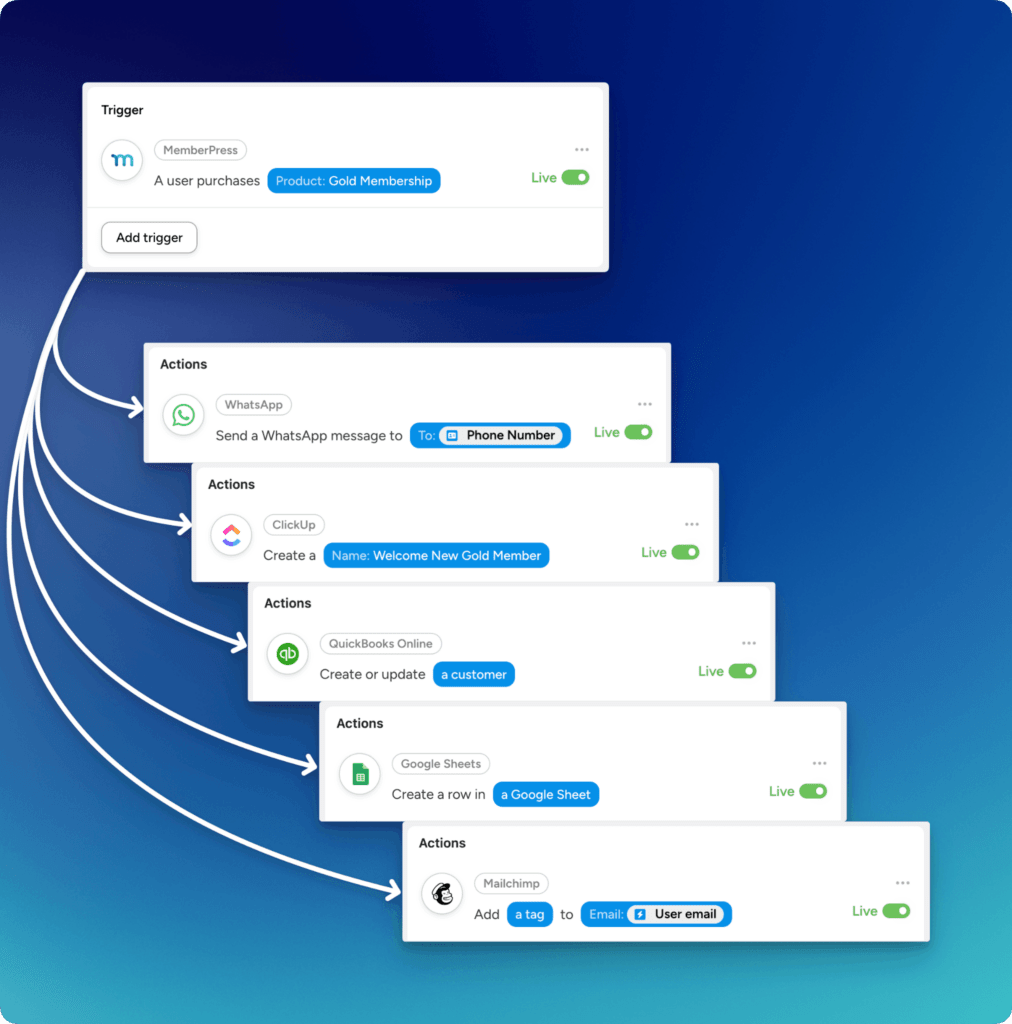
Aqui estão quatro fluxos de trabalho de alto valor que transformam a diferenciação de nível de uma promessa em uma realidade.
Suporte prioritário para membros de nível superior
Os membros de nível mais alto geralmente esperam um suporte mais rápido e pessoal. Mas a verificação manual do nível de associação de alguém toda vez que uma solicitação de suporte é recebida não é escalonável, especialmente à medida que sua comunidade cresce.
Com o Automator, você pode conectar o MemberPress às suas ferramentas de suporte para que, quando um membro premium enviar uma solicitação, ela seja automaticamente sinalizada ou encaminhada de forma diferente.
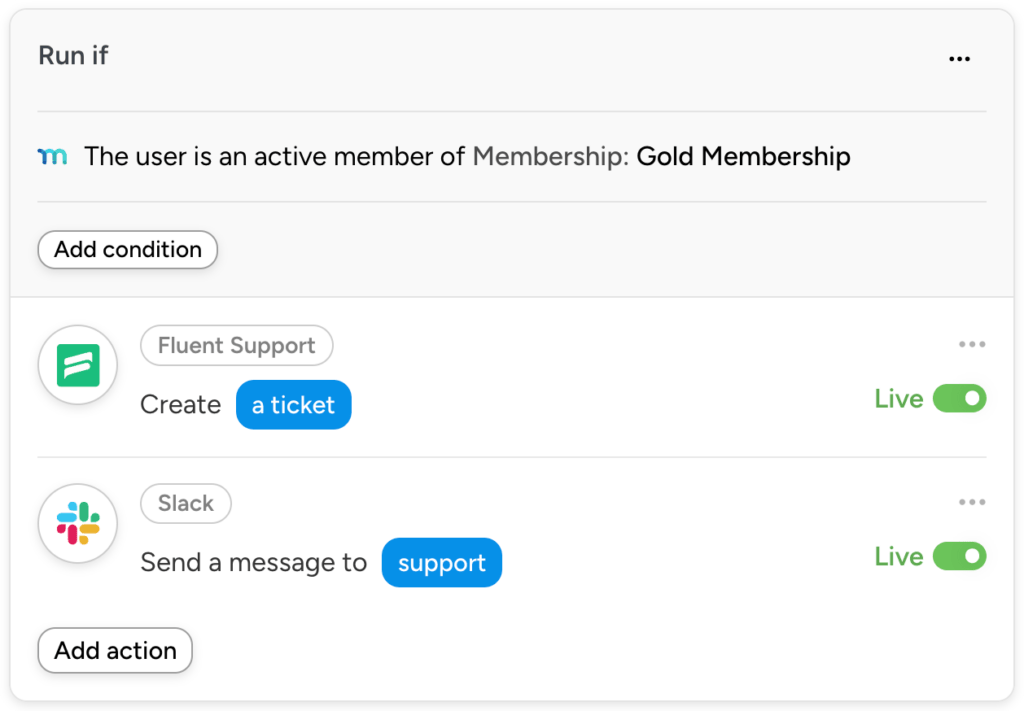
Por exemplo: a Formulários de gravidade O envio de um membro Gold-tier poderia criar automaticamente um tíquete de alta prioridade no Ajuda ao escoteiro, ou iniciar uma tarefa urgente em ClickUp ou Asana.
Um envio de um membro do Basic vai para a fila padrão. Não é necessário fazer uma classificação manual, é tudo no piloto automático!
Programas de acesso antecipado e beta
Seus membros de nível mais alto costumam ser seu público mais interessado - as pessoas mais propensas a lhe dar feedback útil e as que mais apreciam estar “por dentro do assunto”.”
Eles são candidatos naturais para lançamentos antecipados de conteúdo, recursos beta ou anúncios exclusivos.
O Automator simplifica a adição de membros a esses programas no momento em que eles se inscrevem ou fazem upgrade, sem nenhum gerenciamento manual da lista.
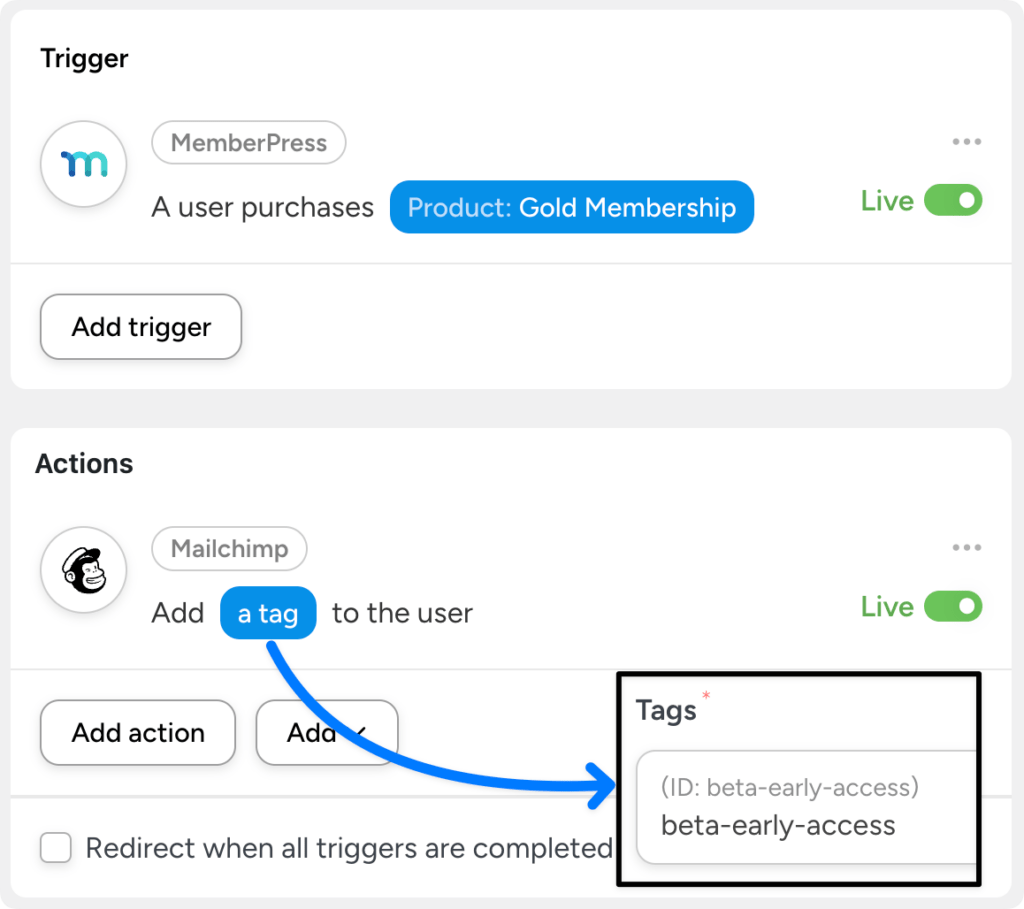
Quando um usuário adquire um nível premium, o Automator pode adicioná-lo automaticamente a uma lista dedicada de “Acesso antecipado” em Mailchimp, ActiveCampaign, ou qualquer outro CRM que você use.
Quando eles fazem downgrade ou cancelam, são removidos automaticamente. Sua lista permanece precisa sem que ninguém a toque.
Eventos exclusivos (webinars e presenciais))
O acesso a eventos é uma das vantagens mais atraentes que você pode oferecer aos membros premium.
Também é um dos mais trabalhosos para gerenciar manualmente: rastrear quem se qualifica, enviar convites, lidar com registros e revogar o acesso quando as associações mudam.
O Automator pode lidar com tudo isso automaticamente, com base no nível de associação.
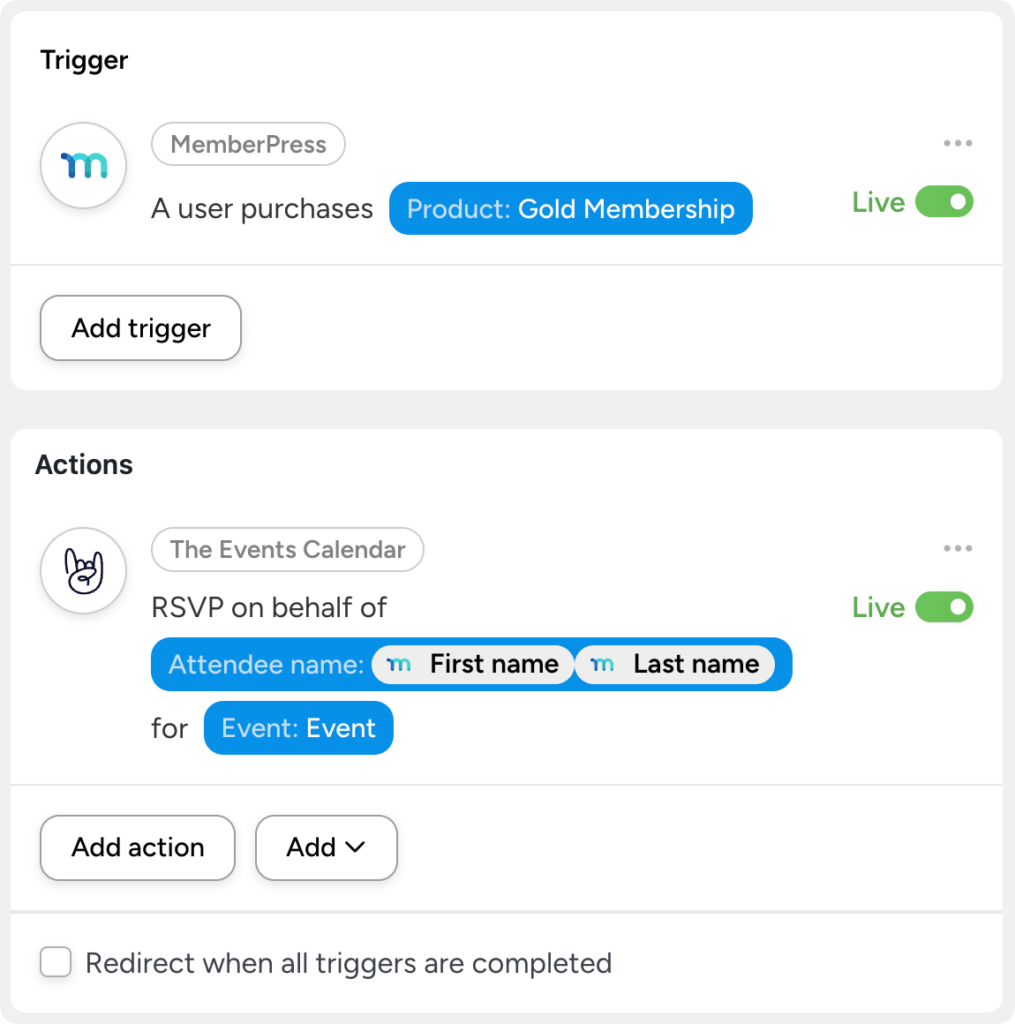
Quando um membro se inscreve em um nível premium, o Automator pode registrá-lo para uma próxima Zoom webinar ou inscrevê-los em um evento mensal recorrente em O calendário de eventos.
Você pode até mesmo registrar membros em massa para novos eventos com uma única automação. E se alguém cancelar a associação, o registro do evento será revogado.
Sequências de integração baseadas em níveis
A forma como você dá as boas-vindas a um membro Básico deve ser diferente da forma como você dá as boas-vindas a um VIP. Uma recepção de tamanho único não comunica que a escolha do nível do membro no checkout é realmente importante.
O Automator pode acionar fluxos de trabalho de integração totalmente distintos para cada nível, de modo que cada novo membro tenha uma primeira experiência personalizada de acordo com o que ele assinou.
Uma inscrição básica pode acionar uma série de e-mails de boas-vindas padrão por meio do seu CRM.
Uma inscrição Pro ou VIP pode acionar uma sequência completamente diferente, que inclua um e-mail de check-in pessoal, um e-mail direto e um e-mail de confirmação. Slack notificação para você (o proprietário do site), ou até mesmo uma mensagem de boas-vindas por SMS via Twilio.
Uma jornada completamente diferente que reflete sua associação.
Como configurar isso
Se os fluxos de trabalho acima parecerem complexos, a configuração real poderá surpreendê-lo.
Primeiro, instale o Uncanny Automator (você pode obter o Automator Lite GRATUITAMENTE sem a necessidade de cartão de crédito, números de telefone ou e-mail).
No painel de administração do WordPress /wp-admin/, navegue até Plugins > Adicionar novo. Na barra de pesquisa, digite “uncanny automator” e clique em Instalar e Ativar.
Dica profissional: Registre sua conta e receba créditos de aplicativos gratuitos para usar integrações de aplicativos como Facebook, LinkedIn, Asana, Zoom, Planilhas Google, Antrópicae muito mais.
Com o Automator instalado, a configuração das “receitas” (ou seja, automações) que abordamos acima é muito simples.
- Crie uma nova receita. Cada receita tem um ou mais acionadores e uma ou mais ações. Defina o acionador como algo como “Um usuário compra um produto de assinatura recorrente” e selecione o nível.
- Adicione suas ações. Escolha entre mais de 200 aplicativos e plug-ins conectados. Adicione o membro a uma lista de CRM, crie um tíquete de suporte, registre-o em um evento, envie uma notificação do Slack, o que quer que o nível exija.
- Repita o procedimento para cada camada. Crie uma receita separada para cada nível de associação, personalizando as ações para corresponder ao que cada nível promete. Alterne cada receita de Draft para Live quando estiver pronto.
É isso aí. Sem código, sem desenvolvimento personalizado, sem unir APIs. A receita é executada automaticamente sempre que o acionador é disparado.
Faça com que cada camada valha a pena
O MemberPress lhe fornece a estrutura: os níveis, as regras de acesso, os preços.
Mas a experiência (a parte que faz com que um membro premium se sinta como um membro premium) acontece em todas as ferramentas que envolvem seu site de associação. Seu CRM. Seu helpdesk. Sua plataforma de eventos. Seus aplicativos de mensagens.
O Uncanny Automator conecta essas ferramentas ao MemberPress para que cada alteração de nível acione as ações certas, nas ferramentas certas, para os membros certos.
Não é necessário nenhum trabalho manual ou código para criar experiências de associação que realmente cumpram o que cada nível promete.
Se você já estiver executando associações em camadas com o MemberPress, adicionar o Automator é a maneira mais rápida de fazer com que essas camadas pareçam significativamente diferentes e de fazer isso em escala, sem adicionar mais trabalho ao seu prato.











 PT
PT  EN
EN  ES
ES  FR
FR  DE
DE 
Adicionar um comentário