


O MemberPress funciona como um sistema completo de gestão de aprendizagem — incluindo cursos, conteúdo liberado gradualmente, questionários e acompanhamento do progresso —, mas você não o encontrará na maioria das listas dos “melhores LMS”. Isso não significa que ele não tenha sido desenvolvido para essa finalidade. É porque o MemberPress se destaca pelo modelo de assinatura, e não como LMS, e os criadores de cursos tendem a descobri-lo indiretamente, primeiro por meio das assinaturas.
Por que você ainda não ouviu falar do MemberPress como um LMS?
Você está comparando Ensinável contra Kajabi contra LearnDash pela terceira vez neste mês, e alguém menciona o MemberPress. “Não é aquele plugin de assinaturas?” É mesmo. Ele também oferece cursos… e muito mais.
Essa lacuna é o cerne da questão. Todas as outras ferramentas dessa categoria basearam seu argumento de venda no fato de serem um LMS e apenas um LMS.
MemberPress é apresentado como uma solução completa, abrangendo cursos, comunidade, treinamento, e de alto nível de detalhe controle de acesso isso dá ao seu negócio de cursos on-line espaço para se expandir para novos territórios sem precisar trocar sua pilha de tecnologias de forma trabalhosa.
Quando você encara a questão dessa forma, o “segredo” não é realmente um segredo. É só que se você estiver procurando apenas por um LMS, talvez você esteja deixando de enxergar o panorama geral e, com isso, uma oportunidade ainda maior.
Por que todos os LMS parecem iguais?
Abra cinco páginas iniciais do LMS e você vai ler as mesmas quatro palavras em uma ordem diferente: cursos, alunos, engajamento, crescimento.
O Teachable, o Kajabi e o LearnDash são todos otimizados para convencê-lo de que são o O LMS, que coloca todos eles no mesmo campo de batalha: funcionalidades, faixas de preço e número de avaliações.
Isso é um problema para você, não para eles. Quando todas as ferramentas se promovem da mesma forma, você deixa de se perguntar “será que essa categoria se encaixa no que estou criando?” e passa a se perguntar “qual delas tem mais avaliações?”.”
Você compara preço com preço e lista de recursos com lista de recursos, mas nunca para para se perguntar se um LMS é realmente o que você precisa, ou se, na verdade, você está criar um negócio de cursos on-line que tenha muito mais a oferecer.
Quais são os sinais de que seu LMS independente já não atende mais às suas necessidades?
A frustração raramente se manifesta como um grande fracasso. Ela se manifesta em alguns momentos específicos em que a ferramenta deixa de se adequar ao negócio que você realmente está administrando.
- Seus alunos acessam um subdomínio do curso que não se parece em nada com o restante do seu site, de modo que a experiência dá a impressão de pertencer à marca de outra pessoa.
- Você tenta adicionar um nível de assinatura, ou um preço especial para uma turma específica, além do seu curso regular, e o configuração de cobrança não dá para chegar tão longe sem uma solução alternativa.
- Você quer uma seção de comentários ou um espaço privado onde os alunos podem conversar entre si, e esse recurso ou não existe de forma alguma ou é vendido como um complemento separado e mais caro.
- Você consegue mais alguns alunos e, de repente, passa para o próximo nível de preços. São exatamente os mesmos recursos, mas por um preço mais alto.
No fim das contas, você acaba usando o Zapier apenas para fazer com que seu LMS, sua ferramenta de e-mail e seu plugin de comunidade se comuniquem entre si.
Nesse ponto, você já não está mais ministrando um curso; está conduzindo um projeto de integração.
Geralmente é nesse ponto que “procurar um LMS” se transforma em “procurar outra coisa”.”
O que o MemberPress realmente oferece aos criadores de cursos?
O curso MemberPress abrange todos os fundamentos de LMS que você esperaria:
- um criador de cursos do tipo arrastar e soltar
- ilimitado aulas
- ilimitado questionários,
- conteúdo de gotejamento
- atribuições
- acompanhamento do progresso
- a livro de notase
- certificados.
Mas, ao contrário de outras soluções de LMS, o MemberPress também oferece:
- Associações
- Controle de acesso com flexibilidade incomparável
- Recorrente assinaturas
- Programas de coaching por meio de CoachKit™
- Downloads
- Comunidade fóruns, bate-papo ao vivo
- Perfis dos membros e diretórios
É uma das poucas ferramentas em que seu curso, sua receita recorrente e sua comunidade tudo em um único painel, em vez de várias assinaturas interligadas com o Zapier e um pouco de sorte.
Veja o que Georgios Mavropalias, cliente da MemberPress, compartilhou recentemente no Trustpilot:
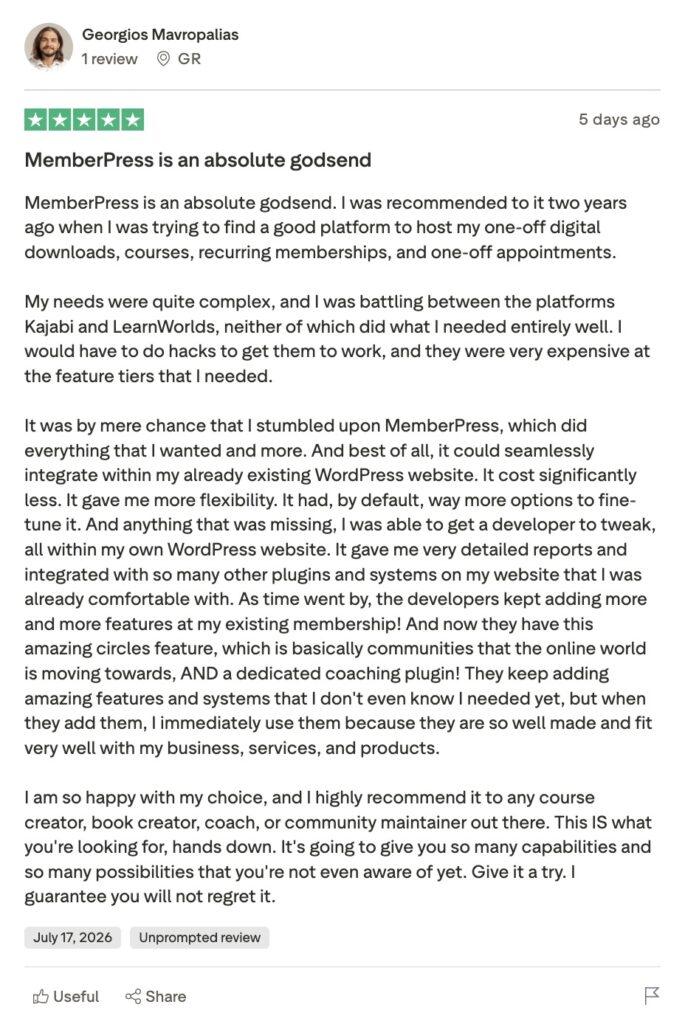
Por que o MemberPress passa despercebido como um LMS?
O MemberPress construiu sua reputação como um plugin de assinaturas já em 2012, e é assim que a maioria das pessoas na internet ainda se refere a ele.
Postagens antigas do blog, backlinks, listas dos “melhores plugins de assinatura”, anos de conteúdo acumulado: tudo isso aponta na mesma direção.
Os mecanismos de busca e as ferramentas de busca baseadas em IA determinam o que é um produto analisando tudo o que já foi escrito sobre ele, e há mais de uma década de conteúdo referindo-se ao MemberPress como um “plug-in de assinatura” para cada vez que é chamado de “LMS”.
Esse desequilíbrio demora a mudar, mesmo com a melhoria dos recursos do curso, e é por isso que o MemberPress não aparece nessas listas dos “melhores LMS”.
Os desenvolvedores e profissionais do WordPress, no entanto, já estão por dentro do segredo. Eles já conheceram as ferramentas do curso, os recursos de orientação, os espaços da comunidade etc., e sabem exatamente do que a plataforma é capaz.
Dentro da comunidade do WordPress, A MemberPress conquistou uma reputação verdadeiramente sólida que continua crescendo a cada vez que um novo recurso é lançado.
A maioria dos criadores de cursos fora desse círculo nunca tem contato com nada disso. Isso não é muito justo, mas se você é um criador de cursos que está conhecendo a gente agora, acho que agora você também faz parte desse círculo!
Como configurar um curso com o MemberPress?
- Escolha um plano com os recursos do curso de que você precisa. A criação de cursos básicos está incluída em todos os planos, mas os questionários e as tarefas exigem os planos “Growth” ou “Scale”, e o livro de notas está disponível apenas no plano “Scale”; portanto, vale a pena conferir a tabela comparativa dos planos antes de comprar.
- Instalar o MemberPress e execute o Assistente de integração. Ele orienta você passo a passo pela ativação da licença, pelas páginas principais e pela configuração de pagamento, e inclui ReadyLaunch™, os modelos de página integrados do MemberPress, para que as páginas do seu curso tenham uma aparência profissional, em vez do visual padrão do WordPress.
- Ativar Cursos do MemberPress e os complementos de que você precisa. Ative os questionários para avaliação, Atribuições para trabalhos escritos ou em arquivos, e Boletim de notas para corrigir tudo em uma única tela.
- Acompanhe o progresso automaticamente. Veja até onde cada aluno chegou e use o Boletim de notas para revisar e dar notas aos questionários e trabalhos enviados pelos alunos sem precisar vasculhar planilhas.
- Incorpore elementos de comunidade e coaching à medida que sua empresa cresce. Adicionar ClubSuite™ para uma comunidade de membros ou CoachKit™ para um programa de coaching, tudo dentro da mesma estrutura MemberPress do seu curso.
Perguntas frequentes
Resumo
- O MemberPress inclui funcionalidade completa do LMS (cursos, conteúdo por etapas, questionários, acompanhamento do progresso), mas se apresenta como um plugin de assinaturas, e não como um LMS.
- Ele não aparece na maioria das listas dos “melhores LMS”, tanto porque as listas elaboradas por pessoas são filtradas com base na marca, quanto porque ferramentas mais específicas, voltadas exclusivamente para LMS, são mais fáceis de serem associadas a essa palavra-chave pelos mecanismos de busca e pela busca por IA.
- Os sinais de que um LMS independente já não atende às necessidades geralmente são sutis e específicos: incompatibilidade com a identidade visual da instituição, falta de flexibilidade no faturamento, ausência de opção de comunidade e aumentos nos preços vinculados ao número de alunos, em vez de a novos benefícios.
- Muitos criadores de cursos conhecem a MemberPress por meio de um desenvolvedor que já confia na plataforma, e não por meio de suas próprias pesquisas sobre LMS.
- A vantagem não está em ter mais recursos. Está em gerenciar cursos, assinaturas, coaching, comunidade e afiliados a partir de um único painel.
Está ficando cada vez mais difícil manter o segredo – cada vez mais criadores de cursos estão descobrindo o MemberPress da mesma forma que você provavelmente o descobriria: por acaso, no meio da configuração, se perguntando por que ninguém mencionou isso antes.
Se esse é o seu caso agora, dê uma olhada em Cursos do MemberPress e ver como é, na prática, controlar tudo a partir de um único lugar.

Obtenha o MemberPress hoje mesmo!
Comece a ser pago pelo conteúdo que você cria.

Se você achou este artigo útil, siga-nos em Facebook, X, Instagrame LinkedIn!











 PT
PT  EN
EN  ES
ES  FR
FR  DE
DE 
Adicionar um comentário