

O ClubConnect™ traz o bate-papo em grupo em tempo real e as mensagens privadas diretamente para o MemberPress, sem a necessidade de aplicativos ou soluções alternativas de terceiros.
Agora, seus membros podem conversar entre si, enviar mensagens ao treinador e se conectar com a comunidade a partir de uma caixa de entrada unificada, incorporada diretamente ao seu site.
Estamos muito animados em apresentar a vocês ClubConnect™, o mais novo add-on da família ClubSuite™. Ele oferece aos seus membros uma experiência completa de mensagens diretamente no MemberPress, integrado às ferramentas que você já utiliza.
Neste guia passo a passo, abordaremos todos os recursos que o ClubConnect™ oferece, mostraremos como ele se integra ao CoachKit™, ao ClubCircles™ e ao ClubDirectory™, e compartilharemos exemplos práticos de como você pode colocá-lo em prática na sua comunidade de associados.
Provavelmente, seus membros já estão conversando por mensagens diretas em aplicativos que você não controla. O ClubConnect™ traz essas conversas para o seu ambiente.
Por que adicionar o Chat?
Acrescentar mensagens em tempo real à sua comunidade é uma decisão óbvia, e aqui estão alguns motivos para isso.
1. Outra dimensão da interação
Existe um tipo de conversa que os tópicos em fóruns não abrangem: a conversa paralela.
Às vezes, um membro lê uma postagem e deseja enviar uma reação rápida a uma pessoa específica, não ao grupo inteiro.
Às vezes, duas pessoas querem fazer um acompanhamento particular de algo que surgiu em um Círculo.
O ClubConnect™ torna isso possível com mensagens diretas individuais, da mesma forma que as mensagens diretas do Instagram ficam ao lado de comentários públicos ou o Facebook Messenger fica ao lado de uma publicação em grupo.
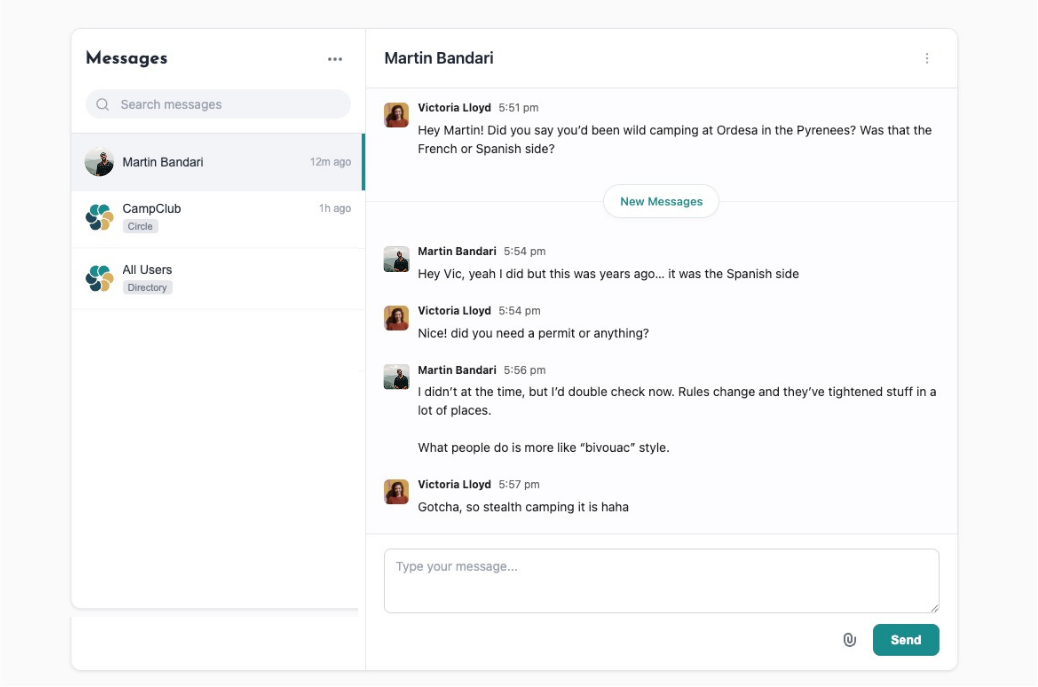
Seus membros recebem as duas camadas: a conversa aberta e o privado.
2. Colabore com o compartilhamento de arquivos
O chat abre todo um leque de interações que as conversas apenas por texto não conseguem realmente oferecer.
Um cliente lhe envia uma mensagem sobre um problema específico e você pode responder diretamente e Insira um PDF, um vídeo explicativo ou um documento na mesma conversa.
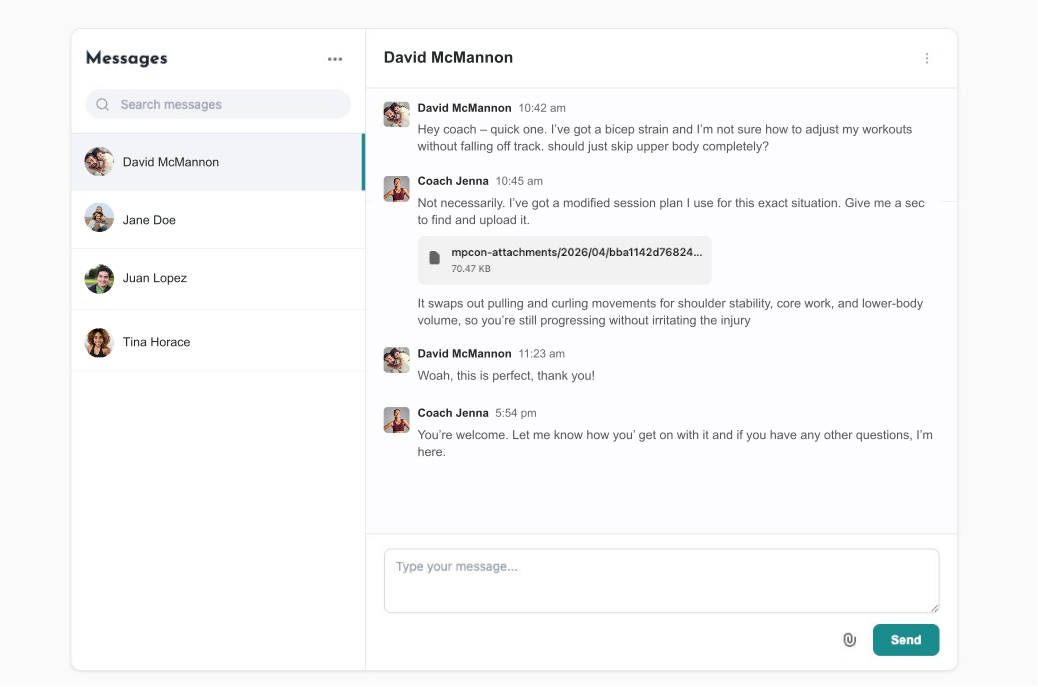
Os alunos que trabalham juntos em uma tarefa podem compartilhar seus rascunhos ou recursos sem sair do seu site.
O ClubConnect™ é compatível com MP3s, MP4s, PDFs e formatos de documentos comuns, com upload de arrastar e soltar integrado.
3. O fator de imediatismo
Há algo no bate-papo em tempo real que simplesmente sente diferente de um fórum.
Postar em um ClubCircle requer um pouco de energia cerebral: você pensa, escreve, edita, posta e espera.
O bate-papo é o oposto: é uma troca de mensagens mais curta e espontânea. Esse menor atrito muda a forma (e a frequência) com que os membros interagem.
Eles aparecem para dizer algo rapidamente, alguém responde e, de repente, surge uma conversa que nem teria começado em um tópico de fórum.
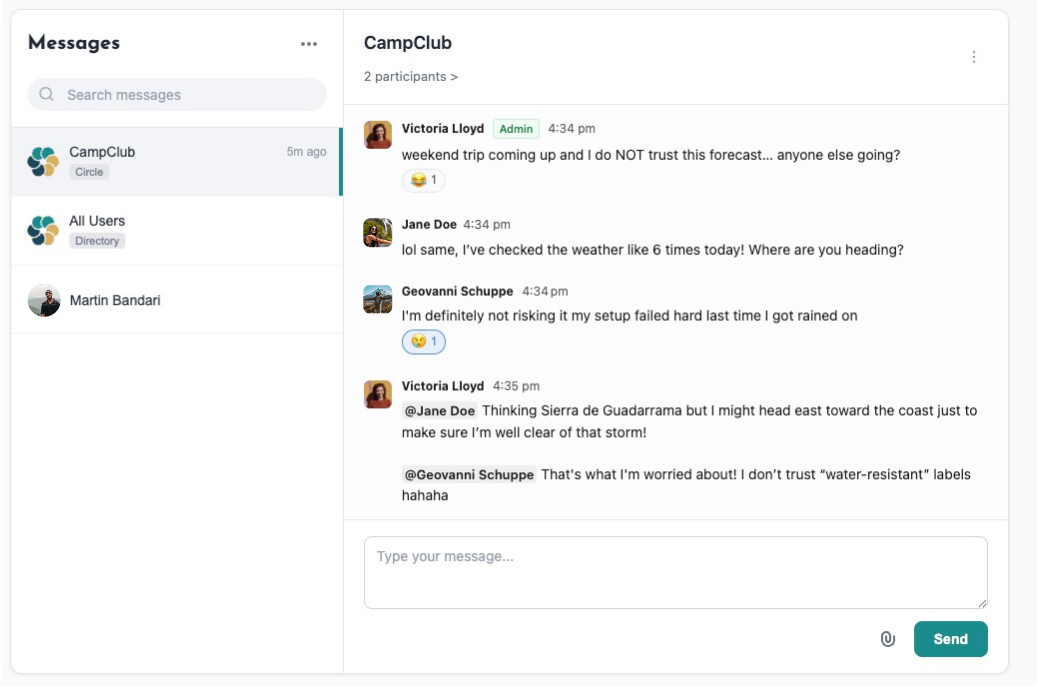
As menções com @ e as reações com emojis mantêm a energia sem exigir que ninguém escreva uma resposta completa. Não há pressão, e as pessoas ficam mais propensas a se envolver.
4. Monetize seus membros mais conectados
Um site de associação em que as pessoas conversam ativamente umas com as outras vale mais, o que significa que você pode cobrar mais por ele.
Use o ClubConnect™ como âncora para um nível premium. Ofereça chat de treinamento em tempo real como um upsell de alto valor. Combine-o com o ClubDirectory™ para que seus membros de nível mais alto possam encontrar e enviar mensagens uns aos outros diretamente.
Tour dos recursos do ClubConnect
1. Salas: Group Conversations That Run Themselves
Quartos são espaços de bate-papo em grupo onde vários membros se comunicam em tempo real. O ClubConnect™ os cria automaticamente com base na estrutura que você já montou.
Criar um novo grupo CoachKit™? Aparece uma sala.
Publicar um novo Círculo? Aparece uma sala.
Adicionar um ClubDirectory™ e ativar a criação automática? Os quartos também aparecem para isso.
Cada sala é identificada com sua origem (“Grupo”, “Círculo” ou “Diretório”), para que os membros sempre saibam em que contexto estão.
Para sites que já estavam em funcionamento antes da instalação do ClubConnect™, há uma opção de um clique Salas de sincronização que cria salas para todos os seus Círculos e Diretórios existentes sem tocar em nenhuma mensagem existente.
2. Mensagens privadas: Um a um, em seu site
Além das Salas de grupo, os membros podem enviar mensagens privadas diretamente um ao outro.
Os membros podem iniciar conversas privadas com qualquer pessoa de um Círculo, Diretório ou Grupo de Coaching do qual façam parte.
Quando acessarem [yoursite.com]/connect/, verão automaticamente todas as salas às quais têm acesso.
Para enviar uma mensagem diretamente a alguém, clique em uma das salas, clique em # Participantes na parte superior da caixa de bate-papo e clique no nome da pessoa com quem você deseja iniciar uma conversa.
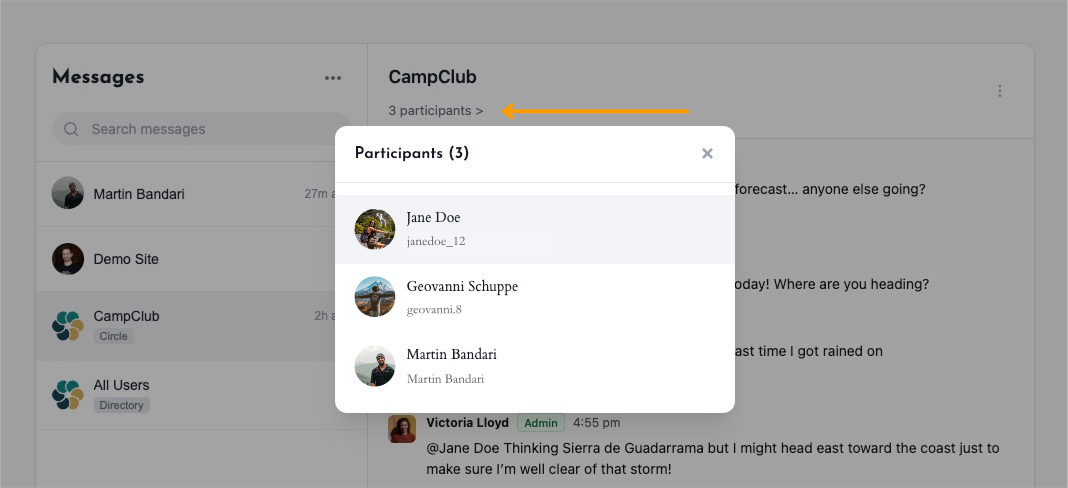
Você controla se as mensagens diretas estão disponíveis em Painel de controle > ClubSuite™ > Configurações > guia Conectar. Se você quiser manter as coisas somente em grupo, desative a configuração e a lista de participantes se tornará somente de visualização.
3. Compartilhamento de arquivos, @menções e reações de emojis
Criamos o ClubConnect™ para oferecer uma experiência interativa rica à sua comunidade. Veja o que você pode fazer na janela de bate-papo, além de enviar mensagens de texto:
- Compartilhamento de arquivos: Anexe MP3s, MP4s, PDFs e formatos de documentos comuns diretamente às mensagens. O upload por arrastar e soltar funciona imediatamente e o tamanho do arquivo é exibido ao lado de cada anexo.
- @ Menções: Marque qualquer participante em uma sala para exibir sua mensagem e enviar uma notificação a ele. Útil para check-ins de treinamento, anúncios da comunidade ou simplesmente para garantir que a pessoa certa veja algo.
- Reações de emojis: Os membros podem reagir às mensagens sem sobrecarregar o tópico com mensagens de resposta.
4. Pesquisa, rótulos e notificações por e-mail
À medida que sua comunidade cresce, encontrar a conversa certa fica mais difícil. O ClubConnect™ inclui um caixa de pesquisa que filtra todas as salas e tópicos de mensagens diretas de uma só vez.
E para os membros que não quiserem verificar o Conectar página constantemente, notificações por e-mail alertá-los sobre novas mensagens.
Você pode configurar quais tipos de notificação estão ativados, editar os modelos de e-mail e enviar e-mails de teste, tudo na mesma tela de configurações.
Como VOCÊ pode usar o ClubConnect™
Esse novo complemento oferece um enorme potencial criativo. Aqui estão algumas sugestões para você começar a pensar em como pode utilizá-lo no seu site.
Criadores e educadores de cursos on-line
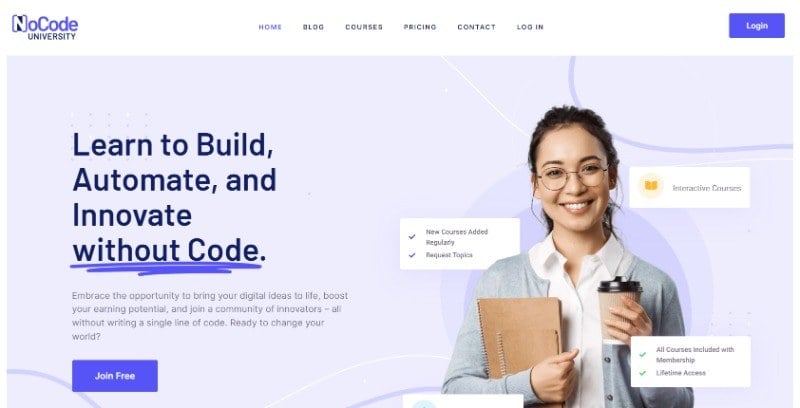
- Crie um círculo ou diretório para cada curso para que seja criada uma sala correspondente e os alunos possam fazer perguntas e compartilhar ganhos em tempo real.
- Use o compartilhamento de arquivos para que os alunos possam enviar amostras de trabalho ou compartilhar recursos entre si.
- Permita que os alunos mencionem os instrutores do curso para obter suporte rápido sem atrasos no fórum.
- Realize seu horário de expediente no Room em vez de no Zoom. Isso reduz a barreira e oferece o mesmo valor. Além disso, a transcrição permanece em sua plataforma.
Associações profissionais e redes do setor

- Crie Círculos para diferentes especializações e, em seguida, ative o ClubConnect™ para que os membros possam bater papo em tempo real dentro de seu grupo de colegas.
- Use o ClubDirectory™ + ClubConnect™ juntos para que os membros possam encontrar e enviar mensagens aos colegas diretamente do diretório.
- Arquive as salas inativas para manter a caixa de entrada limpa e preservar as conversas anteriores.
Comunidades de condicionamento físico e bem-estar
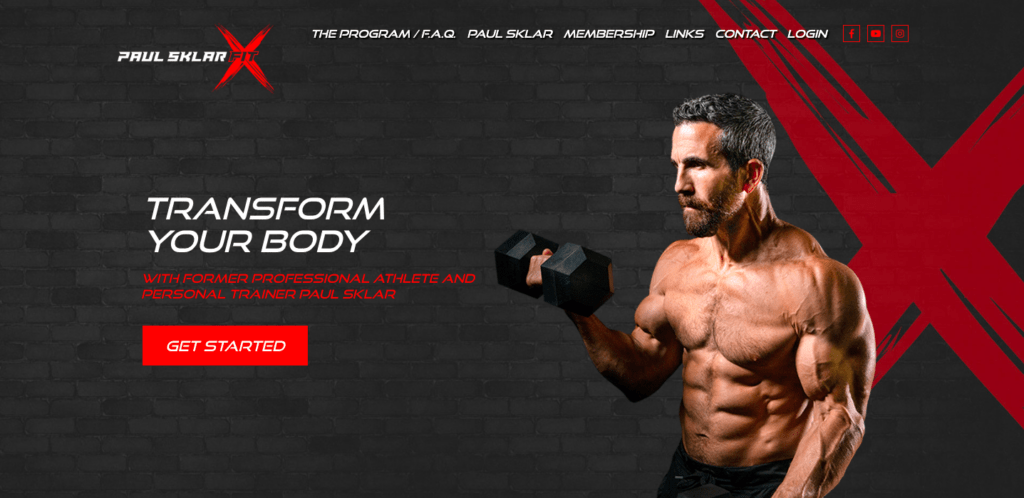
- Crie salas de bate-papo específicas para cada desafio por meio do ClubCircles™ para que os participantes se mantenham responsáveis em tempo real.
- Os treinadores podem enviar mensagens motivacionais com anexos de arquivos (PDFs de exercícios, guias de nutrição) diretamente na sala.
- Ofereça aos seus clientes a possibilidade de entrar em contato com você diretamente por meio de uma mensagem privada para obter orientação especializada ou personalizada.
- Use @ menções para destacar os marcos dos membros para o grupo.
Organizadores de conferências e eventos

- Configure círculos para cada trilha de conferência ou grupo de workshop, com salas que serão ativadas no dia do evento.
- Use a página Connect como um centro de eventos ao vivo, onde os participantes fazem check-in, fazem perguntas e se conectam.
- Arquive as salas após o evento para que o conteúdo seja preservado sem sobrecarregar a caixa de entrada no futuro.
Comunidades de podcasts

- Crie um Círculo e uma Sala conectada para cada programa ou temporada, para que os ouvintes possam discutir os episódios à medida que eles forem sendo lançados.
- Use o Room como um espaço de reação ao vivo no dia do lançamento e, depois, deixe o Circle conduzir a discussão mais longa.
- Compartilhe arquivos de áudio de bônus diretamente no chat como conteúdo exclusivo para membros pagantes.
- Permita que os ouvintes @ mencionem o apresentador com perguntas ou sugestões de tópicos para os próximos episódios.
- Use mensagens privadas para que os superfãs ou possíveis convidados possam entrar em contato com você diretamente, sem passar por e-mail ou mensagens diretas sociais.
Faça seus membros falarem
As melhores comunidades de membros são aquelas em que as pessoas voltam por causa umas das outras. O ClubConnect™ oferece aos seus membros um motivo real para fazerem login e permanecerem: as conversas que lhes interessam estão bem ali, no seu site, e não espalhadas por plataformas que não pertencem a você.
Pronto para levar mensagens em tempo real para seu site de associação? Confira o ClubConnect™ no plano de escala MemberPress.
Configurando o ClubConnect™
Assista ao nosso vídeo tutorial sobre como instalar e configurar mensagens privadas para sua comunidade com o MemberPress ClubConnect™:
A execução do ClubConnect™ leva apenas alguns minutos:
- Certifique-se de que você está na MemberPress Plano de escala.
- Instale e ative o ClubConnect™ no painel de controle de sua conta do MemberPress.
- Navegue até Painel de controle > ClubSuite™ > Configurações > guia Conectar.
- Abaixo de Conectar página, selecione Criação automática de nova página no menu suspenso. Isso cria uma página em [yoursite.com]/connect/ — a central de mensagens unificada dos seus membros.
- Ativar Criação automática de salas para diretórios se você estiver usando o ClubDirectory™.
- Ativar Criação automática de salas para círculos se você estiver usando o ClubCircles™.
- Clique em Opções de atualização para salvar.
Se você tinha Círculos ou Diretórios configurados antes de instalar o ClubConnect™, clique em Salas de sincronização para gerar salas para todos eles de uma só vez.
Para ativar o envio de mensagens em um programa CoachKit™ existente,
- Ir para Painel de controle > MemberPress > Associações
- Editar a associação vinculada ao seu programa de coaching,
- Role para Opções de associação,
- Abra o CoachKit guia,
- Selecione Mensagens no menu suspenso de recursos,
- Clique em Atualização.
Obtenha o MemberPress hoje mesmo!
Comece a ser pago pelo conteúdo que você cria.

Perguntas frequentes sobre o ClubConnect™
Os membros ainda podem usar as salas de grupo; eles apenas não podem iniciar conversas individuais.
Os arquivos são carregados por meio de arrastar e soltar, e cada anexo mostra o tamanho do arquivo em linha. Você pode configurar as permissões de tipo de arquivo e os limites de tamanho de upload na tela de configurações do ClubConnect™.
Como você usará o ClubConnect™ para impulsionar sua comunidade on-line? Compartilhe suas ideias conosco na seção de comentários abaixo!
Se você achou este artigo útil, siga-nos em Facebook, X, Instagrame LinkedIn!











 PT
PT  EN
EN  ES
ES  FR
FR  DE
DE 
Adicionar um comentário