

Si alguna vez has creado un grupo de apoyo, sabrás que surge de una profunda preocupación. Tu objetivo principal es simplemente crear un espacio seguro y centrado para que la gente se conecte.
Durante mucho tiempo, la forma más práctica de hacerlo era a través de un grupo de Facebook o una plataforma social similar. Tenía mucho sentido: era el “botón fácil” para poner en marcha una comunidad. primer paso.
Pero he estado pensando mucho en lo que ocurre cuando esa comunidad crece.
Esas plataformas públicas se han vuelto increíblemente fuerte. Ese espacio seguro que tanto te costó construir ahora se siente desordenado, obligado a competir con anuncios, desplazamientos interminables y discusiones públicas que distraen, a menudo negativas.
Es difícil fomentar la conexión real y la vulnerabilidad en un lugar que parece tan caótico. Y no es culpa tuya; es sólo la naturaleza de esas plataformas. Nunca fueron diseñado para este tipo de apoyo privado y específico.
Aquí es donde quiero sugerir una forma mejor.
¿Y si pudieras coger toda esa energía positiva y trasladarla a un verdadero ¿casa? Un espacio privado, profesional y tranquilo en tu propio sitio de WordPress, donde usted controlar la experiencia de arriba abajo.
Esto es lo que quiero explorar hoy con ustedes. Se trata de un cambio en nuestra forma de pensar sobre la creación de comunidades, y todo ello es posible gracias a una nueva parte totalmente integrada de MemberPress llamada ClubSuite.
Quiero mostrarte cómo ClubSuite puede convertirse en el nuevo corazón de su grupo de apoyo, utilizando su ClubDirectory™ (Directorio de clubes) para ayudar a los miembros a encontrarse y ClubCircles™ y ClubConnect™ para darles ese espacio verdaderamente privado y seguro para hablar.
¿Qué hace que un En línea ¿Grupo de apoyo?
Hablemos rápidamente de lo que es un éxito grupo de apoyo en línea realmente necesita para prosperar.
Según mi experiencia, no se trata de tener un millón de funciones. En realidad se reduce a tres elementos esenciales que son casi imposibles de obtener de esa configuración desordenada en las redes sociales públicas.
- Un espacio verdaderamente privado: Esta es la base absoluta. Sus miembros debe sentirse seguros. Necesitan saber, sin lugar a dudas, que sus conversaciones son 100% privado y protegido.
Esto significa que no hay acceso público, ni indexación en motores de búsqueda, ni algoritmos de minería de datos. Es un entorno seguro “solo para miembros” donde la vulnerabilidad está protegida. - Conexión real y humanan: El apoyo proviene de otros gente, no nombres de usuario anónimos. Un grupo de éxito va más allá de una simple “lista de miembros” anónimos y ofrece a la gente una forma de ver quién más está en la comunidad.
Esto significa tener perfiles de miembros donde la gente pueda compartir quiénes son, encontrar compañeros o buscar socios responsables que “lo entiendan”.” - Debates seguros y centrados: Por último, necesitas un espacio para que se produzca el apoyo real. Un feed único y caótico en el que se mezclen todos los temas no funciona.
Un gran centro de apoyo proporciona organizada, moderado espacios para temas específicos. Esto permite mantener conversaciones positivas y centradas, libres del ruido, los anuncios y la negatividad de la Internet pública.
Un espacio privado, conexión real y debates seguros. Ese es el plan.
El antiguo modelo de utilizar un grupo público en las redes sociales fracasa porque incumple estas tres reglas. En nuevo que estoy a punto de mostrarte, es cómo puedes finalmente construir esto de la manera correcta, justo en tu propio sitio.
Cómo crear un sitio de afiliación para grupos de apoyo
Bien, ahora sabemos qué hace que un grupo de apoyo en línea tenga éxito.
Ahora quiero mostrarte el proceso paso a paso para construir un sitio que cumpla los tres requisitos. Este es el camino práctico para hacer realidad esa visión.
Paso 1: Establecer la base (WordPress + MemberPress)
Aquí es donde construimos el sitio seguro y configuramos el acceso “sólo para miembros”.
Antes de poder crear una comunidad, necesitas una plataforma que te poseer y controlar. Este es el paso más importante para garantizar la privacidad y la seguridad de sus miembros.
Sus cimientos comienzan con WordPress. Es la plataforma más popular y flexible para crear un sitio que pueda crecer con su comunidad.
Por sí sola, una nueva WordPress es público. El cambio crucial se produce al instalar nuestro MemberPress plugin. Es la herramienta que transforma su sitio abierto en una zona segura, privada y “sólo para miembros”.
Una vez instalado MemberPress, ...harás dos cosas simples:
- Crear una “Afiliación": Este es el producto al que se suscribirán sus miembros. Puedes ponerle cualquier nombre, como “Acceso a la comunidad” o “Miembro del grupo de apoyo”. Puedes hacerlo gratuito o cobrar una cuota por él.
- Configurar “Reglas de acceso”: Esta es la parte más importante. Crearás una regla simple que diga: “Sólo las personas que tienen la membresía ‘Acceso comunitario’ pueden ver estas páginas específicas”. Puede aplicar esta regla a sus sitio completo o sólo a las páginas donde vivirá su comunidad.
Con sólo esas dos acciones, habrás creado una fundación segura y privada. El público ya no puede ver tus contenidos protegidos, y tú controlas por completo quién entra.
Ahora que su sitio es seguro, podemos empezar a añadir las características de la comunidad en esa zona protegida.
Paso 2: Crear un directorio privado de socios con ClubDirectory™.
Un grupo de apoyo consiste en conexión. El problema es que en un sitio privado estándar, sus miembros están aislados. No tienen forma de saber quién más está allí con ellos, lo que puede hacer que se sientan tan solos como antes de unirse.
Necesitamos una forma de que se encuentran.
Aquí es donde una herramienta realmente poderosa llamada ClubDirectory™ (Directorio de clubes) llega. Forma parte de un nuevo complemento para MemberPress llamado ClubSuite™, y está diseñado para resolver exactamente este problema.
En términos sencillos, ClubDirectory™ (Directorio de clubes) le permite añadir un directorio de miembros profesional y con función de búsqueda justo dentro del área privada de su sitio.
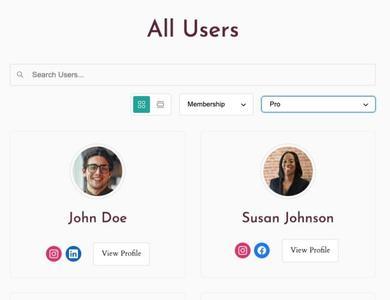
Es como una “guía telefónica” privada e interna para tu comunidad. Para los grupos de apoyo es ideal. Ayuda a los miembros a sentir que forman parte de una comunidad real de personas, no sólo suscriptores de un sitio web.
Esto es lo que te permite hacer:
- Activar los perfiles de los miembros: En lugar de ser sólo una dirección de correo electrónico, los miembros pueden crear sus propios perfiles con una foto, una biografía y otra información. Esto es muy importante para generar confianza y permitir que la gente muestre quiénes son.
- Ayude a los miembros a encontrarse: El directorio permite realizar búsquedas. Se trata de una función práctica y valiosa para sus miembros. Pueden buscar un compañero para rendir cuentas, encontrar a otros miembros en su misma ciudad o ponerse en contacto con alguien que comparta un objetivo concreto.
- Usted mantiene el control total: Lo mejor es que tú, como propietario del sitio, controlas todos los parámetros de privacidad. Tú decides qué información se muestra, quién puede ver el directorio y quién aparece en él.
Al añadir un directorio, has dado a tus miembros una forma segura de conectarse. Ahora que pueden encontrarse entre sí, tenemos que darles un lugar seguro para hable.
Paso 3: Crea grupos de debate seguros con ClubCircles™.
Con un directorio en su lugar, ahora crearemos el directorio actual espacios seguros de conversación mediante foros temáticos moderados.
En el paso 2, hemos ofrecido a los afiliados la posibilidad de encontrar entre sí con ClubDirectory™ (Directorio de clubes). Ahora, tenemos que darles un lugar seguro y organizado para hable entre sí.
Esto nos lleva a la segunda parte del ClubSuite una gran herramienta llamada ClubCircles™.
Está diseñado para crear foros de debate privados, modernos y fáciles de usar. justo dentro su MemberPress sitio.
Es la alternativa perfecta a un único y caótico feed de redes sociales. En lugar de un “muro” gigante en el que se mezclan todos los temas, ClubCircles™ le permite crear múltiple, centrado grupos de debate.
Para un grupo de apoyo, esto es ideal. Por ejemplo, puedes crear fácilmente grupos separados y privados para:
- Un grupo de “Bienvenida y presentaciones”
- Un grupo “Weekly Check-in
- Un grupo “En busca de consejo
- Un grupo “Comparte tus victorias
Aquí es donde cobra vida la idea de “espacio seguro”. Porque estos grupos de debate se construyen por ti en su sitio, ...tienes todo el control.
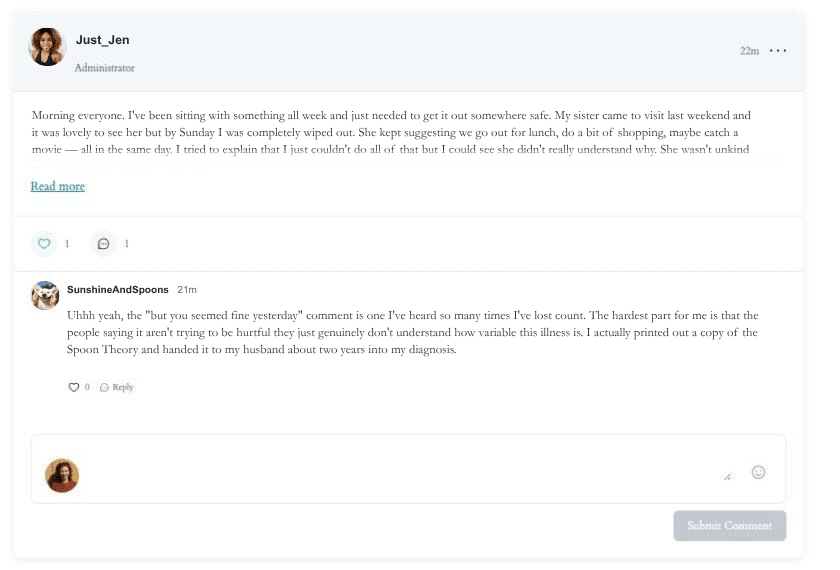
Esto es lo que lo hace tan eficaz para un grupo de apoyo:
- Tú marcas el tono: La herramienta ofrece usted los controles de moderación para guiar la conversación, eliminar los mensajes negativos y mantener un ambiente positivo y de apoyo.
- Es fácil para los afiliados: Está diseñado para ser sencillo e intuitivo. Sus miembros pueden publicar actualizaciones, responder en hilos y seguir temas sin la curva de aprendizaje de un foro complejo de la vieja escuela.
- Es totalmente privado e integrado: Porque ClubCircles™ se ejecuta dentro de su MemberPress todas estas conversaciones están 100% protegidas y sólo son visibles para los usuarios registrados.
Combinando MemberPress (por privacidad), ClubDirectory™ (Directorio de clubes) (para conexión), y ClubCircles™ (para conversar), ya has construido un centro comunitario completo y autónomo.
Paso 4: Conecte a los socios de uno a uno con ClubConnect™.
Hay una capa más de conexión que hace que un grupo de apoyo funcione de verdad: la posibilidad de que dos miembros hablen en privado, sólo entre ellos.
Puede que alguien encuentre un posible compañero de responsabilidad a través del directorio, se sienta inspirado por su publicación en ClubCircles™ y quiera ponerse en contacto directamente.
Sin una forma de hacerlo en privado, esa conexión simplemente... no se produce. O peor aún, se extiende a un canal público al que no pertenece.
Eso es exactamente lo que ClubConnect está diseñado para ello. Es la tercera pieza del complemento ClubSuite™, y añade mensajería privada, uno-a-uno directamente dentro de su sitio MemberPress.
Para un grupo de apoyo, esto es muy importante. He aquí por qué importa:
Mantiene todo en su sitio. Sin esto, los miembros recurren al intercambio de números de teléfono personales o a una aplicación independiente para mantenerse en contacto. Eso rompe el entorno seguro y contenido que te has esforzado en crear. ClubConnect™ mantiene esas conversaciones donde deben estar: dentro de tu comunidad protegida.
Ofrece a los afiliados la propiedad real de sus conexiones. Los foros de grupo son estupendos para compartir apoyo, pero algunas conversaciones son más personales.
Añade una dimensión más espontánea a las interacciones en grupo.. La gente interactúa de forma diferente en los foros que en los chats de grupo. Los mensajes de los foros son más compuestos, generalmente más largos y a menudo editados. Los mensajes son más cortos, se envían en el momento y favorecen más la interacción.
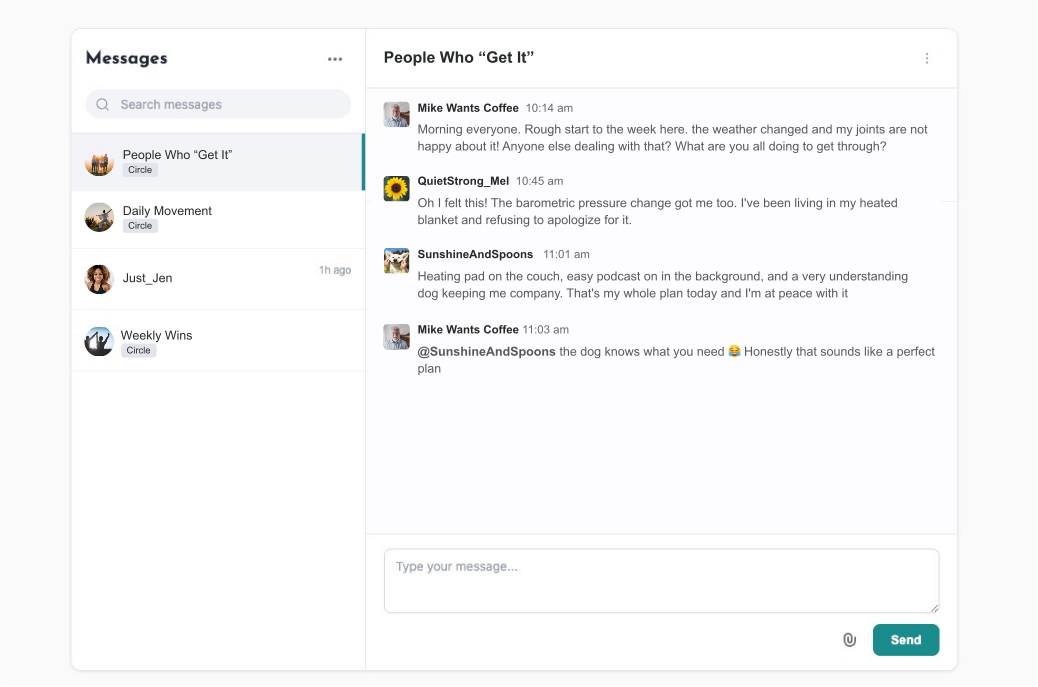
ClubConnect™ ofrece a los socios el espacio para realizar esos intercambios de forma privada, segura y sin salir de tu plataforma.
Con ClubConnect™ en marcha, tu comunidad dispone ahora de una completa gama de opciones de conexión: un directorio para encontrar personas, círculos de grupo para hablar juntos y mensajería privada para profundizar. Es un ecosistema de apoyo completo, todo en un mismo lugar y bajo tu control.
Ahora es el momento de añadir su contenido real y su experiencia a la mezcla.
Paso 5: Añade tu contenido y herramientas de asistencia
Una vez construido el centro de la comunidad, aquí es donde añadirás sin problemas tu biblioteca de recursos, Cursos MemberPresso CoachKit™.
Hasta ahora, hemos creado un centro fantástico y seguro para que sus afiliados se conecten entre sí. Ahora, es el momento de añadir el “valor” fundamental que sólo usted puede proporcionar: su contenido, su orientación y su experiencia.
Así es como su sitio web pasa de ser un simple foro comunitario a convertirse en un completo servicio de asistencia. sistema.
La forma más sencilla de empezar es crear un archivo “Biblioteca de recursos”.” Gracias a la MemberPress Reglas de acceso que establecimos en el Paso 1, esto es fácil. Puede crear cualquier número de páginas privadas con:
- Artículos de apoyo o entradas de blog
- Hojas de trabajo o guías descargables
- Una biblioteca de vídeos útiles
Es una buena base. Pero, ¿y si quieres ofrecer una orientación más estructurada, paso a paso?
Aquí es donde recomiendo encarecidamente un complemento llamado Cursos MemberPress. Es una herramienta creada para trabajar directamente con MemberPress y le permite crear cursos en línea profesionales y fáciles de seguir, con lecciones y seguimiento del progreso.
Para un grupo de apoyo, es una forma perfecta de ofrecer un “Programa de bienvenida de 30 días” o un curso de “Fundamentos de la curación”. Lo mejor es que todo está en el mismo sitio. Sus miembros pueden pasar de un debate en ClubCircles™ a la siguiente lección de su curso sin salir de su sitio.
Por último, muchos grupos de apoyo están dirigidos por un entrenador, mentor o terapeuta. Si planeas ofrecer ayuda individual, necesitarás una forma de gestionarla.
Para ello, recomiendo otra herramienta llamada CoachKit™. También está diseñado para integrarse perfectamente con su MemberPress sitio web. Le ofrece un lugar centralizado para gestionar sus clientes de coaching, establecer hitos, gestionar citas y proporcionar ese apoyo personal y personalizado, todo ello desde su sitio web. WordPress salpicadero.
Así es como se crea un sistema verdaderamente unificado. En lugar de tener un curso en una plataforma, un foro en otra, y coaching en una tercera, todo vive bajo un mismo techo.
Ahora sólo queda preparar la “puerta de entrada” para que la gente se una.
Este es el último paso de nuestro proceso, siguiendo todas sus directrices.
Paso 6: Define tu proceso de afiliación y registro
Bien, esta es la parte más emocionante. Hemos creado la página web privada (Paso 1), hemos añadido las funciones de la comunidad (Pasos 2 y 3) y hemos subido tu valioso contenido (Paso 4).
Ahora, decide cómo quieres que la gente se una.
Todo esto se gestiona desde dentro MemberPress. Empezarás creando tu “Membresía”. Este es el “paquete” o “nivel” al que se apuntará la gente. Para un grupo de apoyo, tienes mucha flexibilidad. Por ejemplo, podría ofrecer:
- Un nivel de “acceso comunitario” gratuito: Esta es una gran opción si tu objetivo principal es crear una gran comunidad de apoyo financiada por otros medios (como donaciones o coaching personalizado).
- Un nivel de pago “All-Access”: Puede tratarse de una suscripción mensual o anual que da a los miembros acceso a todo: el ClubCircles™ debates, la ClubDirectory™ (Directorio de clubes), y su Cursos MemberPress.
- Un modelo “escalonado: Podrías tener un nivel gratuito sólo para los grupos de discusión y un nivel “Premium” que añada tus cursos y CoachKit acceso.
La mejor parte es que una vez que se crea una membresía, MemberPress hace automáticamente el trabajo pesado por usted.
Generará una base de datos segura y privada página de inscripción para esa afiliación. Esta página lo gestiona todo:
- Permite al nuevo miembro crear su nombre de usuario y contraseña.
- Si se trata de una afiliación de pago, recoge de forma segura su información de pago (funciona con Stripe, PayPal, etc.).
- Crea automáticamente su nueva cuenta de usuario.
Todo lo que tienes que hacer es poner un botón “Únete ahora” en tu página de inicio que enlace directamente con esta nueva página de registro. Y ya está.
Tu nuevo, privado y seguro sistema de apoyo está oficialmente abierto.
¿Y si se siente abrumado?
Acabo de guiarte por un montón de pasos. Y si estás mirando esta lista y pensando: “Esto es exactamente lo que quiero, pero estoy no una persona técnica”, quiero que sepas que es completamente normal.
Tu pasión es (¡y debería ser!) dirigir tu grupo de apoyo y ayudar a tus miembros, no preocuparte por plugins, configuraciones y diseño web.
Si es así como te sientes, no dejes que el aspecto técnico te impida construir tu visión.
En MemberPress ofrece un servicio denominado DFY (Hecho para usted). Es literalmente su equipo interno de expertos que han configurado estos tipos exactos de sitios cientos de veces. Ellos pueden manejar todos los pasos que acabo de enumerar - desde la instalación de MemberPress y ClubSuite para configurar sus cursos y afiliaciones.
Lo mejor es que puedes hablarles de tu idea gratis. Puede reserve una consulta gratuita para mostrarles tu visión, hacerles preguntas y pedirles consejo sobre la mejor manera de construirla.
Es una opción realmente útil que te permite construir tu nueva casa comunitaria derecha, para que pueda ahorrarse los quebraderos de cabeza técnicos y dedicarse directamente a lo que mejor sabe hacer.
Dé a su comunidad el hogar que se merece
Cuando empecé a pensar en este tema, volvía una y otra vez a una idea clave: tu grupo de apoyo merece un hogar seguro.
Durante mucho tiempo, hemos tenido que intentar construir estos espacios seguros en plataformas que nunca fueron diseñadas para ser seguras. Hemos estado construyendo nuestras comunidades con herramientas desconectadas, albergando nuestras conversaciones más vulnerables en redes sociales ruidosas, públicas y hostiles.
Es hora de dejar de hacer eso y empezar a utilizar herramientas que funcionen (MemberPress + ClubSuite™).
Con estas herramientas, por fin podrá construirla en un lugar de su propiedad, de forma que proteja y sirva realmente a sus afiliados.
Ahora Tengo curiosidad: ¿qué tipo de grupo de apoyo sueñas con crear? Por favor, comparte tus ideas o cualquier pregunta que tengas en los comentarios de abajo - me encantaría ayudar si puedo.
Si te sientes inspirado y listo para empezar a construir ese verdadero hogar privado para tus socios, el mejor lugar para empezar es explorando MemberPress y el nuevo ClubSuite complementos.
Puede ver todos los características y empezar bien aquí.

Consiga MemberPress hoy mismo
Empieza a cobrar por los contenidos que creas.

Muchas gracias por leernos. No puedo esperar a ver la comunidad que construyes.
Si este artículo le ha resultado útil, síganos en Facebook, X, Instagramy LinkedIn!











 ES
ES  EN
EN  FR
FR  DE
DE  PT
PT 
Hola, sólo bcame aaare de su blog a través de Google, aand encontró que es verdaderamente informativo.
Voy a estar atento a bruselas. I will be grateful
si continúa con esto en el futuro. Mucha gente se beneficiará de su escritura.
¡Salud!
Peculiar artículo, exactamente lo que quería encontrar.