


Ein Mitglied, das seine Mitgliedschaft absichtlich kündigt, nachdem es entschieden hat, dass diese nicht mehr zu ihm passt, und eines, dessen Mitgliedschaft aufgrund einer fehlgeschlagenen Zahlung erlischt, haben etwas gemeinsam: Sie sind keine aktiven Mitglieder mehr.
Um sie jedoch wieder für sich zu gewinnen, sind ganz andere Ansätze erforderlich.
Die Herausforderung besteht darin, herauszufinden, Wer ist gegangen, warum sind sie gegangen und an wen sollten Sie sich als Erstes wenden? ohne stundenlang Abonnementdaten, Transaktionen und Mitgliederdaten durchforsten zu müssen.
Genau hier kann KI helfen.
Mit MemberPress AI Foundation, können Sie einen KI-Assistenten wie Claude Desktop mit Ihrem MemberPress-Standort und Fragen zu Ihren Mitgliedsdaten in verständlicher Sprache stellen. Anstatt mühsam selbst zusammenzusetzen, was passiert ist, können Sie herausfinden, gekündigte Abonnements, untersuchen offene Zahlungsausfälle, und vergleiche das Element Wert und Verlobung.
Und wenn die entsprechenden Berechtigungen aktiviert sind, kann Ihnen die KI auch dabei helfen, auf Ihre Erkenntnisse zu reagieren – von der Erstellung eines Gutscheins zur Kundenrückgewinnung bis hin zur Verwaltung des Abonnements eines wiederkehrenden Mitglieds.
In diesem Leitfaden zeigen wir Ihnen, wie Sie mithilfe von KI die inaktiven Mitglieder identifizieren können, die es wert sind, angesprochen zu werden, wie Sie die möglichen Gründe für ihren Austritt ermitteln und wie Sie sie auf fundierterer Grundlage zurückgewinnen können.
Bevor Sie beginnen: Verbinden Sie Ihren AI-Client mit MemberPress
Um dieser Anleitung zu folgen, benötigen Sie die MemberPress AI Foundation-Erweiterung installiert und aktiviert sein, zusammen mit einem kompatiblen KI-Client – der KI-App, die Sie für die Interaktion mit MemberPress, wie zum Beispiel Claude Desktop.
Wenn Sie Ihre Mitgliederdaten lediglich einsehen und auswerten möchten, Nur Lesen Der Zugriff reicht aus.
Für einige der Aufgaben, die wir später behandeln werden, darunter Gutscheine erstellen Um Abonnements wieder aufzunehmen, müssen Sie folgende Option aktivieren: Voller Zugriff und erteilen Sie die entsprechenden Schreibberechtigungen.
Sie können diese Berechtigungen unter folgendem Menüpunkt verwalten: MemberPress > KI-Einstellungen > MCP-Einstellungen, dann verwenden Sie die MCP-Einrichtungsassistent um Ihren KI-Client zu verbinden. Mit MemberPress können Sie die Verbindung auf die erforderlichen Berechtigungen beschränken.
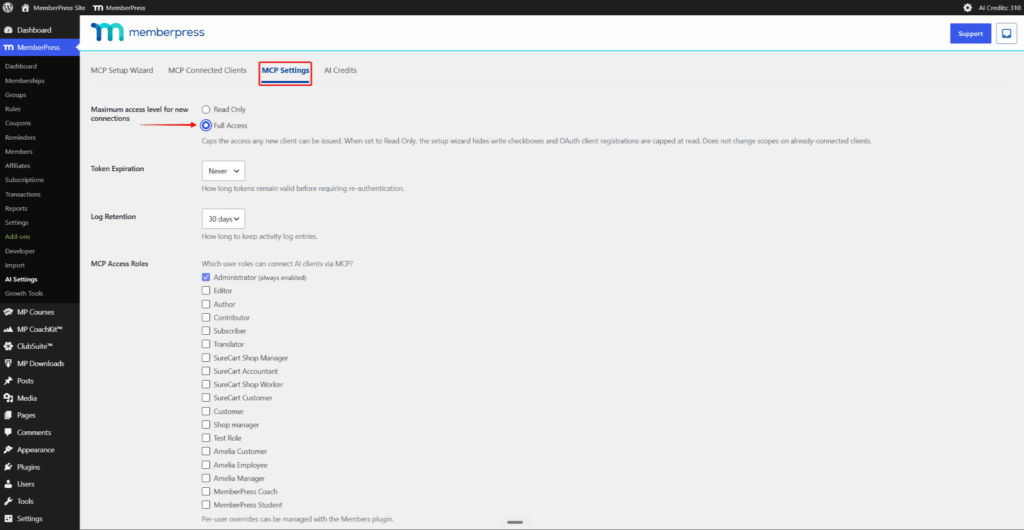
Um den gesamten Verbindungsvorgang durchzuführen, befolgen Sie bitte unsere Schritt-für-Schritt-Anleitung zur Einrichtung von Claude Desktop mit MemberPress.
Schritt 1: Erstellen Sie eine übersichtliche Liste der inaktiven Mitglieder
Legen Sie zunächst fest, wen Sie für Ihre Rückgewinnungskampagne in Betracht ziehen möchten. Wenn Sie alle ehemaligen Mitglieder heranziehen, die Sie jemals hatten, müssten Sie möglicherweise Jahre an Aufzeichnungen durchforsten, die nicht mehr von Nutzen sind.
Ein aktueller Zeitrahmen bietet Ihnen einen besser überschaubaren Ausgangspunkt:
”Listen Sie alle Mitglieder auf, deren Abonnement in den letzten 90 Tagen gekündigt wurde oder abgelaufen ist.“
Ihr KI-Assistent kann in allen Ihren MemberPress-Abonnement- und Transaktionsdaten um Mitglieder zu ermitteln, die den Anforderungen entsprechen.
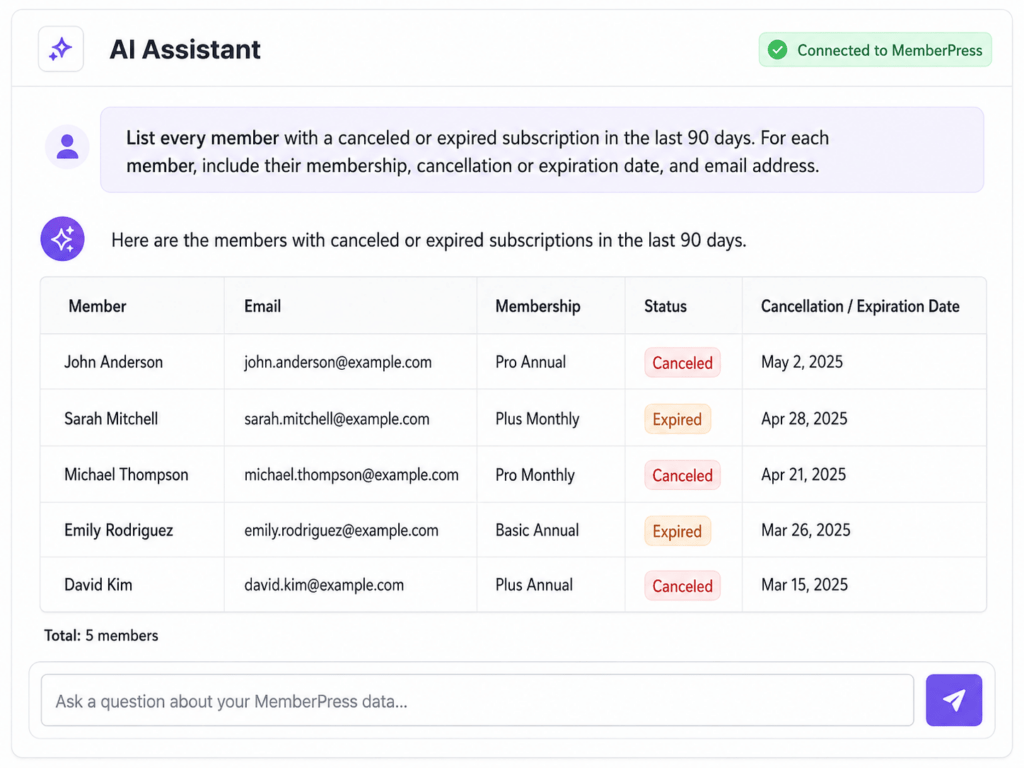
Neunzig Tage sind keine feste Regel. Eine größere Mitglieder-Website könnte bei einer kleineren, zeitlich begrenzten Kampagne mit den letzten 30 Tagen beginnen, während eine Website mit weniger Kündigungen einen Zeitraum von sechs Monaten berücksichtigen könnte.
Sie können auch nach den Angaben fragen, die Sie später benötigen werden:
”Geben Sie für jedes Mitglied das Beitrittsdatum, das Kündigungs- oder Ablaufdatum sowie die E-Mail-Adresse an.“
So erhalten Sie eine überschaubare Liste statt eines umfangreichen Archivs ehemaliger Kunden, die genügend Hintergrundinformationen enthält, um herauszufinden, was mit den einzelnen Konten geschehen ist.
Schritt 2: Freiwillige Stornierungen von fehlgeschlagenen Zahlungen unterscheiden
Trennen Sie anschließend die Mitglieder, die offenbar freiwillig ausgetreten sind, von denen, deren Mitgliedschaft aufgrund eines Zahlungsproblems beendet wurde.
Frage:
”Welche meiner Mitglieder, deren Mitgliedschaft erloschen ist, haben freiwillig gekündigt, und bei welchen ist die Mitgliedschaft aufgrund einer fehlgeschlagenen Zahlung erloschen?“
Konzentrieren Sie sich dann auf offene Zahlungsfragen:
”Zeig mir die fehlgeschlagenen Zahlungen, die nie geklärt wurden.“
AI Foundation kann fehlgeschlagene Transaktionen über einen bestimmten Zeitraum hinweg analysieren und nach Mitgliedschaft oder Zahlungsgateway aufschlüsseln. So können Sie Mitglieder identifizieren, die möglicherweise aufgrund einer fehlgeschlagenen Abrechnung und nicht aus eigenem Wunsch ausgetreten sind.
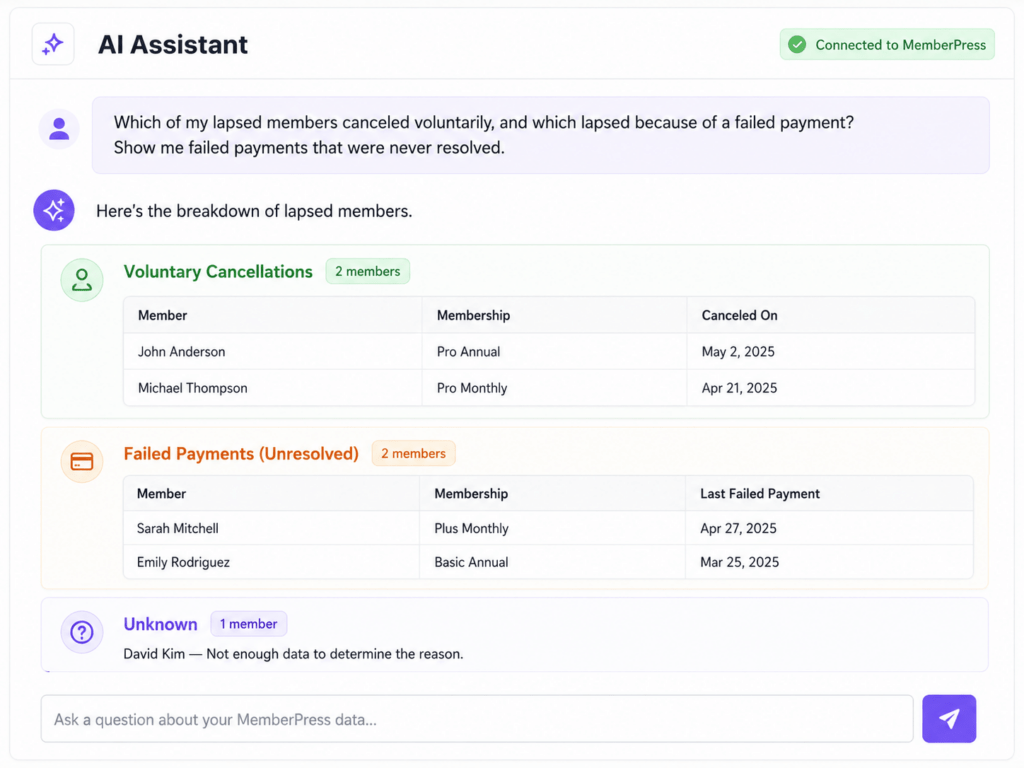
Diese Unterscheidung verändert die Diskussion.
Ein Mitglied mit einer ausstehenden Zahlung benötigt möglicherweise lediglich Hilfe bei der Aktualisierung seiner Zahlungsdaten oder der Wiederaufnahme seines Abonnements. MemberPress ermöglicht es Mitgliedern mit einer überfälligen Zahlung bereits, ihre Zahlungsdaten auf ihrer Kontoseite zu aktualisieren, sofern die entsprechenden Zahlungsmethoden unterstützt werden.
Jemand, der absichtlich abgesagt hat, benötigt eher einen Grund, um seine Entscheidung zu überdenken – beispielsweise ein passenderes Angebot, einen Hinweis darauf, was sich geändert hat, oder eine persönlichere Kontaktaufnahme.
Und wenn aus den verfügbaren Unterlagen der Grund nicht eindeutig hervorgeht, ordnen Sie das Mitglied nicht zwangsweise einer der beiden Kategorien zu. Behalten Sie es in einer unbekannt Gruppe, bis Sie weitere Informationen haben.
Schritt 3: Legen Sie Prioritäten fest, welche Mitglieder am ehesten zurückgewonnen werden sollten
Wenn Ihre Liste noch recht lang ist, nutzen Sie die MemberPress-Daten, um zu entscheiden, wem Sie zuerst Ihre Aufmerksamkeit widmen sollten.
Beginnen Sie mit den Mitgliedern, die die beste finanzielle Bilanz vorweisen konnten:
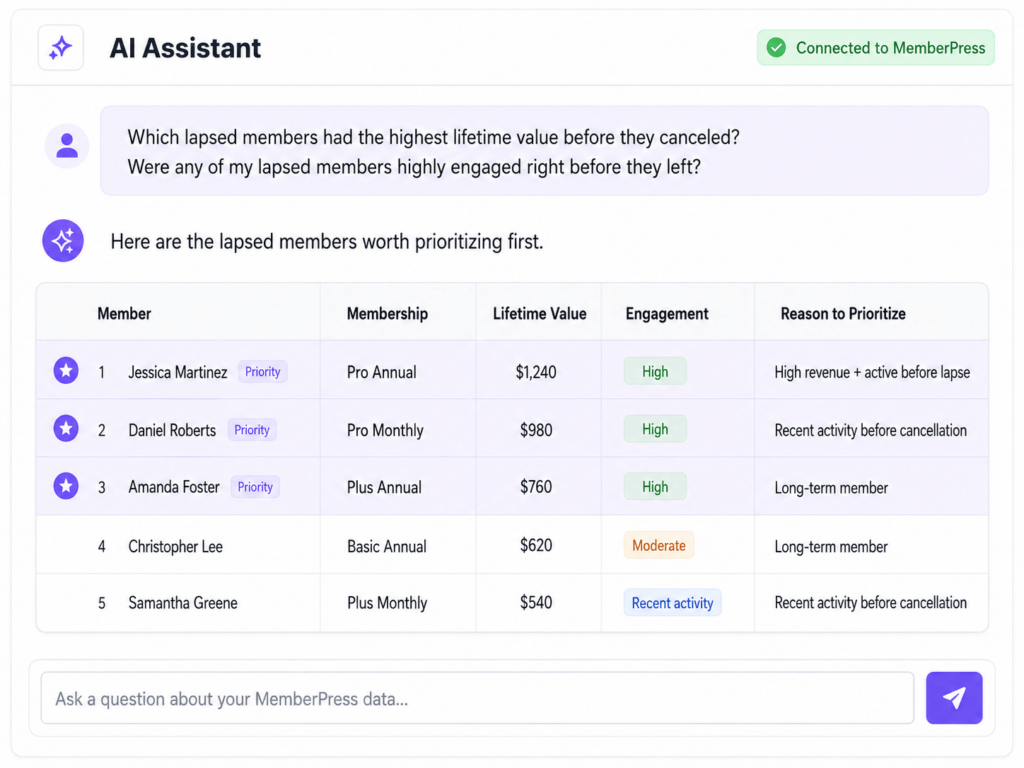
”Welche ehemaligen Mitglieder hatten vor ihrer Kündigung den höchsten Lifetime Value?“
Für einen Vergleich auf Mitglieder-Ebene kann Ihr KI-Assistent den Transaktionsverlauf überprüfen, um festzustellen, wer vor seinem Austritt den höchsten Umsatz generiert hat.
MemberPress umfasst auch eine Lifetime-Value-Analyse, bei der der Wert und die Laufzeit eines Abonnements nach Mitgliedschaft geschätzt werden.
Sie können auch über den Umsatz hinausblicken:
”Gab es unter meinen ehemaligen Mitgliedern welche, die kurz vor ihrem Austritt besonders aktiv waren?“
Die Engagement-Analyse von MemberPress kann Signale wie Transaktionshäufigkeit, Abonnementstatus und aktuelle Aktivitäten untersuchen.
Das kann dir einen weiteren Anhaltspunkt dafür geben, worauf du dich konzentrieren solltest – vor allem, wenn jemand kurz vor Ablauf seiner Mitgliedschaft noch aktiv war.
Prüfen Sie dann, ob sich die Kündigungen auf Personen konzentrieren, die etwa zur gleichen Zeit beigetreten sind:
”Gruppiere meine Kündigungen nach Anmeldemonat. Welche Kohorte hat die meisten Mitglieder, deren Mitgliedschaft abgelaufen ist?“
Bei der Kohortenanalyse werden die Mitglieder nach dem Monat ihrer Anmeldung in Gruppen eingeteilt, und die Kundenbindung, die Kündigungen sowie die Umsätze dieser Gruppen werden miteinander verglichen.
Diese Signale sind keine Garantie dafür, dass jemand zurückkommt. Sie helfen Ihnen lediglich dabei, Ihre Zeit und Ihr Budget für die Rückgewinnung so einzusetzen, dass Sie in Fällen, in denen es einen triftigeren Grund gibt, den ersten Schritt zu machen, gezielt vorgehen können.
Auf dieser Grundlage können Sie entscheiden, welche Art von Angebot oder Kontaktaufnahme für die jeweilige Gruppe sinnvoll ist.
Schritt 4: Wählen Sie die richtige Vorgehensweise, um die einzelnen Gruppen zurückzuholen
Nun können Sie das Gelernte nutzen, um zu entscheiden, wie Sie auf die jeweilige Gruppe zugehen möchten. Ein Rabatt mag bei einigen ehemaligen Mitgliedern wirken, löst aber nicht alle Gründe, aus denen eine Mitgliedschaft beendet wurde.
Zum Beispiel:
- Ungeklärte Zahlungsausfälle: Konzentrieren Sie sich darauf, dem Mitglied dabei zu helfen, seine Zahlungsdaten zu korrigieren oder sein Abonnement wieder zu aktivieren.
- Stornierungen aus preislichen Gründen: Sollte sich aus dem Feedback ergeben, dass die Kosten das Problem waren, könnte ein Rabatt bei Vertragsverlängerung ihnen einen Grund geben, es sich noch einmal zu überlegen.
- Ehemals aktive oder besonders wertvolle Mitglieder: Eine persönlichere Ansprache könnte angebracht sein, insbesondere wenn Sie etwas Relevantes mitzuteilen haben, wie beispielsweise neue Inhalte, Vorteile oder Verbesserungen, die seit ihrem Austritt vorgenommen wurden.
- Mitglieder, die ausgetreten sind, bevor sie wirklich davon profitieren konnten: Eine Verlängerung der Probezeit oder eine kurze Verlängerung des Zugangs könnte ihnen eine weitere Chance bieten, die Mitgliedschaft kennenzulernen.
Achten Sie darauf, Kontodaten nicht als Beweis für die Motivation einer Person zu werten. Ein Kündigungsdatum, die Zahlungshistorie oder eine kurze Abonnementlaufzeit können Ihnen zwar nützliche Hintergrundinformationen liefern, sagen aber nicht unbedingt etwas darüber aus, warum das Mitglied gekündigt hat.
Wenn Sie Feedback zu Stornierungen sammeln, nutzen Sie dieses zusammen mit den von Ihnen erhobenen MemberPress-Daten. Und wenn Sie weitere Ideen für die Kampagne selbst benötigen, lesen Sie unseren Leitfaden zu ehemalige Mitglieder zurückgewinnen.
Wenn Sie einen Ansatz im Sinn haben, können Sie von der Entscheidung, was Sie anbieten möchten, zur Umsetzung übergehen.
Schritt 5: Setzen Sie Ihren Plan zur Kundenrückgewinnung um
Sobald Sie sich für den richtigen Ansatz entschieden haben, kann Ihr KI-Assistent Sie bei einigen der MemberPress-Aufgaben unterstützen, die mit der Rückgewinnung eines Mitglieds verbunden sind.
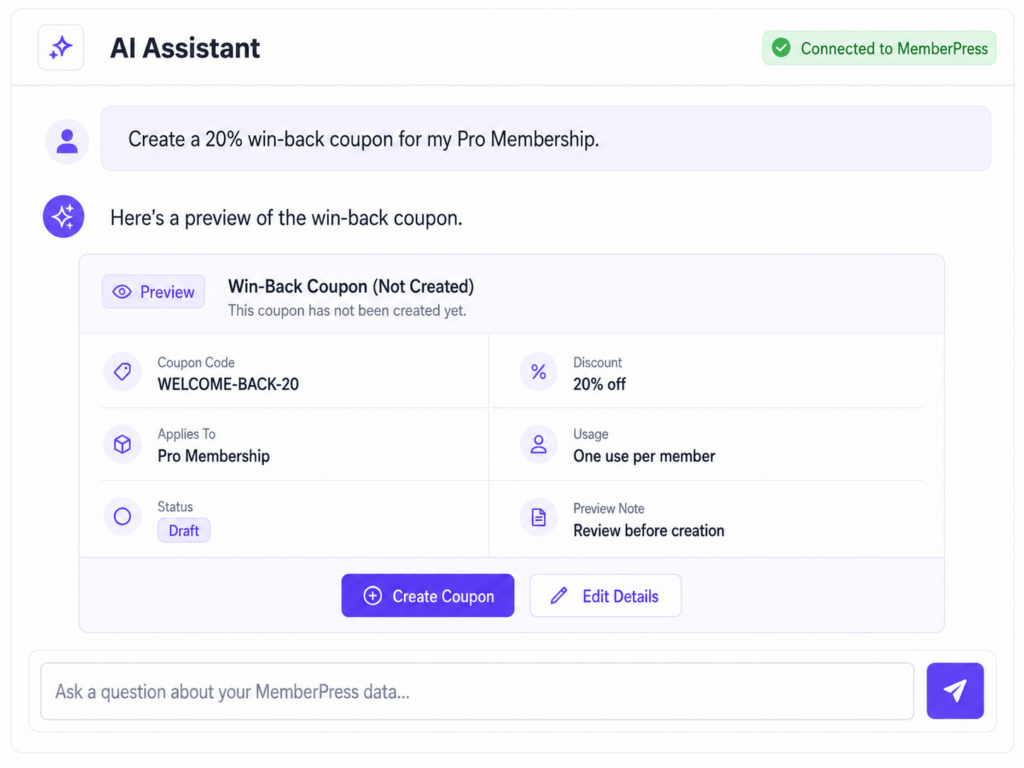
Wenn Sie beispielsweise einen Rabatt anbieten, versuchen Sie Folgendes:
”Erstellen Sie einen 20%-Gutschein zur Kundenrückgewinnung für meine Pro-Mitgliedschaft.“
Sie können den Rabattbetrag und die Mitgliedschaft, für die er gelten soll, festlegen, anstatt einen allgemeinen Gutschein zu erstellen, den Sie anschließend noch anpassen müssen.
An jemanden, der bereit ist, zurückzukehren, kannst du auch fragen:
”Das Abonnement dieses Mitglieds wieder aufnehmen.“
Die Wiederaufnahme eines Abonnements wird anders behandelt als dessen Kündigung oder Aussetzung, da dabei eine zuvor vorgenommene Änderung rückgängig gemacht wird. Das bedeutet, dass sie ohne den zusätzlichen Bestätigungsschritt durchgeführt werden kann, der bei endgültigen Vorgängen erforderlich ist.
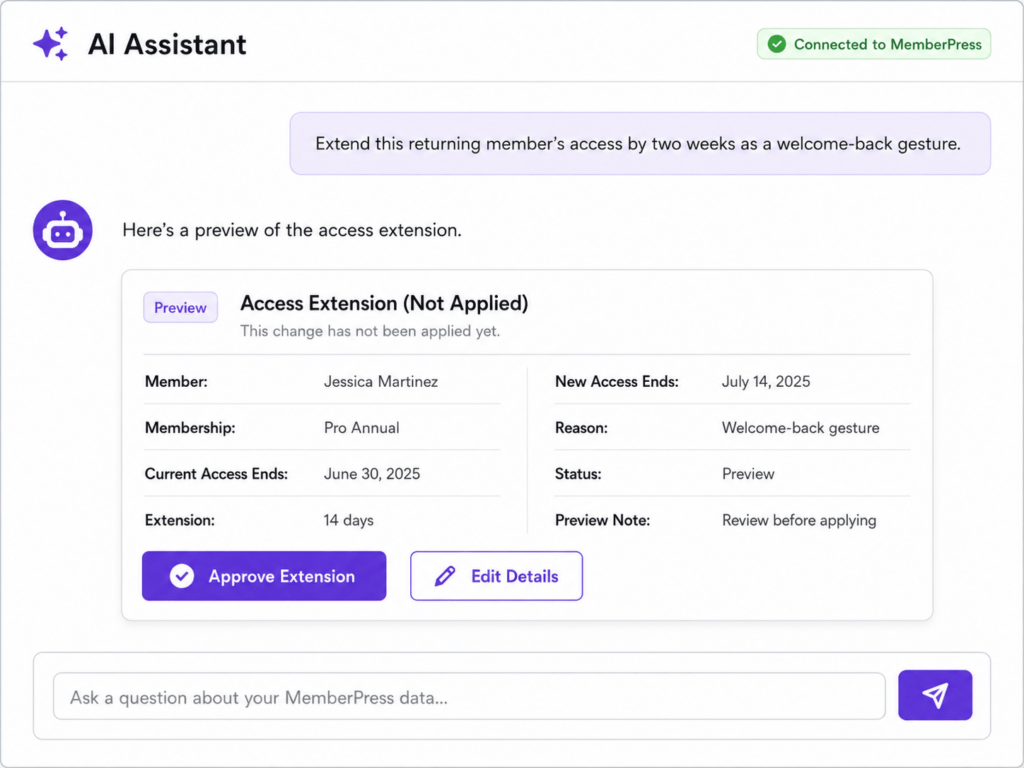
Vielleicht möchten Sie einem wiederkehrenden Mitglied auch ein wenig mehr Zeit als Anreiz einräumen:
”Verlängern Sie die Zugangsberechtigung dieses zurückkehrenden Mitglieds um zwei Wochen als Willkommensgeste.“
In diesem Fall wird die vorgeschlagene Änderung zunächst in einer Vorschau angezeigt, damit Sie sie vor der Genehmigung überprüfen können.
Sie behalten die Kontrolle über Änderungen
AI Foundation gewährt einem verbundenen Assistenten keine uneingeschränkte Freiheit, Ihre Website zu bearbeiten. Schreibrechte werden separat erteilt, und Änderungen werden vor ihrer Umsetzung in einer Vorschau angezeigt.
Für sensiblere Vorgänge wie Stornierungen und Rückerstattungen gelten zusätzliche Bestätigungsanforderungen. MemberPress bietet Administratoren zudem die Möglichkeit, destruktive Schreibvorgänge bei Bedarf auszusetzen.
Weitere Informationen zu diesen Schutzmaßnahmen finden Sie in der Sicherheitsmaßnahmen der AI Foundation.
So können Sie Routineaufgaben im Bereich der Kundenrückgewinnung bequem über Ihren KI-Assistenten abwickeln und behalten gleichzeitig die Kontrolle darüber, was sich auf Ihrer Website tatsächlich ändert.
Schritt 6: Nutzen Sie das Gelernte, um die zukünftige Abwanderungsrate zu senken
Die Erkenntnisse, die Sie im Rahmen einer Rückgewinnungskampagne gewinnen, können auch auf Bereiche Ihrer Mitgliederbasis hinweisen, die einer genaueren Betrachtung bedürfen.
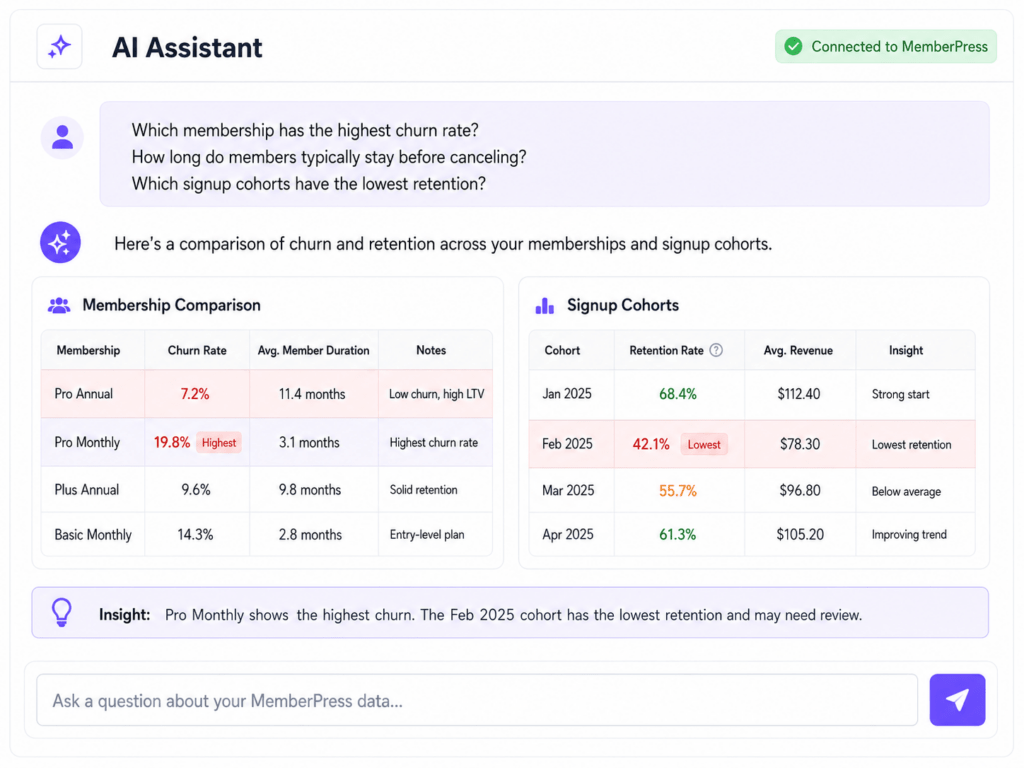
Stellen Sie allgemeinere Fragen wie zum Beispiel:
”Welche Mitgliedschaftsart weist die höchste Abwanderungsrate auf?“
”Wie lange bleiben Mitglieder in der Regel, bevor sie kündigen?“
”Welche Anmeldegruppen weisen die geringste Kundenbindung auf?“
Mit den Berichtstools von AI Foundation lassen sich die Kündigungsraten verschiedener Mitgliedschaften vergleichen, die durchschnittliche Zeit bis zur Kündigung berechnen sowie die Kundenbindung und der Umsatz nach Anmeldekohorten anzeigen.
Angenommen, ein Verein verliert in den ersten Monaten regelmäßig Mitglieder.
Damit haben Sie einen konkreten Ansatzpunkt für Ihre Untersuchung: Weckt das Onboarding-Erlebnis die richtigen Erwartungen? Erhalten die Mitglieder schnell genug Zugang zu den Inhalten oder Vorteilen, für die sie sich angemeldet haben?
Oder Sie stellen vielleicht fest, dass eine bestimmte Anmeldegruppe deutlich besser gebunden ist als eine andere. Ein Vergleich der Veränderungen zwischen diesen Zeiträumen – von Ihrem Angebot über das Onboarding bis hin zur Kommunikation mit den Mitgliedern – könnte Ihnen dabei helfen, etwas zu identifizieren, das es wert ist, erneut getestet zu werden.
Behandeln Sie diese Ergebnisse als Hinweise, keine Schlussfolgerungen. Die Daten können Ihnen zwar zeigen, wo sich etwas geändert hat, erklären aber nicht immer, warum.
Sollten die Zahlen auf ein umfassenderes Problem bei der Mitarbeiterbindung hindeuten, finden Sie in unserem Leitfaden zu Strategien zur Mitgliederbindung kann Ihnen dabei helfen, zu entscheiden, was Sie als Nächstes verbessern sollten.
Das Ziel ist es, am Ende der Kampagne mehr als nur eine Liste mit Ansprechpartnern zu haben: Sie sollten auch eine bessere Vorstellung davon haben, wo künftige Kündigungen möglicherweise verhindert werden können.
Jeden Versuch zur Kundenrückgewinnung fundierter gestalten
Es gibt keine Garantie dafür, dass man ein inaktives Mitglied zurückgewinnen kann. Aber man kann fundiertere Entscheidungen darüber treffen, wen man kontaktieren sollte, was man anbieten sollte und wann es sich lohnt, es zu versuchen.
Das ist der eigentliche Vorteil des Einsatzes von KI in Verbindung mit MemberPress: Anstatt jedes ehemalige Mitglied als einen weiteren Namen auf derselben E-Mail-Liste zu betrachten, können Sie auf die Informationen zurückgreifen, die in Ihrem Mitgliedergeschäft bereits vorhanden sind, und entsprechend reagieren.
Und wenn jemand bereit ist, zurückzukehren, haben Sie bereits die Vorarbeit geleistet, um ihm den nächsten Schritt zu erleichtern.
Bist du bereit, es auszuprobieren? Erfahren Sie mehr über die MemberPress AI Foundation und verbinden Sie Ihren bevorzugten KI-Client mit MemberPress.
Wenn Sie Ihren MemberPress-Daten eine Frage zu Ihren ehemaligen Mitgliedern stellen könnten, wie würde diese lauten? Teilen Sie uns dies in den Kommentaren mit.
Wenn Sie diesen Artikel hilfreich fanden, folgen Sie uns auf Facebook, X, Instagramund LinkedIn!











 DE
DE  EN
EN  ES
ES  FR
FR  PT
PT 
Einen Kommentar hinzufügen