


Stop losing your site engagement to social media. Learn how to easily add a forum to your WordPress site in 4 steps and boost member retention.
I’m an avid comments-section snooper. I realized just how deep the habit went the other day while watching the news live on TV.
I felt a genuine flash of frustration that there wasn’t a comment section or a Reddit thread to jump into yet.
And I know I’m not alone.
Social media has made “second screening” a ubiquitous habit. No matter what content we’re consuming, we have an innate urge to check in, see what others are saying, and share the experience in real-time.
So, what does this mean for your WordPress site?
If you don’t have a dedicated community space, you’re likely facing one of two scenarios:
- You’re missing out on engagement entirely.
- You’re losing the conversation to external social media sites.
Forums give your visitors a home base to build a community around your content.
They invite “lurkers” to join your membership so they can finally contribute, deepening their connection to your brand and significantly reducing churn by giving them a reason to stay.
For online courses and coaching sites, it fosters peer engagement, encouragement, and networking – all of which help your students and clients stick with your material.
That means higher course completion and better coaching success rates (yay!)
Hello, MemberPress ClubCircles™
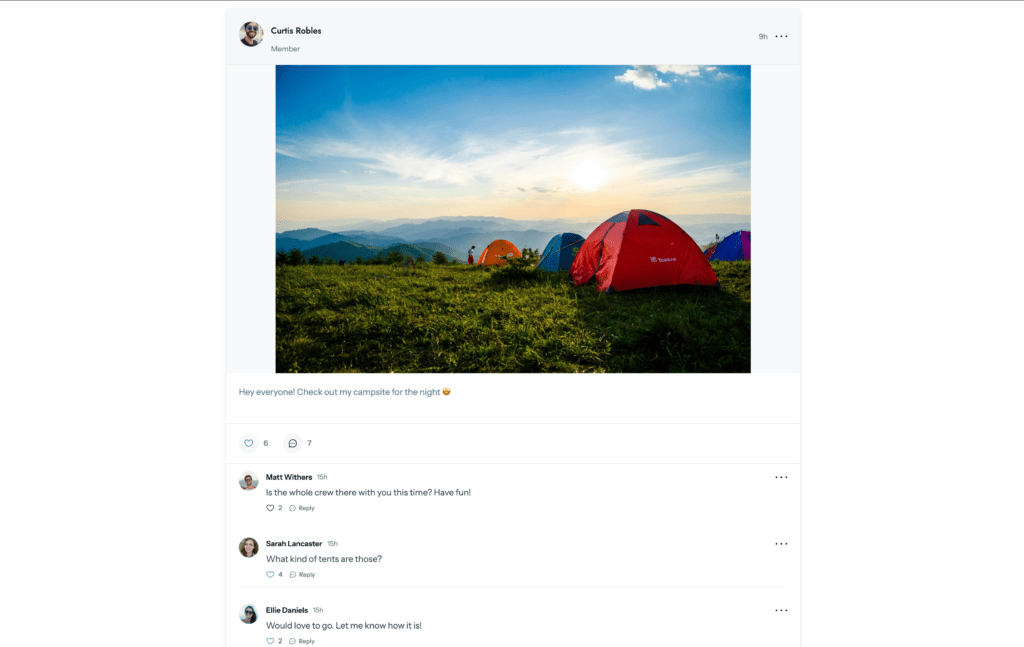
When Blair announced that forums were coming to the platform, I was stoked for our users.
ClubCircles™ is the native MemberPress forum solution. Since communities and memberships go hand-in-hand, you can now create both within a single plugin, finally ditching those clunky, third-party “patchwork” solutions.
I’ll bet it’s easier than you think to set up, and I’m going to show you exactly how to do it!
Why Use MemberPress ClubCircles™?
Before ClubCircles™ arrived, our go-to recommendation was to use bbPress and bridge it to your memberships. It worked, but it always felt like a “workaround.” Here is why ClubCircles™ is a total upgrade:
1. Native Access Restrictions
With third-party plugins, you often have to play middleman, manually mapping specific forum boards to your membership rules. One wrong setting and your private “VIP” board could accidentally go public.
Because ClubCircles™ is native, it “talks” to the MemberPress engine automatically. It recognizes exactly who your members are and what they’ve paid for.
Whether you want to open a forum to everyone or gate it behind a specific high-tier membership, it’s all handled in one place with zero patchwork required.
2. Create as Many Circles as You Need
One of my favorite things about ClubCircles™ is that it doesn’t box you in. You can create unlimited discussion forums (which we call “Circles”).
Want a hidden “Inner Circle” just for your top-tier coaching clients? You can do that too. You never have to worry about hitting a ceiling or paying extra as your community expands.
Need a general “Watercooler” circle for everyone? Easy.
Want 10 different “Study Groups” for 10 different online courses? Go for it.
3. Connected Communities – Forums & Profiles
ClubCircles™ is part of ClubSuite™, which is basically a “community-in-a-box” for your site:
- ClubDirectory™ creates the “Yellow Pages” of your community (profiles and member listings).
- ClubCircles™ creates the “Town Square” (the actual discussion boards).
Because they are part of the same suite, they work in perfect harmony.
When a member joins a Circle, their profile is already there. Other members can simply click a profile to see who they’re talking to and connect.
Building this kind of professional networking hub used to require three or four separate plugins that often clashed; now, it’s an all in one experience.
4. Effortless Monetization
Monetization is our #1 mission at MemberPress. We want to make it as easy as possible for you to turn engagement into income. ClubCircles™ makes upselling look like a natural part of the user experience.
For example, you can set your community so that a “Lurker” can see the enticing forum titles, but they have to click a “Join Membership” button to actually participate.
It’s a massive conversion tool that turns curiosity into sales, and it’s far less clunky than trying to set up “teaser” content with external forum tools.
5. Lower Maintenance & “Update Anxiety”
Every time WordPress releases an update, you used to have to cross your fingers that your theme, your membership plugin, and your forum plugin all stayed compatible.
By moving to a native MemberPress solution, you essentially slash your “things that might break” list in half. You get a unified, professional look that stays stable with every update.
4 Steps to Adding a Forum to Your WordPress Site
So now the reason we’re all here. How do you add a forum to your WordPress site?
1. Get MemberPress
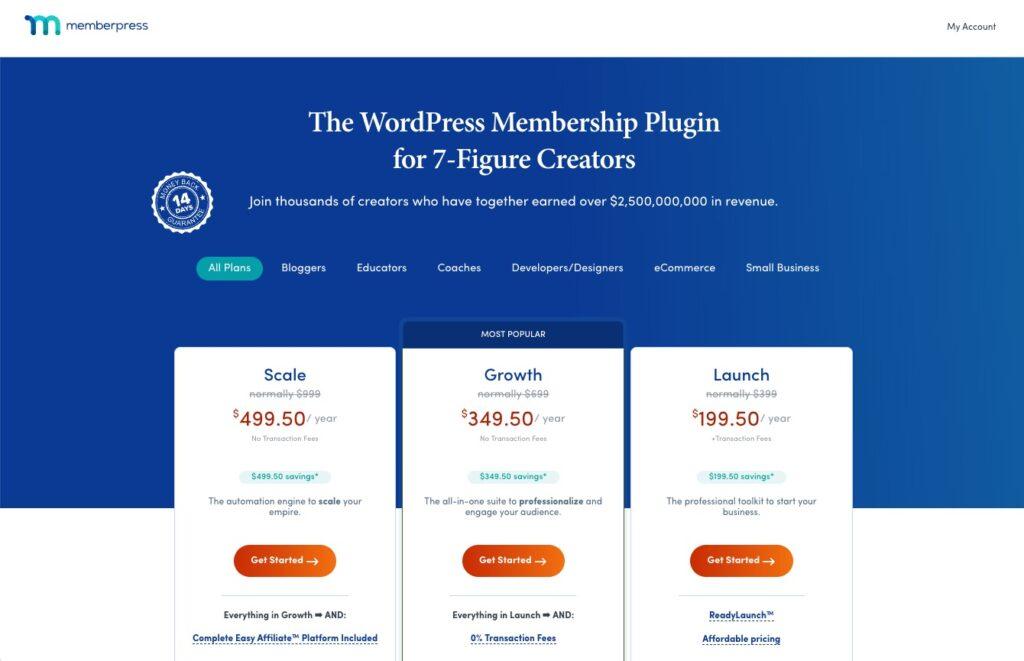
Choose a plan that offers ClubCircles™ – our most popular “Growth” plan, for example.
While you’re at it, check out all the other monetization avenues you get with MemberPress! You might decide, for example, to migrate your LMS or coaching program over to MemberPress and consolidate your plugins even further.
Then follow the steps to activate your license and set up your first membership.
2. Activate ClubSuite™ Add-ons
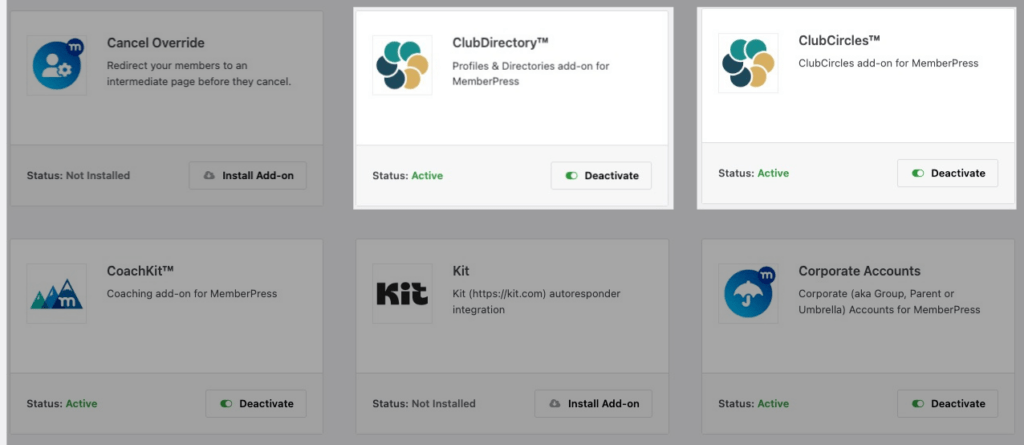
Once you’ve downloaded and configured MemberPress, go to MemberPress > Add-ons and search for ClubDirectory™ and ClubCircles™ and hit the toggle to activate them.
Note: ClubDirectory™ is what powers profiles and directories, which you’ll need so that members can post on Circles.
Once it’s active, a new “ClubSuite™” menu appears in your WordPress dashboard.
3. Create the First Circle
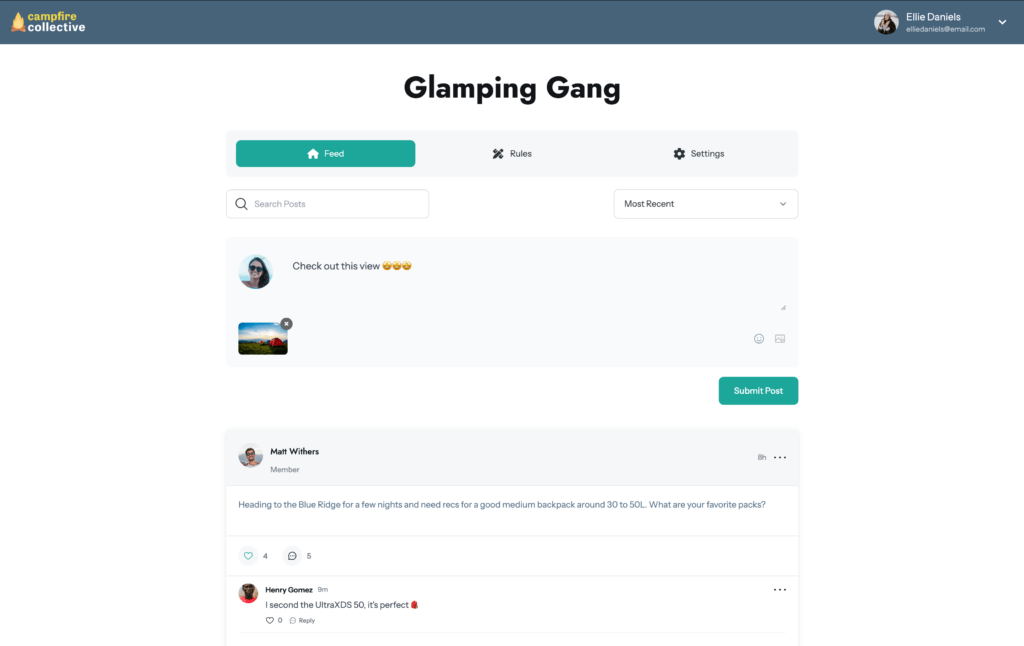
From your WordPress dashboard, head to MemberPress > ClubSuite™ > Circles > and click on Add New. Give the forum a title – something like “VIP Mastermind” or “General Discussion” – and add a quick description.
You can also add a featured image and thumbnail image for your Circle in the Settings Sidebar.
And with MemberPress’s ReadyLaunch™ page styling, your “Circles” page (the name for a community group in MemberPress) will be automatically styled with your brand logo and colors.
4. Publish
Hit Publish, and the discussion area is live!
And that’s it!
How To Restrict Access to Your Forums
The beauty of using MemberPress for your forums is that it makes it really easy to restrict access and set exact permissions for members and non-members.
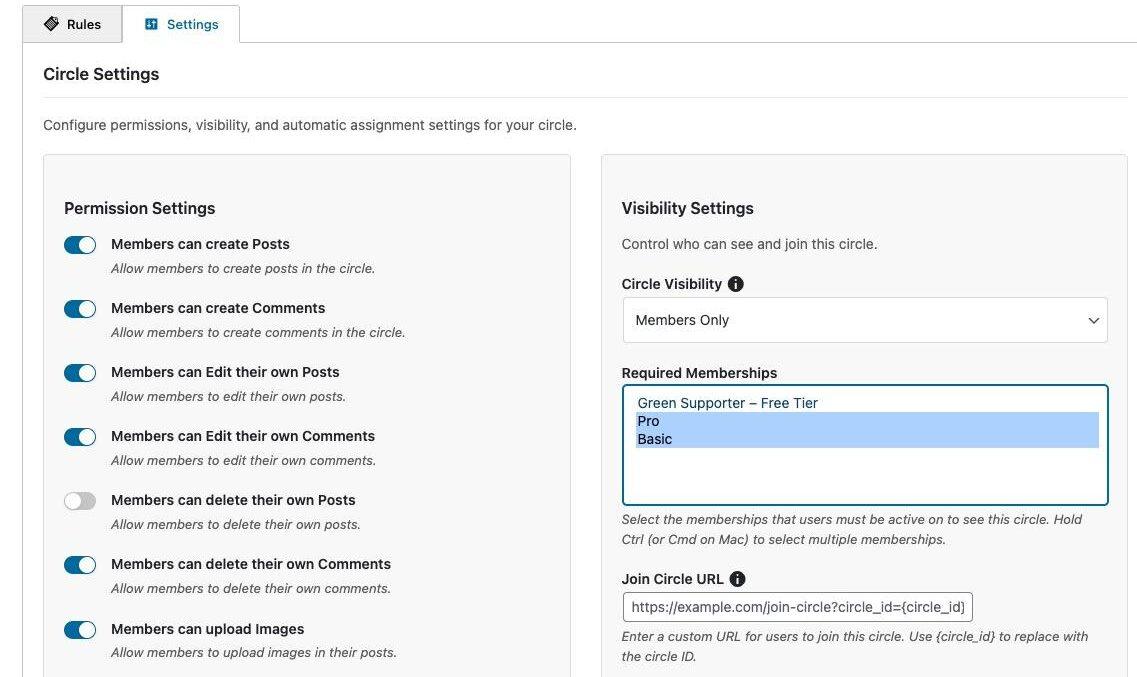
When creating or editing your Circle, scroll down to the Circle Configuration section and click on the Settings tab.
There you’ll see Permissions Settings where you can configure things like whether a member can edit or share links in their posts or comments.
But you’ll also see Visibility Settings which is where you can really lock down your content so that only members (or certain members) can interact in your forum.
To restrict access to your forum, select “Members Only” from the dropdown menu, then select which membership(s) you’d like to have access.
Tips for Managing Community Discussions
Keeping your community troll-free is key to creating a space that people want to visit again and again.
Here’s how ClubSuite™ is set up to help you manage discussions and keep your Circles a space for genuine connection:
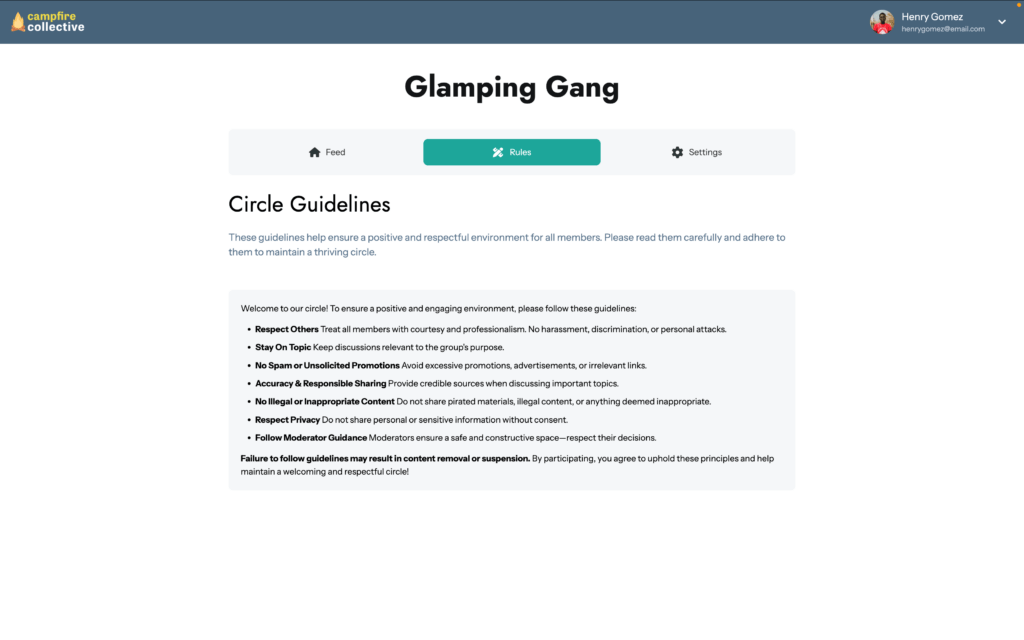
- Set Community Rules: Write your own guidelines and set expectations on what members can post in each Circle.
- Moderator Settings: Control whether moderators can ban and unban members, and delete comments or posts in Permissions Settings when you edit a Circle.
- Moderator Dashboard: Get a “bird’s-eye view” of flagged content across all Circles from your WordPress Dashboard under ClubSuite™> Moderation
Watch The ClubCircles™ Tutorial Video
If you’re after a more in-depth walk through on how to set up and configure a forum with ClubCircles™, I recommend watching our full tutorial video.
You’ll get an idea of just how easy it is to set up, plus you’ll get a peak at what Circles look like once they’re up and running:
Final Thoughts
The whole point of ClubCircles™ is to stop the “plugin Tetris” we’ve all been playing for years.
That patchwork of tools that you need to continually update and problem solve to get the integrations to work how you want them is now a thing of the past.
By adding a community to your WordPress site you’re opening up to way more engagement, and creating something even more valuable for your members.
I’m talking conversations, the “aha!” moments in the study groups, and even the random watercooler chats that turn a one-time customer into a long-term member who wouldn’t dream of hitting “unsubscribe.”
With ClubCircles™, your forums are nestled right into the member experience. You can add, edit, and adjust your Circles with ease, giving you the freedom to experiment as your community grows or your vision for your business shifts.
So, stop sending your engagement away to social media. Open up a Circle, invite your members in, and finally see what they have to say.
Ready to give your “lurkers” a place to talk? Grab MemberPress and get started with ClubCircles™ today”
If you found this article helpful, follow us on Facebook, X, Instagram, and LinkedIn!
As always, let me know in the comments if you have any questions!












Hi Victoria,
Great article and congratulations to the team for launching ClubCircles™. The native integration with MemberPress is a major step forward, especially for course creators who want to keep their community inside their own ecosystem instead of relying on external platforms.
I run an online training business, and community engagement is indeed a key factor for completion rates and long-term retention. ClubCircles™ looks very promising for creating structured study groups and peer support.
One feature that would make it even more powerful, from a practical standpoint, would be real-time mobile push notifications — similar to WhatsApp or a community messaging app.
Today, one of the main reasons learners stay active in WhatsApp or similar tools is the instant notification experience:
New message alerts on the phone
Quick reactions and participation
A feeling of “live group energy”
If ClubCircles™ could send instant mobile push notifications (or support a PWA/app-like experience) when there is a new post or reply, it could significantly increase engagement and reduce the need for external tools.
In other words, the missing piece for many course creators is:
Forum structure + WhatsApp-level immediacy.
That combination would make ClubCircles™ a true central hub for learning communities.
Is real-time mobile notification or an app-like experience something the team is considering on the roadmap?
Thanks again for the great work — this feature has huge potential for online education businesses.
Best,
Terik
Thanks so much for sharing this, Terik! I’ve passed your feedback along to the team so they can see how this would support learning communities like yours. We’re so glad you’re building your training business on MemberPress and ClubCircles™.
This is long awaited addition for us. Please, please help us also getting some plugin/update forums to send weekly/daily recaps like Circle does to members. Love Memberpress!
Thanks for the love ! And yes, this one’s been on a lot of wish lists. We’re really happy ClubCircles is the kind of “finally!” moment you’ve been waiting for.