


MemberPress is a WordPress membership plugin that handles payments, content protection, courses, community, coaching, and digital downloads, all from a single install.
It’s built for creators and online business owners who want recurring revenue without stitching together a dozen separate tools.
What Does a Membership Site Actually Need to Work?
At minimum, a membership site needs three things:
- a way to collect recurring payments,
- a way to protect content from non-members,
- and a way to deliver what members paid for.
Most people figure this out quickly. What takes longer to realize is that as the business grows, you need more – drip schedules, multiple tiers, coupon campaigns, member data exports, email integrations.
The list gets long fast.
The reason so many creators end up on MemberPress is that those things are already there.
You’re not hunting for compatible plugins or paying for add-ons that may or may not play well together. The core features (access rules, subscriptions, billing, coupons, reporting) come bundled in.
And we just keep adding new features and add-ons to create an even more flexible solution, so you can grow no matter where your business journey takes you.
What Has MemberPress Added in Recent Years?
A lot, honestly. The product looks quite different from what it was even a few years ago. Here’s what’s new and worth knowing about:
1. CoachKit™
CoachKit™ is MemberPress’s built-in coaching platform – the only one of its kind that’s native to a membership plugin.
You can build programs with milestones, habit tracking, manage cohorts, assign coaches, and sell the whole thing directly through your membership site.

2. ClubSuite™
ClubSuite™ covers community. It brings together three components:
- ClubCircles™: member forums where people can post, comment, and collaborate
- ClubDirectory™: searchable member profiles so people can actually find and connect with each other
- ClubConnect™: real-time direct messaging, right inside your site
This is major news because community used to be the one thing membership sites consistently outsourced to Facebook Groups or Discord.
Now it lives on your own site, under your own brand, protected by your membership rules.
3. ReadyLaunch™
ReadyLaunch™ is MemberPress’s page builder. It takes you from a blank WordPress install to a sale-ready site in under a day, no design skills needed. Pricing pages, registration flows, account pages, all templated and ready to customize.

4. Order Bumps
Order Bumps let you offer additional products or upgrades at checkout. If someone’s buying a basic membership, you can surface a one-time add-on right at the point of purchase.

5. Corporate Accounts
Corporate Accounts handle B2B sales. You can sell bulk memberships to organizations, and they manage sub-accounts for their teams themselves. Much cleaner than manually creating accounts for a company’s 50 employees.
6. Gifting
Gifting lets members (or new buyers) purchase a membership on behalf of someone else. It’s a surprisingly effective acquisition channel – people who love your content want to share it.
7. MemberPress Downloads
MemberPress Downloads gives you protected file delivery. Upload PDFs, templates, ZIP files, video files – whatever your members are paying for – and track how often each file gets downloaded.
8. MemberPress Courses
MemberPress Courses has grown well beyond a basic lesson builder. A few features worth calling out specifically:
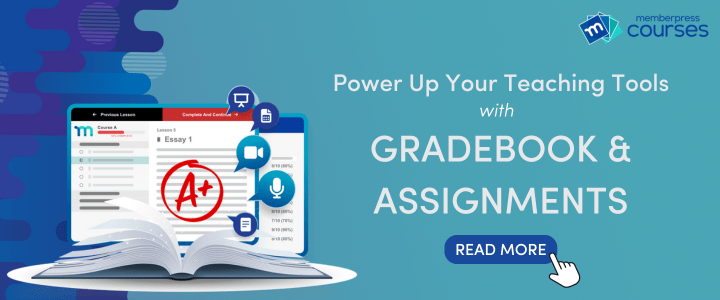
Assignments let students submit written responses, files, or other work directly inside the course.
Instructors can review submissions, leave feedback, and mark them complete: all of which makes it genuinely useful for courses where you need to assess student work rather than just track whether someone clicked through a lesson.
Gradebook gives instructors a bird’s-eye view of how every student is doing across all graded activities in a course.
Pass/fail status, scores, completion rates, it’s all in one place rather than buried in individual student profiles.
Quizzes can be set up with multiple question types and passing score thresholds. You can require a passing grade before a student moves on to the next lesson, which works well for certification-style courses or anything where you need to confirm comprehension before unlocking more material.
9. Developer Tools
MemberPress Dev Tools is for developers and advanced users and includes a REST API and Webhook engine, which connects to Zapier and custom applications.
Can MemberPress Handle Courses, Coaching, and Community Together?
Yes! And this is actually where it stands out from most alternatives. A lot of platforms do one of these things well. MemberPress does all three from a single plugin, with the same access control logic applying across all of them.
A course creator can build structured lessons with MemberPress Courses, layer on a coaching program with CoachKit™ for higher-tier members, and run a private community with ClubSuite™, all under one roof. Members log in once and get access to everything they’ve paid for.
This matters for simplicity (one login, one dashboard, one set of rules) and for revenue (you can sell tiers that bundle different combinations of these features).
What About the Business Side: Reporting, Billing, and Tax?
MemberPress Reports gives you revenue data, subscription counts, churn numbers, and member activity in one place.
You can export transaction data, subscription data, and member lists to Excel. It’s not a full analytics suite, but it covers what most membership site owners actually check day to day.
On the payments side, the gateway options have expanded considerably. Beyond PayPal and Authorize.net, you can now accept Apple Pay, Google Wallet, Cash App, international payments, direct debit, and buy-now-pay-later (Klarna) options via the Stripe integration.
Built-in tax calculations (including VAT) and a TaxJar integration handle the tax side automatically. Members can download branded PDF invoices for any transaction themselves, which removes a common support request.
Recurring billing is automated through your chosen payment gateway. Members can pause, cancel, resume, upgrade, or downgrade their subscriptions themselves from the account page, which reduces support requests significantly.
What Kind of Support Do You Get with MemberPress?
This one matters more than people expect. A membership plugin is the financial core of your business. When something goes wrong, you need a real answer quickly, not a three-day ticket queue.
The MemberPress customer success team is staffed by people (yup, people, not bots) who actually know the product and know WordPress.
They help with initial setup, troubleshoot access rule issues, walk through integrations, and answer the “how do I make this do X?” questions that come up as your site grows.
The goal isn’t only to fix the immediate problem, it’s to make sure you’re getting the most out of what you’re already paying for.
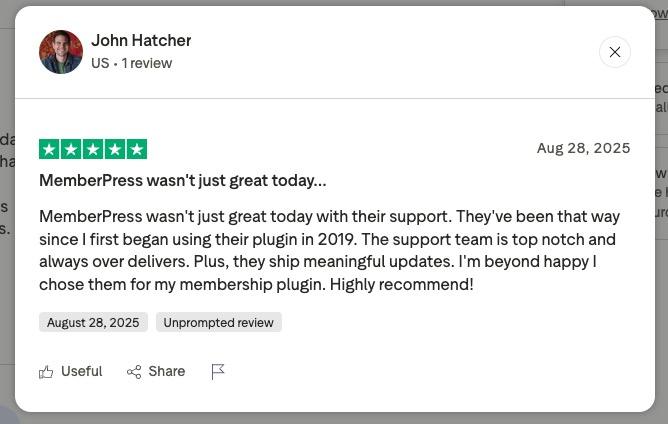
That reputation shows up in the numbers. MemberPress holds a 4.8 out of 5 rating on Trustpilot, and the feedback consistently points to the support team as a standout.
In-depth documentation lives at memberpress.com/docs/, covering everything from first install to advanced API usage.
For most questions, the answer is already there, but if it’s not, the support team has direct access to the development team, which means bugs get flagged, scheduled, and fixed rather than sitting in a backlog.
Frequently Asked Questions
Read our guide on choosing the best payment gateway for your site.
Ready to Build?
MemberPress gives you everything covered in this post, payments, access control, courses, community, coaching, and digital downloads, without needing to stitch together multiple tools. Get started with MemberPress today.

Get MemberPress Today!
Start getting paid for the content you create.

Which features and add-ons are you most excited to try out? Let us know in the comments section below.
If you found this article helpful, follow us on Facebook, X, Instagram, and LinkedIn!












Add a Comment