

The tools you already use with clients are more valuable than you think. Here’s how to package them into downloads that give members a reason to stay – long after they’ve watched the last video.
Templates, workbooks, and toolkits might be the most underused assets in a business coaching membership.
Most coaches have them – built over years of client work, refined through dozens of engagements, sitting in Google Drive folders that only a handful of paying clients ever see. Packaging them as downloads inside your membership changes that. It gives every member access to the tools your methodology is built on, and gives them a reason to keep coming back to your site long after the last session ends.
This guide walks you through what to include in a business coaching download library, how to build resources that members will actually use, and how to set up delivery in MemberPress so access is automatic.
? Building a business coaching website? This guide is part of a full series covering every step, from choosing your niche to setting up your membership. The best place to begin is here ? How to Create a Business Coaching Website
Why Downloads Work Particularly Well for Business Coaches
Business coaching clients aren’t downloading content for fun. They’re opening templates on Monday morning before a difficult conversation, pulling up a workbook when they need to figure out what to charge a new client, or using a hiring framework the week they’re ready to make their first hire.
The use cases are specific, frequent, and tied to real decisions – which is exactly why downloads hit differently in a business coaching membership than in most other niches.
Here’s why they earn their place:
- They keep your coaching working between sessions
A client who leaves a call with a hiring framework they can actually use doesn’t have to wait for the next session to make progress.
They apply it on their own, on their schedule, using the thinking you already walked them through.
That kind of between-session momentum is one of the strongest signals that a membership is delivering real value.
- They make your methodology concrete
Coaching knowledge is easy to dismiss as intangible. A well-built library of templates and workbooks makes it visible.
Members can see the tools your approach is built on, download them, and use them in their actual business, which builds trust in the program and in you faster than almost anything else.
- They make leaving harder
When a member has built their quarterly planning process around your workbook, runs their meetings using your template, and makes hiring decisions using your framework – cancelling the membership means losing the tools their business runs on.
That’s retention through value, which is the only kind that holds long-term.
- They work outside the membership too
A single well-built download, like a pricing calculator or a client onboarding template, can bring someone into your world before they’re ready to commit to a paid membership.
Once they’ve used it and seen what your thinking looks like in practice, becoming a member feels like a natural next step.
What to Include in Your Download Library
The best starting point is what you already have. Look at what you send clients before a strategy session, what you walk them through during onboarding, what you reference every time someone hits the same wall.
Those documents are already proven. They just haven’t been packaged yet.
Check out these ideas:
Templates clients can use immediately
A useful template isn’t a blank document with labeled fields. It’s something a client can open, fill in, and walk away with something useful – within the hour.
That means the structure is already built, the prompts are already written, and the thinking is already done.
- Meeting agendas built around the decisions your clients make regularly
- Client onboarding documents with the questions and sections already in place
- SOP templates organized around how small businesses actually operate
- Proposal and pitch deck frameworks with guidance notes on each section
- Hiring documents with the interview questions already written
Workbooks tied to specific business challenges
A good workbook walks a client through one decision or process, step by step, from stuck to done. These are the downloads members come back to – every quarter, every hiring cycle, every time the same challenge shows up.
- Revenue planning workbooks for mapping out the next quarter or year
- Pricing workbooks for clients who need to fix what they charge
- Offer design workbooks for clients building or redesigning their services
- Delegation planners for clients making their first team hires
- Client acquisition planners for building a more consistent pipeline
Toolkits that bundle related resources
A toolkit combines two or more downloads around a single outcome. A “New Client Onboarding Toolkit” might include an onboarding questionnaire, a welcome document, a 90-day plan template, and a session prep guide.
Together, they feel like more than the individual pieces – and they make a strong case for a higher membership tier.
Reference guides for the questions that keep coming up
If you’re answering the same question in every discovery call or group session, there’s a reference guide in that answer. Keep these short and dense – something a member reads in ten minutes and refers back to for months.
- A one-page guide to pricing service packages
- A decision framework for when to hire vs. when to build a system
- A quick guide to scoping projects without undercharging
- A reference card for structuring sales conversations
How to Create Downloads That Are Actually Worth Using
A download library is only as good as what’s in it. Here’s how to make sure what you build actually gets used.
Design is a credibility signal
Your downloads reflect your coaching before a member reads a single word. A cluttered, hard-to-follow workbook tells them something – and it’s not good. You don’t need a design degree to get this right. Clean layout, readable fonts, and enough white space to actually work through the document comfortably is the standard.
Canva has workbook and guide templates built for exactly this kind of content – you can produce something that looks genuinely professional without any design background.
If you’re working with more complex document layouts, Visme gives you more structural control and handles multi-page formats well.
Tight scope beats comprehensive coverage
Coaches almost always try to include too much. A workbook that takes three hours to complete will sit in a folder, unfinished. One that takes 30 minutes and produces something a client can use right away will get opened, finished, and referenced again. Pick one outcome per download and build everything around that.
Give it context, not just content
A template with no guidance is half a tool. A short note at the top – what it’s for, when to use it, what a finished version looks like – is all it takes to make sure a member can pick it up cold and get something out of it without reaching out to you. Keep it brief. Just make sure it’s there.
Run it through a real client session before publishing
Before anything goes into your library, test it with an actual client. If they can work through it without confusion and walk away with something useful, it’s ready. If you end up explaining it every time, it needs more work first.
Set Up Your Digital Downloads With MemberPress
If you’ve already built out your resource library using the earlier guide in this series, the infrastructure is already there. This section focuses specifically on file delivery and organization.
The MemberPress Downloads add-on gives you a dedicated MP Downloads menu in your WordPress dashboard – separate from the media library – where you upload files, add categories and tags, and track download counts all in one place.
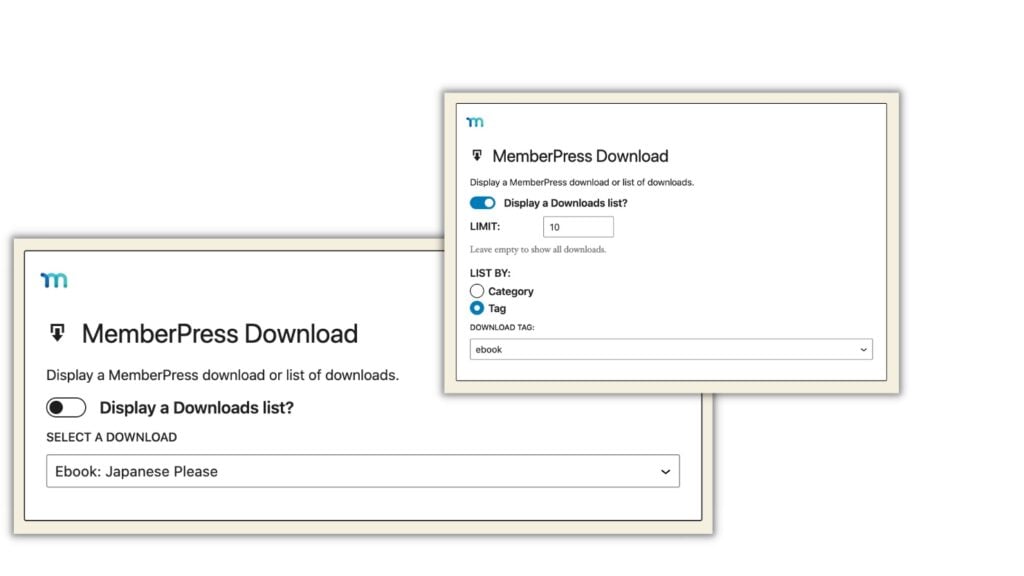
To add a file
- Go to MP Downloads → Files → Add New
- Give it a title specific enough that members know exactly what they’re getting before they click
- Drag and drop the file or select it from your device
- Add tags and categories so it lands in the right place in your library
- Go to MemberPress → Rules → Add New to protect it and tie access to the right membership tier
Organize by tier
Create a separate download category for each tier – “Core Toolkit” for entry-level members, “Full System” for premium – and protect each category with its own rule. Every file you add to that category is automatically covered. No new rule needed each time.
Track what’s actually getting used
MemberPress Downloads logs how many times each file has been downloaded. Over time, that data tells you which resources members are actively using and which ones need to be surfaced more intentionally – through an email mention, a session reference, or better placement in your library.
The MemberPress Downloads Add-on is available on all MemberPress plans.
How to Use Downloads to Attract, Retain, and Upgrade Members
The coaches with the most downloaded files aren’t always the ones with the best retention. What actually moves the needle is thinking about where each download fits in the member journey – from the first thing someone gets from you to the reason they renew. Here’s what you should do:
- Lead magnets that start the relationship
A single well-built download can be the first real interaction someone has with your coaching – before they’ve signed up for anything. Offer it in exchange for an email address. When it’s specific and genuinely useful, it does something a landing page can’t: it shows a prospect what your thinking actually looks like in practice.
Specificity is everything here. “Free Business Toolkit” converts poorly because it means nothing. “Free Client Onboarding Template: the document I use to kick off every new engagement” tells someone exactly what they’re getting and why it’s worth the email address.
- Onboarding that earns the first renewal
The window right after someone joins is when they’re most open to being impressed – and most vulnerable to feeling like they made the wrong call. A “Start Here” download pack of three to five high-value resources gives new members an immediate win. A member who opens a workbook on day one and walks away with something useful has a concrete reason to stay. That’s the reference point they’ll come back to when renewal rolls around.
- Tier gaps that sell themselves
Downloads are one of the cleanest ways to make the difference between tiers feel real. Entry-tier members get the core toolkit – the templates and workbooks that cover the fundamental challenges in your niche. Premium members get the full system – the advanced frameworks, the session prep tools, the quarterly planning resources.
When that gap is made of tools members are actively using, the upgrade doesn’t need to be sold. A member who’s gotten value from the entry tier already knows what they’re missing in the next one.
- Keeping members engaged between sessions
Members who are actively using your downloads are far less likely to cancel than those who are passively watching content. Two things drive active use more than anything else:
Send a short email every time you add something new – the title, what it covers, and who it’s for. Members who haven’t logged in recently will often re-engage when they see something specific that’s relevant to where they are right now.
Reference downloads inside your sessions. When a topic comes up in a group call that a resource covers, mention it and drop the link. That one move turns a passive library item into something members are directed toward at exactly the moment they need it.
Before You Go
Your download library is built and ready to work. The last guide in this series covers the final piece – community. How to build a space where your coaching members connect with each other, stay accountable, and find reasons to stay that go beyond anything you could put in a folder.
? How to Build a Community for Your Business Coaching Site
Ready to set up your download library? MemberPress handles secure file delivery, tier-based access control, and download tracking – all from your WordPress dashboard.

Get MemberPress Today!
Start getting paid for the content you create.













Add a Comment