

A Facebook group can foster a sense of community among your members and keep your brand front-of-mind for their next purchase. Find out how to make the most of Facebook Groups for your membership business.
An enthusiastic runner dedicated to improving her sprint time joins a membership site devoted to runners. But she wants to chat about her technique with those who have similar interests.
Where can she go to connect with such like-minded individuals?
A man has a rubber-ducky obsession, so he joins a duck membership site to find the best duck deals. But he has no one with which to share his quacky kick.
Like the woman and man in the above examples, your site members can benefit from joining a Facebook group.
A Facebook group gives people the opportunity to come together and share feedback, discuss similar passions, get insider info and deals, or even just make friends.
And if you’re at the helm of that Facebook group, it’s a fantastic way to keep your customers engaged and coming back for more.

And with the Zapier MemberPress + Facebook Groups integration, you’ve got even more fun ways to interact and engage with your members on Facebook.
Let’s get into it!
Facebook Group vs Facebook Page
What is a Facebook group, and what makes it unique from other forms of social media?
A Facebook group is exclusive, that is to say, membership is by invite or request only.
In a group, anyone can post within the limits you set. This allows for dialogue between you and the subscribers of your website.
With most social media platforms, you run the gig. You are in control of all the content. For instance, with a Facebook page, you create posts on a regular basis. But with a Facebook group, you’re the host, not the spokesperson.
A community is created.

Why Build a Sense of Community?
Creating a sense of community around your business isn’t just a charitable act that makes you feel warm and fuzzy inside. It also carries some serious revenue-boosting potential for your membership business.
- Customer Engagement and Feedback
A Facebook group provides a platform for your customers to engage with your brand and each other. It’s a great place to gather feedback, understand customer needs, and improve your products or services based on their input.
- Brand Loyalty and Community Building
By creating a space where customers can interact and share, you’re fostering a sense of community. This can lead to increased brand loyalty, as customers feel more connected and invested in your brand.
- Increased Visibility and Organic Reach
Every time a member posts or interacts in the group, it increases the visibility of the group in their network. This can lead to organic growth and increased brand awareness.
- Customer Support
The group can serve as an additional customer support channel where customers can ask questions and get help from both your team and other customers.
Other reasons to create a group
- A group can make members feel part of something exclusive. In your group, provide updates, special deals, and bonus material exclusively for members of your Facebook group.
- If the members of your site form their own group, you may not know if a situation gets out of hand or if a user has had a bad experience. If you’re the one who forms it, you have the ability to vet posts and set sharing rules.
- Facebook provides insights and analytics for groups. These can help you better understand your audience and make data-driven decisions.
Tips For Running a Facebook Group
While it’s true that the community by and large runs the page by contributing content and comments, you’ll still have to do a bit of work.
Here are a few things to keep in mind when running a Facebook group for your membership site.
- DO create a list of rules so things don’t stray too far off-topic. Consider banning politics and self-promotion, and definitely include a clause about hate-speech and bullying.
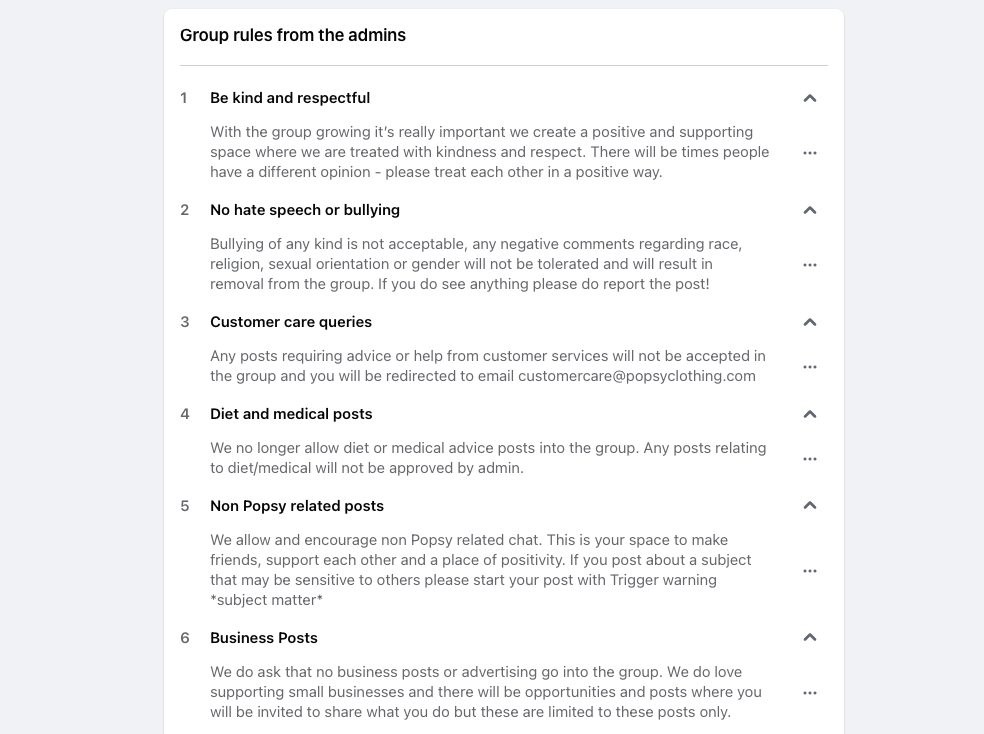
- DO post occasionally and comment in helpful ways. People love to see that the person in charge (you) cares about what they have to say.
- DO come up with a specific and clear name for your page so others can easily find it.
- DON’T make it all about you. This isn’t the place to promote yourself, so be careful about posting too much promotional content or being the main poster.
- DON’T allow negativity in your group. If the group becomes negative, a subscriber may associate that experience with your business. If you see a negative comment, kindly ask the member to take it down or do so yourself.
Facebook Group Alternative: ClubSuite™
Facebook Groups can be a great way to bring people together. They’re familiar, easy to join, and naturally social.
But there’s one big trade-off.
All that engagement lives off your site.
Your conversations, relationships, member data, and community momentum are happening on a platform you don’t own, can’t fully control, and that was never designed specifically for membership businesses.
And as your community grows, that can start to feel limiting.
Ideally, your membership site should be more than just a place to consume content – it should be the central hub where connections are formed, conversations happen, and relationships grow.
That’s exactly why MemberPress introduced ClubSuite™. It is a set of powerful add-ons that let you build a real community directly inside your MemberPress site, without relying on Facebook Groups, Slack, or third-party forums.
What ClubSuite™ Can Do That Facebook Groups Can’t
Unlike Facebook Groups, ClubSuite™ keeps everything where it belongs – inside your membership site. Profiles, conversations, and connections all live alongside your content, fully aligned with your brand and goals.
You can create multiple private directories for different groups, such as students, alumni, coaches, or VIPs, and make them easy to browse with a simple search and filters. Members can build rich profiles that show who they are and what they do, while clean layouts and built-in privacy settings keep everything looking polished and comfortable to use.
When it comes to conversation, ClubSuite™ keeps things focused and friendly. You can set up private, member-only discussion spaces where people share updates, ask questions, react to posts, and follow conversations they care about without algorithms, ads, or distractions getting in the way.
ClubSuite™ vs Facebook Groups
| Feature | ClubSuite™ | Facebook Groups |
| Lives inside your website | Yes | No |
| Fully branded experience | Yes | Limited |
| Member directories & profiles | Built-in, searchable | Very limited |
| Multiple private groups | Yes | Basic |
| Discussion spaces | Focused and member-only | Algorithm-driven feed |
| Ads and distractions | None | Ads and suggested content |
| Privacy and data ownership | You own all data | Facebook owns the data |
| Moderation tools | Advanced and built-in | Basic tools only |
| Overall community feel | Professional and intentional | Casual and noisy |
Built-in moderation tools help you maintain a positive, respectful space, so your community stays supportive and welcoming. Facebook Groups can still work in some situations, but ClubSuite™ gives you a calmer, more intentional way to build community right on your own site.
Now, let’s look at the types of businesses that benefit most from building a community.
Which Businesses Can Benefit from Communities?
Groups and communities can be beneficial for a wide range of businesses. However, they’re particularly boost-worthy when it comes to certain types of companies. Here are a few examples:
1. Online Retailers and Ecommerce Businesses
As a retailer, you can use Facebook Groups to share exclusive deals, new product launches, and gather customer feedback.
It’s also a great place for customers to share their own experiences and recommendations, which can help drive sales.
2. Service Providers
Whether you’re a fitness coach, a software consultant, or a financial advisor, you can use Facebook Groups to share valuable content, answer questions, and build a community around your services.
Doing so can help you establish yourself as an expert in your field and attract new clients.

3. Event Organizers and Community Builders
Whether you’re organizing webinars, local meetups, or large conferences, a Facebook group is a great way to keep attendees engaged before, during, and after an event. It’s also a place where attendees can network and share their experiences.
4. Educational Institutions and Online Course Creators
Facebook Groups provide a platform for students to discuss course material, ask questions, and offer peer support. It can also be a place for you as the course creator to share additional resources and updates.
5. Non-Profit Organizations
Non-profits can use Facebook Groups to build a community of supporters, share updates about their work, and organize fundraising events.
In general, any business that can benefit from building and engaging with a community, providing customer support, gathering customer feedback, and increasing brand loyalty can benefit from using Facebook Groups.
Integrating Facebook Groups with Your Membership Site
The Zapier MemberPress + Facebook Groups integration opens up whole new possibilities for engaging with your members on Facebook.
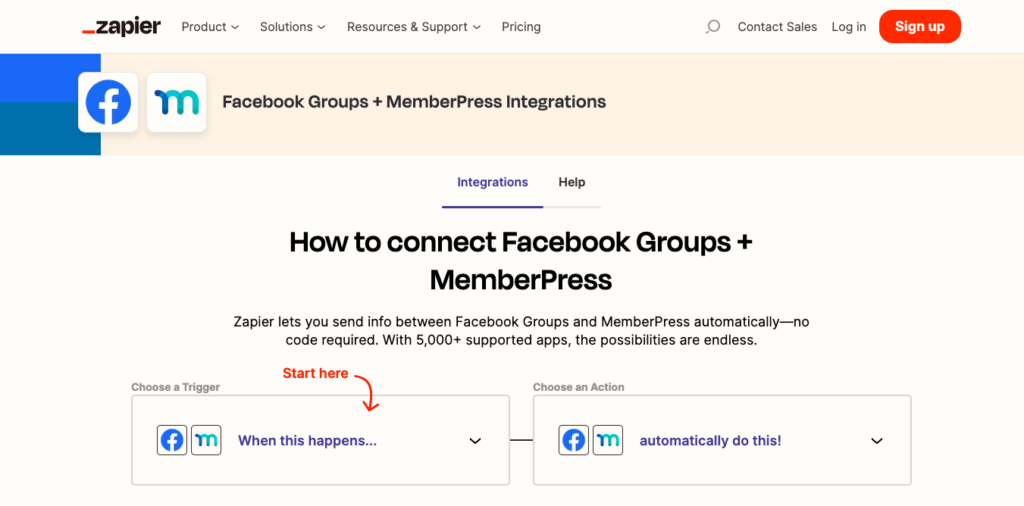
Zapier is an incredible tool that lets you create powerful automations between different online apps and plugins.
What was once only achievable with the help of an experienced developer is now accessible to anyone.
With Zapier, you can seamlessly communicate information between your MemberPress site and Facebook Groups. The result? An enhanced member experience and streamlined administration.
Here are a couple of examples of what you can achieve with this integration:
Automatically Post a Message or Photo on Facebook When Someone Completes a Course on Memberpress
Acknowledge members individually for their incredible achievements on your site and celebrate their milestones in the Facebook Group.
For example, you could post the following message: Congratulations, [Member Name], for completing the course! Who’s next? – along with a celebratory image or badge.

This fosters a sense of community and encourages others to engage and progress in their own journeys.
Post a Welcoming Message on Your Facebook Group When Someone Signs Up for Your Membership
First impressions matter, and a new member’s initial experience with your community can set the tone for their entire journey.
With the MemberPress + Facebook Groups integration, you can ensure that every new member feels recognized and valued from the moment they join.
This small gesture can increase their likelihood of engaging with the community.
For example, you might have an automated post something like this:
Welcome aboard, [Member Name]! We’re thrilled to have you join our community. Introduce yourself, and let us know what you’re excited to learn!
These posts can inspire existing members to engage with the newcomer. It’s an invitation for other members to share their own experiences, tips, or simply offer words of encouragement.

In addition to a warm welcome, you could use this as an opportunity to onboard your new members. The post can include links to essential resources, guidelines, or introductory content.
These interactions build a culture of positive and encouraging community engagement. Best of all, they’re set up to run automatically, so you can cut some of the administrative effort of running an active Facebook Group.
Of course, you can only use this fantasmic Facebook Groups integration if you use MemberPress to run your membership site.😉
If you’re not already part of the MemberPress community, you can use this step-by-step guide to getting started.
How to Use Zapier with MemberPress
Watch this video for more examples of how you can use Zapier to automate tasks and streamline membership site administration.
You’ll also get a step-by-step look at how to connect Zapier to your MemberPress site via the Developer Tools add-on, create your first Zap, and run a test to make sure it’s working just right.
Happy watching!
Facebook Group Community Example: Popsy Clothing
Now let’s take a look at a business using Facebook Groups to its maximum potential – Popsy Clothing.
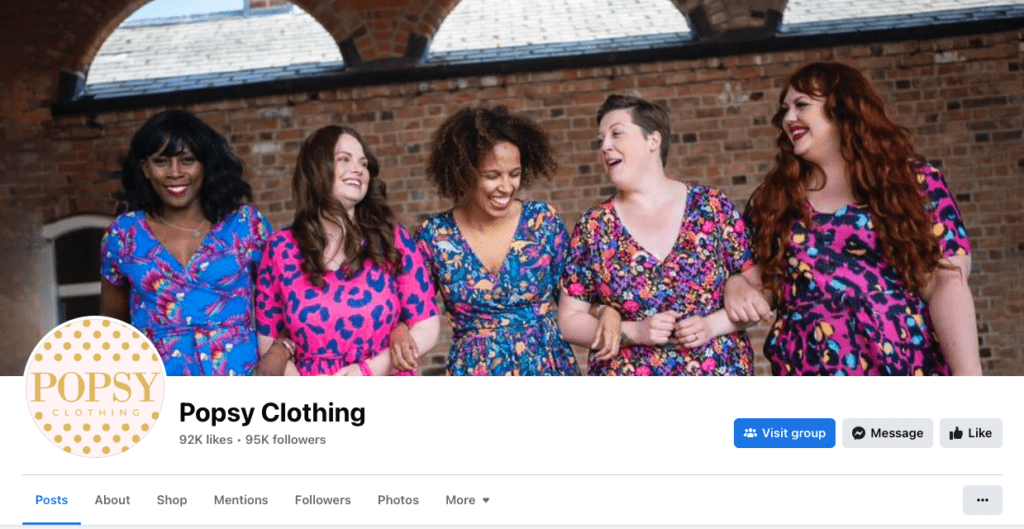
Popsy Clothing is a small UK-based business that makes women’s vintage dresses with quirky prints.
Its Facebook group is now over 47,000 members strong, and they get a high level of post engagement.
Here are some of the reasons why the Popsy Facebook Group is so successful.
Emphasis On Respect & Support
The administrators work hard to maintain a positive and supportive environment within the Facebook group.
As a business that caters to women of all body types, they are particularly careful to protect the group against negativity.
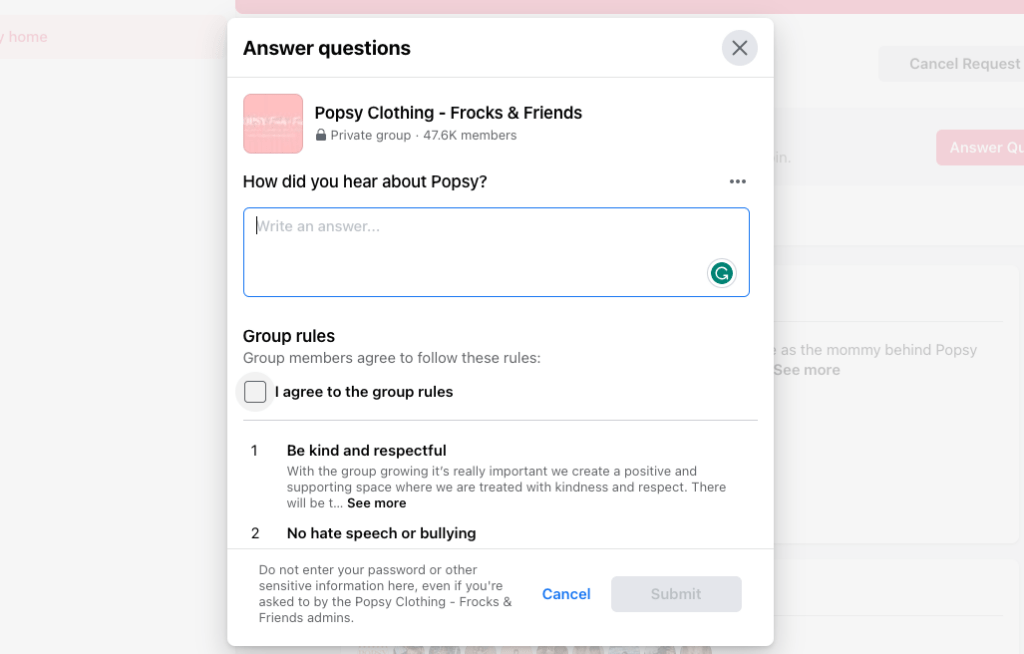
One of the ways they do this is by prioritizing positivity as part of the application process.
New members have to agree to a set of rules which include being “kind and respectful”, “no hate speech or bullying” and not posting “diet and medical advice”.
Fostering Relationships In the Community
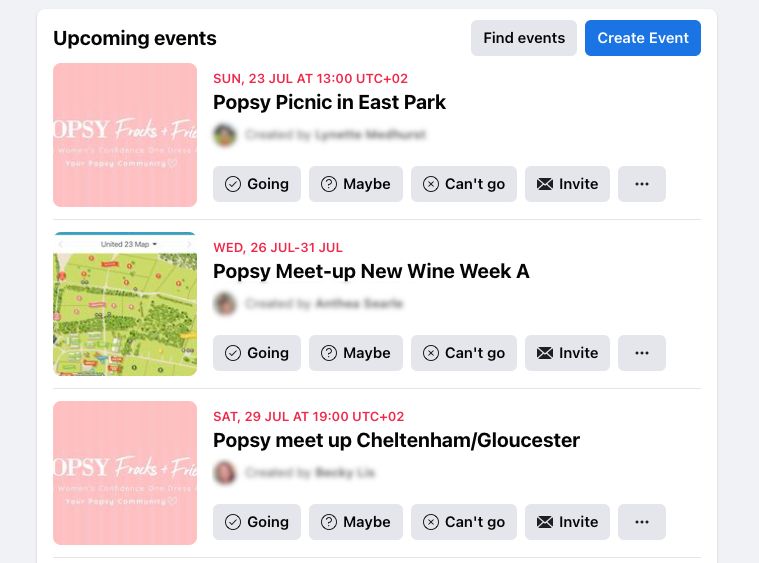
Popsy also encourages people to engage in non-brand related chat, outlining in its rules: “this is your space to make friends, support each other, and a place of positivity.”
This freedom has led members to share and connect over personal issues. So much so, that Popsy Facebook Group members independently organize meet-ups.
Member-Only Exclusives
Popsy regularly shares and promotes new releases, but takes several steps to enhance the experience and make it feel less “salesy”.
For example, new releases are often accompanied by limited-time members-only discount codes.
Members also get an inside look at the inspiration behind each design along with styling advice.
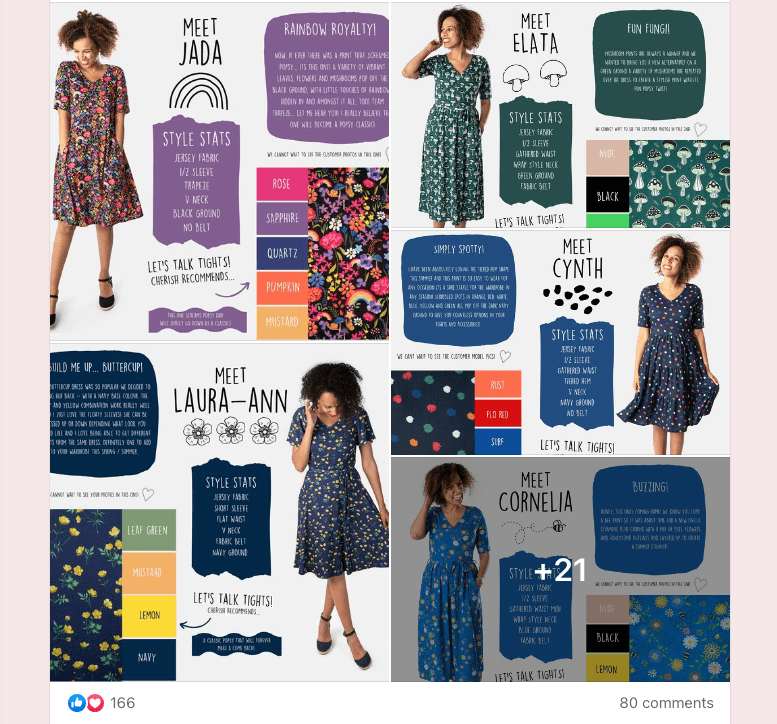
These graphics are attractive, engaging, and super easy to make yourself with an easy-to-use graphic design tool like Canva.
Personal Touches
The personal presence of owner and designer, Cherish Reardon, in Popsy’s content really adds to Popsy’s brand story as a small, independent business.
Cherish models her designs, personally interacts with members, and shows genuine interest in the opinions of her members.
For example, Cherish recently appeared in a live video and gave members a sneak-peak at her Christmas range design ideas. This was then followed by a poll, asking members to vote on their favorite patterns.
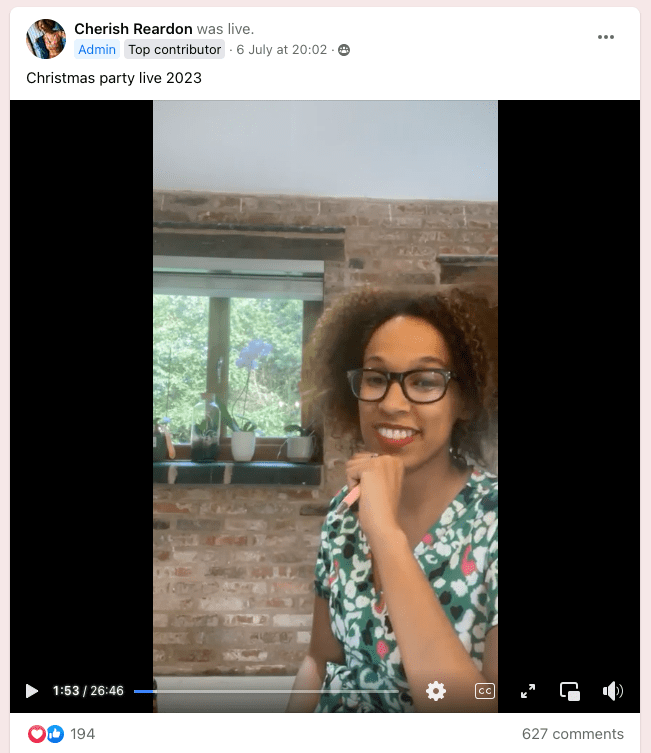
This makes Popsy members feel valued and included in the brand’s decision-making, undoubtedly increasing brand loyalty in the process.
In Summary
We hope we’ve given you plenty of inspiration
- Creating a Facebook group builds community, which leads to more satisfied users.
- A Facebook group isn’t hands-off. Participate.
- Foster positivity by enforcing community rules and encouraging communication.
- Create a feeling of collaboration by involving members in product decisions.
- Make the most of the Zapier MemberPress + Facebook Groups app to boost engagement and foster positive communication.
- Make it a VIP experience with insider information and exclusive deals.
Rubber-ducky owners find the weirdest ducks, and runners achieve personal bests when they have the help of others.
Your subscribers will benefit from the sense of community that comes with a Facebook group and will have you to thank for it. In the process, you’ll be nurturing brand loyalty, organic traffic, and brand recognition.
Do you have a Facebook group? Or maybe you have questions about creating a group? Any success stories? Please let us know in the comments below.

Get MemberPress Today!
Start getting paid for the content you create.













I’m part of a Facebook group that I participate in daily. I’ve been learning all I can for when I have my own Facebook group. It is a wonderful way to directly communicate with customers, add value to your product and grow your business. I will definitely use the above article when I start my own group as well.